Our Short List of 3
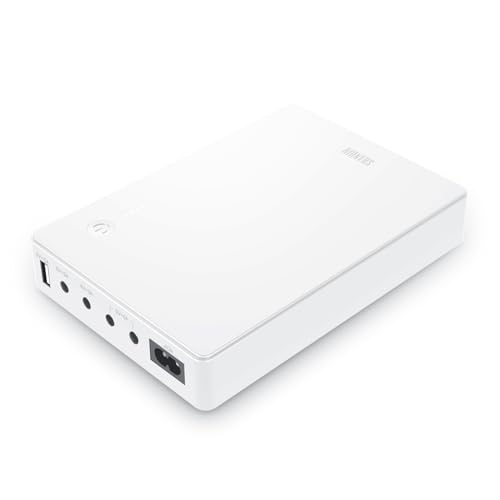
- Best for: A home where one WiFi camera and the router share a single backup.
- Built-in 20000mAh (74Wh) battery pack
- Input: 100-240V AC
- Outputs: 1 x 5V USB, 1 x 5V DC, 1 x 9V DC, 2 x 12V DC
- Output current: USB and DC 5V share 3A, 9V 3A, 2 x 12V share 5A

- Best for: A multi-camera setup where several devices share one high-capacity backup.
- Built-in 27000mAh (97.2Wh) lithium ion battery pack
- Model number: SL3400
- Outputs: 4 x DC 12V, 1 x DC 9V, USB-A and USB-C with 18W PD
- DC 12V output voltage range: 9-12.6V

- Best for: Mixed-voltage setups and PoE cameras that need several output voltages from one unit.
- Outputs: 5V, 9V, 12V, 15V, and 24V DC, plus 5V USB
- Maximum output power: 18W
- Output current: 2A
- Wide AC input: 85-265V, no separate power adapter required
All 3 Picks at a Glance
| Product | Specs | Action |
|---|---|---|
| Shanqiu Mini UPS 20000mAh (74Wh) |
| Check price on Amazon |
| TalentCell Mini UPS SL3400 27000mAh (97.2Wh) |
| Check price on Amazon |
| Hosyond Mini DC UPS 18W |
| Check price on Amazon |
Key takeaways
- Keep your WiFi cameras recording through a power cut with a plug-in mini UPS. Compare three battery backups with the outputs and capacity to match.
A backup battery for a WiFi camera is not really a decision about capacity first. It is a decision about the plug on the end of the cable. Most WiFi cameras run on a low-voltage DC adapter, and the backup has to match that voltage and connector exactly, or the camera simply will not run from it. Capacity matters after that, because it decides how much of an outage the camera can ride out before the recording stops.
This guide is for homeowners who want their cameras to keep recording through a short outage, renters who need a backup that moves with them, and small offices running a camera alongside a router. Every pick below comes from an Amazon listing whose title or description names security camera use, and every specification comes from that listing. Check your camera’s adapter label before you buy, because the voltage on that label is the number that decides which of these boxes fits.
Quick Picks
As an Amazon Associate we earn from qualifying purchases
| Product | Best for | Key spec from title |
|---|---|---|
| Shanqiu Mini UPS 20000mAh (74Wh) | A camera and router sharing one backup | 20000mAh (74Wh) battery pack |
| TalentCell Mini UPS SL3400 27000mAh (97.2Wh) | Several cameras and network gear on one unit | 27000mAh (97.2Wh) lithium ion battery pack |
| Hosyond Mini DC UPS 18W | Mixed-voltage and PoE camera setups | 5V/9V/12V/15V/24V outputs |
How to Choose
Match the Output Voltage and Connector First
The single most important check is the voltage your camera’s adapter delivers, usually printed on its label as 5V, 9V, or 12V. A backup that only puts out 12V cannot run a 5V USB camera, and a USB-only unit cannot run a 12V barrel-plug camera. Connector size matters just as much: most of these units use a 5.5 x 2.1 mm DC barrel, while some cameras and routers use 5.5 x 2.5 mm, so measure the plug or read the adapter before ordering. Pick the backup whose output list includes your camera’s exact voltage and a matching connector, and treat anything else as a mismatch.
Size the Battery for the Outage You Expect
Battery capacity, given in milliamp-hours or watt-hours, decides how long the backup can carry your camera once the mains power drops. A larger pack keeps a camera running through a longer outage, but it also costs more and takes up more shelf space, so there is no reason to buy the biggest box for a camera that only needs to survive brief flickers. Add up the draw of everything you plan to connect, then choose a capacity with room to spare rather than one that only just covers a single camera. If your area sees outages that last most of an evening, step up a size.
Count Every Device That Shares the Box
A backup rarely powers a camera alone. The router and modem usually sit on the same unit, because a camera without WiFi can record locally but cannot send alerts or let you watch the feed. Count each device, note its voltage, and check that the backup has enough outputs of the right kind for all of them at once. A unit with one USB port and two 12V outputs handles a different load from one with five DC outputs. Overloading a small unit with too many devices is the fastest way to cut its backup time short.
Check Switchover, Charging, and Protections
A plug-in backup earns its keep by switching to battery power the moment the mains fails, without you touching anything, and by recharging itself once power returns. Look in the listing for automatic switchover and for protection against overcharging, over-discharging, and short circuits, since the unit sits plugged in around the clock. Also check whether the backup charges from a standard wall outlet or needs a separate adapter, and whether it can work as an ordinary power bank when it is not guarding a camera. Those details decide how the box behaves day to day.
The 3 Best Options
Shanqiu Mini UPS 20000mAh (74Wh)
- Best for: A home where one WiFi camera and the router share a single backup.
- Built-in 20000mAh (74Wh) battery pack
- Input: 100-240V AC
- Outputs: 1 x 5V USB, 1 x 5V DC, 1 x 9V DC, 2 x 12V DC
- Output current: USB and DC 5V share 3A, 9V 3A, 2 x 12V share 5A
A home where one WiFi camera and the router share a single backup.
The unit has no AC outlets, so it only powers DC-input gear; confirm your camera runs on 5V, 9V, or 12V DC before buying.
The Shanqiu is the straightforward choice for a home where one camera and the router share a single shelf. Its listing names security camera use directly, and its spread of outputs covers the two most common camera power setups: a USB port for USB-powered cameras and DC outputs for barrel-plug gear. The aluminum housing keeps the unit compact enough to tuck behind a router, and the built-in battery doubles as an ordinary power bank when it is not on backup duty. For a household that wants one box guarding the camera and the network together, this is the easy fit.
Watch out for: The unit has no AC outlets, so it only powers DC-input gear; confirm your camera runs on 5V, 9V, or 12V DC before buying.
TalentCell Mini UPS SL3400 27000mAh (97.2Wh)
- Best for: A multi-camera setup where several devices share one high-capacity backup.
- Built-in 27000mAh (97.2Wh) lithium ion battery pack
- Model number: SL3400
- Outputs: 4 x DC 12V, 1 x DC 9V, USB-A and USB-C with 18W PD
- DC 12V output voltage range: 9-12.6V
A multi-camera setup where several devices share one high-capacity backup.
The listing covers more than one TalentCell model, so confirm the SL3400 27000mAh 97.2Wh version is the one selected before checkout.
The TalentCell is the heavy lifter of this roundup, built for a setup where several cameras and network devices draw from one backup. Its listing states compatibility with routers, modems, security cameras, and other 9V and 12V devices, and it spreads that capacity across four DC 12V outputs plus a 9V output and USB ports, so a camera, a router, and a modem can all sit on the same unit. The pack is built from twelve rechargeable 18650 lithium-ion cells, and it arrives with a charger and DC cables in the box. For a larger camera setup, the extra capacity is the point.
Watch out for: The listing covers more than one TalentCell model, so confirm the SL3400 27000mAh 97.2Wh version is the one selected before checkout.
Hosyond Mini DC UPS 18W
- Best for: Mixed-voltage setups and PoE cameras that need several output voltages from one unit.
- Outputs: 5V, 9V, 12V, 15V, and 24V DC, plus 5V USB
- Maximum output power: 18W
- Output current: 2A
- Wide AC input: 85-265V, no separate power adapter required
Mixed-voltage setups and PoE cameras that need several output voltages from one unit.
The listing warns against connecting several devices at once if their combined draw goes above 15W, so add up the load before plugging everything in.
The Hosyond suits a setup where the cameras do not all run on the same voltage. Its listing offers five selectable outputs from 5V up to 24V, plus Power over Ethernet, so it can feed a 12V camera, a 5V device, and a PoE camera from one box instead of three adapters. The wide 85-265V AC input means it plugs straight into the wall with no separate adapter, and a battery indicator shows the charge level at a glance. This is the pick for a mixed-voltage camera setup or a small smart-home hub that also needs backup.
Watch out for: The listing warns against connecting several devices at once if their combined draw goes above 15W, so add up the load before plugging everything in.
Which One Fits Your Situation
One Camera and a Router on a Shelf
Pick the Shanqiu if your setup is a single WiFi camera plus the router that serves it. Its USB and DC outputs cover both common camera power types, and the 20000mAh pack gives a single camera and a router a useful stretch of backup without taking over the shelf. Keep the camera on a DC output that matches its adapter voltage and leave the USB port free for a second small device.
Several Cameras Across a House
Pick the TalentCell when more than one camera needs backup, or when a camera, router, and modem all have to stay up together. The four 12V outputs and the large 27000mAh pack are built for that kind of load, and the included charger and cables mean the whole setup runs from one box. Check that each camera’s plug fits the 5.5 x 2.1 mm DC ports before you wire everything in.
A PoE Camera or Mixed Voltages
Pick the Hosyond when your cameras do not share one voltage, or when a PoE camera is part of the setup. Its five selectable outputs and PoE support let one unit feed devices that would otherwise need separate adapters. This is also the right choice for a smart-home hub that runs alongside a camera, as long as the combined draw stays within the unit’s stated limit.
A Single USB-Powered Camera
Pick the Shanqiu or the Hosyond for a lone USB-powered camera in a flat or a small room. Both offer a 5V USB output, and either one keeps a single low-draw camera going through a short outage without the bulk of a larger pack. Choose the Hosyond if you may add a 12V or PoE camera later, and the Shanqiu if you want the larger battery for the same single camera.
Common Mistakes
- Buying on capacity alone without checking that the backup’s output voltage matches the camera’s adapter.
- Assuming every WiFi camera takes 12V, when many run on 5V USB and need a USB output instead.
- Loading a small backup with a camera, router, modem, and more, then finding the backup time far shorter than expected.
- Backing up the camera but not the router, so the camera records while the household WiFi is down and no alert reaches you.
- Ignoring connector size and polarity, then finding the backup’s DC plug does not fit the camera’s power socket.
Frequently Asked Questions
Will a mini UPS keep my WiFi camera recording during a power cut?
Yes, as long as the backup’s output voltage and connector match the camera’s adapter. A plug-in mini UPS sits between the wall outlet and the camera, and it switches to its built-in battery the moment mains power fails. Check the voltage on the camera’s adapter label first, because a mismatch means the camera will not run from the backup at all.
How long will a mini UPS power a WiFi camera?
It depends on the battery capacity of the unit and how much power the camera draws. A larger watt-hour pack lasts longer than a smaller one on the same camera, and adding a router or modem to the same unit shortens the time. Compare the camera’s draw with the capacity stated in the listing, and choose a pack with room to spare for the outages you expect.
Can I use a mini UPS with a USB-powered camera?
Yes, if the unit has a USB output that matches the camera’s requirement. Several mini UPS units include a 5V USB port alongside their DC outputs, and that port is made for USB-powered devices. Confirm the USB output current is enough for the camera, and keep the camera on USB while any barrel-plug devices use the DC outputs.
Do I need to back up my router as well as the camera?
In most homes, yes. The camera can keep recording to local storage without WiFi, but it cannot send motion alerts or let you view the feed remotely while the router is down. Putting the router on the same backup keeps the camera connected, so check that the unit has enough outputs and capacity for both devices before you buy.
FAQ
Will a mini UPS keep my WiFi camera recording during a power cut?
How long will a mini UPS power a WiFi camera?
Can I use a mini UPS with a USB-powered camera?
Do I need to back up my router as well as the camera?
More from Amazon
Programs that pair well with the guide above. Offers and eligibility are set by Amazon and may change.
Free shipping on eligible items, Prime Video and more. Eligible new members can start with a free trial.
Start a Prime free trialAudiobooks and podcasts to listen to on the go. Eligible new members can start with a free trial.
Try Audible freeAd-free music streaming. Eligible new subscribers can start with a free trial.
Try Music Unlimited freeA free business account with business pricing and bulk-buying tools for work, shop or home office.
Create a business accountAs an Amazon Associate we earn from qualifying purchases.