
Key takeaways
What's inside
Wireless doorbell camera choices keep multiplying, so this wireless doorbell camera guide sorts them by the details that decide daily use: how they see the porch, how they store clips, and whether a fee applies. Below are six battery-friendly picks with honest limits for renters and homeowners alike.
As an Amazon Associate we earn from qualifying purchases.
As an Amazon Associate we earn from qualifying purchases at no extra cost to you. Product prices and availability are accurate as of the date shown and are subject to change.


By Daniel Foster
What Sets Video Doorbells Apart
Video doorbells look similar but diverge on the essentials: whether they run on a rechargeable battery or existing chime wiring, how footage is saved, and how wide and tall the lens sees. Sorting these first prevents the common regret of a camera that misses packages left at your feet or charges a fee you did not expect. A well-chosen wireless doorbell camera shows the parcel at your feet and never surprises you with a fee.
Wireless Doorbell Camera Decision Numbers
Start with power (battery versus wired to a chime transformer), storage (local microSD or hub versus cloud), and any subscription for saved video. Battery models install anywhere but need periodic recharging; wired-in units record continuously and never run flat, though they require compatible chime voltage at the door.
Then check resolution (1080p to 2K), and especially the vertical field of view, sometimes called head-to-toe view, which determines whether you see a package on the mat. Confirm two-way audio, night vision range, and whether motion detection separates people from cars and shadows to limit false alerts. Getting these three right up front saves you from the most common porch-camera regrets.
Placement, Space, And Fit
Measure the space beside your door frame and the angle to the walkway; narrow trim, a storm door, or an inward-facing wall can block the view. Angled wedge mounts fix off-center doors, and a chime-tone repeater helps if the unit is far from your router or existing indoor chime.
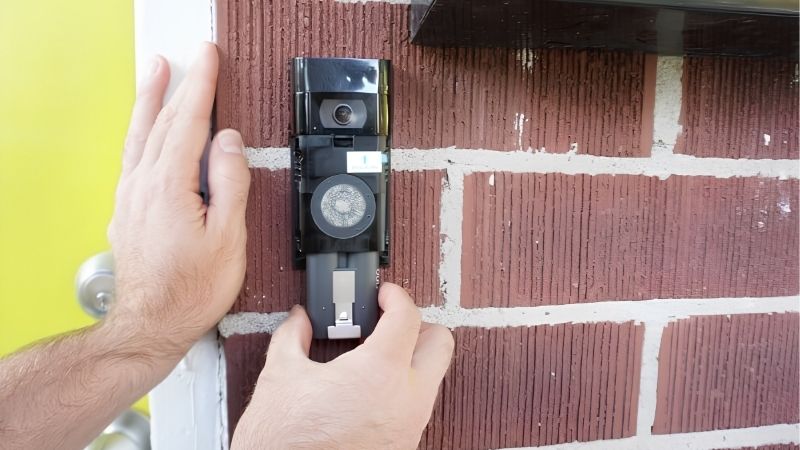
Renters should favor battery models with adhesive or screw-in brackets that patch easily, since wired doorbells tie into house transformers and are harder to remove cleanly. Confirm the mount reaches a usable height near 48 in / 122 cm so faces, not chests, fill the frame at the threshold. Test the view on a phone before final mounting so the camera sees faces, not chests.
Measure the strip of trim beside your door and the angle to the walkway before ordering, because a storm door, narrow frame, or inward-facing wall can crop the view. An angled wedge mount fixes most off-center doors and is cheaper than returning a unit that sees only the neighbor’s fence.
Weather, Wi-Fi, And Night Vision
A porch doorbell faces rain, heat, and cold, so an IP-rated housing and a sensible operating temperature range matter, especially since battery capacity falls in freezing weather. Direct afternoon sun can also overheat dark housings, so a covered or shaded location extends component life and reliability.
Most doorbells use 2.4GHz Wi-Fi for range, so weak signal at the door causes lag and missed events; a mesh point near the entry helps. Night vision is typically infrared for a clear black-and-white image, with some models adding color when a nearby porch light is on. Signal strength at the door matters as much as the sensor, so add a mesh point if needed.
Video doorbells see their biggest surge in the final quarter, when a wave of package deliveries brings a matching rise in porch theft. That is why a tall, head-to-toe view that captures a parcel on the mat, plus a chime or two-way warning, earns its keep most during the holiday delivery season.
Top Wireless Doorbell Camera Picks
These six span fee-free local storage, smart-home integration, and budget value, so you can weigh convenience against ongoing cost. Each includes a genuine drawback, because doorbells juggle battery life, storage policy, and porch conditions that no single model handles flawlessly for every home. Any wireless doorbell camera below can guard your entry once you weigh convenience against ongoing cost.
| Pick | Power | Storage | Best for |
|---|---|---|---|
| eufy Video Doorbell | Battery/wired | Local hub | No monthly fee |
| Ring Video Doorbell | Battery/wired | Cloud | Ecosystem fit |
| Google Nest Doorbell | Battery/wired | On-device+cloud | Smart alerts |
| Arlo Doorbell | Battery/wired | Cloud | Tall field of view |
| Wyze Video Doorbell | Wired/battery | microSD/cloud | Budget tier |
| Blink Video Doorbell | Battery | Local/cloud | Long battery life |
eufy Video Doorbell For Fee-Free Storage
eufy’s doorbells store recordings on a local hub without a required subscription, which appeals to buyers avoiding recurring costs. Many models offer a tall aspect ratio to show packages at the door, plus on-device person detection that trims false alerts from passing traffic and animals.
The trade-off is hub dependence and occasionally slower cloud-based extras, and some features still cost more. Battery versions need recharging every few weeks in busy areas, so a hardwired install is worth it at a high-traffic entrance where events pile up daily. Recharging every few weeks is manageable, but plan for it at a busy entrance.
The appeal of a hub that keeps footage in your own home is largely a response to that privacy conversation. Owning the recording, with no monthly plan and no third party holding your porch video, is the main reason fee-free doorbells keep gaining ground with cautious buyers.
Ring Video Doorbell For Ecosystem Fit
Ring’s doorbells are easy to set up and integrate tightly with Alexa and other Ring devices, making announcements and live view convenient across a household. Battery and wired versions cover most doors, and quick-release packs simplify recharging without removing the whole unit.
Recorded video and event history require a Ring Protect plan, so ongoing fees are the main downside for cost-conscious buyers. Privacy policies and data sharing have drawn scrutiny, so review current terms if cloud storage and third-party access concern you before choosing this route.
Reporting on doorbell data sharing and police partnerships has pushed privacy up many buyers’ lists. If that concerns you, weigh brands that store clips locally without an account, and read the current data policy, since terms and partnerships change and are worth rechecking before you buy.
Google Nest Doorbell For Smart Alerts
Google’s Nest Doorbell adds on-device detection for people, packages, and animals, cutting nuisance notifications, and keeps a short rolling history locally before a plan is added. It suits Google Home households and shows familiar-face options where regionally supported for tailored alerts.
Longer video history and richer features sit behind Nest Aware, returning the fee question for heavy users. The higher price also adds up if you want cameras elsewhere, so it works best as a smart front-door anchor rather than a whole-home budget solution.
With any cloud doorbell, tally the yearly plan against how long you expect to keep the device; over several years the fees can exceed the hardware. Deciding whether that ongoing cost is acceptable up front is the single biggest factor in long-term satisfaction with a doorbell.
Arlo Doorbell For A Tall View
Arlo’s doorbell emphasizes a tall, square field of view so you see a visitor head to toe and any parcel on the ground. Color night vision, a siren, and two-way audio round out a capable package for identifying who is really at the door after dark.
As with Arlo cameras, recorded clips and smart features lean on a subscription, so plan for the recurring cost. Without it, event history is limited, which weakens the appeal for anyone prioritizing fee-free saving of doorbell footage over premium detection extras.
A tall aspect ratio matters more at the door than raw resolution, because the whole point is seeing a package left at your feet. When comparing models, check the vertical field of view first, then night-vision type, and only then weigh megapixels, which rarely change day-to-day usefulness much.
Wyze Video Doorbell For Budgets
Wyze’s video doorbell delivers a tall view and solid resolution at a budget-tier price, recording to a microSD card or an inexpensive cloud plan. For a simple, affordable entry camera, it covers the basics of live view, two-way talk, and motion alerts well.
Compromises include a wired-preferred design on some models, slower app response than premium brands, and fewer advanced smart features. It is a value-first pick, ideal for a secondary door or a first-time buyer testing whether a doorbell camera fits their routine. It is a sensible starting point before investing in a premium model.
Doorbells are also a common gift and see their sharpest markdowns around the big mid-year and late-November sales, though the exact dates move each year. If you are buying one as a present, timing it to one of those windows can help, but confirm the schedule rather than assuming it.
Blink Video Doorbell For Battery Life
Blink’s doorbell is known for long battery intervals from standard cells and a low entry price, with local storage via a Sync Module or an optional cloud plan. It integrates with Alexa and suits households that want simple, low-maintenance coverage at the front door.
Trade-offs are modest resolution and detection compared with premium rivals, and some responsiveness depends on the Sync Module setup. It shines on battery endurance and cost, not on the sharpest image, so set expectations accordingly for a busy, detail-critical entrance. For the sharpest identification at your main door, pair a value camera with a higher-resolution model and keep the budget unit for secondary angles.
Battery-first doorbells trade some responsiveness for long runtime, so set expectations at a high-traffic door where events pile up. If your entry sees constant coming and going, a wired install removes recharge chores and keeps the camera ready for the moment that actually matters.
See More:
- Best eyeshadow blender brush
- Best frozen foods for air fryer
- Best frozen food for air fryer
- Best way to reheat steak in air fryer
- Best air fryer recipes book
Picking The Right Video Doorbell
The best wireless doorbell camera for you hinges on one early choice: will you pay a monthly fee, or store clips locally? If not, favor eufy, Wyze, or Blink and confirm the storage capacity; if smart alerts matter more, Nest and Arlo earn their keep with fewer false pings. Deciding the fee question first makes the rest of the shortlist fall into place quickly.
Measure your door trim and mounting angle, check the vertical field of view for package visibility, and plan for a Wi-Fi point near the entry. During peak delivery months, event volume and cold-weather battery drain both rise, so a wired install keeps a wireless doorbell camera dependable when your porch gets busiest.
Frequently Asked Questions
Do wireless doorbell cameras still require a monthly subscription for video storage?
While many modern wireless doorbell cameras offer cloud subscriptions for advanced AI detection and extended history, local storage options have become much more common. Brands now frequently include built-in local memory or HomeBase storage hubs so you can review footage without paying ongoing monthly fees. Check the specific brand’s storage policy before purchasing if you want to avoid recurring costs.
How long do the batteries actually last before needing a recharge?
Battery life typically ranges from three to six months depending heavily on your front door’s foot traffic and your motion detection settings. Busy doorbells facing a bustling sidewalk will drain much faster than those monitoring a quiet suburban porch. Many 2026 models feature quick-release battery packs or optional solar accessory panels to minimize maintenance downtime.
Can I install a wireless doorbell camera myself if I am not handy with tools?
Yes, installation is designed to be completely DIY-friendly and usually takes less than fifteen minutes using basic household items. Most units come with heavy-duty mounting tape and simple brackets, eliminating the need to drill into brick or siding if you prefer a renter-friendly setup. The accompanying mobile apps walk you through the Wi-Fi pairing and camera angle adjustments step-by-step.
Will a wireless doorbell camera still work if my home internet goes down?
Without an active Wi-Fi connection, you will not receive live video feeds or instant motion alerts on your smartphone. However, models equipped with local storage capabilities can still record motion events to an onboard memory card while the network is offline. Once your internet reconnects, the system will automatically sync the missed footage back to your app.





