Key takeaways
What's inside
- Understanding Acoustic Coupling and Why You Need Isolation
- Weight Capacity and Footprint Compatibility
- Material Density: High-Density Foam Versus Metal-Frame Isolators
- Adjustable Tilt and Height Mechanics for Optimal Tweeter Alignment
- Critical Buying Mistakes to Avoid
- When It Makes Sense to Spend More on Premium Stands
- Related Guides
- FAQ
- Related Guides
When setting up a professional audio workstation or a home recording studio in 2026, investing in studio monitors is only half the battle. Without proper acoustic decoupling, your speakers transmit low-frequency vibrations directly into your desk, causing phase cancellation, muddy bass response, and inaccurate mix translations. Monitor isolation stands are engineered to break this mechanical path, ensuring that the sound waves reaching your ears come purely from the drivers rather than a vibrating piece of furniture.
- Understanding Acoustic Coupling and Why You Need Isolation
- Weight Capacity and Footprint Compatibility
- Material Density: High-Density Foam Versus Metal-Frame Isolators
- Adjustable Tilt and Height Mechanics for Optimal Tweeter Alignment
- Critical Buying Mistakes to Avoid
- When It Makes Sense to Spend More on Premium Stands
- Related Guides
- FAQ
- Related Guides
Navigating the market can be overwhelming due to the sheer variety of designs, ranging from high-density foam pads to heavy steel platforms suspended by internal dampening elastomers. Choosing the right stand requires looking past marketing hype and focusing on the core specifications that directly impact acoustic performance, structural stability, and long-term durability. This guide breaks down what actually matters when selecting the ideal isolation solution for your studio workspace.
As an Amazon Associate we earn from qualifying purchases at no extra cost to you. Product prices and availability are accurate as of the date shown and are subject to change.
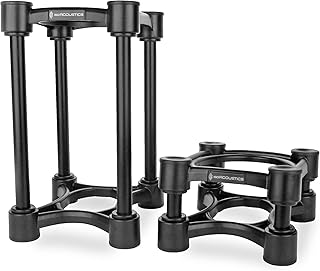
Understanding Acoustic Coupling and Why You Need Isolation
Hard studio desk surfaces act as sounding boards, absorbing the low-end energy generated by your monitors and amplifying frequencies that your room acoustics may already struggle to manage. When a speaker cabinet vibrates against a wooden or laminate desktop, it creates sympathetic resonance that masks subtle details in the mix. Isolation stands introduce a mechanical barrier that absorbs this kinetic energy, transforming it into negligible amounts of heat rather than audible rumble. By floating the speaker cabinet, you achieve tighter transient response, cleaner stereo imaging, and a much more reliable low-end representation.
Weight Capacity and Footprint Compatibility
One of the most common oversights buyers make is ignoring the physical dimensions and weight ratings of their chosen stands. Studio monitors vary significantly in mass, from compact nearfield speakers to heavy three-way cabinets packed with large woofers and robust amplifiers. Always check the maximum weight limit of an isolation stand and ensure it comfortably exceeds your speaker weight with a safe margin. Furthermore, the footprint of the stand must match the base of your monitor; overhang creates instability, compromises the decoupling material’s effectiveness, and increases the risk of accidental tipping.
Material Density: High-Density Foam Versus Metal-Frame Isolators
Isolation stands generally fall into two categories: high-density acoustic foam pads and rigid metal platforms utilizing specialized elastomer feet or internal suspension. Foam pads offer an accessible, low-profile entry point, but their decoupling efficiency depends entirely on density and thickness. Over time, cheaper foams can compress permanently under heavy loads, losing their dampening properties. Metal frames paired with high-grade silicone, sorbothane, or specialized pucks tend to provide superior long-term load stability, better resistance to environmental humidity, and cleaner aesthetic integration into modern studio aesthetics.
Adjustable Tilt and Height Mechanics for Optimal Tweeter Alignment
Acoustic precision relies heavily on proper physical positioning relative to your ears. Ideally, your monitor tweeters should align at ear level, forming an equilateral triangle with your mixing position. Many advanced isolation stands feature built-in tilt mechanisms—often utilizing wedge inserts or mechanical adjustment knobs—that allow you to angle the speakers upward or downward. If your monitors sit on a low desk or a high bridge, choosing a stand with adjustable height or multi-angle tilt options is essential for eliminating high-frequency roll-off and securing accurate phase alignment.
Critical Buying Mistakes to Avoid
Buyers often fall into the trap of prioritizing aesthetic design over structural integrity, purchasing sleek platforms that fail to support the dynamic forces of powerful woofer cones. Another frequent error is mismatching the isolation medium to the weight of the speaker; foam that is too dense will act like a hard surface, while foam that is too soft will cause the monitor to sag and rock dangerously during playback. Finally, avoid placing secondary objects like external hard drives or audio interfaces on the same stands, as any added mass alters the resonant frequency and disrupts the acoustic decoupling process.
When It Makes Sense to Spend More on Premium Stands
Entry-level foam pads are often sufficient for lightweight, budget-friendly desktop speakers used in casual listening environments. However, upgrading to premium decoupled platforms becomes necessary when working in critical mixing and mastering scenarios where every decibel of accuracy matters. Premium stands constructed from aircraft-grade aluminum, heavy steel plates, and proprietary polymer compounds offer vastly superior vibration attenuation across the entire frequency spectrum. If your work requires pinpoint panning decisions and absolute low-end translation across different playback systems, investing in high-end isolation infrastructure yields an immediate return in audio clarity.
Related Guides
To round out your workspace setup and explore other essential gear categories, check out our other comprehensive resources. For detailed product evaluations, read through our Best Monitor Isolation Stands in 2026: Tested and Ranked guide. If you are upgrading your entertainment space or living room layout alongside your studio, take a look at our insights within the Best Electric Fireplace TV Stands in 2026: Tested and Ranked roundup. Additionally, for professional staging and studio lighting setups, explore our expert recommendations in the Best Lighting Stands in 2026: Tested and Ranked analysis.
FAQ
Do isolation stands really make a noticeable difference in sound quality?
Yes, isolation stands dramatically reduce desktop resonance and muddy low-frequency buildup. This results in a tighter bass response, clearer midrange, and more accurate stereo imaging during mixing.
Can I use standard foam or mouse pads instead of dedicated isolation pads?
Standard household materials lack the calibrated density and cellular structure required for effective acoustic decoupling. Dedicated isolation stands are engineered to absorb specific kinetic frequencies produced by speaker cabinets.
How do I know if my monitor stands are overloaded?
If your isolation pads or springs compress completely flat under the weight of the speaker, or if the cabinet rocks excessively when playing transient-heavy music, your stands are overloaded and require a higher weight capacity model.
Should my monitor isolation stand tilt upward or stay completely flat?
Your stands should tilt only if your tweeters are currently firing below ear level. Proper alignment requires the high frequencies to direct straight to your ears for optimal phase coherence and frequency response.