Key takeaways
- Budget: Basic hobby kits with a handheld press and a few supplies. They suit gift making and occasional use but may be slower and show more variance in fit.
- Mid-range: Metal-body machines from American Button Machines or Badge-A-Minit with a circle cutter. They suit regular hobbyists, school clubs and small craft sellers.
- Premium: Tecre and other professional-grade machines with a heavy build, rotating base and interchangeable dies. They are designed for high volumes and long service.
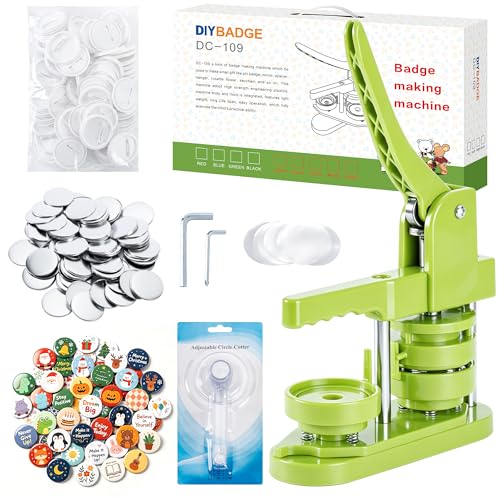
The best button maker for most crafters is a hand-press machine in the 1.25-inch to 2.25-inch range with a built-in circle cutter or a separate punch, while hobby sellers and schools should look at heavier presses from established brands such as Tecre, American Button Machines or Badge-A-Minit that offer interchangeable dies; the choice depends on button size, volume and whether you want to cut artwork by hand.
Our top picks


As an Amazon Associate we earn from qualifying purchases at no extra cost to you.
How button makers work
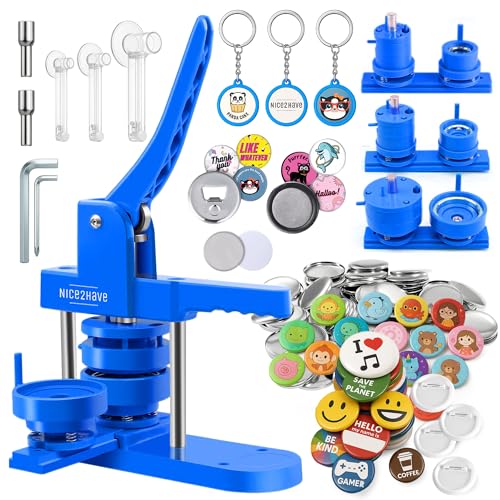
A button maker, also called a badge maker or pin-back button press, assembles a button from a printed paper circle, a clear mylar film, a metal shell and a back, which is usually a pin, magnet or mirror. You place the parts in a die, pull the handle and the press crimps them together. Most machines come with one die for one size, and additional dies can be bought separately from the same brand.
Output quality depends on the press, the die fit and the parts, and some makers sell parts only for their own machines, so check that you can buy supplies for the model you choose.
At a glance: well-known makers
| Option | Best for | Key points the makers describe | Limits |
|---|---|---|---|
| Tecre button makers | Small businesses and schools that want long-run machines | Sold in several sizes with metal bodies and interchangeable dies, plus circle cutters | Higher budget tier than basic hobby presses |
| American Button Machines | Hobbyists and shops that want a machine and a wide range of part types | Presses in multiple sizes, many shell and back styles, and cutters | Parts must match the machine model |
| Badge-A-Minit | Classrooms and clubs | Long-standing brand with kits and refills, including child-friendly models | Some models run at a lower speed for high-volume work |
| Generic hand-press machines | Casual crafters and gift makers | Lower budget kits with machine, cutter and a few supplies | Variable fit and parts availability; less durable |
| Combination and multi-die presses | Sellers who offer several button sizes | Machines that allow swaps between dies; some come with a rotating base | Dies are an added cost; changing takes time |
Because kits, model names and included parts change often, read the maker’s current page for what is included and which size the die produces.
Choosing a size
Button sizes are described by the finished diameter. Common sizes are 1 inch, 1.25 inch, 1.5 inch, 2.25 inch (often about 58 mm) and 3 inch. Smaller sizes suit pins on bags and jackets and are popular for fandom and craft fairs. The 2.25-inch size is a common choice for campaign buttons, school spirit items and event badges because it leaves room for artwork. Larger sizes show detail well but are heavier and cost more per piece in supplies.
The artwork circle is larger than the finished button face, since it wraps around the shell. Makers provide template sizes, and following them matters because a wrong circle size can cause crooked edges.
Features to compare
Press mechanism
Most hobby presses use a lever or a rotating base with a pull handle. Heavy-duty machines use a steel body and a rotating turntable that moves the button between stations. Rotating bases are faster, since you can load one station while another is pressed, and they generally reduce handling mistakes.
Interchangeable dies
If you plan to make multiple sizes, check whether the machine accepts other dies from the same maker. This avoids buying a new base for each size. Check, too, whether dies are simple to switch or need tools.
Circle cutter
A circle cutter saves time and gives round, consistent paper. Options include a rotary cutter, a graphic punch or a die-cut service. Punches tend to be fast and accurate for repeat sizes but are only for one size each. Rotary cutters adjust for several sizes but need practice. For big batches, buying pre-cut paper or using a cutting machine may be worth the cost.
Back styles
Backs include pin-back (safety pin), magnet, mirror, bottle opener and keychain. Not every back works with every press, so check compatibility. Pin-backs are common and sturdy. Magnets suit fridge sets, and mirrors are popular for pocket gifts. Some pins on children’s items raise safety questions about small parts and sharp points, so follow the maker’s age guidance.
Parts and supply availability
Buying supplies from the same maker usually gives the best fit. Third-party parts may fit, but fit can vary. Look at the number of parts per pack and how easy the brand makes reordering.
Printing artwork
Print artwork on an inkjet or laser printer using the maker’s template, then cut it to the circle size. Matte or glossy paper both work, and the mylar film gives a protective gloss. Water-based inkjet inks can smear if they come into contact with moisture before pressing, so let prints dry. For selling, make sure you have the right to use any artwork, logos or characters you print; licensed characters and trademarks are often protected.
Budget tiers
- Budget: Basic hobby kits with a handheld press and a few supplies. They suit gift making and occasional use but may be slower and show more variance in fit.
- Mid-range: Metal-body machines from American Button Machines or Badge-A-Minit with a circle cutter. They suit regular hobbyists, school clubs and small craft sellers.
- Premium: Tecre and other professional-grade machines with a heavy build, rotating base and interchangeable dies. They are designed for high volumes and long service.
Safety and care
- Keep fingers clear of the press during pulling, and supervise children, especially with circle cutters and pin-backs.
- Pin-back buttons have sharp points. Follow the maker’s age guidance and avoid use on babies or toddlers’ clothing.
- Store small parts away from children and pets.
- Wipe the dies clean and keep them dry to avoid rust.
- Do not force the handle if parts do not fit. Check alignment and artwork size first.
Pick X if…
| Pick this | If you… |
|---|---|
| Tecre machine | plan to sell buttons regularly and want a durable press and dies |
| American Button Machines | want a wide range of sizes, backs and supplies from one brand |
| Badge-A-Minit | run a classroom or club and want an established, accessible kit |
| Generic hobby kit | only plan to make a small number of buttons for gifts |
| Multi-die setup | need to offer several sizes to customers |
Alternatives to buying a press
- Custom button services. Print shops and online makers produce buttons from your artwork, which makes sense for a single event or a small batch.
- Library or makerspace presses. Some libraries and makerspaces have button makers available to patrons, letting you try the process before buying.
- Stickers and magnets. If you only want small branded items, die-cut stickers or magnets may be simpler and need no special press.
Getting started with your first batch
Start with a small test run. Print a sheet of artwork using the maker’s template, cut the circles, then assemble the parts in order: shell, paper, film, then the back. Press, remove, and compare the finished button with the maker’s picture. If edges look uneven, the paper may be the wrong size or off-center. Keep a handful of spare parts for practice, since the first few buttons are often wasted while you learn the pressure and alignment.
Buying checklist
Decide on a size, count how many buttons you expect to make in a month, and choose a machine that matches that volume. Check which backs are supported, whether a cutter is included, and how easily you can reorder parts. Read the return policy and the maker’s support pages, since fit problems are easier to settle early. If you plan to sell, budget for extra dies, packaging and display cards, and keep records of the artwork rights you hold.
Frequently Asked Questions
What size button should I choose?
Choose a size by use. One inch to 1.5 inches suits small pins and bag decorations, 2.25 inches is popular for campaign and school buttons, and larger sizes show more detail. Remember that each size needs its own die and artwork template.
Do I need a circle cutter?
You need some way to cut round paper. A circle cutter or punch speeds the work and improves consistency. For small projects, cutting by hand with scissors and the maker’s template can work but is slower and less even.
Can I use any printer for button artwork?
Most inkjet and laser printers work. Let inkjet prints dry fully before pressing so ink does not smear. Use the template size the maker supplies for your die.
Are button supplies interchangeable between brands?
Not always. Shells, backs and mylar must match the die size and design. The safest approach is to buy parts from the same maker as the machine, or confirm compatibility with the seller.
Are pin-back buttons safe for children?
Pin-backs have a sharp point and small parts, so they are generally not suitable for babies and toddlers. Follow the maker’s age guidance, and consider magnet or mirror backs carefully because small magnets also carry risks if swallowed.
Can I sell buttons I make?
You can sell original artwork. Using licensed characters, brand logos or copyrighted images without permission can create legal problems, so use your own designs or content you have the right to use.
FAQ
What size button should I choose?
Do I need a circle cutter?
Can I use any printer for button artwork?
Are button supplies interchangeable between brands?
Are pin-back buttons safe for children?
Can I sell buttons I make?
More from Amazon
Programs that pair well with the guide above. Offers and eligibility are set by Amazon and may change.
Free shipping on eligible items, Prime Video and more. Eligible new members can start with a free trial.
Start a Prime free trialAudiobooks and podcasts to listen to on the go. Eligible new members can start with a free trial.
Try Audible freeAd-free music streaming. Eligible new subscribers can start with a free trial.
Try Music Unlimited freeA free business account with business pricing and bulk-buying tools for work, shop or home office.
Create a business accountAs an Amazon Associate we earn from qualifying purchases.