Key takeaways
- Find the best camera surveillance for car protection: 4K dash cams with parking mode, motion and impact detection, and night vision that watch your car.
Introduction
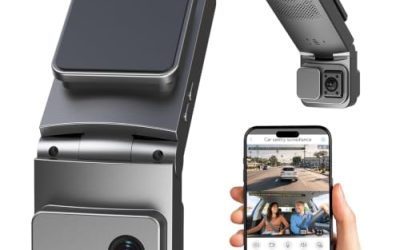
A parked car is an unguarded car. A shopping cart, a careless driver reversing out of a bay, or someone trying a door handle at night can all leave damage that is hard to explain without evidence. That is the job of the best camera surveillance for car use: a dash camera that keeps watching after you switch the ignition off, records when something moves or bumps the car, and saves footage you can actually use. This guide covers visible, windshield-mounted dash cams only — not hidden interior cameras, which are a different category covered separately.
Parking surveillance is different from ordinary driving recording. A camera that only records while the engine runs will miss exactly the incident you need most: the hit-and-run in a parking lot at midnight. The cameras below were chosen for what they do while parked — buffered recording that saves seconds before an event, motion and impact triggers, low-power modes that stretch for days, and sensors that can read a plate in a dark garage.
One honest note before the picks. This guide is based on maker specifications, manuals, and listing details, not on driving with each camera ourselves. Listing codes change, bundles change, and stock changes, so confirm the exact model name and listing on Amazon US before ordering. At the time of writing, only the VIOFO A229 Pro 2CH listing code below was confirmed against an Amazon listing reference; the other models are listed by their exact model names so you can find the current Amazon US listing for each one. No code has been guessed or filled in here.
Disclosure: As an Amazon Associate, we earn from qualifying purchases.
How to Choose a Car Surveillance Camera
Parking modes, explained
Parking mode is not one feature. It is a set of behaviours, and the differences matter more than the resolution number on the box.
Auto event detection records only when motion or an impact is sensed, which saves card space and power. Low bitrate mode records continuously at reduced quality, so nothing is missed between triggers but files stay small. Time-lapse mode takes periodic frames, compressing hours of parked time into a short clip. Buffered modes are the most valuable for proving a parking bump: they save footage from seconds before the trigger as well as after it, so you see the car approaching, not just the empty space it left behind.
Hardwiring is not optional for parking mode
Most parking modes need a hardwire kit. The kit taps a fused circuit, powers the camera while the car is off, and adds a low-voltage cut-off so the camera stops before the battery drops too far to start the car. A cigarette-lighter plug usually powers down with the ignition, which disables parking mode entirely. Budget for the kit and the install, and confirm which kit your camera requires before buying.
Battery drain and low-voltage cut-off
A surveillance camera draws power while the car sleeps, so the cut-off setting matters. Set it before the first night of parking use, and check the first week of footage rather than discovering a flat battery on a Monday morning. Radar-based cameras use the least power in standby because the radar wakes the camera only when a large object approaches; motion-only cameras wake more often and drain faster.
Channels: front, rear, and cabin
Front-only cameras suit drivers whose main risk is a front impact in a lot. Front plus rear covers both bump directions and is the right default for most street-parked cars. Adding a cabin camera covers rideshare disputes and break-in attempts through side glass. Each added channel uses more card space and more power, and generates more heat, so buy the channels your parking risk actually needs rather than the maximum available.
Night vision and plate reading
Night plate reading depends on sensors and HDR more than on raw pixels. Sony STARVIS 2 sensors and HDR matter at night; a high resolution on a weak sensor still blooms under headlights and loses plates. Infrared cabin cameras can see in complete darkness inside the car, which is useful for documenting an attempted break-in. Judge night footage from owner videos and independent coverage, not from the resolution number alone.
Card size and endurance
Parking surveillance writes constantly, which wears ordinary cards and overwrites quickly on small ones. High-endurance cards rated for continuous recording last longer, and larger cards keep event footage longer before loop recording overwrites it. Size the card to the longest parked stretch, not to the daily drive, and format the card in the camera regularly so parking files do not fragment.
Installation and legal notes
Mount the front camera high on the windshield, clear of the wiper sweep and any tint band, and route the rear cable along the headliner rather than across airbags. Never let a camera or cable block the driver view or an airbag path. Tell passengers a cabin camera is recording where local rules require notice, and check the recording rules for audio where you drive, since audio consent rules vary by place.
Top Picks
1. VIOFO A229 Pro 4K HDR Dash Cam 2CH — Best Overall

The VIOFO A229 Pro 2CH is the strongest all-round parking surveillance camera in this guide, and the pick most drivers should start with. It pairs a 4K front camera with a 2K rear camera, both using Sony STARVIS 2 sensors, and offers three parking modes — auto event detection, low bitrate, and time lapse — with buffered capture that stores 15 seconds before and 30 seconds after a detected event.
In parking mode, the A229 Pro captures usable plates at close range in near darkness, according to listing and review summaries, thanks to the STARVIS 2 IMX678 front sensor and dual HDR. The 5GHz Wi-Fi speeds up footage downloads to a phone, GPS logs speed and location, and voice control keeps hands off the camera while driving.
The hardwire kit is the catch: parking mode needs the VIOFO HK4 Acc hardwire kit, sold separately, ASIN B09MRVP2PX. No memory card is included in the box, so add a high-endurance card to the order. There is no cabin camera on this two-channel variant, so rideshare drivers should look at the three-channel options below instead.
Key specifications
- Front resolution: 4K 2160p; rear resolution: 2K 1440p
- Sensors: Sony STARVIS 2 IMX678 front, IMX675 rear
- HDR: dual HDR, front and rear
- Parking modes: 3 — auto event detection, low bitrate, time lapse
- Buffered capture: 15 seconds before, 30 seconds after event
- Card support: up to 512GB
- Connectivity: 5GHz Wi-Fi, GPS, voice control
- Hardwire kit: HK4 Acc, sold separately
- Memory card included: No
- ASIN: B0CKYFSKNN
Pros
- Buffered parking capture covers before and after events
- Three parking modes suit different parking durations
- 4K front resolution reads plates in daylight
- Dual STARVIS 2 sensors help night footage
- 5GHz Wi-Fi speeds up footage downloads
Cons
- Hardwire kit sold separately and required for parking mode
- No memory card in the box
- No cabin camera on this two-channel variant
- Parking modes need a hardwired install, not just a cigarette-lighter plug
Best for: Owners who want front and rear coverage with the strongest buffered parking capture in this guide, and who park on streets, in lots, or in garages where bumps and break-in attempts are the risk.
2. Vantrue N4 Pro S 4K 3 Channel Dash Cam — Best Cabin Coverage
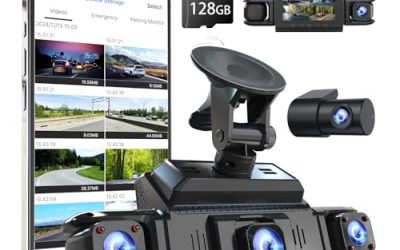
Rideshare drivers, parents, and fleet owners need the cabin on record, not just the road. The Vantrue N4 Pro S records 4K front, 1080p interior, and 2.5K rear simultaneously, with infrared night vision for the cabin and four parking modes including buffered motion detection that captures 10 seconds before motion. Its 1TB card support matters for long parking surveillance, where small cards overwrite the very footage a claim needs.
Key specifications
- Front resolution: 4K; interior resolution: 1080p; rear resolution: 2.5K
- Sensors: triple STARVIS 2
- Night vision: HDR plus infrared for cabin
- Parking modes: 4, including buffered motion, collision, low bitrate, low framerate
- Buffered capture: 10 seconds before motion, 30 seconds after
- Card support: up to 1TB
- Connectivity: Wi-Fi, GPS, voice control
- Hardwire kit: required, sold separately
- ASIN: not verified at time of writing — search the exact model name “Vantrue N4 Pro S” on Amazon US and confirm the listing before ordering
Pros
- Three channels cover road, cabin, and rear
- Four parking modes for different parking risks
- 1TB card support for long surveillance
- Infrared cabin night vision
- Buffered motion capture keeps pre-event footage
Cons
- Hardwire kit sold separately
- Three-channel mode runs hotter and uses more card space
- Most complex install in this guide
- Largest file sizes need regular card management
Best for: Rideshare vehicles, family cars, and fleets where cabin events need recording alongside road and rear views, and owners who park for long stretches and need large card capacity.
3. Vantrue N4 3 Channel Dash Cam — Best Value Three-Channel
The original Vantrue N4 proves that three-channel coverage does not require a flagship budget. It records 4K front with interior and rear views, adds infrared for cabin night recording, and offers 24-hour parking mode for parked protection. A supercapacitor replaces a battery, which handles heat better and lasts longer in a car that sits in the sun.
Its card ceiling is lower than the Pro S at 256GB, and its sensors are an older generation, so night plate reading is a step behind the flagship models. For owners who want cabin coverage at value pricing, that is a fair exchange. The N4 is a proven long-running model with a large owner base, which also means more owner footage and troubleshooting help is available than for newer cameras.
Key specifications
- Front resolution: 4K; interior resolution: 1440p in two-channel mode per listing; rear resolution: 1080p in three-channel mode per listing
- Night vision: infrared for cabin
- Parking mode: 24-hour parking mode
- Card support: up to 256GB
- Connectivity: USB, Wi-Fi per listing features
- Features: supercapacitor, loop recording, motion sensing
- Hardwire: required for full parking mode
- ASIN: not verified at time of writing — search the exact model name “Vantrue N4” on Amazon US and confirm the listing before ordering
Pros
- Three channels at value pricing
- Infrared cabin night vision
- 24-hour parking mode
- Supercapacitor instead of a battery
- Proven long-running model
Cons
- 256GB card ceiling, below the Pro S
- Older sensor generation than the Pro S
- Parking mode still needs hardwiring
- File management matters more on a smaller card
Best for: Family cars and rideshare vehicles on a budget where cabin coverage matters but flagship sensors are not required, and owners who accept a 256GB card ceiling in exchange for value.
4. Nextbase 622GW Dash Cam with 128GB Card Bundle — Best Front-Only Parking
Not every car needs three cameras. The Nextbase 622GW is a front-only flagship with image stabilization, a 3-inch touch screen, 10Hz GPS with what3words location, and Intelligent Parking Mode that uses the mount battery to watch for bumps while parked, with maker-described standby stretching over weeks. The bundle includes a 128GB micro SD card, which removes the most common first-week mistake: buying a camera and having no card in it.
Key specifications
- Resolution: 4K at 30fps, 1440p at 60fps, 1080p at 120fps
- Screen: 3-inch HD IPS touch screen
- GPS: 10Hz, with what3words location
- Parking mode: Intelligent Parking Mode
- Standby: maker-described G-sensor surveillance for up to 2.5 weeks on mount battery
- Stabilization: image stabilization
- Connectivity: Wi-Fi dual band, Bluetooth, Alexa built in
- Lens: 6-layer f1.3
- Bundle: includes 128GB micro SD card
- ASIN: not verified at time of writing — search the exact model name “Nextbase 622GW 128GB bundle” on Amazon US and confirm the listing before ordering
Pros
- True 4K front footage with stabilization
- Intelligent Parking Mode with long standby claim
- Bundle includes a 128GB card
- 10Hz GPS and what3words location
- Touch screen for on-camera review
Cons
- Front only, no rear or cabin coverage
- Rear and cabin modules are separate purchases
- Parking standby depends on mount battery state
- Bundle option may cost more than the camera-only option
Best for: Drivers who want one excellent front camera and parked bump detection without rear or cabin cameras, and cars parked in busy lots where front impacts are the main risk.
Comparison Table
| Camera | Channels | Parking modes | Buffered capture | Card max | Card included |
|---|---|---|---|---|---|
| VIOFO A229 Pro 2CH | Front 4K + rear 2K | 3: event, low bitrate, time lapse | 15s before, 30s after | 512GB | No |
| Vantrue N4 Pro S | Front 4K + cabin 1080p + rear 2.5K | 4: buffered motion, collision, low bitrate, low framerate | 10s before, 30s after | 1TB | Not stated |
| Vantrue N4 | Front 4K + cabin + rear 1080p | 24-hour parking mode | Not stated | 256GB | Not stated |
| Nextbase 622GW bundle | Front 4K only | Intelligent Parking Mode | Not stated | 128GB in bundle | Yes, 128GB |
Frequently Asked Questions
What is parking mode on a dash cam?
Parking mode keeps a dash cam recording while the car is off, either continuously, on motion detection, or triggered by impact sensors. The best parking-mode cameras use low-power standby, buffered recording that saves seconds before an event, and a hardwire kit with low-voltage cut-off so the camera can watch for days without draining the car battery.
Do I need a hardwire kit for car surveillance?
For most cameras, yes. A hardwire kit taps a fused circuit and powers the camera while the car is off, which is what makes parking mode work at all. A cigarette-lighter plug usually powers down with the ignition, so the camera sleeps with the car. The Nextbase 622GW is an exception in this guide because its mount battery supports parking standby, but even there the mount must stay charged.
Will a dash cam drain my car battery while parked?
It can, which is why the low-voltage cut-off matters. The kit stops recording before the battery drops too far to start the car. Radar-based cameras drain the least in standby because the radar wakes the camera only when a large object approaches. Set the cut-off before the first night of use and check the first week of footage.
Is 4K necessary for a car surveillance camera?
It helps for reading plates in daylight, but it is not the whole answer. Night plate reading depends on the sensor and HDR more than on pixel count, which is why STARVIS 2 sensors appear on the strongest picks in this guide. A 1080p camera with a good sensor and HDR can beat a 4K camera with a weak sensor after dark.
Should I choose a three-channel camera for my car?
Choose three channels if the cabin matters: rideshare driving, family cars, or a car parked where break-in attempts are a real risk. The cabin camera documents what a front camera cannot see. If you park in a garage and only worry about bumps, a front-plus-rear camera covers the risk with less heat, less card use, and a simpler install.
How big a memory card do I need for parking surveillance?
Use a high-endurance card rated for continuous recording, sized to the longest stretch your car sits parked. Parking mode writes constantly, so ordinary cards wear out faster and small cards overwrite event footage quickly. A 128GB card suits overnight parking; drivers who leave a car for days should consider 256GB or more, and the Vantrue N4 Pro S supports up to 1TB for the longest stretches.
Conclusion
The best camera surveillance for car protection is the one that records the incident you were not there to see. For most drivers, that is the VIOFO A229 Pro 2CH: 4K front plus 2K rear, three parking modes, and buffered capture that saves 15 seconds before and 30 seconds after an event. Its verified Amazon listing is ASIN B0CKYFSKNN, and its HK4 hardwire kit is the one accessory to budget for alongside it.
If the cabin matters as much as the road, the Vantrue N4 Pro S adds an infrared interior camera and 1TB card support, while the original Vantrue N4 delivers the same three-channel idea at value pricing. If you want one excellent front camera and nothing else to install, the Nextbase 622GW bundle pairs true 4K with Intelligent Parking Mode and a card already in the box.
Whichever camera you choose, install the hardwire kit, set the low-voltage cut-off, fit a high-endurance card, and confirm the first night of parking footage before trusting the system. A surveillance camera earns its place not on the day you fit it, but on the night something happens while you are away.
FAQ
What is parking mode on a dash cam?
Do I need a hardwire kit for car surveillance?
Will a dash cam drain my car battery while parked?
Is 4K necessary for a car surveillance camera?
Should I choose a three-channel camera for my car?
How big a memory card do I need for parking surveillance?
More from Amazon
Programs that pair well with the guide above. Offers and eligibility are set by Amazon and may change.
Free shipping on eligible items, Prime Video and more. Eligible new members can start with a free trial.
Start a Prime free trialAudiobooks and podcasts to listen to on the go. Eligible new members can start with a free trial.
Try Audible freeAd-free music streaming. Eligible new subscribers can start with a free trial.
Try Music Unlimited freeA free business account with business pricing and bulk-buying tools for work, shop or home office.
Create a business accountAs an Amazon Associate we earn from qualifying purchases.