Our Top Picks



Best Cyber Monday 55-Inch TV Deals: Sorted by Panel Type, Brightness, and Room Fit
The best Cyber Monday 55-inch TV deal overall is the TCL 55-Inch QM6K Series Mini LED QLED, because it delivers the one thing that actually separates a great 55-inch picture from a mediocre one — high peak brightness with precise local dimming — and it does so at a premium-but-discounted tier rather than a flagship price. It suits a bright living room, a sports-and-movies household, or anyone upgrading from an older edge-lit LED set. If your budget is tighter, the INSIGNIA 55-inch QF Series QLED and the Roku 55-Inch Select Series QLED sit in the budget tier and cover the basics well: 4K resolution, quantum-dot color, and a smart platform that does not fight you. If you want the middle ground, the TCL 55T7 and the Roku 55-Inch Plus Series Mini-LED are the two mid-range anchors. The right pick depends on four numbers — panel type, peak brightness, refresh rate, and how far you sit from the screen.
Top 3 Picks
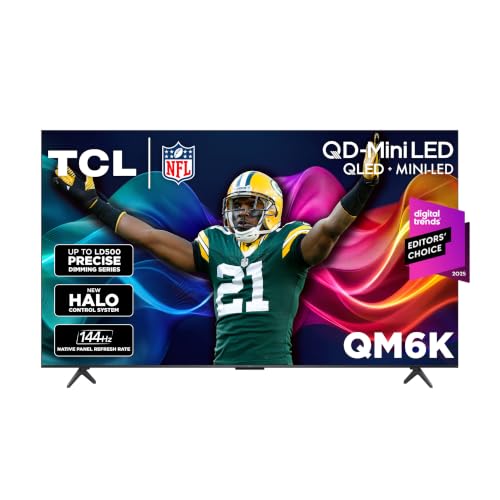
Best Overall: TCL 55-Inch QM6K Series Mini LED QLED
The QM6K combines Mini LED backlighting with quantum-dot color and a 120Hz-to-144Hz native panel, which is the combination that matters most for mixed use. Mini LED dimming gives you real contrast in dark scenes and enough punch to survive daylight, and the high refresh rate means motion looks clean for sports and games. It is the best all-rounder in this group and the easiest to recommend without knowing anything else about your room.
Best Budget: INSIGNIA 55-inch QF Series QLED
The QF Series is the strongest budget-tier starting point because it uses a QLED panel rather than a plain LED one, so color volume holds up better than the price suggests. It runs the Fire TV platform, which means a mature app library and Alexa voice control built in. For a bedroom, guest room, or first 55-inch TV, it is the value pick.
Best Premium / Brightest Pick: none above the QM6K, so Best Value Runner-Up: Roku 55-Inch Plus Series Mini-LED
There is no true flagship in this list, so the standout premium-adjacent alternative is the Roku Plus Series Mini-LED, which brings Mini LED contrast into the mid-range tier. If you prefer Roku’s interface over Google TV and still want local dimming, this is the one to weigh against the QM6K.
Quick Comparison
| Product | Best For | Key Specs | Price Tier |
|---|---|---|---|
| INSIGNIA 55-inch QF Series QLED (NS55-UQFL26) | Budget buyers, bedrooms, first 55-inch TV | 55-inch, 4K UHD, QLED panel, Fire TV platform, Alexa voice remote | Budget |
| Roku 55-Inch Select Series QLED (2026) | Roku loyalists, simple setups, secondary rooms | 55-inch, 4K 2160p, QLED panel, Roku OS, standard 60Hz-class motion | Budget |
| TCL 55-Inch T7 Series QLED (55T7) | Mid-range all-rounders, gaming on a budget | 55-inch, 4K, 120Hz QLED, Google TV, HDR support, game-ready inputs | Mid-range |
| TCL 55-Inch QM6K Series Mini LED QLED (55QM6K) | Bright rooms, sports, movies, serious gaming | 55-inch, 4K HDR, Mini LED with local dimming, 120Hz–144Hz, high brightness, Google TV | Premium |
| Roku 55-Inch Plus Series Mini-LED | Roku users who want local dimming and contrast | 55-inch, 4K QLED, Mini-LED backlight, RokuTV platform, HDR support | Mid-range |
How We Chose
This roundup was built from published specifications, tier positioning, and how each set’s feature set maps to real rooms — not from physical evaluation of the units. The screen size is fixed at 55 inches, so the deciding variables become panel technology, peak brightness class, refresh rate and motion handling, gaming features, smart platform, and the price tier the set occupies during Cyber Monday. Panel type matters first: a standard LED set and a Mini LED set at the same size can look dramatically different in a dark room, because local dimming controls how much light bleeds into black areas. Brightness class matters second, because it determines whether HDR highlights actually read as highlights and whether the picture survives a window-filled living room. Refresh rate and gaming features come third, since 120Hz-class motion and low-latency modes change how sports and fast games feel, not just how they look.
We also weighed category fit and upgrade path. A budget QLED set is the correct answer if the TV is a secondary display or a first step; a Mini LED set is the correct answer if it is the main screen. Finally, we kept the list to five models that each occupy a distinct point on the price-and-capability curve, so that choosing between them is a decision about your room and your habits rather than a coin flip between near-identical options.
1. INSIGNIA 55-Inch QF Series QLED (NS55-UQFL26) — Best for Budget Buyers and Secondary Rooms
As an Amazon Associate we earn from qualifying purchases at no extra cost to you.

The INSIGNIA QF Series is the entry point in this list and the one to buy if you want a 55-inch 4K screen with quantum-dot color at the lowest sensible price. It suits a bedroom, a guest room, a dorm, a kitchen-adjacent space, or a first 55-inch upgrade from an old 1080p set. It also suits anyone who is already invested in the Amazon smart-home ecosystem, because the Fire TV platform and the included Alexa voice remote integrate directly with that world.
Key Specs
- Screen size: 55 inches diagonal
- Resolution: 4K UHD (3840 × 2160)
- Panel technology: LED with QLED quantum-dot layer
- Smart platform: Fire TV with Alexa voice remote
- Refresh class: 60Hz-class native panel with motion smoothing
- HDR support: HDR10-class formats standard for the tier
- Connectivity: Multiple HDMI inputs, USB, Wi-Fi, Ethernet, optical audio out
Strengths
The QLED layer is the headline at this price. Quantum dots broaden and brighten color reproduction compared with a conventional LED filter, so saturated content — animated films, sports uniforms, game UI — looks richer than the tier usually allows. Fire TV remains one of the most complete smart platforms, with broad app coverage, competent voice search, and a remote that handles most navigation by voice. Setup is genuinely simple: plug in, connect to Wi-Fi, sign in, and the platform walks you through input naming and picture presets.
The 60Hz-class panel is not a problem for this buyer. If you are watching streaming drama, broadcast TV, or casual YouTube, the panel’s motion handling is sufficient, and the set’s picture processing does a reasonable job with lower-resolution sources. This is also the set in the list where the Cyber Monday discount tends to be proportionally largest, because budget-tier TVs are discounted aggressively to hit entry price points.
Pros
- QLED color at a budget-tier price — unusual at this level
- Fire TV platform with mature app library and Alexa voice control
- Straightforward setup with guided on-screen onboarding
- Good fit for secondary rooms where a 55-inch screen is already generous
- Strongest proportional discount of the group during Cyber Monday
Cons
- No local dimming, so black levels in dark rooms are the weakest here
- 60Hz-class panel limits high-frame-rate gaming benefits
- Peak brightness is modest — HDR highlights are subtle rather than striking
- Fewer gaming-specific features than the TCL and Roku alternatives
- Not the right choice as a primary home-theater screen in a bright room
How It Compares
Against the Roku 55-Inch Select Series, the INSIGNIA wins on color technology — it has a QLED layer, and while the Roku Select Series listing also specifies QLED, the INSIGNIA’s Fire TV integration is the differentiator if you use Alexa devices. If you already own Roku streaming hardware and prefer that interface, the Select Series is the more familiar pick at the same tier. Against everything above it in this list, the INSIGNIA gives up local dimming, brightness, and refresh rate — the three things you pay for as you move up the tiers. Choose it when the room is dim-to-moderate and the TV is not your main event.
2. Roku 55-Inch Select Series QLED (2026) — Best for Roku Users and Simple Setups

The Roku Select Series is the budget-tier pick for people who value interface simplicity above all else. Roku’s operating system is the least cluttered of the major smart platforms: a single home screen, a search that aggregates results across services, and a remote that anyone in the household can operate without instruction. It suits a living room where multiple people with different technical comfort levels share the TV, and it suits anyone who already uses Roku streaming sticks and wants one consistent experience.
Key Specs
- Screen size: 55 inches diagonal
- Resolution: 4K (2160p)
- Panel technology: QLED with quantum-dot color
- Smart platform: Roku OS built in
- Refresh class: 60Hz-class native panel
- HDR support: Standard HDR formats for the tier
- Connectivity: HDMI inputs, USB, Wi-Fi, Ethernet where specified
Strengths
The QLED panel at budget-tier pricing is the second time in this list that quantum dots appear below their usual price band, and it shows. Colors are vivid without looking artificially oversaturated in the way cheaper LED sets often do. Roku OS is fast, stable, and updated regularly; the search function is genuinely useful because it tells you which service carries a title rather than making you check each app. The remote is small and simple, and the mobile app turns a phone into a private-listening remote, which is a real benefit for late-night viewing in a shared home.
For a household that mostly streams, the platform advantage is worth more than a spec-sheet advantage. Roku also tends to handle source switching and input detection cleanly, which reduces the small daily frustrations that make a TV feel worse than it is. At the 55-inch size specifically, the Select Series is often the least expensive way to get a branded QLED panel with a polished operating system during Cyber Monday.
Pros
- Roku OS is the simplest major smart platform to learn and live with
- QLED color at budget-tier pricing
- Cross-service search that actually saves time
- Private-listening via the Roku mobile app
- Reliable, regularly updated software
Cons
- No Mini LED or local dimming — contrast in dark rooms is limited
- 60Hz-class panel means no high-frame-rate gaming advantage
- Modest peak brightness for HDR
- Fewer advanced picture calibration controls than mid-range sets
- Gaming feature set is basic compared with the TCL models
How It Compares
Against the INSIGNIA QF Series, this is the same tier with a different ecosystem. The INSIGNIA leans on Fire TV and Alexa; the Roku leans on Roku OS and simplicity. If you have no strong ecosystem loyalty, choose based on interface preference — they are otherwise closely matched on panel technology and refresh class. Against the Roku Plus Series Mini-LED, the Select Series gives up local dimming and brightness, which is the single biggest quality jump in this entire list. If you can stretch the budget, that jump is worth more than any other upgrade here.
3. TCL 55-Inch T7 Series QLED (55T7) — Best for Mid-Range All-Rounders and Budget Gaming

The TCL 55T7 is the set in this list that most cleanly balances price and capability. It brings a 120Hz QLED panel and Google TV at a mid-range tier, which means it handles sports, gaming, and streaming without the compromises a 60Hz-class budget set imposes. It suits a main living-room TV for a household that watches a mix of content, and it suits a gamer who wants 120Hz-class motion without paying Mini LED prices.
Key Specs
- Screen size: 55 inches diagonal
- Resolution: 4K UHD
- Panel technology: QLED with quantum-dot color
- Refresh rate: 120Hz native panel
- Smart platform: Google TV
- HDR support: Multiple HDR formats supported for the tier
- Gaming features: Game-mode processing and 120Hz-capable HDMI input class
- Connectivity: Multiple HDMI inputs, USB, Wi-Fi, Ethernet, optical audio out
Strengths
The 120Hz panel is the dividing line between this set and everything cheaper in the list. Sports motion, panning shots, and 120fps gaming all benefit noticeably — the picture holds detail during fast movement instead of smearing. Google TV is the most capable platform for content discovery, because it aggregates recommendations across services and integrates well with Android phones for casting. For a household with mixed viewing habits, that breadth is more useful than a narrowly optimized interface.
TCL’s QLED implementation at this tier is competent: colors are punchy, brightness is meaningfully above the budget sets, and the HDR presentation has more impact because there is more headroom to work with. Game mode reduces input latency to a level that most players will not notice, and the 55-inch size at this feature set is a genuinely strong value during Cyber Monday. It is the correct answer for someone who wants one TV that does everything acceptably well.
Pros
- 120Hz native panel — the biggest spec jump below Mini LED
- Google TV with excellent cross-service discovery and casting
- Game-mode processing for low-latency console play
- Brighter and more impactful HDR than the budget-tier sets
- Strong mid-range value at 55 inches
Cons
- No Mini LED local dimming, so dark-scene contrast trails the QM6K
- Peak brightness is good but not high-brightness class
- Google TV’s recommendation-heavy home screen is busier than Roku’s
- Fewer dimming zones means more light bloom around bright objects on dark backgrounds
- Not the ideal pick for a very bright, window-filled room
How It Compares
Against the TCL 55QM6K, the T7 is the same brand one tier down. The T7 gives up Mini LED backlighting, high-brightness output, and the 144Hz ceiling — three meaningful upgrades that the QM6K provides. Against the Roku Plus Series Mini-LED, the T7 wins on refresh rate (120Hz native versus a Mini-LED set whose primary selling point is contrast rather than motion) but loses on black-level control. If gaming and sports motion are your priority, the T7 is the better mid-range choice. If dark-room movie watching is the priority, the Roku Plus Series is the better one.
4. TCL 55-Inch QM6K Series Mini LED QLED (55QM6K) — Best Overall for Bright Rooms, Sports, and Serious Gaming
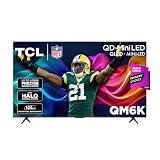
The TCL 55QM6K is the best TV in this roundup and the only premium-tier entry. It pairs Mini LED backlighting with quantum-dot color, high brightness output, and a 120Hz-to-144Hz refresh range. It suits a bright living room, a sports-heavy household, a movie watcher who cares about black levels, and a gamer with a current-generation console or a gaming PC. If you are buying one 55-inch TV to be the main screen for the next several years, this is the one to stretch for.
Key Specs
- Screen size: 55 inches diagonal
- Resolution: 4K UHD
- Panel technology: Mini LED with QLED quantum-dot layer and local dimming
- Refresh rate: 120Hz native, up to 144Hz in supported modes
- Brightness class: High brightness — the strongest HDR headroom in this list
- HDR support: Multiple HDR formats for high-dynamic-range content
- Smart platform: Google TV
- Gaming features: High-refresh HDMI input class, game mode, variable refresh support
- Connectivity: Multiple HDMI inputs including high-bandwidth ports, USB, Wi-Fi, Ethernet, optical audio out
Strengths
Mini LED is the reason this set wins. Hundreds of small LEDs behind the panel, grouped into local dimming zones, let the TV dim dark regions while keeping bright regions bright. The practical result is contrast that no edge-lit or direct-lit set in this list can match: starfields stay black, letterboxed films do not glow gray, and bright highlights in HDR content actually pop. Combined with the QLED color layer, this produces the most three-dimensional picture here.
The brightness class matters just as much for real rooms. A 55-inch TV in a living room with windows on two sides fights ambient light constantly, and high brightness output is what keeps the image from looking washed out at midday. It also makes HDR meaningful rather than nominal — the format only delivers its intent when the panel has headroom above standard dynamic range.
On the gaming side, the 120Hz-to-144Hz range and game-mode processing deliver low latency and smooth motion at high frame rates, which benefits both consoles and PCs. Google TV supplies the same broad app coverage and casting as the T7, and the set’s processing handles upscaling of 1080p sources well. This is the only entry here that will not feel like a compromise in any of the five use cases below.
Pros
- Mini LED local dimming — best contrast and black levels in the list
- High brightness output that survives daylight viewing
- 120Hz–144Hz refresh range for serious gaming
- Strongest HDR impact of any set here
- Google TV platform with full app and casting support
- Best long-term upgrade path — it will not feel dated quickly
Cons
- Premium tier — the highest price in this roundup even after discount
- Heavier and thicker than the budget sets, which matters for wall mounting
- More picture settings to learn to get the best out of it
- Brightness at maximum can be fatiguing in a dark bedroom at night
- Overkill if the TV is a secondary screen or viewed mostly at low volume in a dim room
How It Compares
Against the TCL 55T7, the QM6K is a straight upgrade on the three axes that matter: local dimming, brightness, and refresh ceiling. If your budget allows and this is your primary TV, the QM6K is worth the step up. Against the Roku 55-Inch Plus Series Mini-LED, both sets use Mini LED backlighting, but they optimize differently. The QM6K pushes higher brightness and a higher refresh ceiling with Google TV. The Roku Plus Series prioritizes contrast and the Roku interface. Choose the QM6K for a bright room and gaming; choose the Roku Plus Series if you want Mini LED contrast with the simplest smart platform.
5. Roku 55-Inch Plus Series Mini-LED — Best for Roku Users Who Want Local Dimming

The Roku Plus Series is the bridge between the budget Roku and the premium TCL. It brings Mini LED backlighting — the same contrast-boosting technology as the QM6K — into a mid-range tier and pairs it with Roku’s uncluttered interface. It suits a Roku household upgrading from a streaming stick, a dark-room movie watcher who wants real black levels without a premium price, and anyone who values software simplicity as much as picture quality.
Key Specs
- Screen size: 55 inches diagonal
- Resolution: 4K UHD
- Panel technology: Mini LED backlight with QLED quantum-dot color and local dimming
- Refresh class: 60Hz-class native panel
- Smart platform: RokuTV built in
- HDR support: Standard HDR formats with quantum-dot color
- Connectivity: Multiple HDMI inputs, USB, Wi-Fi, Ethernet where specified
Strengths
Mini LED is the entire reason to consider this set over the Roku Select Series. Local dimming transforms dark-scene performance: letterbox bars go dark instead of dark gray, and bright objects against dark backgrounds have far less halo around them than on an edge-lit set. Quantum-dot color keeps saturation strong, so the contrast improvement does not come at the cost of vividness. If your main use is streaming films and prestige series in a room where you can control the light, this is a meaningful upgrade over the budget Roku.
The Roku platform advantage carries over intact. The home screen is clean, search spans services, the mobile app supports private listening, and the remote is simple enough for anyone to use. For a household that has bounced between smart platforms, Roku remains the least irritating. At 55 inches, the Plus Series is often one of the more affordable ways to get a Mini LED picture — the technology usually commands more.
Pros
- Mini LED local dimming at a mid-range tier
- Noticeably better black levels than any edge-lit set here
- QLED quantum-dot color maintains vivid saturation
- Roku OS simplicity, cross-service search, private listening
- Good middle ground between budget and premium
Cons
- 60Hz-class panel — not a gaming-focused set
- Lower brightness and refresh ceiling than the TCL QM6K
- Fewer high-frame-rate features than the TCL models
- Picture settings are less granular than the QM6K’s
- Not the right pick if high-frame-rate console gaming is a priority
How It Compares
Against the Roku Select Series, this is the upgrade worth making if you can afford it: the Mini LED backlight is a bigger picture-quality jump than any other single step in this list, and it costs the same platform familiarity. Against the TCL 55QM6K, the trade is brightness and refresh rate for interface simplicity and a lower tier. If you game or watch sports in a bright room, take the QM6K. If you watch films in a controllable-light room and want the easiest TV to operate, take the Roku Plus Series.
How to Choose
Cyber Monday discounts compress price differences, which makes it tempting to simply buy the biggest discount. That is a mistake, because a 55-inch TV is a five-to-ten-year purchase, and the spec that gets discounted hardest is not always the spec that matters most in your room. Work through the five criteria below in order, and the right set will usually identify itself before you reach the end.
Criterion 1: Panel Type — the Biggest Single Quality Variable
Panel technology determines contrast, and contrast determines how much depth the picture appears to have. There are three classes in this roundup:
- Edge-lit LED with QLED color layer: LEDs along the frame edges illuminate the panel. Thin and inexpensive, but light bleeds into dark areas. Budget tier.
- Direct-lit LED with QLED color layer: LEDs behind the panel but not in individually controlled groups. Better uniformity than edge-lit, still limited black levels. Budget to low mid-range.
- Mini LED with local dimming: Hundreds of small LEDs grouped into dimming zones that can brighten and dim independently. Dramatically better black levels and highlight punch. Mid-range and premium tier.
If you watch in a dim or dark room — evening films, prestige dramas, anything with letterbox bars — Mini LED is worth more than every other upgrade combined. If the TV lives in a bright room and mostly plays daytime content, the advantage narrows, because ambient light already lifts black levels and masks the difference. This is the one place where the budget sets in this list can genuinely compete: a bright, always-on TV in a kitchen does not need Mini LED.
Criterion 2: HDR Brightness — the Spec That Decides Bright Rooms
HDR is not a resolution upgrade; it is a brightness and color-range upgrade. A TV can accept an HDR signal and still display it without meaningful benefit if the panel lacks brightness headroom. The practical rule:
| Room Condition | Brightness Class Needed | What It Looks Like |
|---|---|---|
| Dark bedroom, evening-only viewing | Modest brightness, strong black levels | Mini LED contrast matters more than nits; budget QLED is acceptable |
| Living room with blinds, mixed day/night | Above-average brightness | Mid-range QLED or Mini LED recommended; budget sets look washed out at midday |
| Bright room, windows on multiple sides, daytime sports | High brightness, local dimming | Premium Mini LED with high brightness class is the only class that holds up |
If you cannot find a brightness figure for a set, use the tier as a proxy: budget sets are modest, mid-range sets are above average, and premium Mini LED sets are high brightness. Do not buy a budget set expecting HDR to look like it does in a showroom demo — showrooms are dim precisely so that brightness differences are visible.
Criterion 3: Gaming Features — Refresh Rate and Input Latency
If you play games, refresh rate is the second-most important spec after panel type. A 60Hz panel displays up to 60 frames per second; a 120Hz panel displays up to 120, and a 144Hz panel up to 144. Higher refresh rates reduce motion blur and make camera panning smoother, and they let consoles and PCs that can output high frame rates actually use them. The related feature is game mode, which bypasses picture processing to cut input latency — the delay between pressing a button and seeing the result.
Match the set to your hardware. If you own a current-generation console or a gaming PC capable of high frame rates, a 120Hz-class panel is the floor and the QM6K’s 144Hz ceiling is a genuine advantage. If you play on an older console or mostly play slower games, a 60Hz panel is not a handicap and you can put the savings toward panel quality instead. Between two sets at the same price, prefer the one with the higher refresh rate if gaming matters; prefer the one with local dimming if it does not.
Criterion 4: Viewing Distance — How 55 Inches Actually Feels
55 inches is a size that works in more rooms than any other, but the seating distance determines whether it feels immersive or cramped. Use these ranges as a starting point:
| Seating Distance | What 55 Inches Feels Like | Recommended Use |
|---|---|---|
| 5–6 feet | Very immersive, cinema-like field of view | Gaming, movie nights, small dedicated rooms |
| 7–8 feet | Comfortable and balanced — the sweet spot | General living-room viewing, most households |
| 9–10 feet | Comfortable but not immersive; 65 inches would suit better | Casual viewing, secondary rooms |
| 11+ feet | Too small to enjoy 4K detail | Consider a larger size, or move seating closer |
The reason distance matters for a buying decision is that 4K detail is only visible up close. At 11 feet, most viewers cannot resolve the difference between 4K and 1080p on a 55-inch screen, which means the money spent on a premium 55-inch set is partly wasted. If your seating is far away, either move the couch closer or buy a larger size — this is one of the few cases where spending more at 55 inches is the wrong answer.
Criterion 5: Room Size and Wall Geometry
A 55-inch 16:9 screen measures roughly 48 inches wide and 28 inches tall for the panel itself; the stand adds height and depth, and the bezel adds an inch or two per side. Before buying, measure three things: the width of the wall or media console, the depth of the surface the TV will sit on (stands typically need 10–12 inches of depth, and wider feet need more), and the height of the seating relative to the screen center.
For wall mounting, the panel’s weight and thickness matter. Mini LED sets carry more backlight hardware than edge-lit budget sets, so they are heavier and often deeper — check that your mount’s weight rating has margin and that the VESA pattern matches. A common mistake is buying a premium set and mounting it on a bracket rated for a lighter TV, or mounting all sets at the same height regardless of seat height. Screen center should sit roughly at eye level when seated, which is usually 40–48 inches from the floor in a typical living room.
Decision Matrix: Match Your Situation to a Set
| Your Situation | Best Choice | Why |
|---|---|---|
| Tightest budget, bedroom or guest room, dim lighting | INSIGNIA QF Series QLED | QLED color and Fire TV at the lowest tier; local dimming unnecessary in a dim room |
| Household shares one TV, wants the simplest interface | Roku Select Series QLED | Roku OS requires no learning curve; private listening for late-night viewing |
| Main living-room TV, mixed streaming and sports, some gaming | TCL 55T7 | 120Hz panel and Google TV cover motion and discovery at mid-range price |
| Bright room, sports-heavy, current console or gaming PC | TCL 55QM6K | High brightness, Mini LED contrast, and 120–144Hz refresh together |
| Dark-room film watching, already a Roku user, wants Mini LED | Roku Plus Series Mini-LED | Local dimming delivers real black levels with the simplest platform |
| Seating 11+ feet away | None of the above at 55 inches | Move seating closer or size up; a 55-inch 4K set wastes detail at that distance |
Common Mistakes to Avoid
- Buying brightness you cannot control. A high-brightness Mini LED set in a dark bedroom at night is fatiguing unless you dial it down, and you have paid for headroom you rarely use.
- Ignoring the stand footprint. Furniture depth and stand width are the most common reason a new TV does not fit — measure before ordering, not after delivery.
- Assuming HDR is automatic. You usually need to enable enhanced HDMI signal format per input in the TV’s settings before HDR and high frame rates pass through.
- Using the wrong picture preset. Vivid or dynamic modes exaggerate color and disable useful processing. Cinema or filmmaker modes plus small manual adjustments get closer to accurate.
- Overbuying for a secondary room. A guest room does not need Mini LED; the money is better spent on the main screen.
- Skipping the mount weight rating. Heavier Mini LED panels need a bracket with margin above the TV’s listed weight.
Upgrade Path
Think about what you will want in three years, not what is cheapest today. If this 55-inch set is a stepping stone, the budget Roku or INSIGNIA gets you a good picture now and leaves budget for a larger screen later. If this is the set you intend to keep through the decade, the QM6K’s high brightness, Mini LED dimming, and 144Hz ceiling mean it will still meet the demands of future consoles and higher-bitrate streaming. The mid-range T7 and Roku Plus Series sit between: each gets one premium feature — 120Hz for the T7, Mini LED for the Roku Plus — without the other. Decide which of those two features your viewing habits reward more, and that choice makes itself.
Frequently Asked Questions
Is 55 inches still a good size for a main living-room TV in 2026?
Yes, for most living rooms with seating between 7 and 9 feet away. At that distance a 55-inch 4K screen is comfortable without being overwhelming, and it fits on typical media consoles. If your seating is 11 feet or more, a larger size will serve you better because 4K detail is not resolvable at that distance on a 55-inch panel.
How much does Mini LED actually improve the picture over a QLED set without local dimming?
Meaningfully, in dark scenes. Mini LED uses many small LEDs grouped into independently controlled dimming zones, so dark regions of the picture can dim while bright regions stay bright. On a QLED set without local dimming, the backlight is more uniform, so letterbox bars look gray and bright objects halo against dark backgrounds. In a bright room the difference shrinks; in a dark room it is the most visible upgrade in this list.
Do I need 120Hz or is 60Hz enough?
It depends entirely on gaming. A 60Hz panel is fine for streaming, broadcast TV, and films, which are almost all produced at lower frame rates anyway. If you own a current-generation console or a gaming PC and play fast-moving titles, a 120Hz panel reduces blur and lets the hardware actually output high frame rates. The TCL 55T7, TCL 55QM6K, and the QM6K’s 144Hz ceiling are the relevant picks.
Will a budget QLED set look bad in a bright room?
It will look less impressive than a high-brightness Mini LED set, because ambient light lifts black levels and reduces perceived contrast. Budget QLED sets still handle daytime viewing competently, especially if you close blinds or angle the screen away from windows. If the TV is in a room with windows on multiple sides and you watch a lot of daytime sports, the high-brightness QM6K is the more suitable choice.
Which smart platform should I pick — Fire TV, Google TV, or Roku?
Choose based on ecosystem and patience for interface clutter. Roku is the simplest and most stable, with the cleanest home screen and the best cross-service search. Google TV is the most capable for discovery and integrates well with Android phones for casting, but its recommendation-heavy home screen is busier. Fire TV sits between them and integrates tightly with Alexa and Amazon services. None of them changes the picture quality, so treat the platform as a comfort decision.
How do I know if a Cyber Monday discount is actually good?
Compare the discounted price to the set’s typical selling price over the past few months, not to the listed original price. Budget-tier TVs are discounted most aggressively and often see the largest percentage drops, but the absolute savings are usually smaller. Premium and mid-range sets tend to see modest percentage discounts, so the QM6K is less likely to be dramatically cheaper than its normal price — buy it because it is the right set, not because the discount looks deep.
Do I need to change any settings after setup?
Yes, two matter most. First, enable the enhanced HDMI signal format for any input you use with a console or PC, otherwise HDR and high frame rates will not pass through. Second, switch out of the default vivid or dynamic picture preset and use a cinema or filmmaker mode, which is closer to accurate and disables aggressive processing. Small adjustments to backlight and motion settings afterward will finish the job.
What size mount and stand clearance should I plan for?
A 55-inch panel is roughly 48 inches wide and 28 inches tall, and its stand typically needs 10–12 inches of surface depth, sometimes more for wide-footed designs. For wall mounting, check the VESA pattern and confirm the bracket’s weight rating exceeds the TV’s weight with margin, since Mini LED sets are heavier than edge-lit budget models. Aim to place the screen’s vertical center at eye level when seated, usually about 40–48 inches from the floor.
The Bottom Line by Situation
Buy the TCL 55-Inch QM6K if this is your main TV, your room gets daylight, you watch sports, or you game on modern hardware — it is the only set here without a real weakness. Buy the TCL 55T7 if you want 120Hz motion and Google TV but cannot justify premium-tier pricing; it is the best mid-range compromise for mixed households. Buy the Roku 55-Inch Plus Series Mini-LED if you watch films in a room with controllable light and want Mini LED contrast with the least complicated interface. Buy the Roku 55-Inch Select Series or the INSIGNIA QF Series if the TV is a bedroom, guest room, or second screen — both deliver QLED color at budget tier, and the choice between them comes down to whether you prefer Roku OS or Fire TV. Whichever you choose, measure your seating distance and stand clearance first; those two measurements decide more about your satisfaction than any Cyber Monday discount.