Tablet comparison chart readers want specs side by side, not slogans, so this tablet comparison chart lines up five popular slates by chip, screen, storage, pen and OS. We combine maker specs with long-term owner feedback, explain how to read the numbers, and list one honest drawback per pick so the comparison is fair.
As an Amazon Associate we earn from qualifying purchases.
Our top picks



As an Amazon Associate we earn from qualifying purchases at no extra cost to you.
By Daniel Foster
The Tablet Comparison Chart
The table below sets five slates against the same spec rows so you can weigh them at a glance, from budget Android to a premium performer. Prices move constantly on Amazon, so tiers are a guide; read the per-model notes beneath for how each one actually performs.
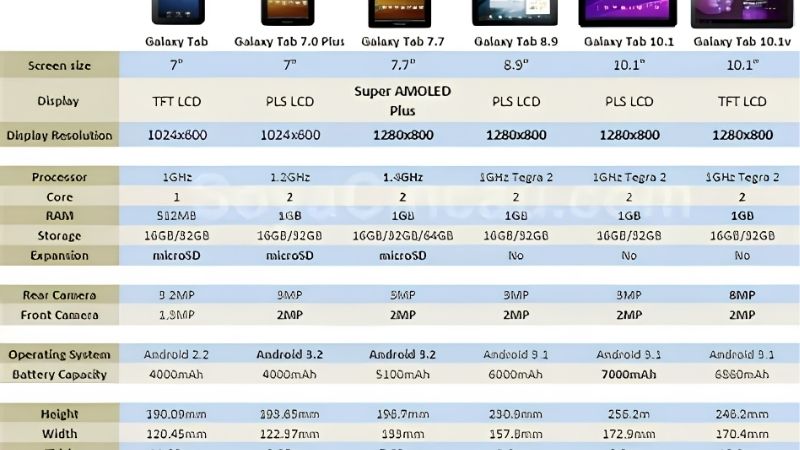
| Spec | Tab A9+ | iPad 10th | Tab S9 FE | Tab P12 | Pad 2 |
|---|---|---|---|---|---|
| Screen | 11″ 90Hz LCD | 10.9″ LCD | 10.9″ 90Hz | 12.7″ 3K | 12.1″ 144Hz |
| Chip | SD 695 | A14 | Exynos 1380 | Dimensity 7050 | SD 8 Gen 3 |
| microSD | Yes | No | Yes | Yes | No |
| Pen | No | USB-C Pencil | Included | Included | Optional |
| OS | Android | iPadOS | Android | Android | Android |
| Tier | Budget | Mid | Mid | Mid | Premium |
Samsung Galaxy Tab A9+ (Budget Column)
In this tablet comparison chart the Tab A9+ anchors the budget end: an 11-inch 90Hz LCD, Snapdragon 695, microSD and quad speakers on full Android. It wins on value and sound, handling reading, video and light study smoothly while costing far less than every other column here.
The trade-off is the weakest chip in the group, so heavy games stutter, and there is no included pen. Read it as the value baseline: if your needs are reading and media, it matches pricier slates where it counts and saves you money you can put toward storage.
Apple iPad 10th Generation (App Library)
The iPad 10th gen brings the deepest app library and years of updates on the A14 chip and a 10.9-inch LCD. In the chart it stands out for software quality and resale value, making it the safe mid-tier pick for anyone already using an iPhone or Apple services.
It is the only column with no microSD, storage starts at 64GB, and the USB-C Pencil lacks pressure. Compared with the Android slates it trades expandable storage and an included pen for app polish, so weigh how much the iPadOS ecosystem matters to you against that.
Samsung Galaxy Tab S9 FE (Best All-Round)
The Tab S9 FE reads best across the chart for balance: a 10.9-inch 90Hz LCD, Exynos 1380, microSD, IP68 water resistance and an S Pen included. It is the only mid slate here with both a bundled pen and expandable storage, plus durability the others lack.
The Exynos chip trails the OnePlus in raw speed and it is LCD, not AMOLED. In a like-for-like comparison it offers the most features per dollar, which is why it suits note-takers and students weighing the columns for the best everyday value rather than peak performance.
Lenovo Tab P12 (Biggest Screen)
The Tab P12 owns the screen row: a 12.7-inch 3K LCD, Dimensity 7050, microSD and a bundled Tab Pen. In the chart it is the pick when display size and a pen matter most, giving far more room for split-screen work and reading than the smaller columns.
The mid-tier chip limits heavy gaming and the size is less portable. Compared across the table it trades speed and pocketability for canvas and a free pen, making it the clear choice for home-and-desk use where a big screen beats travel-friendliness.
OnePlus Pad 2 (Performance Column)
The OnePlus Pad 2 tops the performance row: a 12.1-inch 144Hz LCD and flagship Snapdragon 8 Gen 3, the fastest chip and highest refresh rate in this tablet comparison chart. It is the pick for gaming and heavy multitasking on a big, fluid screen.
It drops microSD and a headphone jack, and the pen is optional, so factor storage and accessories into its higher price. Against the others it wins on speed and screen fluidity but loses the expandable storage and bundled pen that the mid Samsung and Lenovo columns offer.
How to Read This Tablet Comparison Chart
A chart only helps if you know which rows matter for you. The points below explain how to weigh the specs, size and value so the comparison leads to a confident choice rather than more indecision.
The Specs That Decide It
Focus first on OS, chip and screen. The operating system row sets your app library and file freedom, the chip row predicts speed and longevity, and the screen row covers size, resolution and refresh. These three rows separate the columns more than any other single spec.
Then check the microSD and pen rows, since expandable storage and a bundled stylus change the real cost. A cheaper column with microSD and an included pen can beat a pricier one once accessories are added, so read the whole row set, not just the headline chip.
Size and Fit for How You Hold It
The screen row is also a footprint row. A 10 to 11-inch column is light for one-handed reading and travel, while the 12-inch-plus columns give more room for split-screen and drawing but weigh more and suit a stand at home over long handheld reading sessions.
Match the size row to your routine before the spec rows. Check the weight in grams and dimensions against your bag, and consider a folio stand. A big-screen column is excellent at a desk but a burden on a commute, which no chart figure captures on its own.
Value, Ecosystem and Timing
Read value as total cost, adding a pen and keyboard to the base price. The Android columns with an included pen and microSD often win on value, while the iPad column trades that for app depth and resale. Decide which ecosystem your other devices already use.
On timing, the late-June Prime Day and November sales are the strongest windows for any tablet comparison chart pick, and slates are popular gifts in the holiday season, though Amazon shifts sale dates each year, so confirm the official ones before planning a purchase.
Finally, do not judge on a single row in isolation. A slate that wins the chip row can lose on storage, pen or price once the whole table is read together. Weigh the rows as a set against your real tasks, and the column that fits your life stands out.
Tablet Comparison Chart FAQ
These are the questions readers ask most when comparing slates, covering which spec matters most, whether more expensive always means better and how to compare across operating systems.
Which spec matters most when comparing tablets?
The operating system usually matters most, since it decides your apps and file freedom, followed by the chip for speed and longevity and the screen for daily comfort. Storage, pen and microSD then refine the choice. Start with OS and chip, then use the other rows to break ties.
Does a higher price always mean a better tablet?
No. A pricier column can lack microSD or a bundled pen that a cheaper one includes, and raw speed is wasted if you only read and stream. Compare the rows against your actual use; the best value is often a mid slate with a pen and expandable storage, not the top price.
How do I compare Android and iPad fairly?
Compare on what you do, not brand loyalty. Weigh app availability, file handling, expandable storage and whether a pen is included. iPad wins on app depth and resale; Android wins on flexibility, storage and often a bundled pen. Pick the ecosystem your other devices already use.
See More:
- Best eyeshadow blender brush
- Best frozen foods for air fryer
- Best frozen food for air fryer
- Best way to reheat steak in air fryer
- Best air fryer recipes book
Bottom Line of This Tablet Comparison Chart
This tablet comparison chart makes the choice clear by row: the Tab A9+ for budget value, the iPad 10th gen for app depth, the Tab S9 FE for the best all-round balance with an included pen, the Lenovo Tab P12 for the biggest screen, and the OnePlus Pad 2 for flagship speed. Read OS, chip and screen first, add pen and storage to the cost, and let Prime Day or the holidays set the price. Match the rows to your use and the winner picks itself.