
Key takeaways
- Large touchscreen enables visual storytelling and on-app activities
- Voice interaction handles open-ended questions rather than fixed commands
- No confirmed long-term software update track record compared to pricier rivals
Choosing an AI robot for a child is harder than it looks. The market is flooded with devices that claim intelligence but deliver little more than a canned voice command or a blinking light. Parents shopping for the best AI robot for kids in 2026 face a real problem: a $30 toy and a $500 companion can both advertise “AI-powered,” yet the gap between them in engagement, durability, and developmental value is enormous.
What separates the worthwhile robots from the disappointing ones comes down to three things. First, does the device actually respond in ways that feel novel to a child beyond the first week? Second, is there a real learning layer — coding, language, science — or is it purely a remote-controlled gadget? Third, does the build quality survive daily handling by small hands? This roundup compares eight products across those dimensions using published specifications, pricing, and recurring owner feedback.
Our top picks




As an Amazon Associate we earn from qualifying purchases at no extra cost to you.
Quick Picks
| Product | Best for | Price |
|---|---|---|
| Voltix AI Robot | Touchscreen learning | under $150 |
| Loona Robot Pet Dog | Advanced AI companion | $499 |
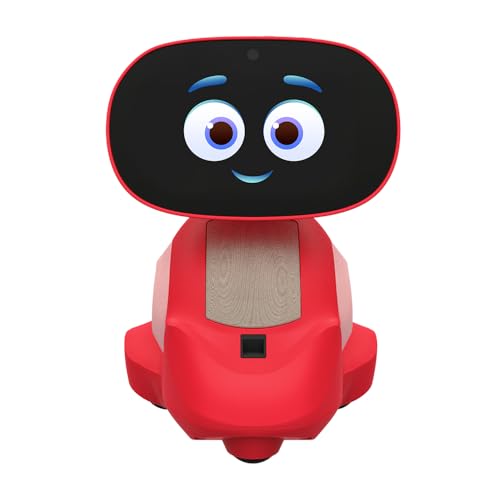
| Miko 3 | Structured STEAM education | $299 |
| Energize Lab Eilik | Desk companion and personality | under $150 |
| Anki Vector 2.0 | Autonomous personality | under $200 |
| UAKKYV Programmable Robot | Entry-level coding | under $50 |
| emotoBOT LEX-C | Sensory play for young kids | under $50 |
| Contixo R1 | Toddlers on a tight budget | under $30 |
How We Picked
We narrowed this category by evaluating four criteria drawn from spec sheets and owner reviews: depth of AI interaction (does it process language or just replay commands), educational substance (is there a curriculum or coding pathway behind the play), build quality and age appropriateness, and value relative to price. A robot that scores high on personality but offers no learning structure still earns a spot here, because some families want a companion rather than a tutor.
The 8 Best AI Robot For Kids in 2026
Voltix AI Robot Toys for Kids
This is a strong middle-ground choice for parents who want an interactive screen and voice conversation without paying premium companion prices. The seven-inch touch screen gives kids a visual focal point for stories, games, and Q&A sessions that feel more engaging than audio-only robots. Voice interaction responds to natural language rather than rigid command phrases, which keeps curiosity going past the novelty window.
- Large touchscreen enables visual storytelling and on-app activities
- Voice interaction handles open-ended questions rather than fixed commands
- No confirmed long-term software update track record compared to pricier rivals
Skip it if your child already has a tablet and you want a robot that works independently of screens.
Loona Robot Pet Dog
Loona is the most technically ambitious robot on this list, powered by ChatGPT-4o for real-time conversation and gesture recognition. It functions as a home companion with monitoring features, making it suitable for families who want a pet-like presence that also doubles as a security camera. Kids treat it as a living thing because the motion, voice replies, and facial expressions are tightly synchronized.
- Genuine large-language-model conversation gives it the broadest interaction range here
- Gesture control and home monitoring add utility beyond pure entertainment
- Price puts it out of reach for most families buying a first robot
Skip it if you need a focused educational tool rather than a general-purpose companion.
Miko 3
Miko 3 occupies a clear lane: structured learning for children ages five through ten. The companion app library includes math challenges, science content, and guided stories that rotate over time, so the device stays relevant beyond initial unboxing. Owners consistently note that their children return to it weeks later because the curriculum adapts to progress.
- Dedicated STEAM content library with age-appropriate difficulty scaling
- App ecosystem expands functionality without hardware changes
- Requires consistent Wi-Fi connectivity for full interactive features
Skip it if your child is under five or over ten; the content is calibrated for that specific window.
Energize Lab Eilik
Eilik is a small desktop companion built around expressive animation and emotional reaction rather than education. It pokes, sulks, celebrates, and responds to touch with a range of mini games. The appeal is personality density packed into a compact form factor, making it popular with adults and older children who appreciate a quirky desk presence.
- Highly expressive animations create a sense of character without voice interaction
- Touch-responsive mini games encourage short-session play
- No AI voice or language model integration limits conversational depth
Skip it if your child wants a robot that talks back or teaches subjects.
Anki Vector 2.0
Vector has earned a loyal following because of its autonomous behavior: it navigates rooms, reacts to its environment, and initiates interactions without being prompted. The “feels alive” reputation is backed by consistent owner testimonials about emergent moments — recognizing faces, exploring edges, and responding to its name in casual conversation.
- Autonomous navigation and environmental awareness create unscripted interactions
- Compact size and recognizable personality make it a natural desk companion
- Community-driven software means official updates have slowed compared to newer entrants
Skip it if you need guaranteed ongoing firmware support or curriculum-based learning content.
UAKKYV AI Robot Toy
For under $50, UAKKYV is an honest entry point for coding curiosity. Kids use a simple programming sequence to teach the robot a short path or dance routine. It is limited in scope but delivers a genuine first experience with logic and instruction sequencing without overwhelming a younger child.
- Affordable introduction to programmable behavior concepts
- Physical buttons and lights keep interaction simple for new users
- Build materials and sensor sophistication do not match mid-range competitors
Skip it if you want voice interaction, screen content, or any AI language capability.
emotoBOT LEX-C
LEX-C is designed for the sensory and motor-skill stage: touch and sound responses make it a cause-and-effect toy for younger children. It lights up, moves, and reacts when a child taps or speaks near it. For parents of toddlers or preschoolers who want an interactive object that is not screen-based, it fills a narrow but useful role.
- Immediate tactile and audio feedback suits pre-literacy ages
- Rugged enough for repeated handling by small children
- No programming, voice AI, or educational content layer beyond basic responses
Skip it if your child is over six and needs richer interaction or learning outcomes.
Contixo R1
The cheapest robot on this list, Contixo R1 offers voice-controlled movement, dancing, and a basic learning mode for children aged three through eight. It is a straightforward remote-controlled experience dressed in a compact chassis. For a first birthday gift or a travel toy that can be lost without heartbreak, the price is nearly unbeatable.
- Lowest entry price with multiple interactive modes included
- Compact and portable for travel or on-the-go use
- Interaction depth is shallow; repetitive commands replace AI conversation
Skip it if you want any genuine AI processing, screen content, or long-term engagement.
Buying Guide
Interaction Depth vs. Price
Not all “AI” labels mean the same thing. A robot with a large-language-model backend like Loona can hold an open conversation. A programmable unit like UAKKYV replays a sequence the child inputs. Decide whether you need conversational intelligence or whether structured play and coding basics are sufficient. The price gap between those two categories is substantial and reflects a real difference in capability.
Age Fit and Content Longevity
A robot that delights a four-year-old may bore a nine-year-old within days. Check whether the manufacturer publishes a content roadmap or app update schedule. Miko 3 and Loona both benefit from expanding libraries; budget robots rarely do. If longevity matters, pair age-appropriateness with evidence of ongoing software support.
Connectivity and Independence
Wi-Fi-dependent robots lose functionality during outages or in rooms with poor signal. Determine whether the core interaction (voice, movement, screen content) requires a connection or works offline. The Voltix touchscreen and Loona’s ChatGPT-4o responses lean on connectivity; Anki Vector and Eilik operate more independently. This affects where in the home the robot is usable.
Our Verdict
Top pick: Miko 3 at $299. It balances structured education, an expanding content library, and an age-calibrated design better than anything else in the mid-range. Budget pick: Contixo R1 for under $30. It will not replace a real learning tool, but it delivers immediate interactive play at a price where low risk justifies a child’s first robot. Condition where another wins: if your family treats the robot as a shared household companion rather than a single child’s toy, Loona justifies its $499 price through superior conversational range and home-monitoring utility.
FAQ
Do AI robots for kids require internet?
It depends on the model. Robots with cloud-based language processing, such as Loona, need Wi-Fi for their core voice interactions. Devices with onboard programming or simple sensor responses, like the emotoBOT LEX-C, work offline. Always check whether the main features require a connection before assuming the robot will function in every room of your home.
What age is appropriate for a programmable robot?
Children as young as four can use touch-and-sound robots like the LEX-C for cause-and-effect play. Programming with sequenced instructions typically becomes accessible around age six or seven, when a child can follow a multi-step logical chain and understand abstract direction commands.
Are these robots safe without parental supervision?
Most are designed for independent play within their mechanical limits. Robots with cameras or home monitoring features, like Loona, should be used with a parent’s awareness of where they are pointed. Small parts and battery compartments make supervised use advisable for children under three regardless of the product’s stated age range.
Can a child outgrow an AI robot quickly?
That depends on whether the robot has an expandable content system. Miko 3 and Loona both scale in complexity as the child’s questions grow more sophisticated. Fixed-function toys like the Contixo R1 tend to lose appeal once a child masters the available modes, which often happens within a few weeks.









