
Key takeaways
- Pro: Touch-and-sound responsiveness suits pre-literacy-age kids who need intuitive feedback.
- Pro: Compact size makes it easy to carry and store without a dedicated shelf.
- Con: Limited replay value once the novelty of the sound effects fades.
A parent searching for the best robot for kids faces a crowded market where a $30 remote-control toy and a $500 AI companion get lumped together under the same heading. The real question is not which robot is objectively superior, but which one matches a child’s age, a family’s budget, and the kind of engagement you want happening in your living room. A five-year-old who needs flashing lights and simple commands has almost nothing in common with a ten-year-old who wants to program dance routines or draw with a motorized arm.
What separates a worthwhile purchase from a shelf ornament comes down to three things: how easily the child can operate it independently, whether the interaction holds attention beyond a single afternoon, and whether build quality survives a household full of enthusiastic kids. We compared published specs, listed prices, and recurring themes in owner feedback across eight current models to narrow this field for 2026.
Our top picks




As an Amazon Associate we earn from qualifying purchases at no extra cost to you.
Quick Picks
| Product | Best for | Price |
|---|---|---|
| emotoBOT COR-A | Very young children wanting tactile feedback | under $50 |
| KingsDragon RC Robot | First remote-control robot experience | under $40 |
| Hamourd RC Robot | Lowest entry price with rechargeable battery | under $30 |
| ENERGIZE LAB Eilik | Desk companionship for kids and adults | under $150 |
| Contixo R1 | Toddlers and preschoolers needing voice interaction | under $30 |
| RIVGOT Drawing Robot | Children who want to create, not just control | under $60 |
| Loona Robot Pet Dog | Advanced AI interaction with smart-home features | $499 |
| KingsDragon Gesture Robot | Gesture-controlled play on a tight budget | under $30 |
How We Picked
We evaluated each model on four criteria that consistently determine satisfaction in this category. Age appropriateness matters most: a robot that frustrates a four-year-old or bores an eight-year-old fails regardless of its feature list. Durability and battery design follow, because children handle toys with far less care than adults. Educational depth separates toys that develop skills from those that only entertain briefly. Finally, ease of independent operation: if a parent must hold a small hand through every interaction, the value drops quickly.
The 8 Best Robot For Kids in 2026
emotoBOT COR-A Interactive Robot
Designed for children who respond to touch and sound rather than buttons, the COR-A rewards physical interaction with cheerful responses, making it approachable for toddlers who cannot yet operate a remote control. Owner feedback highlights how quickly young children grasp its cause-and-effect play pattern.
- Pro: Touch-and-sound responsiveness suits pre-literacy-age kids who need intuitive feedback.
- Pro: Compact size makes it easy to carry and store without a dedicated shelf.
- Con: Limited replay value once the novelty of the sound effects fades.
Skip this if your child is old enough to want programming or drawing features; the COR-A will not hold a school-age child’s interest for long.
KingsDragon RC Robot Toys
This model fills the role of a first remote-control robot for children who are ready for directional commands and simple routines. It teaches basic spatial reasoning through steering, making it a logical step up from touch-only toys.
- Pro: Straightforward remote layout lets kids operate independently without parental coaching.
- Pro: Demonstrates early programming concepts through repeatable movement sequences.
- Con: Plastic joints feel flimsy and owners report cracking after rough play.
Skip this if you need rechargeable convenience; the battery type means recurring costs that add up over months of use.
Hamourd RC Robot with Auto-Demonstration
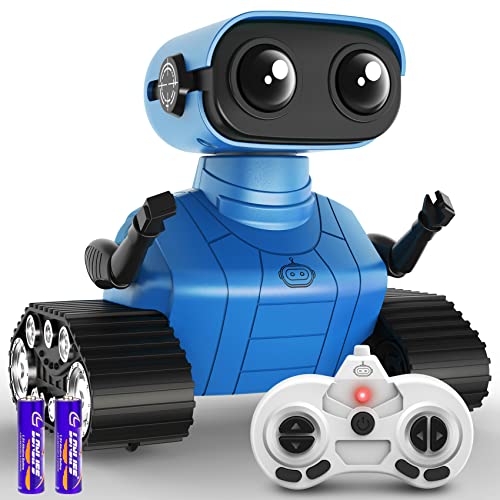
At the lowest price point among the rechargeable options, the Hamourd proves you do not need to spend much to get dance moves, LED eyes, and flexible limbs. The auto-demonstration mode shows the child what is possible before handing over control, reducing the confusion that plagues cheaper RC toys.
- Pro: Rechargeable battery eliminates ongoing replacement costs.
- Pro: Flexible head and arms add personality and pose variety during dance sequences.
- Con: Voice quality and music volume are noticeably underpowered in open rooms.
Skip this if your child needs more than light entertainment; there is no educational depth or app connectivity here.
ENERGIZE LAB Eilik Desktop Companion
Eilik targets a different scenario entirely: a small desktop companion that reacts to touch with expressive animations and mini games. It appeals to older kids and even adults who want something on their desk that responds with apparent personality rather than following programmed routes.
- Pro: Rich animation set and multiple reaction modes sustain long-term engagement.
- Pro: Mini games add interactive layers that justify the higher price for families with limited screen-space.
- Con: For under $150 it costs several times more than comparable movement-based robots.
Skip this if your child wants a robot that walks, dances, or draws across the floor; Eilik is a seated companion.
Contixo R1 Kids Robot
The Contixo R1 targets the three-to-eight demographic with voice commands, talking functions, and a compact frame that small hands can manage. Its educational angle leans toward language and following instructions rather than engineering thinking.
- Pro: Voice control lowers the barrier for children still developing fine motor skills for button pressing.
- Pro: Touch sensor on the head gives immediate positive feedback for affectionate interaction.
- Con: Vocabulary set is limited, so conversation novelty wears off within a few weeks.
Skip this if your household already owns multiple voice-activated devices; the R1 adds little beyond what a smart speaker provides.
RIVGOT Drawing Robot
The RIVGOT stands apart because it produces a physical result: traced and drawn artwork guided by included cards. For children who want to create rather than control, this bridges a gap that movement-based robots do not fill. The Montessori framing resonates with parents seeking purposeful play.
- Pro: 150 included cards provide structured art exercises that develop hand-eye coordination.
- Pro: Voice interaction guides the child through each drawing step independently.
- Con: Requires a steady supply of paper and replacement markers, adding minor ongoing costs.
Skip this if storage space is tight; the robot and its accessories need a flat surface wider than most toy shelves offer.
Loona Robot Pet Dog
Loona is the premium entry in this roundup, powered by ChatGPT-4o for genuinely fluid conversation and gesture recognition. It functions as an AI companion, home monitor, and interactive pet in one device. For families who want the closest experience to a conversational robot that adapts over time, Loona sits at the top of the field.
- Pro: Real-time AI interaction with gesture and voice control delivers conversation quality far beyond scripted responses.
- Pro: Home monitoring feature doubles its value as a security camera for family use.
- Con: The $499 price puts it in a different budget tier than any other product here.
Skip this if you want a toy for children under six; the interaction complexity and small parts are better suited to school-age kids and up.
KingsDragon RC Robot with Gesture Sensing
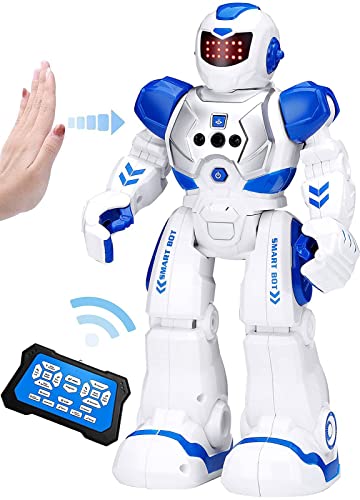
This KingsDragon variant trades the traditional remote for wrist-mounted gesture control, letting children wave and rotate their hand to steer the robot. It offers a tangible sense of physical agency at a very low price, making it an accessible introduction to sensor-based interaction.
- Pro: Gesture sensing feels intuitive and novel for children who find button layouts confusing.
- Pro: Priced identically to the cheapest competitors while offering a distinctive control method.
- Con: The wrist band is one-size and does not fit very small children securely.
Skip this if your child has limited wrist mobility or sensory sensitivity to wearable accessories.
Buying Guide
Match the Interaction Type to Your Child’s Age
Children under five need cause-and-effect feedback: touch the head, hear a sound; press a button, see movement. Preschool and early elementary kids handle directional commands and simple sequences. School-age children can manage programming logic, gesture interfaces, or open-ended drawing tasks. Choosing a robot above or below this developmental band is the single most common mistake parents make.
Check Power Delivery Before You Commit
Rechargeable batteries reduce long-term cost but add a downtime window when the robot is off the charger. Disposable batteries mean instant swaps but recurring purchases. If your child rotates between several toys daily, rechargeable models with fast-charge support will frustrate less than you might expect.
Evaluate Replay Value Through Owner Feedback
Spec sheets list features; owner reviews reveal whether those features actually hold a child’s attention past the first week. Search for terms like “still playing” or “lost interest” in review sections. Robots with progression paths such as unlockable dance moves, drawing complexity levels, or adaptive AI conversations consistently outlast models that only execute a fixed set of routines.
Our Verdict
The top pick is the Loona Robot Pet Dog. It delivers the deepest, most adaptive interaction in this group and will not be outgrown within a single season. For budget-conscious families, the Hamourd RC Robot for under $30 offers rechargeable convenience, dance features, and flexible limbs that keep play varied at a fraction of the cost of premium competitors. If your household prioritizes creative output over movement or conversation, the RIVGOT Drawing Robot wins for children who want to produce something tangible every session.
FAQ
What age is appropriate for a voice-controlled robot?
Most voice-controlled robots in this category work well for children three and older, though comprehension depth varies. Toddlers trigger simple responses, while children five and up can follow multi-step verbal instructions that unlock more features.
Do robot toys for kids require an internet connection?
Only the Loona and Eilik rely on connectivity for their core AI or game functions. The remaining six models operate entirely offline, which is an advantage for travel or screen-time management.
How long do these robots typically last?
Owner reports suggest two to four years of regular use for plastic-bodied RC models before joints loosen or battery life degrades. Metal-reinforced or solid-state designs like Eilik tend to hold up longer since they have fewer moving parts.
Can a robot toy replace hands-on learning activities?
No. A robot adds engagement and introduces concepts like cause-and-effect or spatial reasoning, but it works best alongside building blocks, art supplies, and outdoor play rather than replacing them.









