
Key takeaways
Adjustable standing desk best lists tend to compare motors and forget the number that decides fit: the height range. A frame that will not drop low enough to sit at, or reach high enough to stand at, is the wrong desk regardless of how quickly it moves.
As an Amazon Associate we earn from qualifying purchases.
By Daniel Foster
Full Desk or Converter
Two products answer the adjustable standing desk best question. A full sit-stand desk replaces your existing one and adjusts the whole surface; a converter sits on top of a fixed desk and raises only the monitor and keyboard. The converter is cheaper and reversible, the full desk is more stable and more usable.
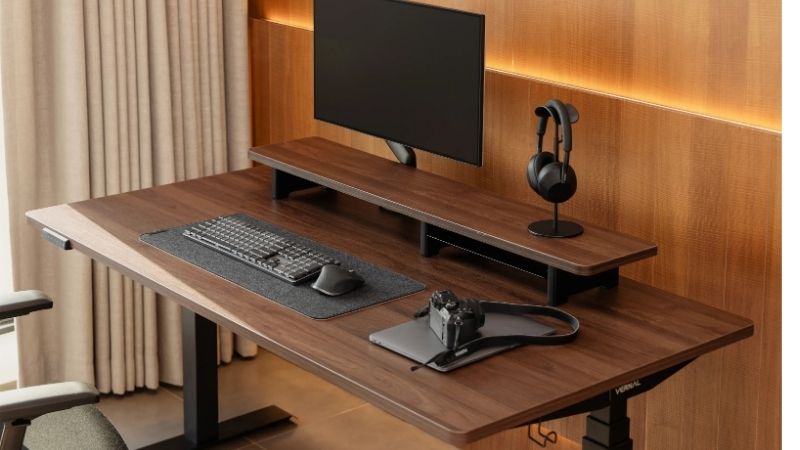
The Decisive Numbers: Height Range, Load Capacity and Stability
Height range is the first filter. Good frames span roughly 22-49 in (56-124 cm) including the desktop, which covers users from about 5’0″ to 6’6″. Cheaper frames start at 28-29 in (71-74 cm), which is already too high for many shorter users to sit at properly.
Load capacity ranges from about 150 lb (68 kg) on entry frames to 355 lb (161 kg) on commercial ones, and it includes the desktop itself. A solid wood top can weigh 60-80 lb (27-36 kg) before you put anything on it, so the usable figure is lower than it appears.
Stability at standing height is where cheap frames reveal themselves. Wobble comes from leg column tolerances and the crossbar design, and it worsens as the desk rises. The adjustable standing desk best suited to a large monitor arm is one with three-stage legs and a wide foot.
Space and Fit: Measuring Before You Order
The adjustable standing desk best suited to you starts with two measurements, so work out your target heights before shopping. Seated, elbows should sit at roughly 90 degrees with feet flat; standing, the same elbow angle with the monitor top near eye level. For a 5’10” user that is typically about 29 in (74 cm) seated and 43-44 in (109-112 cm) standing.
Desktops run 48-72 in (122-183 cm) wide and 24-30 in (61-76 cm) deep, and the frame footprint plus cable management needs another few inches behind. Measure the room, the doorway the desktop must pass through, and the wall space including where the cables will run.
Assembly, Cables and What Fails
The adjustable standing desk best on paper still has to be built: a full desk arrives in two or three heavy boxes and takes 60-120 minutes to assemble, usually with two people for flipping the completed desk upright. Converters arrive assembled and are ready in minutes, which is a genuine consideration if lifting is difficult.
Cable management is the practical failure people overlook. A desk that travels 20 in (51 cm) vertically will pull a short power cable out of the wall, so plan a cable tray and a surge-protected strip mounted on the frame. Beyond that, controller boards, leg motors and the handset are the components that fail, typically after three to five years.
7 Desks and Converters Compared
The adjustable standing desk best for a rented office may be a converter rather than a desk. This mix covers both at different price points. Amazon prices change frequently, so treat the tiers as approximate.
| Model | Type | Height range (listed) | Price tier |
|---|---|---|---|
| Uplift V2 | Full desk, dual motor | ~25.5-51.1 in / 65-130 cm | Premium |
| Fully Jarvis | Full desk, dual motor | ~24.5-50 in / 62-127 cm | Mid-premium |
| FlexiSpot E7 | Full desk, dual motor | ~22.8-48.4 in / 58-123 cm | Mid |
| Autonomous SmartDesk Core | Full desk, dual motor | ~29.4-48 in / 75-122 cm | Mid |
| Branch Standing Desk | Full desk, dual motor | ~25.5-50.5 in / 65-128 cm | Mid |
| VariDesk ProPlus 36 | Converter, spring assist | Adds ~17.5 in / 44 cm | Mid |
| FlexiSpot ClassicRiser M7 | Converter, gas spring | Adds ~19.7 in / 50 cm | Budget-mid |
Uplift V2: The Reference Frame
Three-stage legs, a wide height range that suits both short and tall users, and one of the highest load ratings available to consumers. Stability at full standing height is the clearest differentiator from cheaper frames.
It is expensive once a desktop is specified, and the configuration options are extensive enough to be confusing. Assembly takes a couple of hours and the packages are heavy.
Fully Jarvis: The Long-Standing Alternative
Very similar three-stage construction with a comparable range, a good warranty and a wide choice of tops. For most people the practical difference against the Uplift comes down to price at the moment of purchase.
Stability is marginally behind the Uplift at maximum height with a heavy load. The handset options and accessory ecosystem are narrower.
FlexiSpot E7: Value Three-Stage
Brings three-stage legs and a genuinely low minimum height into a mid-market price, which matters for shorter users that most frames exclude. Load capacity is generous for the money.
Fit and finish are a step below the premium frames, and the handset is basic. Assembly instructions are less clear, which adds time for a first-time builder.
Autonomous SmartDesk Core: Simple Package
Desktop and frame sold together as one purchase, which removes the specification exercise entirely. Good value and straightforward ordering.
The minimum height of around 29 in (75 cm) is too high for many shorter users to sit at comfortably, which is the significant limitation. Two-stage legs also mean more wobble at full extension than three-stage frames.
Branch Standing Desk: Design-Led
Looks like furniture rather than office equipment, with a good height range and clean cable management built in. Suits a desk that lives in a shared living space.
Load capacity is lower than the enthusiast frames, and the top options are limited to Branch’s own. It costs more than the specification alone justifies.
VariDesk ProPlus 36: The Solid Converter
Spring-assisted lift, arrives fully assembled, and sits on an existing desk without modification. For a rented office or a desk you cannot replace, it is the practical answer.
It occupies a large footprint on the desk even when lowered, and it raises the keyboard several inches above the desk surface at sitting height. It is also heavy to move.
FlexiSpot ClassicRiser M7: Budget Converter
A gas-spring converter with a separate keyboard tray at a lower price, adjusting smoothly through its range with one hand. Good value for occasional standing.
The keyboard tray is shallow and the platform flexes under a heavy monitor. Like all converters, it does not raise the desk surface itself, so writing or paperwork while standing is awkward.
Using a Sit-Stand Desk Properly
Buying the adjustable standing desk best matched to your heights is the easy part; the habits around it determine whether it stays at one height for a year.
Alternating Rather Than Standing All Day
The point of an adjustable desk is variation, not standing permanently. Standing still for hours brings its own discomfort, and common guidance is to alternate every 30-60 minutes rather than committing to either position for a whole day.
An anti-fatigue mat makes standing periods considerably more tolerable, and supportive footwear matters more than most people expect. Nothing here is medical guidance, and any persistent back, leg or foot pain is a matter for a doctor or a physical therapist.
Monitor Height and Cable Planning
Raising the desk without raising the monitor simply moves the neck problem. The monitor top should sit near eye level in both positions, which usually means a monitor arm clamped to the desk so it travels with the surface.
Mount a power strip to the underside of the frame and run everything to it, leaving enough slack for full travel. Test the full range slowly the first time to check nothing snags, and set memory presets for your two heights so the desk is actually used.
Warranty, Assembly Help and Buying Timing
Warranties on frames run from two to fifteen years, and the difference reflects motor and controller quality. Check whether the warranty covers the frame, the motors and the controller separately, since those terms often differ.
Desks follow the general home and office calendar, with Prime Big Deal Days in early October and Black Friday and Cyber Monday in late November as the next two windows where large items are most consistently discounted. Late summer brings peak demand as home offices and student desks are set up.
Frequently Asked Questions
These come up whenever the adjustable standing desk best choice is between replacing a desk and adding a riser.
Converter or full desk?
A converter if you cannot replace the desk, need it now, or want to try standing before committing. A full desk if you want the whole surface to move, better stability and a usable writing area while standing.
What height range do I need?
Measure your seated and standing elbow heights and add the desktop thickness. A 5’10” user typically needs about 29 in (74 cm) seated and 43-44 in (109-112 cm) standing, and shorter users should check the minimum height carefully.
Is a dual motor necessary?
For most setups, yes. Dual motors lift faster, handle heavier loads and stay level across the width, while single-motor frames are slower and more prone to racking under an uneven load.
See More:
- Best noise cancelling headphones Bose
- Best deal on air fryer
- Best buy Bella air fryer
- Best deals air fryer
- Best blender bottle
Final Thoughts on Adjustable Desks
The adjustable standing desk best suited to you is the one whose height range covers both your seated and standing elbow heights, with enough load capacity for your desktop plus equipment. Measure both heights and the room before ordering, plan cable management for full travel, and alternate positions rather than standing all day.
Our top picks


As an Amazon Associate we earn from qualifying purchases at no extra cost to you. Ratings are shown as listed on Amazon.


Write Your Review
No reviews yet. Be the first to share your experience!