Key takeaways
- Structured-light and laser projectors can be bright. Follow the maker’s eye-safety guidance and do not point the scanner at faces or eyes, especially at close range, and be careful when scanning people or pets.
- Keep lenses clean with a microfibre cloth and store the scanner in its case to avoid dust and knocks.
- Use only the supplied or approved power adapter and cable, and let the device cool when the maker advises it.
- If you use scanning spray, work in a ventilated area and test on an inconspicuous spot first, especially for painted or delicate items.
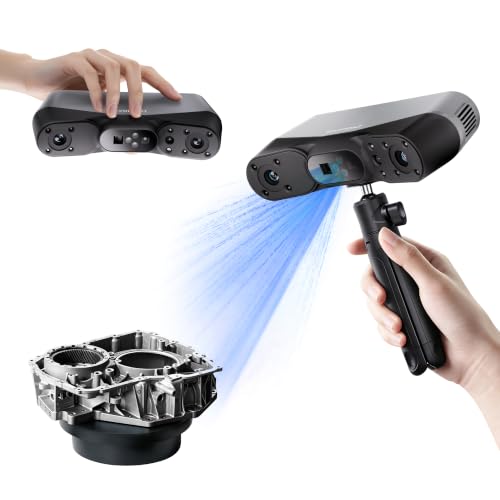
For most hobbyists and small-shop users, a handheld structured-light scanner from Creality or Revopoint is the practical starting point, while a turntable desktop scanner suits small objects and a professional-grade unit from Shining 3D suits engineering work where measured accuracy matters. Which one fits depends on the size of what you scan, the surface finish, and whether the end goal is 3D printing, a game asset, or a measured part.
Our top picks


As an Amazon Associate we earn from qualifying purchases at no extra cost to you.
3D Scanners at a Glance
| Scanner | Type | Best for | Key stated traits | Limits |
|---|---|---|---|---|
| Creality CR-Scan Ferret Pro | Handheld, structured light | Beginners scanning mid-size objects and people | The maker lists wireless-capable use and a colour-capable mode; accuracy is stated in the tenth-of-a-millimetre range | Dark, shiny or transparent surfaces need scanning spray; needs a capable computer |
| Creality Otter | Handheld, multi-mode | Users who want one device for small and larger items | The maker positions it as a compact dual-purpose scanner for small detail and larger objects | Newer line with a shorter track record in reviews |
| Revopoint POP 3 | Handheld, structured light | Small to medium objects with fine detail | The maker lists high single-frame accuracy and a compact body; works with a turntable | Smaller field of view; large objects take many passes |
| Revopoint MIRACO line | Handheld, standalone | Scanning without a tethered computer | The maker describes onboard processing and a built-in screen | Premium tier; heavier than entry units |
| Shining 3D EinScan SP / SE | Desktop turntable | Small parts, collectables, dental or jewellery-style items | The maker lists fixed-position scanning with an automatic turntable | Object size is capped by the turntable and field of view |
| Shining 3D EinScan Pro / Einstar | Handheld, professional or prosumer | Engineering, reverse engineering, larger parts | The maker lists higher accuracy and larger scan volume than hobby units | Premium tier; software has a learning curve |
How to Choose a 3D Scanner
Match the technology to the surface
Most consumer scanners use structured light (a projected pattern read by cameras) or a laser line. Structured light is quick and good at fine detail, but bright sunlight, glossy paint, chrome, glass and very dark matte surfaces can confuse it. Makers commonly advise a thin coat of removable scanning spray or a light dusting of developer for reflective parts. If your parts are mostly black plastic or polished metal, budget for that extra step, or lean towards a unit whose maker lists a dark-object mode.
Accuracy versus resolution
Resolution describes how densely points are captured, and accuracy describes how close the model is to the real dimension. A scan can look detailed yet be slightly off in size. Makers state accuracy under controlled conditions, and reviewers frequently report that real-world results are looser, especially on large objects where small errors add up. If you need parts to fit, scan with reference targets (markers) where the maker supports them and measure a known dimension afterwards.
Scan volume and object size
A handheld scanner built for small detail takes many passes on a large object, and alignment drift can creep in. For objects the size of a helmet, a chair or a person, look for a wider field of view and a larger working distance. For coins, miniatures and jewellery-style items, a turntable desktop unit is steadier because the scanner stays fixed and the turntable handles the rotation.
Computer requirements
Many scanners process data on the host computer, so a modern graphics card and enough memory matter. Makers publish minimum specs for their software, and reviewers often note that a laptop without a dedicated graphics card can slow or fail on large scans. Standalone models process on the device, which helps portability but typically sits in a higher tier.
Software and file formats
Check that the scanning software exports common formats such as STL, OBJ and PLY, since these open in slicers and mesh editors. Some makers bundle their own software, while others rely on partner tools for advanced editing. Cleaning a raw scan (closing holes, removing noise, decimating) is usually done in a mesh editor such as MeshLab or Blender, both of which are free.
Creality CR-Scan Ferret Pro
Creality positions the Ferret Pro as an approachable handheld unit for people entering 3D scanning. Reviewers describe it as light and easy to hold, with straightforward alignment features for features-rich objects, and the maker lists wireless operation with a compatible device. It suits scanning mid-size items such as shoes, statues, car parts and human busts. Trade-offs include the need for scanning spray on shiny items and slower tracking on flat, featureless surfaces such as a plain box, where the software has little to lock onto. Adding temporary markers or placing the object on a patterned mat is the usual workaround.
Creality Otter
The Otter extends Creality’s line towards a more versatile design that the maker presents as covering both fine detail and larger subjects. It is aimed at users who want a single device for varied tasks rather than a dedicated small-object tool. As a newer product, long-term durability reports are thinner than for older models, so buyers who rely on a scanner daily may want to read recent owner feedback first.
Revopoint POP 3
The POP 3 is a compact handheld scanner built around detail on small to medium objects. The maker lists high single-frame accuracy, and reviewers often single out its fine-detail results on figurines, mechanical parts and craft items. It is commonly paired with a turntable for hands-free capture. The limit is coverage: its smaller field of view means larger items take longer and demand careful tracking. It is a sensible fit for 3D printing hobbyists who mostly copy or modify small parts.
Revopoint MIRACO
Revopoint’s MIRACO range moves towards standalone operation with onboard processing and a built-in display, as the maker describes. That removes the need for a tethered computer during capture, which is handy for fieldwork, classrooms and workshops without a powerful PC. It sits in a premium tier, and it is heavier than entry-level handhelds, which matters over long sessions.
Shining 3D EinScan Series
Shining 3D has a long history in professional scanning. The EinScan SP and SE are desktop turntable scanners that suit small objects, where the fixed position and automatic rotation produce repeatable results. The Einstar and EinScan Pro families are handheld, with the maker listing higher accuracy and larger scan areas, aimed at engineering, inspection and reverse engineering. Reviewers generally describe the software as capable but with a steeper learning curve than hobby apps. These suit buyers who need defensible measurements, not just attractive models.
Pick the Right Scanner: Decision Table
| Pick this if… | Choose | Why |
|---|---|---|
| You are new and want to scan people, busts and mid-size items | Creality CR-Scan Ferret Pro | Approachable handheld with a mid-range or budget-leaning tier |
| You mainly scan small parts and figurines | Revopoint POP 3 | Fine detail in a compact body, turntable-friendly |
| You want one device for varied sizes | Creality Otter | Positioned by the maker as a flexible dual-purpose unit |
| You scan in the field without a PC | Revopoint MIRACO | Standalone operation with onboard processing |
| You scan small objects repeatedly and want repeatable results | Shining 3D EinScan SP or SE | Fixed scanner plus turntable |
| You need measured accuracy for engineering | Shining 3D Einstar or EinScan Pro | Higher stated accuracy and larger volume, premium tier |
Budget Tiers and Trade-offs
At the budget tier, expect handheld scanners with smaller fields of view, more reliance on markers and spray, and software that needs patience. Mid-range units add better tracking, colour capture and faster processing. Premium and professional units add higher stated accuracy, larger working volumes, better handling of difficult surfaces and, in some cases, standalone operation. Spending more mainly buys speed, reliability on tricky surfaces and measurement confidence, not just prettier meshes.
Care and Safety Notes
- Structured-light and laser projectors can be bright. Follow the maker’s eye-safety guidance and do not point the scanner at faces or eyes, especially at close range, and be careful when scanning people or pets.
- Keep lenses clean with a microfibre cloth and store the scanner in its case to avoid dust and knocks.
- Use only the supplied or approved power adapter and cable, and let the device cool when the maker advises it.
- If you use scanning spray, work in a ventilated area and test on an inconspicuous spot first, especially for painted or delicate items.
Alternatives to a Dedicated Scanner
- Phone photogrammetry: Apps that build a model from many photos need no extra hardware and work for larger, textured subjects, though fine accuracy is limited.
- Phone depth-sensor scanning: Some phones and tablets with LiDAR-style sensors can capture rooms and large objects quickly. Reviewers generally find the detail too coarse for small mechanical parts.
- Scanning services: For a one-off job, a local maker space or service bureau can scan the part for you, which avoids buying hardware.
Frequently Asked Questions
Can a 3D scanner scan shiny or transparent objects?
Not reliably on its own. Glossy, chrome, glass and very dark surfaces reflect or absorb the projected pattern, which causes holes and noise. The usual fix is a thin coat of removable scanning spray or a matte developer, and some makers also list a dedicated mode for dark objects.
Are 3D scanners accurate enough for 3D printing replacement parts?
Often yes for hobby use, but the figures printed on a box are lab results under ideal conditions. For parts that must fit, scan with markers where supported, measure a known dimension, and be ready to adjust the model in CAD. Mission-critical or tight-tolerance parts call for a professional-grade scanner or traditional measuring tools.
Do I need a powerful computer?
For most tethered scanners, yes. Makers publish minimum requirements, and a dedicated graphics card and ample memory help considerably with large scans. Standalone scanners reduce this need because processing happens on the device.
Handheld or turntable, which is better?
A turntable unit is steadier and simpler for small objects, while a handheld scanner is more flexible for larger or awkward subjects. Handhelds depend on tracking features, so flat plain surfaces can be harder. If most of your work is under palm size, a turntable-friendly option may be all you need.
Is it safe to scan people with these devices?
Makers generally design consumer scanners with eye-safety in mind, but the light source is still bright. Follow the manual, keep the projector away from eyes, and ask the person to close their eyes or look away when scanning faces. If you have any doubt, consult the manufacturer’s safety documentation.
What file formats should the scanner export?
Look for STL, OBJ and PLY at a minimum. STL is standard for 3D printing, while OBJ and PLY keep colour and texture data for rendering or game assets. Most scanners can export to these, but confirm the format list in the maker’s specifications before buying.
FAQ
Can a 3D scanner scan shiny or transparent objects?
Are 3D scanners accurate enough for 3D printing replacement parts?
Do I need a powerful computer?
Handheld or turntable, which is better?
Is it safe to scan people with these devices?
What file formats should the scanner export?
More from Amazon
Programs that pair well with the guide above. Offers and eligibility are set by Amazon and may change.
Free shipping on eligible items, Prime Video and more. Eligible new members can start with a free trial.
Start a Prime free trialAudiobooks and podcasts to listen to on the go. Eligible new members can start with a free trial.
Try Audible freeAd-free music streaming. Eligible new subscribers can start with a free trial.
Try Music Unlimited freeA free business account with business pricing and bulk-buying tools for work, shop or home office.
Create a business accountAs an Amazon Associate we earn from qualifying purchases.