Key takeaways
- Read the manual, including the list of people who should not use the device.
- Do not use an eye massager if you have eye surgery, glaucoma, retinal problems, a recent eye injury or any infection unless your eye doctor says it is fine.
- Stop if you feel pain, pressure that is uncomfortable, dizziness or headache.
- Do not use while sleeping, driving or operating machinery.
- Keep sessions to the length the maker recommends.
- Pregnant users, people with implanted medical devices and children should ask a doctor before using.
- If eye strain, redness or vision changes persist, see an eye care professional.
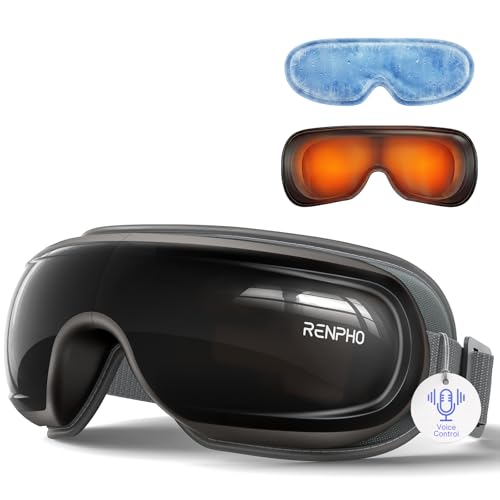
For most people who want a relaxing wind-down for tired eyes after screen time, a heated, rechargeable eye massager with Bluetooth music from a brand such as Renpho or Breo is the usual starting point, while the Therabody SmartGoggles suits buyers who want a more premium build and a companion app. These devices are comfort products, not treatment, so anyone with eye pain, vision changes or a medical eye condition should see an eye doctor rather than rely on a gadget.
Our top picks



As an Amazon Associate we earn from qualifying purchases at no extra cost to you.
Eye Massagers at a Glance
| Model type | Best for | Stated features | Limits |
|---|---|---|---|
| Therabody SmartGoggles | Premium relaxation and app control | The maker lists heat, vibration modes and a companion app | Premium tier |
| Renpho eye massager | All-round value | Maker lists heat, air compression or vibration, and Bluetooth on some models | Fit varies by head size |
| Breo iSee style | Design and features | Heat and air-pressure modes, per maker | Mid to premium tier |
| Bob and Brad style | Budget to mid-range users | Foldable form, heat and vibration, per maker | Battery life varies |
| Simple heated eye mask | Basic warmth with no electronics | Microwavable or USB-heated pad | No massage action |
What These Devices Do
Eye massagers are wearable devices that combine gentle warmth, vibration or air-pressure pulses around the eye area. Makers market them for relaxation after long screen sessions or at bedtime. They are not designed to treat or cure any condition, and makers generally state this in their manuals.
The experience is subjective. Some people find the warmth and pressure soothing, while others find it distracting. Reviewers at wellness outlets often describe them as pleasant extras rather than essentials.
Key Features to Compare
Heat
Many models offer a warming function with a stated temperature range or preset. Follow the manual on session length, and stop if the device feels too hot. People with sensitive skin should be especially cautious. If the maker states auto shut-off, that is a useful safety detail, but confirm what the manual says rather than assuming it.
Massage modes
Air compression, vibration and tapping are the most common modes. Air compression models can feel stronger, while vibration models are lighter. Several modes let you adjust intensity.
Fit and comfort
Head size, nose shape and glasses all affect fit. Foldable designs are easier to store but may have more gaps. Padding made from soft materials improves comfort. Try to read reviews from users with a similar head size.
Battery and charging
Most devices use a rechargeable battery with USB charging. Makers list runtime figures that vary by mode. Heat usually drains the battery faster.
Bluetooth and extras
Some devices play music or guided sessions. This is nice for relaxation but adds cost. If you only want warmth, skip it.
Cleaning
Wipe pads with a soft damp cloth as directed. Do not immerse electronics. Replace worn or damaged pads according to the maker.
Picks by Buyer
The premium wellness shopper
The Therabody SmartGoggles is built for people who already use massage tools and want app-based sessions. Expect a premium budget tier and a more refined finish.
The value seeker
A Renpho model gives heat, massage modes and often Bluetooth at a mid-range tier. It is a popular entry point.
The design-focused buyer
Breo style devices emphasize a sleek design with air-pressure and heat. They suit buyers who want a polished product.
The budget buyer or traveler
Foldable models from Bob and Brad style brands pack easily. Expect fewer premium touches.
The no-electronics buyer
A simple warm eye mask offers a gentle option without batteries. It does not provide massage motion.
Pick X If… Decision Table
| If you… | Choose |
|---|---|
| Want an app and premium feel | Therabody SmartGoggles |
| Want a balanced mid-range option | Renpho style eye massager |
| Like air-pressure modes and a modern design | Breo style device |
| Travel often or have limited budget | Foldable Bob and Brad style model |
| Prefer warmth only | Heated eye mask |
Safety Notes
- Read the manual, including the list of people who should not use the device.
- Do not use an eye massager if you have eye surgery, glaucoma, retinal problems, a recent eye injury or any infection unless your eye doctor says it is fine.
- Stop if you feel pain, pressure that is uncomfortable, dizziness or headache.
- Do not use while sleeping, driving or operating machinery.
- Keep sessions to the length the maker recommends.
- Pregnant users, people with implanted medical devices and children should ask a doctor before using.
- If eye strain, redness or vision changes persist, see an eye care professional.
Eye Strain Habits That Matter More
A massager is no substitute for basic screen habits. Eye care groups commonly advise regular breaks, such as looking at something distant every so often, blinking more, adjusting screen distance and brightness, and keeping the room lit properly. An annual eye exam helps rule out issues such as uncorrected vision. A device can add comfort on top of those habits.
Common Mistakes
Many buyers choose by the number of modes rather than fit, then find the device presses uncomfortably on the nose or slips with glasses frames. Others use heat for too long. Another mistake is expecting medical results from a comfort product. Reading the maker’s claims carefully and treating the device as a relaxation tool avoids disappointment.
Alternatives
- Warm compress or heated mask: A simple, inexpensive way to relax the eye area.
- Cooling gel mask: For people who prefer cool comfort.
- Blue-light and screen-setting adjustments: Software settings can reduce screen discomfort.
- Desk habits and breaks: Often the most effective step for screen fatigue.
- Eye exam: If symptoms persist, a professional exam is the right next step.
How to Read Product Claims
Marketing for these devices sometimes uses vague wellness language. Look for specifics: temperature settings, session timers, battery capacity, materials and the maker’s safety instructions. Be cautious about any product that promises to fix vision or treat disease. Reviewers at consumer outlets generally evaluate comfort, fit and ease of use instead of medical outcomes, and that is a sensible way to judge them.
Budget Tiers
Budget devices provide basic warmth and vibration. Mid-range models add air-pressure modes, Bluetooth and better padding. Premium options like the SmartGoggles add app control and a more refined design. For many people, a mid-range model is enough.
Who Should Skip One
Eye massagers are not suited to everyone. People who have had recent eye surgery, who have glaucoma, retinal conditions or detachment risk, or who have a current eye infection or injury should ask their eye doctor before using any device that applies warmth or pressure near the eyes. The same applies to people with implanted medical devices, anyone who is pregnant and children. If you notice redness, pain, blurred vision, flashing lights or headaches after use, stop and seek professional advice. Makers include these cautions in their manuals, and they are worth reading before the first session. For ordinary tired eyes after a long day at a screen, many people prefer starting with simple measures such as breaks and a warm compress, then adding a device if they enjoy the feel.
Quick Pre-Purchase Checklist
Before choosing any eye massager, run through the points below. Writing down the answers beside each candidate makes the final choice much easier, and it prevents the common problem of paying for features that do not match your real needs. It also helps to read the maker’s manual or product documents in advance, since they describe limits and care steps that are rarely visible in a short listing.
- Fit with your head size: compare it against the maker’s published details before you commit.
- Heat and session timer: compare it against the maker’s published details before you commit.
- Battery runtime: compare it against the maker’s published details before you commit.
- Pad cleaning: compare it against the maker’s published details before you commit.
- The maker’s safety list: compare it against the maker’s published details before you commit.
Frequently Asked Questions
Are eye massagers safe to use?
For most healthy adults, gentle use following the manual is generally considered low risk, but they are not suitable for everyone. People with eye conditions, recent surgery or implants should ask a doctor first. Stop if you feel pain.
Can an eye massager help with dry eyes or eye strain?
Makers market them for relaxation and comfort, not as treatment. If you have persistent dry eyes or strain, see an eye care professional for advice.
How long should I use one at a time?
Follow the maker’s recommended session length, which is often a short period of several minutes. Do not use longer than advised.
Can I wear glasses or contact lenses with it?
Remove glasses before use. Contact lens wearers should check the manual and may prefer to remove lenses. If unsure, ask your eye doctor.
How do I clean an eye massager?
Wipe the pads with a soft, slightly damp cloth and let it dry. Do not immerse the device or use harsh cleaners. Follow the care instructions provided.
Do I need Bluetooth?
No. It adds music or guided sessions but is not essential. If you mainly want warmth and gentle massage, a model without it is fine.
FAQ
Are eye massagers safe to use?
Can an eye massager help with dry eyes or eye strain?
How long should I use one at a time?
Can I wear glasses or contact lenses with it?
How do I clean an eye massager?
Do I need Bluetooth?
More from Amazon
Programs that pair well with the guide above. Offers and eligibility are set by Amazon and may change.
Free shipping on eligible items, Prime Video and more. Eligible new members can start with a free trial.
Start a Prime free trialAudiobooks and podcasts to listen to on the go. Eligible new members can start with a free trial.
Try Audible freeAd-free music streaming. Eligible new subscribers can start with a free trial.
Try Music Unlimited freeA free business account with business pricing and bulk-buying tools for work, shop or home office.
Create a business accountAs an Amazon Associate we earn from qualifying purchases.