Key takeaways
- Pro: Hardware-accelerated VPN throughput means encryption does not crush your connection.
- Pro: OpenWrt gives you scripting and plugin options that closed firmware never allows.
- Con: No Wi-Fi means an extra access point and slightly more cabling work.
A smart home with thirty-plus connected devices is a network security nightmare waiting to happen. The average homeowner has cameras that phone home to Chinese servers, a TV that collects behavioral data, and a thermostat with a firmware update from 2019. Software firewalls on individual devices cannot cover this surface area, and most consumer routers offer little more than a password gate. That is why hardware firewalls have moved from enterprise closets into living rooms and network shelves across the country in 2026, and why the market is now crowded enough to be genuinely confusing.
What separates a good hardware firewall for smart home use from a mediocre one comes down to three things: whether it can actually inspect traffic from dozens of low-power IoT devices without bottlenecking your connection, whether the management interface works for a non-engineer without a terminal window, and whether it enforces segmentation policies automatically or expects you to build VLANs by hand. Several products below nail two of these three; only one nails all three out of the box.
Our top picks


As an Amazon Associate we earn from qualifying purchases at no extra cost to you.
Quick Picks
| Product | Best for | Price |
|---|---|---|
| GL.iNet Brume 3 | Visionaries who want OpenWrt flexibility on a budget | under $150 |
| FortiGate-40F | Tech-savvy homeowners who want enterprise-grade threat intelligence | $260 |
| SonicWall TZ280 | Power users who demand maximum throughput and granular control | $436 |
| SafeHome | Non-technical families wanting zero-config smart home protection | $399 |
| Firewalla Purple SE | DIY enthusiasts who want no recurring fees | $289 |
| Zyxel USGFLEX50AX | Home offices that need Wi-Fi and firewall in one box | under $300 |
| Ubiquiti USG | Existing UniFi ecosystem owners expanding their network | under $200 |
| SonicWall TZ380 | Multi-property owners with heavy bandwidth and threat needs | $624 |
How We Picked
We evaluated every unit on four criteria. First, real-world throughput under inspection — not just raw firewall speed but how quickly the appliance slows when deep packet inspection is active across dozens of simultaneous IoT connections. Second, the learning curve of the management interface: whether a competent homeowner can segment a guest network, block a suspicious device, and set up alerts within ten minutes. Third, feature depth for smart home use specifically — auto-discovery, device fingerprinting, and built-in content filtering matter more than packet capture tools most users will never touch. Fourth, total cost of ownership, including mandatory subscriptions that quietly erode the sticker price.
The 8 Best Hardware Firewalls For Smart Home Security in 2026
GL.iNet GL-MT5000 Brume 3
The Brume 3 is the gateway I recommend to anyone who wants enterprise-caliber VPN capability without the enterprise price. It pushes up to 1100 Mbps through hardware-accelerated encryption across three 2.5GbE ports, supports multi-WAN failover so your home office never drops a call, and runs OpenWrt with a full gigabyte of DDR4. The lack of built-in Wi-Fi is by design — it is wired-only, so you pair it with your existing access point. For smart home use, the VPN obfuscation is a genuine differentiator if you tunnel IoT traffic through a remote exit node.
- Pro: Hardware-accelerated VPN throughput means encryption does not crush your connection.
- Pro: OpenWrt gives you scripting and plugin options that closed firmware never allows.
- Con: No Wi-Fi means an extra access point and slightly more cabling work.
Skip this if you want a single-box solution that handles wireless and firewalling without any additional hardware.
FortiGate-40F
Fortinet’s entry-level appliance brings FortiGuard threat intelligence into a residential rack for under three hundred dollars. Five Gigabit Ethernet RJ45 ports give you enough physical segmentation for IoT, corporate laptops, and guest traffic on separate interfaces. The FG-40F runs the same OS as units ten times its price, so policy language, SD-WAN features, and application control are identical. For a smart home, this is overkill in the best sense — it handles traffic inspection at wire speed without breaking a sweat.
- Pro: Enterprise firmware with no functional feature reduction from larger models.
- Pro: Five native RJ45 ports eliminate the need for a switch in small setups.
- Con: The learning curve is steep if you have never touched a FortiGate before.
Skip this if you have zero networking background and prefer an app-based interface over a CLI or web console with hundreds of options.
SonicWall TZ280
The TZ280 delivers 2.5 Gbps firewall throughput and 1 Gbps of actual threat prevention — meaning it can inspect encrypted traffic at meaningful speed without collapsing to 100 Mbps like some competitors. Ten physical interfaces (8x1GbE plus 2x1G SFP) give you serious segmentation headroom for smart home VLANs. SonicOS 8 adds better application visibility than previous generations. For power users who want to define granular policies per device group and enforce them across dozens of connections simultaneously, this is the best balance of raw capability and manageable pricing in the SonicWall lineup.
- Pro: Threat prevention throughput stays high even with deep inspection enabled.
- Pro: Ten interfaces support complex network topologies without a separate switch.
- Con: Full security features require a subscription license that increases lifetime cost.
Skip this if you refuse to pay recurring fees and are okay with basic stateful filtering only.
SafeHome Home Firewall
SafeHome is the only product on this list that I would hand to a non-technical relative and trust them to use correctly. It combines a 4.3 Gbps firewall with built-in Wi-Fi covering 3000 square feet, and the parent-facing app handles device onboarding, malware blocking, phishing protection, and web filtering with genuinely pleasant UX. Plug it in, connect to its network, and it auto-discovers every IoT device and assigns a security profile. For families with kids and connected appliances, nothing else on this list matches its simplicity.
- Pro: True plug-and-play with automatic device discovery and policy assignment.
- Pro: Integrated Wi-Fi and firewall in one unit, reducing points of failure.
- Con: Limited advanced configuration compared to enterprise-class appliances.
Skip this if you want to write custom firewall rules or need VPN server functionality for remote access to your home network.
Firewalla Purple SE
Firewalla has built its brand on a no-subscription model, and the Purple SE delivers on that promise: local firewall processing, ad blocking, parental controls, and VPN server and client functions all run on-device with no monthly fee. The mobile app is clean and well-organized. Smart home protection focuses on anomaly detection and outbound traffic blocking rather than deep packet inspection, which means it catches the obvious threats without requiring you to understand TLS certificates. The 3.8 rating reflects its middling hardware throughput, which will bottleneck gigabit fiber connections under load.
- Pro: No recurring subscription cost for any security feature.
- Pro: Ad blocking and parental controls work well across all connected devices simultaneously.
- Con: Hardware throughput is modest; heavy inspection will reduce usable bandwidth noticeably.
Skip this if you have multi-gigabit internet and want to filter traffic at full line speed.
Zyxel USGFLEX50AX
Zyxel targets a specific niche: small offices and advanced home networks that need a unified security gateway with integrated Wi-Fi 6. Supporting up to 25 users, the USGFLEX50AX bundles IPSec and SSL VPN, intrusion prevention, and firewalling into a single access-point-sized unit. For smart home use, the integrated Wi-Fi means one fewer device on your shelf, and the SSL VPN lets you access your home network from anywhere without standing up a separate server. The 5-star rating reflects how well it executes its multi-role mission.
- Pro: Firewall, VPN, IPS, and Wi-Fi 6 in one physical device.
- Pro: Built-in application visibility helps identify misbehaving IoT devices quickly.
- Con: Designed primarily for small offices, so smart home-specific device management features feel secondary.
Skip this if you already have a mesh Wi-Fi system you love and only need the firewalling layer.
Ubiquiti Unifi Security Gateway
The USG is not a standalone security product — it is a routing and firewalling component of the Ubiquiti UniFi ecosystem. If you already own a UniFi console or self-hosted controller, the USG adds a dedicated security boundary at a competitive price point. The single-unit, white design fits neatly on a network shelf. For smart home owners deep in UniFi, it provides VLAN assignment and basic stateful firewalling without introducing a second management platform. Outside that ecosystem, it is a much less compelling proposition.
- Pro: Seamless integration with existing UniFi gear through the same controller.
- Pro: Affordable price with no subscription required for basic operation.
- Con: Lacks advanced threat prevention or deep inspection; it is primarily a routing and filtering layer.
Skip this if you do not already own UniFi hardware, as you will end up buying the full ecosystem.
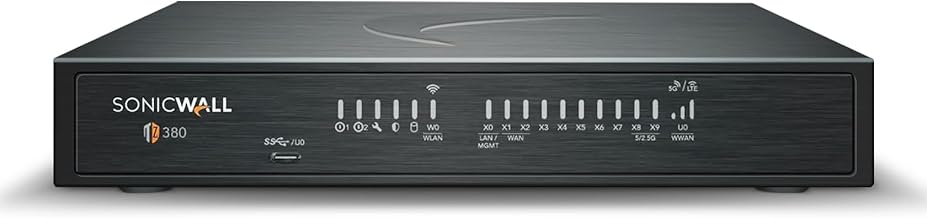
SonicWall TZ380
The TZ380 is the TZ280’s bigger sibling, pushing firewall throughput to 3.5 Gbps and threat prevention to 1.5 Gbps with the same ten-interface topology. If your smart home spans multiple buildings, or you run a significant number of always-on cameras and servers alongside consumer IoT, the additional throughput headroom matters. It is the unit I would recommend for a five-thousand-square-foot home office setup with heavy upstream video traffic and dozens of simultaneous connections. The price reflects its positioning above the consumer tier and into the growing small-business bracket.
- Pro: Threat prevention throughput scales well under mixed traffic loads with deep inspection enabled.
- Pro: Same SonicOS 8 interface as the TZ280, so policy knowledge transfers directly.
- Con: Higher price and mandatory subscription for full security services make total ownership cost significant.
Skip this if your household has fewer than fifteen connected devices — the TZ280 covers that ground for less money.
Buying Guide
Throughput Under Inspection Is the Only Number That Matters
Marketing pages list raw firewall throughput — the speed at which the device passes packets through basic stateful filtering. That number is largely irrelevant. The figure you need is threat prevention throughput, which reflects the speed when the device is actively decrypting, scanning, and inspecting traffic for malware, exploits, and policy violations. A unit that advertises multi-gigabit raw speed but drops to a fraction of that under full inspection will bottleneck your smart home the moment you enable the features you actually paid for.
Interface Count Determines Segmentation Without Extra Hardware
Smart home security depends on putting IoT devices on their own network, separate from laptops and phones that hold sensitive data. If your firewall has enough physical ports or virtual interface support, you can create these segments without buying a managed switch. Look for at least four assignable interfaces in a residential context, or more if you want to separate cameras, media devices, personal computing, and guest traffic into distinct zones with different trust levels.
Subscription Models Change What You Actually Pay
Several products on this list include a powerful web filtering engine and threat intelligence feed only if you pay an annual license fee. Others run entirely on-device. Before committing, decide whether you want a one-time purchase that locks in capabilities or whether you prefer a cloud-fed model that receives new detection signatures continuously. Neither is universally better, but it affects your three-year cost significantly and determines how well the device handles zero-day threats from firmware exploits common in smart home hardware.
Our Verdict
The SafeHome is the top pick for the majority of smart home owners. It delivers 4.3 Gbps throughput with integrated Wi-Fi, automatic device discovery, and a management experience that requires zero networking knowledge. If you have a normal home with a mix of IoT and personal devices and want to stop worrying about it, this is the unit.
The budget pick is the GL.iNet Brume 3. At its price point, no other product offers hardware-accelerated VPN at this throughput level with full OpenWrt access and multi-WAN failover.
The condition that changes the recommendation: if you have multi-gigabit fiber and want deep packet inspection at line speed for a complex home network, the SonicWall TZ280 becomes the right answer despite the subscription cost.
FAQ
Do I really need a hardware firewall if my router already has a firewall?
Most consumer routers include a basic stateful firewall that blocks unsolicited inbound traffic, but they perform no deep packet inspection, cannot identify malware in outbound connections, and offer no device-level segmentation. A hardware firewall adds the visibility and control needed to prevent a compromised smart bulb from reaching your laptop.
Can a hardware firewall protect against attacks that originate inside my network?
Yes, but only if it supports internal segmentation. A properly configured firewall with distinct zones for IoT and personal devices can inspect and block lateral traffic moving from a compromised smart device toward trusted hosts, which a perimeter-only firewall cannot do.
Will a hardware firewall slow down my gaming or video streaming?
At idle or under light load, no. Under active deep inspection with threat scanning enabled, throughput will decrease. Quality appliances listed above maintain high enough speeds that most households will not notice, but very low-end units can introduce measurable latency.
What happens to my protection if the firewall loses internet connectivity?
On-device detection signatures still function offline. Cloud-fed threat intelligence will stop updating until connectivity returns, and remote management features become inaccessible. Core firewalling, segmentation, and previously downloaded blocking rules remain fully operational regardless.