Our Top Picks
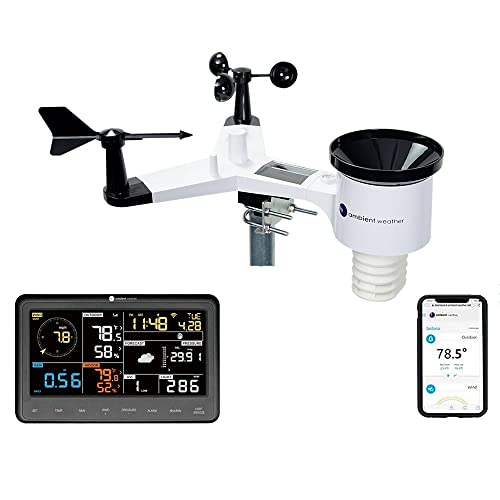 Ambient Weather WS-2902 Wi-Fi Smart Weather StationBase Console + Array7.5 x 0.75 x 4.5 Inches3.9 PoundsCheck on Amazon
The best home weather station is the one whose sensors match what you actually want to know: a plain thermometer with a forecast icon for the kitchen wall, or a Wi-Fi station with wind and rain sensors for the garden. This roundup compares ten Amazon listings across both ends of that range, from budget indoor-outdoor thermometers to app-connected stations. We rely on what each title says, and we say plainly when a listing is a basic thermometer rather than a full station.
Top picks at a glance
Ambient Weather WS-2902 Wi-Fi Smart Weather Station | With Wi-Fi Remote Monitoring and Alerts


As an Amazon Associate we earn from qualifying purchases. Product prices and availability are accurate as of the date/time indicated.

Sainlogic 12-in-1 Wireless Weather Station with Rain Gauge, Indoor Outdoor | Monitors Temperature, Humidity, Wind Speed/Direction, Rainfall, Air Pressure, Clock and Dew Point for Home Garden (No WIFI)


As an Amazon Associate we earn from qualifying purchases. Product prices and availability are accurate as of the date/time indicated.
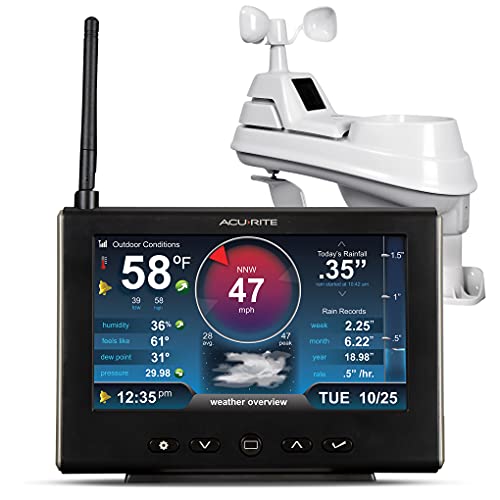
AcuRite Iris Weather Station with Rain Gauge and Wind Speed/Direction, Indoor Outdoor Thermometer Wireless Outdoor Sensor for Temperature and Humidity, and HD Display with Built-in Barometer (01535M)


As an Amazon Associate we earn from qualifying purchases. Product prices and availability are accurate as of the date/time indicated.
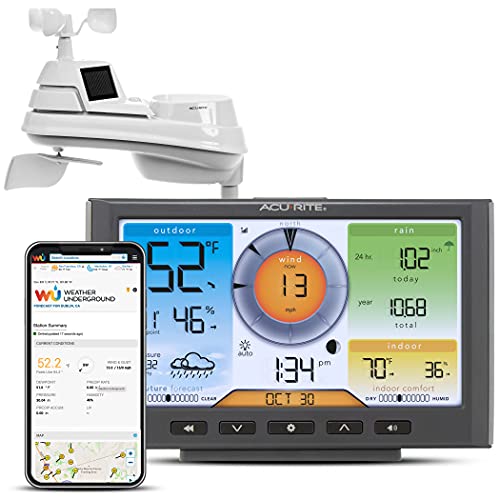
AcuRite Iris (5-in-1) Home Weather Station with Wi-Fi Connection to Weather Underground with Temperature, Humidity, Wind Speed/Direction, and Rainfall (01540M), Black


As an Amazon Associate we earn from qualifying purchases. Product prices and availability are accurate as of the date/time indicated.

Weather Station Wireless Indoor Outdoor Thermometer Digital, Black | Home Weather Stations with Remoter Sensor, 7.5" Large Color Display with Weather Forecast, Temperature&Humidity, Atomic Clock


As an Amazon Associate we earn from qualifying purchases. Product prices and availability are accurate as of the date/time indicated.
| Model | Key point from title | Price tier | Best for |
|---|---|---|---|
| Ambient Weather WS-2000 | Wi-Fi monitoring and alerts | Premium | Connected hobbyists |
| Tempest Weather Station | Built-in wind meter, rain gauge, app and Alexa | Premium | App-first users |
| Ambient Weather WS-2902 | Wi-Fi monitoring and alerts | Premium | Alerts on a smaller budget |
| AcuRite Iris 5-in-1 (01540M) | Wi-Fi to Weather Underground | Mid-range | Sharing data online |
| AcuRite Iris (01535M) | Rain gauge, wind, barometer | Mid-range | Full console station |
| AcuRite Iris (01512MCB) | Color screen, indoor/outdoor | Mid-range | Check the listing first |
| Sainlogic 12-in-1 | Rain, wind, dew point, no Wi-Fi | Budget | Feature-rich without an app |
| AcuRite 02077M | Color display, thermometer | Budget | Basic temperature |
| Grillum 7.5-inch display | Large color display, atomic clock | Budget | Easy-to-read forecast |
| Newentor Weather Station | Thermometer, pressure, atomic clock | Budget | Lowest-cost basics |
What is changing in home weather stations
The category has split into two groups. One group is the traditional console station, where an outdoor sensor array talks to a tabletop display. The other is the connected station, where readings flow through Wi-Fi to an app, alerts and, in some cases, a public network such as Weather Underground, which one AcuRite title mentions. For many buyers the app is now the main interface, and the display is secondary.
Voice and smart-home integration is a growing selling point. The Tempest title mentions app and Alexa support, and the Ambient Weather listings stress remote monitoring and alerts. That makes sense for people who want frost warnings, rain notifications or wind alerts on a phone, but it also raises practical questions about router range, account requirements and what happens if a service changes.
At the budget end, the product is still essentially a thermometer with extras such as an atomic clock, a forecast icon and a barometric reading. Those units are useful for knowing the outdoor temperature at a glance, and they are priced accordingly, but they are a different class from a station with wind and rain sensors. Comparing them directly can be misleading, so this guide keeps the two groups clearly labeled. If you are unsure which group you belong to, a good test is whether you would ever look at a wind or rain number; if the answer is no, the budget group will likely do.
How we picked these
This list comes from listing titles, published specifications, manufacturer documentation and buyer reviews that we read, not from anything we handled. Nobody on the team used or measured these units. We chose ten listings spanning basic thermometers, console stations and Wi-Fi stations, and we marked which ones lack wind and rain sensors. Price tiers are relative within this set, without dollar figures, because prices move frequently.
The ten listings
Ambient Weather WS-2000 Smart Weather Station
The title says smart weather station with Wi-Fi remote monitoring and alerts, and that is nearly all it says. There is no sensor list, display description or range in the title, so everything beyond connectivity belongs in the “check the listing” column. It sits in the premium tier of this set, which suggests it is aimed at buyers who want more than a thermometer.
It suits a hobbyist who wants alerts and remote monitoring from a phone, for instance a gardener who wants a frost warning at night. Because the title is sparse, a first step is to open the product page and confirm which sensors come in the box.
A thin title is not a flaw in the product, just a gap in the listing, but it does mean you should compare this against the WS-2902 line by line before paying the difference. If you cannot find a clear sensor list, a manufacturer manual or a buyer question-and-answer thread is the next place to look.
- Pro: Wi-Fi remote monitoring and alerts
- Pro: smart-station positioning in the title
- Con: title lists no sensors
- Con: premium tier price
Check the listing for the sensor array, display, range to the console and app requirements. One question to ask: which readings does the box actually measure, and which are optional add-ons?
Tempest Weather Station with Built-in Wind Meter and Rain Gauge
The Tempest title lists a built-in wind meter, a rain gauge, weather forecasts, wireless operation and app and Alexa support. It is the only listing in the set that pairs an all-in-one description with voice-assistant mention, and it has the highest price tier.
It suits someone who wants most of the information on a phone and is happy without a separate console. For example, a homeowner who checks wind speed before grilling and rainfall before watering might appreciate seeing both in an app.
Because the main view is an app, the practical questions are about your Wi-Fi coverage where the sensor will sit and whether you want a separate display at all. Voice-assistant support is convenient for a quick spoken forecast, but treat it as a bonus rather than a reason to buy.
- Pro: wind and rain sensing named in the title
- Pro: app and Alexa support
- Con: highest price tier
- Con: relies on a phone or voice assistant for the main view
Check the listing for a display, power source, Wi-Fi requirements and forecast data source. Question to ask: do I want to read the weather on my phone, or on a screen in the kitchen?
Ambient Weather WS-2902 Wi-Fi Smart Weather Station
Like its WS-2000 sibling, the WS-2902 title mentions Wi-Fi remote monitoring and alerts and little else. It costs less than the WS-2000 but is still in the top price tier of this set. The model number is the main identifier, so confirm the exact sensor suite on the page.
It suits buyers who want alerts and remote readings without paying for the top tier. A backyard garden with a rain concern is a typical use case, though you should confirm that a rain gauge is included.
A good way to decide between the two Ambient Weather models is to write down the three readings you care about, then check which model lists them. If you only need temperature alerts, you may not need to pay for either of them; if you need rain and wind, make sure both are in the box.
- Pro: Wi-Fi monitoring and alerts
- Pro: lower price than the WS-2000
- Con: title lists no sensors
- Con: still premium tier
Check the listing for what is in the box, mounting hardware and any account requirement. Question to ask: how do the WS-2902 and WS-2000 differ in what they measure?
AcuRite Iris 5-in-1 Home Weather Station (01540M)
This title is richer: it mentions Wi-Fi connection to Weather Underground and measurements of temperature, humidity, wind speed and direction, and rainfall. The “5-in-1” label points to a multi-sensor array outdoors.
It suits someone who wants a full set of readings and an option to share them online. A hobbyist contributing to a neighborhood weather map is an example. The title says Wi-Fi connection, but check whether this requires an extra bridge or display.
The “5-in-1” wording is helpful because it groups the readings in one outdoor array rather than several separate sensors, which can simplify mounting. It also means one position has to suit temperature, wind and rain at once, which is a compromise on a cluttered lot, so think about the spot before you buy.
- Pro: temperature, humidity, wind and rain in the title
- Pro: Weather Underground mention
- Con: Wi-Fi arrangement unclear
- Con: mid-range price
Check the listing for how the Wi-Fi link works and for sensor range. Question to ask: does it come with a display, or is it app-only?
AcuRite Iris Weather Station (01535M) with Rain Gauge and Wind
The title lists a rain gauge, wind speed and direction, an indoor-outdoor thermometer, a wireless outdoor sensor for temperature and humidity, and an HD display with a built-in barometer. This is the classic console station, with no Wi-Fi in the title.
It suits a gardener or homeowner who wants wind, rain and pressure on a tabletop screen without an app. If you prefer a dedicated display on the kitchen counter to a phone, this fits better than the app-first options.
The built-in barometer is a quiet advantage for anyone who likes to watch pressure trends before a storm. Without Wi-Fi in the title, you will not get remote alerts, so this is a better fit for someone who is home often and likes to glance at a screen than for a frequent traveler.
- Pro: wind, rain and barometer named
- Pro: HD display
- Con: no Wi-Fi in the title
- Con: mid-range tier
Check the listing for sensor range and mounting hardware. Question to ask: is the console’s history view enough for my needs?
AcuRite Iris (01512MCB) Indoor/Outdoor Wireless Weather Station
The title says indoor-outdoor wireless weather station with a color screen, and nothing about wind, rain or Wi-Fi. That makes it hard to tell where it sits between a thermometer and a full station, so it needs the most verification.
It suits a buyer who wants a bigger step up than a budget thermometer but has not decided on sensors. For example, someone who wants a color screen and an outdoor sensor could shortlist it, then confirm what it measures.
Think of this as the “verify me” listing. It shares a family name with two better-described AcuRite models in this set, so a quick comparison of model numbers on the product page will show whether it adds anything or simply costs more for a thinner feature set.
- Pro: color screen
- Pro: indoor and outdoor readings
- Con: title lists no wind or rain sensors
- Con: mid-range price for unclear contents
Check the listing for the sensor list, including barometer and forecast. Question to ask: does this model measure anything beyond temperature and humidity?
Sainlogic 12-in-1 Wireless Weather Station with Rain Gauge
This title lists temperature, humidity, wind speed and direction, rainfall, air pressure, clock and dew point, for indoor and outdoor use, and states no Wi-Fi. That is a lot of readings for a budget-tier listing, with honesty about connectivity.
It suits a gardener who wants a full sensor set on a console without any app or account. A vegetable bed that needs rainfall tracking is a natural fit.
The twelve readings include calculated values such as dew point, so the count overstates the number of physical sensors. That is normal across the category, but it is why you should read the actual sensor list. The explicit “No WIFI” note is useful: you know in advance that readings stay on the console.
- Pro: many measurements named
- Pro: no Wi-Fi, so no account or router needed
- Con: no remote alerts
- Con: title gives no range or display size
Check the listing for display size, range and mounting. Question to ask: do I need remote access, or is a console enough?
AcuRite Wireless Home Weather Station with Color Display (02077M)
The title describes a color display, an indoor-outdoor thermometer and a temperature sensor. It is clearly a thermometer-class product despite the “weather station” label, so it does not include wind or rain sensing based on the title.
It suits someone who wants a simple, reliable-looking readout of temperature at a glance. A porch or garage where you check the outdoor temperature before leaving is the typical setting.
The word “station” in the title can mislead, because nothing in the listing mentions wind, rain or pressure. If the goal is just to know whether to bring a jacket, it does the job; if the goal is to track a storm, move up a class. Pairing it with a separate rain gauge is a possible workaround, though that adds clutter.
- Pro: simple, budget-friendly
- Pro: color display
- Con: no wind or rain in the title
- Con: limited data
Check the listing for humidity, pressure and sensor range. Question to ask: am I sure I do not want wind or rain readings?
Grillum Weather Station Wireless Indoor Outdoor Thermometer, 7.5 Inch Display
The title mentions a remote sensor, a 7.5-inch large color display, weather forecast, temperature and humidity, and an atomic clock. It is another thermometer-class listing, with the notable trait of a large screen.
It suits a user who wants big, readable numbers across a room, such as in a family room or workshop. Because the title includes typos and odd phrasing, read the product page and buyer reviews carefully before ordering.
Large displays help in rooms where you glance from a distance, such as a workshop or a living room. The trade-off is that bigger screens may be bulkier on a shelf, and a forecast icon is only a rough guide, so use it as a hint rather than a prediction.
- Pro: large display
- Pro: forecast and atomic clock
- Con: no wind or rain sensing
- Con: title wording is sloppy
Check the listing for sensor range and the forecast approach. Question to ask: how does the forecast icon work, and how reliable is it?
Newentor Weather Station Wireless Indoor Outdoor Thermometer
The title lists one sensor, a color display, an atomic clock, barometric pressure, forecast and an adjustable backlight. It is at the lowest end of the price range and is a thermometer-class product.
It suits a person who wants basic indoor-outdoor temperature and a clock at the lowest cost, such as a bedroom or office. A backlight is a nice touch for night reading.
The listing says one sensor, so if you want to monitor a second place such as a garage or greenhouse, look for a multi-sensor listing instead. As a bedside or desk device, the combination of clock, pressure reading and backlight is arguably its strongest use.
- Pro: low cost
- Pro: backlight and atomic clock
- Con: no wind or rain
- Con: single sensor
Check the listing for humidity and range. Question to ask: do I need more than temperature and pressure?
Home weather station buying guide
Sensors: what is in the box
A station is defined by its sensors. Temperature and humidity are nearly universal, barometric pressure is common, and wind and rain sensors separate real stations from thermometers. Dew point is calculated from temperature and humidity, so it is an extra readout rather than a separate sensor. Match the sensor list to your goal, whether it is frost alerts, irrigation planning or curiosity about wind. If the title does not say a sensor exists, assume it does not until the product page says otherwise.
Console, app or both
Console stations show readings on a tabletop display and often work without internet. App-connected stations use Wi-Fi to store history, send alerts and sometimes share data publicly. Decide which interface you will actually look at. If you only check a phone, an app-first model makes sense; if you want a glanceable screen, look at display size and brightness.
Placement and siting
Siting affects accuracy more than most buyers expect. Commonly recommended practice is an open location away from walls, roofs, pavement and exhaust vents, with the temperature sensor shaded and ventilated, and the wind sensor high and clear. Follow the manufacturer’s mounting instructions, keep poles well away from power lines and use a stable ladder or a helper.
Power, range and maintenance
Wireless sensors usually run on batteries or a mix of batteries and solar, and cold weather can shorten battery life. Range through walls varies, so a sensor placed far from the console may drop signal; stated ranges are usually open-air figures, and walls, metal siding and distance reduce them. Clean the rain gauge and sensor housings as the manual says, and expect to replace batteries periodically. Fallen leaves, spider webs and bird droppings are common culprits for odd rain or wind readings, so a quick seasonal inspection pays off.
Shared data and long-term history
Some buyers want more than a snapshot. Wi-Fi stations can log readings over weeks and months, which helps with garden planning, energy bills and comparing seasons. One AcuRite title mentions Weather Underground, a network where hobbyists upload data. Before you buy, check whether history is stored on the console, in an app or at a third-party service, and whether any of it is behind a paid tier.
Worked example
Assume a vegetable gardener with a quarter-acre lot who wants frost alerts, rainfall tracking and a quick wind check. Gardening guidance often cites about one inch of water per week for many vegetables, which is a rough rule that varies by crop and soil. With a rain gauge, the gardener can subtract measured rain from the target before watering. That requirement rules out the three thermometer-class listings and points to a station with wind and rain sensors, such as the AcuRite 01535M or Sainlogic if no app is needed, or an Ambient Weather or Tempest model if alerts matter. These choices are illustrative assumptions, not measured results.
| Spec concept | What to look for | Why |
|---|---|---|
| Rain gauge | Named in the title or specs | Needed for irrigation planning |
| Wind sensor | Speed and direction | Storm watching and outdoor plans |
| Connectivity | Wi-Fi, app or display only | Alerts and history |
| Display | Size and backlight | Readability across a room |
| Power | Battery or solar notes | Maintenance burden |
| Calibration | Adjustable offsets | Correct for siting error |
Mistakes buyers make
The most common mistake is buying a thermometer and expecting a weather station. The three thermometer-class listings here are fine for temperature, but they will not report rainfall or wind. Another is ignoring siting, then blaming the device when afternoon sun on a wall pushes readings upward.
Some buyers skip the connectivity question and end up with a console they cannot check remotely, or the reverse, paying for Wi-Fi they never use. Others forget about router range, battery upkeep or the safety of mounting a pole near power lines or on a roof. Finally, many people expect lab-grade accuracy from a consumer unit; treat the readings as a good local guide, and compare them against a nearby official report occasionally to see how far your siting shifts them.
Verdict by use case
For app alerts and remote monitoring, look at the Ambient Weather and Tempest listings. For a console with wind, rain and pressure, the AcuRite 01535M or Sainlogic 12-in-1 are the clearest matches. For sharing data online, the AcuRite 5-in-1 (01540M) mentions Weather Underground. For simple temperature and a clock, the AcuRite 02077M, Grillum and Newentor listings are enough. Verify the AcuRite 01512MCB contents before ordering.
One practical way to choose is to decide on the interface first, app or console, then filter by sensors. After that, price differences usually reflect connectivity and brand rather than raw measurement ability, so you can avoid overpaying for features you will never open.
Care and upkeep
A weather station is low-maintenance but not no-maintenance. Wipe the sensor housing, clear the rain collector of debris and check mounting hardware after strong winds. Replace batteries on the schedule the manual suggests, and keep the console out of direct sun and away from heaters so the indoor readings stay meaningful. If a reading looks wrong, check placement and batteries before assuming the sensor has failed.
Related guides
- Rechargeable Electric Toothbrush With Travel Case
- Countertop Water Filters Without Installation
- Skin Lifting And Tightening Devices
Frequently asked questions
What is the difference between a weather station and a weather thermometer?
A true home weather station usually measures several things, such as temperature, humidity, wind, rainfall and barometric pressure, using an outdoor sensor array and an indoor display or app. A weather thermometer with a forecast icon, like several budget listings here, mainly reports indoor and outdoor temperature and humidity, sometimes with pressure and a clock. Check the title for wind and rain sensors if you want more than temperature, since those are the parts that make a station useful for gardening and storm tracking.
Do I need Wi-Fi on a home weather station?
Not necessarily. A display-only station shows readings on a console and is simpler and cheaper, but it does not log history online or send alerts. Wi-Fi models, such as the Ambient Weather and Tempest listings, can feed an app, alerts and sometimes a network like Weather Underground. The Sainlogic listing says outright that it has no Wi-Fi. Decide whether you want remote viewing and history before choosing, because adding it later is often not possible.
Where should I place the outdoor sensor?
Commonly recommended practice is an open spot, away from walls, roofs, pavement and air-conditioner exhaust, with the temperature sensor shaded and ventilated and the wind sensor as high and clear of obstructions as practical. Real homes rarely meet the ideal, so expect some readings to differ from an official station. Follow the manufacturer’s mounting instructions, keep any pole well away from power lines, and take care when climbing a ladder.
How accurate are home weather stations?
Accuracy varies by sensor, siting and calibration, and none of the titles here state accuracy figures, so any claim would be a guess. Readings are usually good enough to compare day to day and spot trends, while exact values can drift with sun exposure, nearby buildings and sensor age. If precision matters, read the manufacturer’s specification sheet, check how the station can be calibrated and compare with a nearby official report for a few weeks.
How often do the batteries need replacing?
The titles do not state battery life or solar charging, so check each product page. Wireless sensors commonly run on batteries, and cold weather can shorten battery life, so plan to inspect them each season. Keeping spare batteries on hand helps avoid gaps in the data. If a listing mentions solar assistance or an adapter, read how it behaves at night and in winter, and replace batteries as the manufacturer instructs.
Can a weather station protect against lightning or storms?
No weather station prevents storm damage, and a metal mast can be a hazard in a thunderstorm. Treat the station as a source of information, not a safety system. Follow official weather warnings for decisions about shelter, and never climb a pole or ladder during bad weather. Check the manual for guidance on mounting, grounding and what the manufacturer recommends when severe weather is forecast.