Our Top Picks


Streaming boxes have gotten boring in the best way. Fire TV Stick, Roku, and Chromecast with Google TV all do the same basic job now: fast menus, good HDR support, and enough apps to cover anything you’d actually watch. The differences that matter in 2026 come down to who’s tracking your viewing habits, how pushy the home screen ads are, and whether you already own a pile of gear from one of these ecosystems.
I’ve run all three in different rooms of the same house for the past year, swapping them around whenever one started lagging. None of them are bad. But the right pick depends more on what you already own than on raw specs.
Quick take
If you want the least annoying interface, get a Roku. If you already use Alexa or own other Amazon gear, get a Fire TV Stick. If your household is all Android phones and Google apps, Chromecast with Google TV makes the most sense. Nobody needs the top-tier 4K Max version of anything unless they’re mirroring games or running a very large TV.
| Factor | Fire TV Stick 4K | Roku (Streaming Stick 4K) | Chromecast with Google TV |
|---|---|---|---|
| Home screen ads | Heavy | Moderate, less intrusive | Moderate |
| Voice assistant | Alexa | Roku voice (basic) | Google Assistant |
| Best paired with | Echo speakers, Ring, Fire tablets | No ecosystem lock-in | Android phones, Nest, Google Home |
| Remote finder | Yes (Alexa app) | Yes (Roku app) | No |
| Interface speed | Good | Fastest, simplest | Good, more animations |
| Casting from phone | Limited | Limited | Excellent (built for it) |
| Data collection concerns | Amazon-tied profile | Ad-tracking by default, opt-out available | Google-tied profile |
Fire TV Stick 4K: best if you’re already in Amazon’s world
The Fire TV Stick 4K is the one to get if you’ve got an Echo in the kitchen, a Ring doorbell, or you just buy a lot from Amazon and like having everything in one app. Alexa voice control works well here, better than Roku’s voice search, and if you lose the remote you can shout at an Echo speaker to find it.
The trade-off is the home screen. Amazon has leaned harder into ads and sponsored rows every year, and by 2026 the main screen is more storefront than launcher. You can get used to it, but if you want to open the box and watch something without scrolling past promoted content, this isn’t the quietest option. The remote also defaults to opening Amazon Prime Video on the home button, which is a minor annoyance if you mostly watch something else.
Performance-wise it’s fine for 4K HDR content and handles most apps without stutter. If you’re shopping for one, this is a reasonable place to start: Fire TV Stick 4K options.
Roku: best if you just want it to work
Roku remains the simplest of the three. The interface is a flat grid of app icons with no forced ecosystem opinions, no assistant trying to upsell you, and the ads that do exist are confined to a sidebar rather than taking over the whole screen. It’s also the most device-agnostic choice: it doesn’t care if your phone is an iPhone or Android, which makes it a good pick for shared households or guest rooms where you can’t assume everyone uses the same assistant.
The downside is that Roku’s own voice assistant is weak compared to Alexa or Google Assistant, and there’s no serious smart home integration beyond basic TV control. If you were hoping to use your streaming stick as a smart speaker substitute, it won’t do that job. Roku also makes money by inserting itself into your TV’s native menus if you own a Roku-brand TV, which is a separate consideration from the stick itself.
For most people who just want to watch Netflix, YouTube, and live TV apps without friction, this is still the easiest recommendation. Worth a look here: Roku streaming stick options.
Chromecast with Google TV: best for Android households
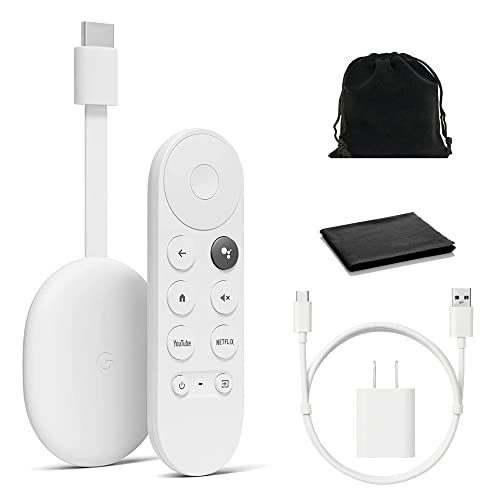
Chromecast with Google TV is the strongest pick if your phone is Android and you already use Google Photos, Google Home, or Nest devices. Casting from a phone is noticeably smoother here than on the other two, since Google built the casting protocol and it shows. The interface leans more on recommendation rows than Roku’s, but less aggressively than Fire TV’s.
One real failure mode worth knowing about: the remote has no dedicated “find my remote” feature, so if it slides under the couch, you’re digging around by hand. It’s a small thing but it comes up more than you’d expect. Google Assistant integration is solid for voice search and smart home control if you’re already using Nest or Google Home speakers elsewhere in the house.
If that’s your setup, this is the natural choice: Chromecast with Google TV options.
Who should actually buy what
If you don’t own any smart home gear and don’t care about voice assistants, Roku is the lowest-friction choice and the one least likely to annoy you day to day. If your house already runs on Alexa or Google, buy the matching stick rather than introducing a third ecosystem that won’t talk to anything else you own. And if you’re just replacing an old box that’s finally died, don’t overthink it. All three handle 4K HDR streaming fine in 2026, and the differences are about ads and voice assistants, not picture quality.
Skip the 8K or “Max” tier of any of these unless you own an 8K TV, which almost nobody does, or you’re doing heavy game streaming through the device. The extra processing power goes mostly unused for standard Netflix-and-YouTube viewing.
FAQ
Which one has the least annoying ads?
Roku’s ads are confined to a sidebar and don’t take over the main screen. Fire TV’s home screen is the most ad-heavy of the three by 2026. Chromecast sits in the middle.
Do any of these work without wifi?
No. All three stream over your home network and need a stable connection for 4K content. If your wifi is weak in the room where the TV sits, consider a mesh extender before blaming the streaming stick.
Can I use Fire TV Stick if I have an iPhone?
Yes, all three work fine with iPhones. Alexa and Google Assistant both have iOS apps, though casting from an iPhone to Chromecast is smoother than casting to a Fire TV Stick.
Is it worth paying more for the 4K Max version of any of these?
Only if you’re on a very large TV, doing cloud gaming, or have a very demanding wifi environment with multiple 4K streams running at once. For a single TV in a typical living room, the standard 4K version of any of these three is enough.