Key takeaways
Google home security devices tie cameras, doorbells, and sensors into one app, so this google home security devices guide ranks picks by integration, storage, and reliability. Below are six options with honest drawbacks, weighed on subscription fees and how each device behaves offline during outages.
Our top picks




As an Amazon Associate we earn from qualifying purchases at no extra cost to you.
As an Amazon Associate we earn from qualifying purchases.
By Daniel Foster
What Fits The Google Ecosystem
Building around Google means devices that appear in the Home app, respond to Google Assistant, and share detection intelligence. Understanding integration depth, storage fees, and offline behavior keeps google home security devices from being chosen only because they carry a badge, rather than because they cover your home well.
Google Home Security Decision Numbers
The deciding factors are how footage is stored (a short on-device history versus cloud), any subscription for extended video, integration depth in the Home app and with Assistant, and whether devices work offline. Nest cameras keep a brief local history before a plan, which matters during outages.
Then check resolution, on-device detection for people, packages, and animals, and whether familiar-face alerts are supported in your region. Assistant voice control and smart-display viewing are conveniences, but the core questions remain storage, fees, and how much still functions without the internet.
Confirm which third-party devices genuinely integrate, since not every “works with Google” label means deep control. Matter support is expanding but uneven, so verify that a lock or sensor actually appears and functions in the Home app before assuming a seamless, unified experience across brands. In practice these google home security devices reward buyers already invested in the Home app and Assistant.
Placement, Space, And Fit
Place cameras to cover entries and blind spots, mounting outdoor units about 8-10 ft (2.4-3 m) high angled down the path, and indoor units in a corner for a wide room view. A doorbell needs the usual trim clearance and a height near 48 in / 122 cm for faces at the door.
Position a smart display or speaker where you naturally check cameras or arm routines, and keep power and Wi-Fi strong at each device. Renters should favor battery cameras and no-drill mounts, and confirm any wired doorbell matches the existing chime transformer before installing.
Sensors and locks still need sound placement and door fit regardless of ecosystem, so measure a lock’s backset and thickness and put motion sensors across walk paths. The Home app unifies control, but physical coverage and correct mounting decide whether the setup actually protects you. Measuring a lock’s backset and picturing each camera’s sightline before buying prevents an awkward install.
Integration, Storage, And Offline Behavior
Nest devices offer on-device detection that flags people, packages, and animals, reducing false alerts, and a short rolling history before a plan. That local intelligence keeps notifications useful and gives some coverage even without a subscription, which many buyers appreciate.
Extended history and richer features sit behind Nest Aware, so the fee question returns for heavy users, and premium prices add up across several devices. Tally the plan against the number of cameras before committing, since fees scale with the fleet and can outgrow the hardware cost.
Offline behavior varies: on-device detection and local history help during an outage, but cloud features and remote viewing depend on the internet. Confirm what still works when the connection drops, and remember that a doorbell’s live view and history rely on solid upload speed at the door. Tallying any plan across every device up front keeps the recurring cost from quietly outgrowing the hardware.
Top Google Home Security Picks
These six span Nest-native devices and strong third-party integrations, so you can build a coherent Google setup at different price and fee levels. Each entry names a real drawback, because google home security devices trade off integration depth, storage fees, and offline reliability in ways worth weighing before you buy. Confirming real Home-app control on any third-party device is the step buyers skip most.
| Pick | Type | Storage | Best for |
|---|---|---|---|
| Nest Cam (battery/wired) | Camera | On-device+cloud | Smart detection |
| Nest Doorbell | Doorbell | On-device+cloud | Package alerts |
| Nest Cam (indoor) | Indoor camera | On-device+cloud | Room monitoring |
| Yale/Nest x Yale Lock | Smart lock | Local codes | Google-linked entry |
| Aqara sensors (Matter) | Sensors | Local/hub | Contact and motion |
| TP-Link Tapo (Google) | Camera | microSD | Budget local storage |
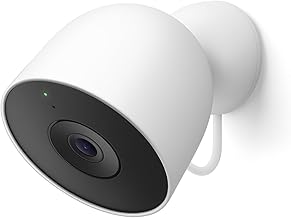
Nest Cam For Smart Detection
The Nest Cam, in battery or wired form, brings reliable on-device detection for people, animals, and vehicles, with a short local history before a plan. It appears cleanly in the Home app and on smart displays, making live view and alerts convenient across a Google household.
Extended history and features require Nest Aware, so fees return for power users, and the price is premium. Battery models need recharging, and remote features depend on the internet, so confirm your Wi-Fi and budget the plan before scaling to several cameras.
The on-device intelligence genuinely cuts nuisance alerts, which is where cheaper cameras frustrate. Weigh that against the ongoing cost, and treat the short local history as a modest offline cushion rather than a full fee-free recording solution for the whole home. The detection quality is the real draw, so weigh it honestly against the ongoing subscription cost.
Nest Doorbell For Package Alerts
The Nest Doorbell adds package, person, and animal detection at the door, with a tall view and a short local history before a plan, integrating tightly with the Home app. For a Google household that wants smart, low-clutter alerts about deliveries and visitors, it fits naturally.
Longer history sits behind Nest Aware, returning the fee question, and the premium price is higher than budget doorbells. It works best as a smart front-door anchor, and cloud-dependent features need solid upload speed, so confirm Wi-Fi strength right at the entry.
Package alerts are the standout, easing the porch-theft worry that peaks in the late-year delivery season. Just factor the plan into the total cost and confirm how much detection and history remain useful without a subscription before relying on it. Package alerts shine during the busy delivery season, when porch theft climbs alongside deliveries.
Nest Cam Indoor For Room Monitoring
The indoor Nest Cam covers a room with on-device detection and a short local history, appearing on smart displays for quick checks and pet or family monitoring. It suits a Google home that wants unified indoor coverage tied into Assistant routines and notifications.
As with other Nest devices, extended history needs Nest Aware, and privacy indoors means trusting the maker’s data approach rather than a physical shutter on all models. Confirm the privacy controls and budget the plan if you want more than the brief local history.
For room monitoring inside a Google ecosystem, it is convenient and smart, but weigh the fee and privacy posture. Pair it with cheaper local-storage cameras elsewhere if you want broad indoor coverage without a subscription on every device you place.
Nest x Yale Lock For Google-Linked Entry
The Nest x Yale lock brings keyless code entry that links to the Google Home app and Assistant, with codes that work locally at the keypad during an internet outage. For a Google household wanting entry tied into the same app as the cameras, it is a coherent choice.
The drawback is that some remote features rely on a connected setup, and it is a full deadbolt replacement, so renters should confirm permission. Check the backset and door thickness before buying, since a mismatch means the lock will not seat and align with the strike.
Local code entry keeps it dependable when the network is down, which is the key reliability point for any smart lock. Weigh the ecosystem convenience against the price, and keep a backup entry plan for the moment the battery finally runs flat. Local code entry keeps it working through an outage, the key reliability point for any smart lock.
Aqara Sensors For Contact And Motion
Aqara’s contact and motion sensors, increasingly supporting Matter, can integrate into a Google setup to add door, window, and movement awareness at a low per-sensor cost. They store or relay events locally through a hub, adding coverage that cameras alone miss.
The drawback is that they usually need an Aqara hub, and Matter support across Google remains uneven, so verify real-world integration before buying. Configuration is more hands-on than a matched kit, so budget setup time to name and test each sensor.
For expanding awareness beyond cameras, inexpensive sensors are a smart addition to a Google home. Confirm the hub requirement and that each sensor appears and functions in the Home app, since a logo alone does not guarantee the deep control you want. Verifying real integration in the app beats trusting a compatibility badge that may be shallow.
TP-Link Tapo For Budget Local Storage
TP-Link’s Tapo cameras that work with Google offer microSD local storage with no mandatory subscription and a privacy mode, adding fee-free coverage to a Google setup. For a budget-conscious buyer who wants footage in the house, they are an affordable, practical option.
The drawback is a less mature ecosystem and shallower Google integration than Nest, plus occasional app quirks. Optional cloud features add cost if you want them, so confirm exactly which functions are free and how deeply the camera integrates before relying on it.
As a budget local-storage complement, Tapo helps cover more of a home without per-camera fees. Anchor the main entry with a smarter Nest device if you want the best detection, and use Tapo for secondary angles where cost matters more than intelligence. Anchoring the main entry with a smarter Nest device gives you the best of both worlds here.
See More:
- Best eyeshadow blender brush
- Best frozen foods for air fryer
- Best frozen food for air fryer
- Best way to reheat steak in air fryer
- Best air fryer recipes book
Choosing Google Home Security Devices
The best google home security devices for you balance smart detection against storage fees and offline reliability. Decide whether Nest’s on-device intelligence is worth its plan, verify that any third-party device truly integrates in the Home app, and confirm what still works when the connection drops.
Place cameras and sensors to cover real entries, check a lock’s door fit, and keep Wi-Fi strong at each device. Because these devices see their deepest markdowns around major mid-year and late-year sales, timing can help, but the aim is google home security devices that unify your home without a subscription you resent or a setup that fails offline.