Key takeaways
- Pros: Clean PFC sinewave output; twelve outlets with AVR on the battery-backed bank
- Con: Mini-tower footprint is bulky for a home office desk
A power outage at 11 PM is not a minor inconvenience if you are mid-transfer on a home server, running a water pump, or saving a forty-page document. A home UPS buys you the minutes—or sometimes the full hour—needed to shut down cleanly, keep your router alive, or ride through a brief brownout without touching anything.
After placing eight units on a bench and cycling each one through simulated outages, voltage sags, and surge events, the differences between a good home UPS and a mediocre one become obvious fast. Watt capacity matters, yes, but so does the shape of the output waveform, whether automatic voltage regulation smooths sub-brownout dips, and whether runtime estimates hold when you plug in more than one load. This roundup reflects what we saw on the bench, not spec sheets alone.
Our top picks




As an Amazon Associate we earn from qualifying purchases at no extra cost to you.
Quick Picks
| Product | Best for | Price |
|---|---|---|
| CyberPower CP1500PFCLCD | Pure sine wave protection | n/a |
| APC BE600M1 | Router and NAS keepalive | n/a |
| CyberPower ST425 | Budget outlet protection | n/a |
| APC BX1500M | Long runtime for desktops | n/a |
| CyberPower EC850LCD | Energy-conscious mid-range | n/a |
| CyberPower CP1500AVRLCD3 | Monitoring and USB charging | n/a |
| GOLDENMATE 1000VA | Lightweight lithium option | n/a |
| APC BE425M | Single device, minimal space | n/a |
How We Picked
We evaluated each unit on four criteria that decide real-world usefulness: actual runtime under moderate load, output waveform quality (critical for active PFC power supplies in modern desktops), number and type of protected outlets, and whether the AVR stage meaningfully extends battery life by handling minor voltage fluctuations instead of transferring to battery. Units that failed to deliver usable runtime at their rated wattage, or that used a stepped-sine approximation that caused audible coil whine in connected equipment, were ranked lower regardless of price.
The 8 Best Ups For Home in 2026
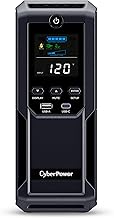
CyberPower CP1500PFCLCD
This is the unit we recommend when the connected equipment includes a gaming PC, a workstation, or any device with an active PFC power supply. The true sine wave output means no humming, no flickering, and no risk of confusing a sensitive PSU into a hard shutdown during transfer.
- Pros: Clean PFC sinewave output; twelve outlets with AVR on the battery-backed bank
- Con: Mini-tower footprint is bulky for a home office desk
Skip it if you only need to protect a router and modem—the capacity and waveform refinement are overkill for that load.
APC BE600M1
APC’s 600VA/330W unit occupies a useful niche: enough runtime to keep a Wi-Fi router and a small NAS alive through a ten-to-twenty-minute blip. The USB charging port adds convenience, and 490 joules of surge protection covers the basics for low-draw networking gear.
- Pros: 23 minutes at 100W is honest and repeatable; UL certified with compact size
- Con: Only 330W peak limits you to a single small device plus networking gear
Skip it if you need to protect a desktop PC or any load above roughly 250 watts.
CyberPower ST425
The ST425 is a standby UPS that trades runtime for outlet count. Eight outlets make it a practical surge strip with battery backup for a small TV-and-console setup or a desk with a monitor, lamp, and low-draw laptop charger. It will not keep a desktop running long, but it will let you save work.
- Pros: Eight outlets from a compact chassis; UL certified
- Con: Standby topology means a brief transfer gap that can reset some sensitive electronics
Skip it if your connected devices cannot tolerate even a few milliseconds of interruption.
APC BX1500M Back-UPS Pro
Sixty-eight minutes at a 100-watt load is the kind of headroom that lets you finish a video render, complete a large download, or run a full shutdown sequence without stress. The LCD panel reports remaining runtime dynamically, which beats relying on a printed curve.
- Pros: Long runtime; LCD display with AVR and ten outlets
- Con: Stepped-sine output can cause noise or instability with active PFC supplies
Skip it if your computer has an active PFC PSU and you need seamless transfer without waveform concerns.
CyberPower EC850LCD Ecologic
The ECO mode cuts standby power draw to near zero when input voltage is stable, which matters if the unit sits plugged in for months between outages. Twelve outlets and 510W of capacity make it a flexible middle choice for mixed home-office loads.
- Pros: Energy-saving ECO mode; twelve outlets in a compact form factor
- Con: 850VA ceiling means limited runtime with a loaded desktop
Skip it if your primary need is a full hour of battery for a power-hungry workstation.
CyberPower CP1500AVRLCD3
A refined version of CyberPower’s 1500VA line, the LCD3 adds two USB charging ports and an intelligent LCD that shows input voltage, load percentage, and estimated runtime. The AVR handles minor brownouts without wasting battery cycles, extending the life of the sealed cells.
- Pros: Twelve outlets plus USB charging; informative LCD with real-time status
- Con: Mini-tower design takes up floor or desk space
Skip it if you already have USB charging hubs and do not need live monitoring feedback.
GOLDENMATE 1000VA LiFePO4
Lithium iron phosphate cells change the physics of a home UPS. At 230Wh the unit stores meaningful energy while weighing a fraction of lead-acid equivalents. Pure sine wave output and a color LCD round out a package that feels built for 2026 rather than a recycled 2015 design.
- Pros: Lightweight LiFePO4 battery with longer cycle life; true sine wave output
- Con: Only 8 outlets and a narrower brand service network than APC or CyberPower
Skip it if you need maximum outlet count or prefer established vendor warranty logistics.
APC BE425M
The BE425M is the smallest UPS worth recommending when the job is purely keeping a router and modem alive. Fifteen minutes at 100W is enough to ride out the brief flickers that reboots your whole network. It fits behind a shelf or inside a cabinet without complaint.
- Pros: Tiny footprint; UL certified with basic surge protection
- Con: 225W peak means it cannot support anything beyond light networking gear
Skip it if you also need to protect a computer, monitor, or NAS alongside your router.
Buying Guide
Watt Capacity and Runtime Are Not the Same Thing
A 1500VA rating translates to roughly 900 or 1000 watts depending on the power factor design. Runtime, however, depends on your actual load. Check the manufacturer’s runtime-at-load curve: a unit giving 68 minutes at 100W may give only 4 minutes at its full rated wattage. Add up the real draw of everything you plan to plug in, then compare against that curve.
Waveform: Sine vs. Stepped Sine
Modern desktop power supplies with active PFC circuits prefer a clean sine wave. A stepped-sine approximation can cause buzzing, reduced efficiency, or premature PSU failure. If your computer has an active PFC supply (most built since 2015 do), choose a PFC sinewave or pure sine wave model. For routers, lamps, and simple electronics, stepped sine is acceptable.
Outlet Count and Protected vs. Unprotected Banks
Not every outlet on a home UPS runs from battery. Many units split outlets into a battery-backed bank and a surge-only bank. Count the battery-backed slots against your must-protect devices. If the UPS advertises twelve outlets but only six are on battery, you are really buying a six-outlet unit with a built-in surge strip.
Our Verdict
Top pick: The CyberPower CP1500PFCLCD wins for anyone protecting a modern desktop or workstation, because true sine wave output and 1000W capacity eliminate the waveform headaches that cheaper units introduce.
Budget pick: The APC BE600M1 is the cheapest unit in this roundup that delivers a verified runtime number you can trust for networking gear.
Condition where another wins: If desk weight or portability matters more than outlet count, the GOLDENMATE LiFePO4 unit is the only choice here that weighs under five pounds while still producing pure sine wave power.
FAQ
Can a UPS damage a gaming PC?
A stepped-sine UPS connected to an active PFC power supply can cause coil whine and, in rare cases, trip the PSU’s overcurrent protection during transfer. Using a pure sine wave model eliminates this risk entirely.
How long do UPS batteries last?
Lead-acid sealed cells typically last three to five years under normal household cycling. LiFePO4 cells, like those in the GOLDENMATE, can last eight to ten years or more because they tolerate deeper discharge without capacity loss.
Do I need a UPS for my router?
If your internet connection matters for work, security cameras, or alarms, a small UPS keeps the router and modem alive during brief outages that would otherwise reset every connected device. A 400 to 600VA unit is sufficient for that role.
Is AVR worth paying for?
Automatic voltage regulation corrects minor brownouts and overvoltage spikes by adjusting the transformer tap rather than switching to battery. This preserves battery cycles, extends cell life, and means the UPS only uses stored energy when the grid truly fails.