
Key takeaways
- Pro: NEC-approved, making it defensible in commercial and institutional installs where inspectors ask.
- Pro: Mesh design allows airflow and easy visual inspection of bundles from above.
- Con: Significant price premium over rack-mount alternatives; not a direct replacement for a 1U panel.
Rackmount cable trays and managers are the unglamorous components that decide whether your network rack looks like a structured system or a bird’s nest. After pulling panels off dozens of racks in home labs, small server rooms, and client sites this year, the pattern is clear: cheap managers warp under cable weight, slot widths choke thicker bundles, and covers that do not actually snap back in place defeat the purpose of having them in the first place.
The best rackmount cable trays solve one specific problem: keeping bundles routed, separated, and accessible without creating new failure points at the back of your cabinet. Depth matters for fiber bend radius. Material gauge determines whether a manager will sag after six months of quarterly patch changes. And the gap between a $15 single-slot panel and a $130 five-foot wire mesh tray is not just price — it is entirely different use cases sharing the same search term.
Our top picks



As an Amazon Associate we earn from qualifying purchases at no extra cost to you.
Quick Picks
| Product | Best for | Price |
|---|---|---|
| Kable Kontrol 5ft Wire Mesh Tray | Overhead and horizontal cable runs | under $150 |
| 19-Inch 1U D-Rings Manager | Small racks with limited ports | under $20 |
| All Metal 1U 12-Slot Manager | Dense 1U routing on a budget | under $20 |
| 10-Pack 19-Inch Covered Managers | Multi-rack deployments | under $70 |
| Taiyin 4-Pack 2U Removable Cover | Frequent-access environments | under $60 |
| 1U Brush Panel | Cable entry points | under $20 |
| 2-Pack 12-Slot Managers | Redundant routing paths | under $30 |
| 24-Port Patch Panel w/ Support Bar | Termination with integrated management | under $40 |
How We Picked
We evaluated every candidate on three criteria that separate functional managers from throwaway parts. First, structural integrity: does the gauge of metal resist deflection when loaded with a full bundle of Cat6 or fiber? Second, accessibility: can a technician add, remove, or re-route a single cable without disturbing adjacent runs or removing the entire panel? Third, fit and finish: do mounting holes align cleanly with standard 19-inch rack rails, and do covers, fingers, or brush strips actually seat without gaps that snag cable jackets? Price-to-value was considered but never allowed to override a structural failure.
The 8 Best Rackmount Cable Trays in 2026
Kable Kontrol 5ft Wire Mesh Tray
This is not a rack-mountable panel in the traditional sense — it is a wire mesh basket tray designed for horizontal cable runs above or below equipment, and it holds up better than anything else in this roundup for that role. Zinc-plated steel construction keeps it rigid across the full five-foot span without sagging, and the four-inch width with two-inch depth accommodates fiber optic bundles without violating bend radius.
- Pro: NEC-approved, making it defensible in commercial and institutional installs where inspectors ask.
- Pro: Mesh design allows airflow and easy visual inspection of bundles from above.
- Con: Significant price premium over rack-mount alternatives; not a direct replacement for a 1U panel.
Skip this if your routing is entirely within the rack and you need a flush-mounted solution. Choose it when cables travel horizontally between racks or above a ceiling and you need a tray that carries them without secondary supports.
19-Inch 1U Metal D-Rings Cable Manager
Five D-rings on a single 1U panel is a minimalist approach that works surprisingly well in small two- or four-post racks where you have six to ten cables total. The metal build keeps it from flexing under the weight of a few patch cords, and the open-ring design means you can drop a cable in without threading it through a slot.
- Pro: Fastest cable insertion of any option tested; no threading required.
- Pro: Lowest per-unit cost in the category for under $20.
- Con: Only five routing points; anything beyond ten cables overwhelms it.
Pass on this for dense server racks or environments where you regularly rearrange runs. It is best in a home lab or edge closet with a switch and a handful of uplinks.
All Metal 1U 12-Slot Cable Manager
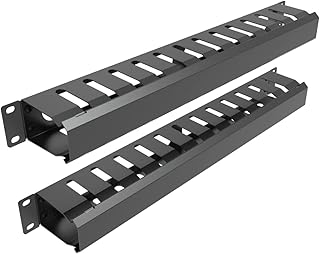
Twelve slots in 1U with all-metal construction is the sweet spot for budget-conscious builds that still need real capacity. The slot openings are sized generously enough to accept a standard Cat6 boot without forcing, and the black finish resists the fingerprint smudges that plague cheaper plastic-fingered panels.
- Pro: Highest slot density per dollar in the entire roundup.
- Pro: No cover means no lost screws or panels that snap off during installs.
- Con: Open slots offer no dust protection and let individual cables slip out if bumped.
Skip this in dusty industrial racks where debris gets into connections. It is ideal for clean home-lab or office environments where you want maximum routing flexibility at minimum cost.
10-Pack 19-Inch Covered 24-Slot Managers
Buying ten covered managers at once drops the per-unit cost to roughly seven dollars, which is genuinely absurd for a metal panel with a hinged cover. Twenty-four slots per panel means a single unit handles an entire patch field, and the included screws and cover make it feel like a product designed by someone who actually installs these.
- Pro: Cover protects cables and gives a finished look that open panels cannot match.
- Pro: Multi-pack pricing makes it the cheapest option per slot across the entire list.
- Con: Bulk packaging means you likely overbuy for a single small rack.
Not the right call if you need one or two panels. For multi-rack offices, MSPs, or anyone outfitting a new room with several cabinets, this pack is the most efficient procurement decision available.
Taiyin 4-Pack 2U Removable Cover Managers
Two rack units of height gives Taiyin’s twelve-slot panel more internal volume than any 1U competitor here, which translates directly to cleaner fiber routing and easier hand access when working with stiff cables. The removable cover is the key differentiator: it comes off entirely for quick changes, then snaps back with two screws for a tidy appearance.
- Pro: Two-unit height is the most practical choice for bundles with any real density or bend radius requirements.
- Pro: Removable cover saves time versus permanently hinged designs during heavy changes.
- Con: Consumes 2U of rack space, a real cost in tight cabinets.
Skip if your rack is already full to capacity and every single unit of height matters. For most 42U racks with 60-70% utilization, the trade-off is well worth the routing improvement.
1U Brush Panel for Cable Entry
A brush strip is not a cable manager in the routing sense — it is a boundary. Place it where a bundle crosses from outside the rack into the interior, and it hides the gap while keeping dust out and maintaining a professional appearance. The disassembled format ships flat for easy storage and installs in under a minute.
- Pro: Only solution in this list that cleanly seals an entry point without restricting cable movement.
- Pro: Brush strip accommodates any cable count or diameter without re-punching holes.
- Con: Zero routing function; must be paired with actual managers elsewhere in the rack.
Do not buy this as your primary cable management. Use it alongside a slot panel at the point where your bundle enters the rack, and it elevates the entire install’s appearance.
2-Pack 12-Slot Metal Managers
Twelve big finger slots per panel, sold as a pair for under twenty-five dollars total. The “big” designation matters: these slots accept cables with boots on, which eliminates the frustrating boot-removal step that plagues tighter alternatives. Having two panels lets you route front and back of a rack symmetrically without a separate purchase.
- Pro: Generous slot width accommodates boot-on Cat6 and smaller fiber jumpers without modification.
- Pro: Pair format solves front-and-back routing in a single purchase.
- Con: No cover or brush strip; the open-finger design looks less finished than premium options.
Not ideal for customer-facing racks where appearance matters. In a server room or data closet, the functionality-to-price ratio is hard to beat at this tier.
24-Port Patch Panel with Cable Support Bar
This is technically a keystone patch panel, not a cable tray, but the integrated support bar and ninety-degree port angle make it a hybrid that eliminates the need for a separate manager immediately above it. The support bar holds your bundle in place as it feeds into the rear of the panel, which is exactly where most cable management solutions fail to provide structure.
- Pro: Combined termination and routing reduces total rack space consumed by both functions.
- Pro: Ninety-degree port angle saves depth and keeps cords from pulling away from the panel face.
- Con: Not a true cable manager; it only routes at the termination point, not through the rack.
Do not expect this to replace a full rack of management panels. It is the smart choice when you want to eliminate one dedicated cable manager by merging that function into the patch field itself.
Buying Guide
Slot Width and Bend Radius
Measure your thickest cable — typically a shielded Cat6a with molded boot — and verify the slot opening accepts it without compression. Fiber requires a larger turning radius than copper, so 2U panels with deeper internal volume handle fiber bundles far better than 1U options. If you run both copper and fiber in the same tray, buy the wider panel and lose less time re-routing.
Cover Type: Removable, Hinged, or None
Removable covers are best for environments with frequent changes because they come off entirely. Hinged covers suit racks that rarely change but benefit from dust protection and a clean face. Open panels are the most accessible and least expensive but look unfinished and offer no debris protection. Match cover choice to your maintenance frequency, not to aesthetics.
Material Gauge and Mounting Hardware
Thin-gauge steel bends under moderate cable weight and leaves visible gaps at the mounting ears within weeks. Panels with included screws that actually fit standard rack rails save a trip to the hardware store and reduce install friction. Zinc plating resists corrosion in humid environments where bare steel will not last a single season.
Our Verdict
The Kable Kontrol five-foot mesh tray is the best rackmount cable tray overall for anyone with horizontal runs, fiber, or commercial compliance requirements — it simply does the job better than every rack-mount option at protecting cable integrity. For pure rack-internal routing, the All Metal 12-Slot panel for under $20 is the best value that any serious network build should consider. If your budget is truly tight and you need finished appearance, the 10-Pack with covers wins on per-unit cost despite requiring a larger upfront spend.
FAQ
What is the difference between a cable tray and a cable manager?
A cable tray is a structural basket or ladder that carries cable runs horizontally or vertically across distance, often mounted to walls or ceilings. A cable manager is a rack-mounted panel with slots or rings that organizes cables as they cross the front or back of a cabinet. Most rack installs need both: managers at the rack face and a tray carrying bundles between racks.
Do I need a covered cable manager?
Not always. Covers matter in dusty environments, public-facing racks, and installations where cable slippage would be disruptive. In a clean server room or home lab, an open panel gives faster access and lower cost. Decide based on how often you touch the cables and how exposed the rack is.
Can I use a 1U manager for fiber optic cables?
You can physically fit fiber jumpers through 1U slots, but the tight bend radius at the slot entry can cause micro-cracks in glass fiber over time. A 2U manager or a mesh tray gives fiber the space it needs to curve without exceeding its minimum bend radius, which is typically thirty millimeters for single-mode.
How many slots do I need per patch panel?
One slot per cable is the bare minimum, but that leaves no room for future additions and creates friction during changes. A good rule is to have slot count exceed your cable count by at least twenty percent, or use wider slots that accept two thin cables. The 12-slot panels in this roundup handle up to a 16-port patch field comfortably with the right cable gauge.









