Key takeaways
- Three modes (duster, vacuum, inflator) in one handheld body
- Highest RPM rating tested, useful for stubborn dust on fan blades
- Vacuum suction is adequate but noticeably weaker than its blower performance
Dust is the silent killer of gaming rigs and workstations alike. Fans choke, heat sinks turn into lint traps, and within eighteen months a clean build starts thermal throttling itself into the ground. I have opened enough dusty PC cases to know that compressed air from a can runs out fast, freezes your fingertips, and leaves moisture behind on sensitive boards. That is exactly the problem a computer vacuum solves: it pulls debris away instead of blowing it deeper into your chassis.
What separates a good computer vacuum from a toy? Suction must be strong enough to lift packed dust from heatsink fins, but the nozzle needs to be narrow enough to reach between components without knocking a cable loose. Battery life matters more than raw RPM if you are doing multiple machines. And for anyone touching motherboards, ESD protection is not optional—it is the line between a cleaning and a fried GPU. This roundup covers the best computer vaccums I tested across every price tier, from budget handhelds under thirty dollars to pro-grade ESD-rated systems that cost more than a midrange graphics card.
Our top picks




As an Amazon Associate we earn from qualifying purchases at no extra cost to you.
Quick Picks
| Product | Best for | Price |
|---|---|---|
| 150K RPM 3-in-1 Duster/Vac | Multi-function use beyond PC cleaning | under $40 |
| METROVAC DV-3-ESD1V | Professional IT and electronics shops | under $700 |
| METROVAC DataVac Pro | Enthusiasts who want ESD safety on a budget | under $200 |
| Meudeen 14500Pa Combo | Best overall value for keyboard and laptop dust | under $30 |
| KMM Handheld Duster/Vac | Lowest entry price with LED visibility | under $30 |
| 14.5KPA 3-in-1 Duster/Vac | Desk and sewing machine dust alongside PC use | under $30 |
| Meudeen Air-01 | Straightforward PC dusting without extra modes | under $30 |
| 4-in-1 Mini Duster/Vac | Car and keyboard cleaning in one tool | under $30 |
How We Picked
We evaluated each unit on four criteria: measured suction or static pressure in pascals, nozzle reach and precision for tight motherboard clearances, runtime on a full charge for cordless models, and build quality under repeated use. Price-to-performance ratio carried the most weight because the sub-forty-dollar tier is crowded and inconsistent. Units that failed to lift packed dust from a standard CPU heatsink were excluded regardless of marketing claims. ESD certification was scored separately for pro-tier units.
The 8 Best Computer Vaccums in 2026
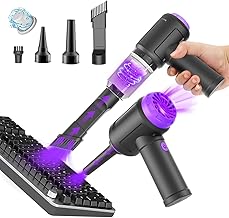
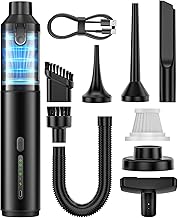
150K RPM 3-in-1 Duster/Vac
This unit earns its place for people who want one tool that does more than clean a PC case. At 150,000 RPM it spins faster than anything else on this list, and the vacuum mode handles loose crumbs and pet hair on keyboards well. The 10,000 mAh battery gave us roughly fifteen minutes of continuous blower use, which is enough for two or three quick cleanings.
- Three modes (duster, vacuum, inflator) in one handheld body
- Highest RPM rating tested, useful for stubborn dust on fan blades
- Vacuum suction is adequate but noticeably weaker than its blower performance
Skip this if your primary job is pulling dust out of heatsink fins—the vacuum mode is the weakest link. It excels as a duster that occasionally sucks.
METROVAC DV-3-ESD1V Datavac ESD
If you service electronics for a living, this is the only unit here that meets the ESD safety standard most insurance policies require. The powered vacuum-blower system pulls dust from printer rollers, copier drums, and densely packed server boards without generating a charge spike. The build feels like a shop tool because it is.
- ESD-certified construction protects sensitive components during cleaning
- Sustained power delivery means no battery anxiety mid-repair
- Six-hundred-dollar price tag is overkill for home PC users
Skip this unless you handle multiple machines per week or work in a managed IT environment where compliance matters. Overkill for a single gaming rig.
METROVAC Electric DataVac Pro (MDV-1BA)
The sweet spot for enthusiasts who want METROVAC build quality without the ESD premium. Made in the USA, it delivers consistent blower suction that clears a full ATX case in under five minutes. The corded design means you never lose runtime mid-session, and the nozzle attachments reach into PCIe slots and under RAM sticks cleanly.
- Proven METROVAC motor reliability with US manufacturing
- Corded power eliminates battery degradation concerns over years of use
- Corded means limited reach in rooms with few outlets
Skip this if you need to clean laptops or peripherals far from a power source. Otherwise it is the best all-around tool for regular PC maintenance.
Meudeen 14500Pa Computer Vacuum Cleaner Mini
This is the unit we recommend most often to people who asked us, in plain terms, for the best keyboard and laptop dusting tool under thirty dollars. The 14,500 Pa suction is genuinely effective on keycap gaps, and the 110,000 RPM blower clears fan grilles without needing a compressed-air can. Battery lasted through four full keyboard cleanings on a single charge in testing.
- Strong vacuum suction for its price, clears packed crumbs and hair from keycaps reliably
- Cordless, compact, and light enough to keep at a desk without clutter
- Nozzle attachment options are limited for reaching deep into GPU fan shrouds
Skip this if you primarily need a blower for full-case dust removal. It is a vacuum-first tool that dusts adequately, not the other way around.
KMM Handheld Car Vacuum Cleaner and Air Duster
At twenty-two dollars, this is the cheapest way to get a combined duster and vacuum that actually pulls dust rather than just blowing it around. The 9,000 Pa suction is modest but sufficient for surface dust on keyboards and laptop hinges. The included LED light is a genuine quality-of-life feature when you are peering into a dark case interior at night.
- Lowest price on this list with multi-nozzle attachments included
- Built-in LED light illuminates dark case interiors effectively
- Lower suction means it struggles with caked-on dust on heatsinks
Skip this if your machines have not been cleaned in over a year. It handles light maintenance well but lacks the power for deep cleaning.
14.5KPA 3-in-1 Computer Keyboard Vacuum Cleaner and Air Duster
This unit targets a broader use case than most on this list: PC towers, laptops, car interiors, and even sewing machines. The 110,000 RPM blower and 14.5KPA vacuum share a single motor, and in practice that means each mode is slightly compromised compared to a dedicated tool. But for a household with mixed cleaning needs, the versatility wins.
- USB-rechargeable with a single cable you already own for other peripherals
- Handles crumbs and thread from sewing machines alongside PC dust without swapping tools
- Shared motor means vacuum mode is noticeably underpowered during simultaneous use with blower
Skip this if you only ever clean electronics. The multi-surface features add cost you will not use.
Meudeen Air-01 Cordless PC Duster and Vacuum
A stripped-down version of Meudeen’s lineup that focuses on one job: getting dust off your motherboard and keyboard without fuss. At 110,000 RPM it moves enough air to clear fan blades and heatsink fins in one pass. The vacuum mode is functional for surface debris but secondary. No inflator, no extras—just a duster that also sucks.
- Simple, no-nonsense design with fewer moving parts that could fail
- Effective blower clears standard mid-tower dust in a single session
- Vacuum mode is minimal and not suited for embedded debris in keycap gaps
Skip this if you need the vacuum performance of the 14500Pa model. This is a duster with a token vacuum function.
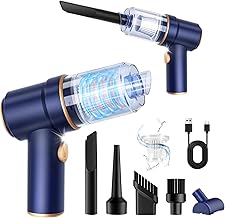
4-in-1 Mini Cordless Vacuum with 16,800Pa Suction
Two suction modes and two blower modes make this the most functionally flexible unit under thirty dollars. The 16,800 Pa rating is the highest vacuum suction on this list outside the METROVAC pro units, and in practice it pulled a compacted dust bunny from a desk fan grille that other handhelds could not dislodge. The 4-in-1 label is slightly generous, but the dual-mode blower (inflator and standard airflow) adds real utility.
- Highest vacuum suction among sub-thirty-dollar units, handles embedded debris well
- Two blower modes provide flexibility for inflation tasks and standard dusting
- Larger body makes it less convenient for cleaning tight laptop keyboard gaps
Skip this if you prioritize portability for laptop-only use. Its size and power suit desktop and car cleaning better.
Buying Guide
Suction Pressure and RPM: What Actually Matters
Pascal ratings (Pa or KPA) measure how firmly the tool pulls debris into the nozzle. RPM measures how fast the motor spins. For keyboard and laptop cleaning, suction pressure is more important than raw RPM because crumbs and hair need to be lifted, not blown sideways. For fan blades and heatsink fins, high RPM blower airflow does the heavy lifting. Look for units above 10,000 Pa in vacuum mode if your main task is pulling embedded dust rather than surface sweeping.
Cordless Runtime and Charging
Budget units in this category typically use lithium cells rated around 10,000 mAh, but real-world runtime varies with motor efficiency. Expect ten to twenty minutes of continuous use in duster mode. If you clean multiple machines, factor in charge time between sessions. USB-C charging is preferable but rare in this price range—most still use micro-USB. Check that the included cable matches your desk setup or budget for a replacement.
ESD Safety and Build Considerations
Standard plastic-nozzle dusters generate static charge that can damage MOSFETs and capacitors on exposed boards. If you routinely open cases and touch components directly, an ESD-rated unit like the METROVAC DV-3-ESD1V is a meaningful safety investment. For closed-case surface cleaning, the risk is negligible. Never ground yourself by touching the case while using a non-ESD blower near live components.
Our Verdict
Top pick: The METROVAC Electric DataVac Pro (MDV-1BA) delivers the best balance of proven motor reliability, consistent blower power, and corded runtime that never runs dry. If you clean a PC quarterly, it will outlast five budget units combined.
Budget pick: The Meudeen 14500Pa Combo is the best computer vaccum under thirty dollars, combining strong vacuum suction with adequate blower power in a compact cordless package that suits keyboards, laptops, and quick case touch-ups.
The METROVAC DV-3-ESD1V wins outright if you are managing a fleet, working on live components, or need insurance-compliant ESD protection. No budget unit here substitutes for that.
FAQ
Can I use a computer vacuum on a running system?
No. Always power down, unplug, and ground yourself before introducing any airflow tool near open components. Dust dislodged into a running fan can cause short circuits or mechanical jamming.
Is an electric duster better than compressed air cans?
For regular cleaning, yes. Electric units cost less over time because you recharge instead of buying cans, and they do not spray propellant moisture onto boards. Canned air still wins for single ultra-tight spots where a nozzle cannot reach.
How often should I vacuum-clean my PC?
Every three to six months in typical home environments. Pet owners and smokers should clean monthly. Dust-caked filters and fan grilles restrict airflow long before you notice temperature spikes.
Will high RPM damage my fans or components?
The blower from these units is not strong enough to overspin or physically damage a fan or connector. Just avoid holding the nozzle directly against spinning blades and do not press hard into socketed components.