Key takeaways
What's inside
Monitor for programming choices come down to sharp text and how much code fits on screen at once. The best monitor for programming maximizes resolution and vertical space so you scroll less and read more, so this roundup ranks seven screens by clarity, layout and comfort for long days in an editor.
As an Amazon Associate we earn from qualifying purchases.
As an Amazon Associate we earn from qualifying purchases at no extra cost to you.


By Daniel Foster
Top Screens for Writing Code
These seven panels prioritize crisp text, generous resolution and useful vertical space over gaming speed. Each entry names an honest limitation, since a tall specialist panel and a standard 4K screen suit different workflows. Amazon pricing shifts often, so check the live listing first.
| Model | Size / Res | Aspect | Standout | Tier |
|---|---|---|---|---|
| LG DualUp 28MQ780 | 27.6″ / 2560×2880 | 16:18 | Extra vertical space | Mid-premium |
| Dell UltraSharp U2723QE | 27″ / 4K | 16:9 | Sharp text + hub | Premium |
| Dell UltraSharp U3223QE | 32″ / 4K | 16:9 | Big 4K workspace | Premium |
| LG 27UP850 | 27″ / 4K | 16:9 | USB-C value | Mid |
| Samsung ViewFinity S8 | 32″ / 4K | 16:9 | Matte 4K value | Mid |
| Gigabyte M28U | 28″ / 4K | 16:9 | 4K + 144Hz | Mid |
| BenQ PD2725U | 27″ / 4K | 16:9 | Thunderbolt + KVM | Premium |
LG DualUp 28MQ780
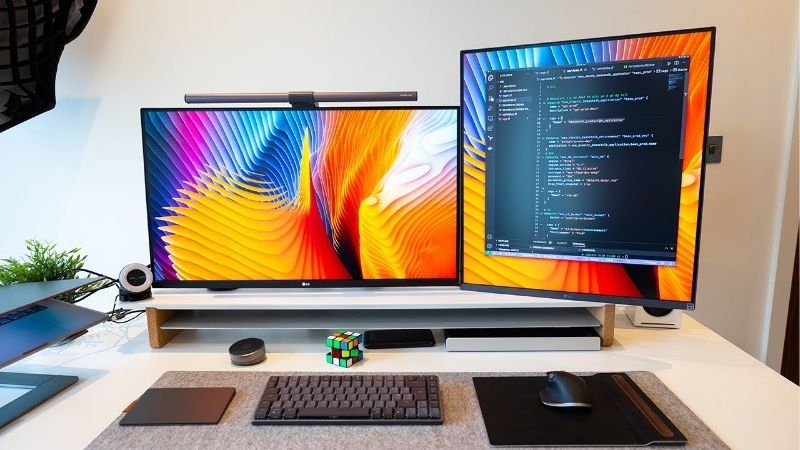
The DualUp is a unique monitor for programming, a 27.6-inch 16:18 panel at 2560×2880 that stacks the height of two screens. That extra vertical space shows far more lines of code at once, cutting scrolling in long files and letting you read a function without paging through it.
The unusual square-ish shape takes adjustment and its horizontal width is narrower than a 16:9 panel, so side-by-side windows are tighter. For a code-first workflow that values seeing more lines over more columns, though, the vertical real estate is genuinely useful.
Dell UltraSharp U2723QE
This 27-inch 4K IPS Black panel delivers razor-sharp text that keeps small fonts crisp through long sessions, plus a 90W USB-C hub. One cable docks a laptop and feeds peripherals, and the high pixel density makes reading code comfortable without eye strain.
At 60Hz it is a productivity screen, not a gaming one, and the hub features push it to premium pricing. For a developer who wants pin-sharp text and clean single-cable docking, though, it is one of the most comfortable panels on this list.
Dell UltraSharp U3223QE
The 32-inch 4K U3223QE gives a large 4K workspace with the same IPS Black contrast and USB-C hub as its 27-inch sibling. The extra size lets you tile an editor, a terminal and a browser side by side without shrinking any of them below a readable font.
A 32-inch screen needs more desk depth to sit comfortably, and it carries a premium price. For developers who want to replace a dual-monitor setup with one big, sharp 4K panel, though, it offers a spacious and tidy single-screen alternative.
LG 27UP850
This 27-inch 4K IPS panel is the value pick, offering crisp text and USB-C power delivery well below premium hub monitors. It docks a laptop over one cable and keeps code readable at high pixel density, making it a smart everyday monitor for programming on a budget.
Its calibration and contrast trail the IPS Black panels above it, and at 60Hz it is a productivity display. For a developer who wants sharp 4K text and simple laptop docking without paying flagship prices, though, it hits a strong balance of clarity and value.
Samsung ViewFinity S8
The 32-inch ViewFinity S8 pairs 4K sharpness with a matte finish that tames glare, ideal for a bright room where reflections tire your eyes. The large workspace suits multi-window development, and accurate color is a bonus for anyone who also touches design or front-end work.
It is a 60Hz panel and USB-C support varies by version, so confirm the exact model. As a glare-free, large 4K screen for reading code and running several tools at once, though, it is a comfortable and well-priced choice for long coding days.
Gigabyte M28U
The M28U is a 28-inch 4K IPS panel that adds 144Hz, so scrolling code and moving windows feel smooth on top of sharp text. It suits developers who also game after hours, giving crisp 4K clarity for work and a high refresh rate for play from one screen.
Driving 4K at 144Hz for games needs a strong GPU, though coding does not, and IPS contrast trails OLED. For a dual-purpose desk that codes by day and games by night, it is a flexible and well-rounded value option that avoids compromise.
BenQ PD2725U
The PD2725U is a 27-inch 4K designer panel with Thunderbolt and a built-in KVM, which suits developers on a two-machine desk. Thunderbolt daisy-chaining and single-cable docking keep cables tidy, while the sharp, accurate panel keeps small code fonts easy to read.
It is a 60Hz screen aimed at professionals, and the Thunderbolt feature set raises the price. For a developer who switches between a work laptop and a personal machine and values connectivity, though, the KVM and clean cabling make it a compelling hub.
How to Choose a Monitor for Programming
The right coding screen shows more code clearly and stays comfortable for hours. Work through the criteria below, starting with the numbers that define readability, so your monitor for programming fits your workflow and desk rather than a generic spec sheet aimed at gamers.
The decision numbers: resolution, vertical space and panel
For a monitor for programming, pixel density and vertical space matter most. High resolution keeps small fonts crisp, while extra height, whether from a 32-inch 4K panel or a tall 16:18 screen, shows more lines of code at once so you scroll less through long files.
Choose an IPS panel for accurate color and wide viewing angles, which keeps text consistent across the screen. Contrast matters less for code than for media, so prioritize sharpness and comfortable viewing angles over the deep blacks that a VA or OLED panel would add.
Refresh rate is a low priority for coding itself, though a higher rate makes scrolling and window movement feel smoother. Do not overpay for gaming-grade speed unless you also play, and put the budget toward resolution and screen height that you will use all day.
Space and fit: desk depth and orientation
Match the panel to your desk depth so you sit at a comfortable distance. A 32-inch 4K screen needs room to sit back, while a 27-inch panel suits most desks, and a tall 16:18 display has a taller footprint that needs headroom under a shelf.
Consider a second panel in portrait orientation for even more vertical lines. Many developers pair a main landscape screen with a rotated portrait one for logs or documentation, so check that any monitor you buy supports pivoting or a VESA arm for that layout.
Use a monitor arm to free desk space and fine-tune height. Setting the top of the screen near eye level reduces neck strain over long sessions, so confirm the VESA pattern and the arm’s weight rating before committing to a large or unusually shaped panel.
Connectivity and the two-machine desk
USB-C with power delivery docks a laptop over one cable, driving the display and feeding peripherals, which keeps a developer’s desk tidy. Thunderbolt adds daisy-chaining and faster data, useful if you connect external drives or a second monitor to the same chain.
A built-in KVM is a quiet productivity boost for anyone who switches between a work laptop and a personal machine. It lets one keyboard and mouse control both computers through the monitor, so check for a KVM if your desk runs more than one system daily.
Comfort, value and timing
Eye comfort features pay off over long hours of reading text. Flicker reduction, a low-blue-light mode and a matte coating all reduce fatigue, and while they are not a medical fix, they make a real difference across a full day spent staring at code.
Timing helps the budget. Monitors drop most around Prime Day in late June, Black Friday in November and the back-to-school window, so a little patience can move you into a 4K, Thunderbolt or tall specialist panel for the same price you would pay off-season.
Frequently Asked Questions
Here are quick answers to the questions developers ask most when picking a screen for long coding sessions, so you can choose with confidence.
Is one big screen or dual monitors better for coding?
Both work well. A single 32-inch 4K panel gives a seamless space to tile an editor, terminal and browser, while dual monitors let you dedicate one screen to logs or docs. Choose based on desk space and whether you prefer one surface or separate, angled screens.
Does vertical space really matter?
Yes, for code it is a real benefit. More height shows more lines at once, which reduces scrolling through long files and helps you keep a whole function in view. That is why tall 16:18 panels and portrait second screens are popular among developers.
Is 4K necessary for programming?
4K is not essential but it makes small fonts noticeably crisper and easier on the eyes over long hours. A good 1440p panel is a solid budget option, but the extra sharpness of 4K at 27 inches or larger is the most comfortable for reading code.
Do I need a high refresh rate?
Not for coding itself, though a higher rate makes scrolling and dragging windows feel smoother. If you do not game, 60Hz is fine and you can spend the budget on resolution or vertical space, which you will benefit from throughout every working day.
See More:
- Best eyeshadow blender brush
- Best frozen foods for air fryer
- Best frozen food for air fryer
- Best way to reheat steak in air fryer
- Best air fryer recipes book
Final Thoughts on the Best Monitor for Programming
The best monitor for programming is the one whose resolution, vertical space and IPS panel keep your code sharp and readable for hours. Favor 4K for crisp text, prize screen height to see more lines, and add USB-C or a KVM if your desk runs more than one machine. Skip gaming-grade refresh unless you play, time the buy around a major sale, and the right monitor for programming will let you read more and scroll less every day.