Key takeaways
What's inside
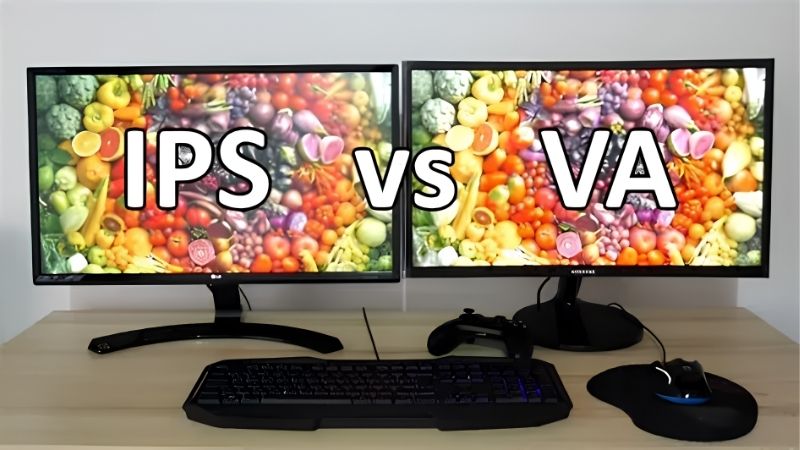
IPS vs VA monitor is the panel debate that decides how your screen looks in daily use. The IPS vs VA monitor choice comes down to contrast, response time, viewing angles and color, so this guide breaks down each number, shows where each panel wins, and recommends picks to match your work or play.
As an Amazon Associate we earn from qualifying purchases.
As an Amazon Associate we earn from qualifying purchases at no extra cost to you.


By Daniel Foster
How IPS and VA Panels Differ
Both panel types are LCD technologies, but they trade strengths in ways you can see every day. Understanding those trade-offs first makes the shopping simple, because you will know which compromises you can live with before you compare any specific models or prices.
| Attribute | IPS | VA |
|---|---|---|
| Contrast / black levels | Lower (grayer blacks) | Higher (deeper blacks) |
| Color accuracy | Excellent | Very good |
| Viewing angles | Wide, consistent | Narrower, some shift |
| Response time | Typically faster | Can smear in dark scenes |
| Best suited to | Office, creative, mixed | Immersive gaming, media |
The decision numbers that separate them
The IPS vs VA monitor gap shows up in four figures: contrast ratio, response time, viewing angle and color accuracy. VA panels post higher contrast, often around 3000:1 or more, for deeper blacks, while IPS typically sits near 1000:1 but delivers faster response and wider angles.
Response time matters for motion. IPS panels usually transition faster and cleaner, which helps fast gaming, whereas VA can show smearing in the darkest scene transitions. Weigh these numbers against what you watch and play before letting contrast alone decide the panel.
Color and angles round it out. IPS holds accurate color across wide viewing angles, ideal for shared screens and creative work, while VA looks best viewed head-on and can shift slightly toward the edges, which is worth checking if you sit off-center often.
Where IPS panels win
IPS is the safer all-rounder for most desks. Its wide, consistent viewing angles and accurate color make it the default for office work, photo and design tasks, and any screen shared between several people who do not always sit directly in front of it.
Fast IPS panels have also closed much of the old speed gap, so modern IPS gaming monitors handle competitive play well. The main compromise is contrast: blacks look grayer than VA, which is most noticeable watching dark movies or playing atmospheric games in a dim room.
For a mixed-use screen that codes, edits and games, IPS is usually the sensible pick. You trade some contrast for reliable color, wide angles and quick response, which suits the widest range of tasks without a glaring weakness in everyday use.
Where VA panels win
VA is the contrast champion, and that is its headline strength. Deep blacks and high contrast make it excellent for immersive single-player games, movies and dim-room viewing, where the difference between grayish and inky shadows is immediately obvious on screen.
Many curved gaming panels use VA for exactly this reason, pairing high contrast with high refresh rates for an immersive feel. The trade-off is response time in dark transitions, which can smear, and narrower viewing angles that suit a single seated user better than a crowd.
If you mostly game solo, watch a lot of movies, or want the most striking contrast for the money, VA rewards you. Just sit reasonably head-on and accept that fast, dark motion is where VA shows its one real weakness against a good IPS panel.
Space and fit for each panel
Panel type interacts with size and seating. VA suits a single-user desk where you sit centered, since its contrast shines head-on, while IPS holds up better on a wide or shared screen viewed from an angle, so factor your seating into the IPS vs VA monitor choice.
Curved VA panels often come in larger and ultrawide sizes, which need a deeper desk to sit at a comfortable distance. Measure your desk depth and check the VESA mount either way, since a monitor arm helps you position any panel for the best angle and comfort.
Choosing Between IPS and VA for Your Use
With the differences clear, the last step is matching a panel to your main task and picking a proven model. The recommendations below cover both technologies so you can act on the IPS vs VA monitor decision rather than just understanding it in theory.
Best IPS picks
For mixed use and gaming, the LG UltraGear 27GP850 is a strong 27-inch 1440p Nano IPS panel with a high refresh rate and fast response. It balances speed, color and wide angles well, making it a reliable all-round choice for a desk that does a bit of everything.
For office and creative work, the Dell UltraSharp U2723QE is a 27-inch 4K IPS Black panel with a USB-C hub and deeper-than-usual contrast for IPS. If value matters, the Gigabyte M27Q offers 1440p IPS at 170Hz with a KVM, covering both work and play affordably.
Best VA picks
For immersive gaming, the Samsung Odyssey G7 pairs a steep curve with a 240Hz VA panel, delivering high contrast and speed for single-player worlds and racing. Its deep blacks and wrap-around feel are exactly what VA does best on a focused, single-user gaming desk.
For maximum width, the Samsung Odyssey G9 is a 49-inch 32:9 VA super ultrawide that replaces two screens with rich contrast. Budget VA options like AOC’s curved models also deliver strong blacks affordably, though with slower response than a comparable IPS gaming panel.
Matching the panel to your task
Let your main use lead the IPS vs VA monitor decision. Choose IPS for office, creative and shared or off-angle screens where color and viewing angles matter, and choose VA for solo gaming, movies and dim rooms where contrast and deep blacks carry the experience.
If you cannot decide, IPS is the lower-risk default because its weakness, contrast, is less disruptive than VA smearing for most mixed tasks. But if you know contrast and immersion are your priority and you sit centered, VA gives you more visual impact for the money.
Remember OLED sits above both for contrast and response if budget allows, though it carries burn-in caution for static content. For LCD buyers weighing cost against performance, though, the IPS versus VA choice remains the practical decision for most desks today.
Frequently Asked Questions
Here are quick answers to the questions readers ask most when deciding between the two panel types, so you can choose with confidence.
Is IPS or VA better for gaming?
It depends on your games. IPS suits competitive play with faster, cleaner response and wide angles, while VA suits immersive single-player games and movies with deeper contrast. Fast IPS has narrowed the speed gap, so pick based on whether motion clarity or contrast matters more.
Which panel is best for office work?
IPS is the better default for office and creative work thanks to accurate color and wide, consistent viewing angles. That matters for documents, design and any shared screen viewed off-center, whereas VA’s contrast advantage is less useful for typical productivity tasks.
Do VA panels really smear?
VA can show smearing in the darkest scene transitions, which is its main weakness in fast, dark motion. Good modern VA panels reduce this, but if you play fast competitive games with dark scenes, a quick IPS panel usually handles that motion more cleanly.
Is OLED better than both?
OLED beats both IPS and VA on contrast and response with per-pixel lighting, but it costs more and risks burn-in from static content over long hours. For LCD buyers on a budget, the IPS versus VA choice remains the practical decision for most desks.
See More:
- Best eyeshadow blender brush
- Best frozen foods for air fryer
- Best frozen food for air fryer
- Best way to reheat steak in air fryer
- Best air fryer recipes book
Final Thoughts on the IPS vs VA Monitor Choice
The IPS vs VA monitor decision comes down to contrast versus versatility. Choose VA for deep blacks, immersive solo gaming and movies viewed head-on; choose IPS for accurate color, wide angles and mixed work-and-play use where flexibility matters most. Match the panel to your main task, sit at the right distance and angle, and either technology can serve you well once you know which trade-offs you are comfortable living with.