Best tablet for note taking is decided by pen feel, latency and app support, not marketing, so this roundup ranks the best tablet for note taking by stylus quality, screen type and software. We combine maker specs with long-term owner feedback, note which pens are included, and give one honest drawback per pick.
As an Amazon Associate we earn from qualifying purchases.
Our top picks




As an Amazon Associate we earn from qualifying purchases at no extra cost to you.
By Daniel Foster
Best Tablet for Note Taking Ranked by Pen and Screen
Note-takers split into two camps: distraction-free e-ink writing slates, and colour tablets that also run study and drawing apps. The tiers below cover both, and Amazon prices move often, so read them as guidance and confirm the live figure before you buy.
| Tablet | Screen | Pen / apps | Tier |
|---|---|---|---|
| Amazon Kindle Scribe | 10.2″ e-ink 300ppi | Pen included / basic notes | Mid |
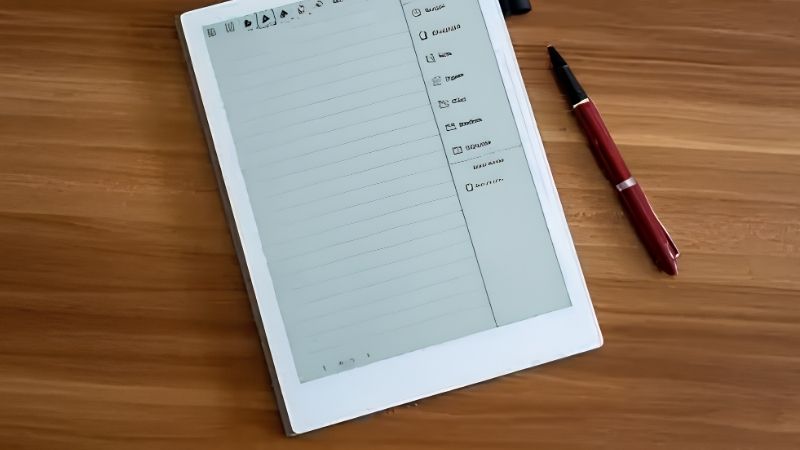
| reMarkable 2 | 10.3″ e-ink | Pen extra / paper feel | Mid |
| Boox Note Air | 10.3″ e-ink Android | Pen included / full apps | Mid |
| Galaxy Tab S9 FE | 10.9″ 90Hz LCD | S Pen included / Samsung Notes | Mid |
| Galaxy Tab S9 | 11″ 120Hz AMOLED | S Pen included / Samsung Notes | Premium |
| Apple iPad Air (M2) | 11″ LCD | Pencil Pro / GoodNotes | Premium |
Amazon Kindle Scribe (Mid, e-ink)
The Kindle Scribe writes on a 10.2-inch 300ppi e-ink screen with an included pen, pairing distraction-free note-taking with the full Kindle library. The paper-like display is easy on the eyes for long sessions and the battery lasts weeks, not hours, which suits all-day study.
The note features are simpler than a full app, and it stays inside Amazon’s ecosystem. If your goal is reading plus handwritten margins and notebooks without the pull of apps and notifications, it is a focused best tablet for note taking pick that avoids screen fatigue.
reMarkable 2 (Mid, e-ink)
The reMarkable 2 is the purist’s writing slate: a thin 10.3-inch e-ink panel tuned for a genuine paper drag under the pen, with low latency that feels close to ink. There is no app store or browser, which is the entire point for people who want to think without distraction.
The pen is a separate purchase and some cloud and handwriting-conversion features sit behind a subscription. It is grayscale only with no backlight. For focused meeting and lecture notes it is superb; for anything colour or app-driven, a tablet elsewhere on this list fits better.
Boox Note Air (Mid, e-ink Android)
The Boox Note Air brings full Android to e-ink: a 10.3-inch panel with an included pen that runs Google Play apps, so you can use your preferred note software on a paper-like screen. Warm and cold front lights let you write in any lighting without eye strain.
The trade-off is software polish, as e-ink refresh causes some ghosting and Android on e-ink can feel less smooth than on LCD. For readers who want app flexibility and handwriting on one low-fatigue screen, it is uniquely versatile among note-taking devices, provided you accept the quirks.
Samsung Galaxy Tab S9 FE (Mid, LCD)
The Tab S9 FE is the value colour pick: a 10.9-inch 90Hz LCD with an S Pen in the box and no charging or pairing needed, plus microSD and an IP68 rating. Samsung Notes offers strong handwriting, shape recognition and easy export, making it a practical daily notebook.
The Exynos chip is mid-tier and it is LCD rather than AMOLED, so it is less vivid than the flagship. But for handwritten notes, marking up PDFs and general study in colour, the included pen and water resistance make it one of the best value note-taking tablets available.
Samsung Galaxy Tab S9 (Premium, AMOLED)
The Tab S9 steps up to an 11-inch 120Hz AMOLED with a low-latency S Pen included, so ink appears almost instantly under the tip. The Snapdragon 8 Gen 2 keeps large notebooks and multitasking smooth, and IP68 plus DeX support add durability and desktop-style productivity.
It is premium-priced and the base storage fills fast, though microSD helps. For students and professionals who want fast, fluid handwriting on a vivid screen that doubles as a media and work tablet, it is among the best tablet for note taking choices in colour.
Apple iPad Air M2 (Premium, LCD)
The iPad Air M2 pairs a laptop-class chip with Apple Pencil Pro and the strongest note apps around, including GoodNotes and Notability. Pencil latency is very low, and hover and tilt support make handwriting and sketching feel natural for long, dense lecture sessions.
The Pencil Pro is a separate buy and the glossy, non-textured screen feels smoother than paper unless you add a matte protector. For anyone in the Apple world who wants best-in-class note software and years of updates, the Air is the pick, with the Pencil cost factored in.
How to Choose the Best Tablet for Note Taking
Match the screen type, pen and app to how you actually write before you buy, and check whether a stylus is included. The points below settle most decisions faster than comparing spec sheets line by line.
The Specs That Decide It
The deciding factors are pen latency and support, screen type and note software. E-ink suits distraction-free, low-fatigue writing with weeks of battery; colour LCD or AMOLED suits app-rich notes, mark-up and multitasking. Decide which camp you fall into before comparing individual models.
Check whether the pen is included, as that changes the true price, and confirm your preferred app runs on the platform, since e-ink and Fire devices limit choice. Getting pen and software right first prevents buying a slate that handwrites poorly or lacks your notebook app.
Size and Fit for How You Write
Screen size shapes the writing experience. A 10 to 11-inch panel mirrors a small notebook and travels easily, while larger tablets give more page room for diagrams but weigh more in a bag. Think about whether you write on a desk, in lectures or on the move.
A matte screen protector adds paper-like friction on glossy tablets, which many handwriters prefer. Check the device weight in grams and how it feels held for long stretches, since a heavy slate that tires your hand undermines even the best pen and note app pairing.
Battery, Cloud and Timing
Battery life separates the camps: e-ink lasts weeks, while colour tablets last a day or two of heavy note use. Also check how notes sync, whether through a free account or a subscription, since some writing slates gate cloud and handwriting conversion behind a paid tier.
On timing, back-to-school in August and the late-June Prime Day and November sales are the strongest windows for the best tablet for note taking, and pen-equipped slates are popular gifts in the holiday season, though sale dates move yearly, so confirm the official ones.
Best Tablet for Note Taking FAQ
Readers ask these questions most when choosing a handwriting device, covering e-ink versus colour, paper feel and whether note conversion works.
Is e-ink or a colour tablet better for notes?
E-ink is easier on the eyes, distraction-free and lasts weeks, ideal for pure writing and reading. A colour LCD or AMOLED tablet runs full apps, supports mark-up in colour and doubles as a media and study device. Choose e-ink for focus, colour for versatility and app choice.
Do these tablets feel like writing on paper?
E-ink slates like reMarkable have a natural paper drag out of the box. Glossy tablets feel smoother, but a matte screen protector adds friction close to paper. Low pen latency matters as much as texture, so look for models where ink appears almost instantly under the tip.
Can handwritten notes convert to text?
Yes on most modern platforms. Samsung Notes, GoodNotes, Notability and reMarkable offer handwriting-to-text, though accuracy varies with your writing and language. Some devices include it free while others require a subscription, so check that detail before buying if conversion is important to you.
See More:
- Best eyeshadow blender brush
- Best frozen foods for air fryer
- Best frozen food for air fryer
- Best way to reheat steak in air fryer
- Best air fryer recipes book
Bottom Line on the Best Tablet for Note Taking
The best tablet for note taking depends on your camp: a Kindle Scribe, reMarkable 2 or Boox Note Air for distraction-free e-ink writing, and a Galaxy Tab S9 FE, Tab S9 or iPad Air M2 for app-rich colour notes that also handle study and media. Check that the pen is included, add a matte protector if you want paper feel, and let back-to-school or Prime Day set the price. Match the pen and app to how you write and notes become a pleasure.