Best tablet for students comes down to value, battery and note-taking, not brand hype, so this roundup ranks the best tablet for students by chip, screen, storage and stylus support. We pair maker specs with long-term owner feedback, note where microSD and a pen are included, and list one honest drawback per pick.
As an Amazon Associate we earn from qualifying purchases.
By Daniel Foster
Best Tablet for Students Ranked by Specs
Students need a screen that reads well, a chip that keeps up through a degree, and battery that survives a lecture day. The tiers below run budget to premium, and Amazon prices move constantly, so treat them as a guide and check the live figure at checkout.
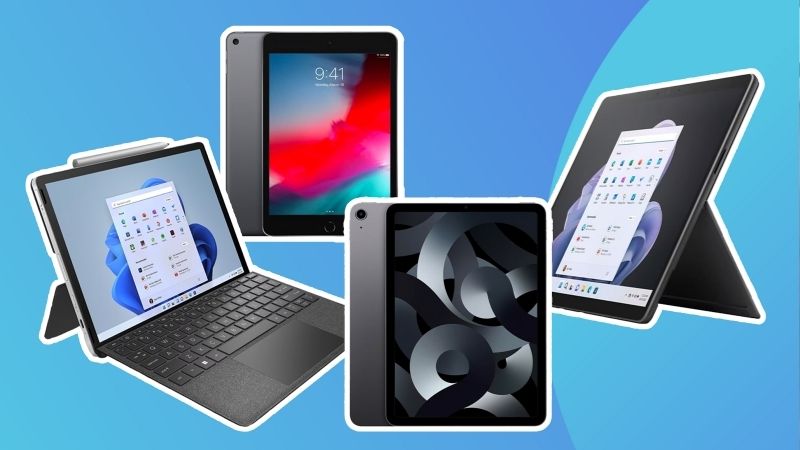
| Tablet | Display / chip | Stylus / storage | Tier |
|---|---|---|---|
| Amazon Fire HD 10 | 10.1″ LCD / MediaTek | No pen / +microSD | Budget |
| Galaxy Tab A9+ | 11″ 90Hz LCD / SD 695 | Optional / +microSD | Budget |
| Apple iPad (10th gen) | 10.9″ LCD / A14 | USB-C Pencil / 64-256GB | Mid |
| Galaxy Tab S9 FE | 10.9″ 90Hz LCD / Exynos 1380 | S Pen included / +microSD | Mid |
| Lenovo Tab P12 | 12.7″ 3K LCD / Dimensity 7050 | Tab Pen included / +microSD | Mid |
| Apple iPad Air (M2) | 11″ LCD / M2 | Pencil Pro / 128-512GB | Premium |
Amazon Fire HD 10 (Budget)
The Fire HD 10 is the cheapest way onto a 10-inch screen: a 1080p LCD, a modest MediaTek chip and microSD expansion, priced for tight student budgets. For textbooks, video lectures and browsing inside Amazon’s world it does the core job without draining a term’s savings.
The catch is Fire OS, which uses the Amazon Appstore rather than Google Play, so many study apps need workarounds. Performance is basic and multitasking stutters. Treat it as a reading and media device, not a laptop replacement, and it earns its low price for lighter coursework.
Samsung Galaxy Tab A9+ (Budget)
The Tab A9+ adds full Google Play at a budget price, with an 11-inch 90Hz LCD, Snapdragon 695, 4 to 8GB of RAM and microSD. The higher refresh rate smooths scrolling through notes and PDFs, and quad speakers make shared study sessions and video lectures easier to hear.
Performance is modest, so heavy apps and games will slow, and the pen is a separate buy. As an everyday Android study slate for browsing, streaming and light note-taking it is one of the best tablet for students options on a shoestring, with expandable storage keeping costs down.
Apple iPad 10th Generation (Mid)
The 10th-gen iPad pairs a 10.9-inch LCD with the A14 chip, USB-C charging and access to the deep iPadOS app library, including strong study and note apps. It is fast, well supported for years of updates and light enough to carry between classes all day without strain.
The drawbacks are storage that starts at 64GB and a non-laminated screen, plus the USB-C Apple Pencil lacks pressure sensitivity. For most students the ecosystem, longevity and app quality justify the mid-tier price, especially if you already use an iPhone for handoff and shared files.
Samsung Galaxy Tab S9 FE (Mid)
The Tab S9 FE is the note-taker’s value pick: a 10.9-inch 90Hz LCD, Exynos 1380 chip, microSD and, crucially, an S Pen in the box with no extra cost. An IP68 rating means a spilled coffee at the library is survivable, which matters for gear that lives in a backpack.
The Exynos chip is mid-tier rather than flagship, and it is an LCD, not AMOLED. But for handwriting in Samsung Notes, reading and general study, the included pen and water resistance make it a standout among the best tablet for students at this price point.
Lenovo Tab P12 (Mid)
The Tab P12 gives students the most screen for the money: a 12.7-inch 3K LCD, Dimensity 7050, microSD and a bundled Tab Pen. The large, sharp panel suits split-screen work, side-by-side reading and marking up lecture slides without constant scrolling on a cramped display.
The trade-offs are a mid-tier chip that limits heavy gaming and a size that is less pocketable. For a home-and-library study tablet where screen space beats portability, it is excellent value, and the included pen removes an extra purchase from the budget entirely.
Apple iPad Air M2 (Premium)
The iPad Air M2 is the long-haul pick: a laptop-class M2 chip, an 11-inch laminated LCD, Apple Pencil Pro support and storage up to 512GB. It handles design apps, heavy multitasking and years of updates, making it a device that can last a full four-year degree with room to spare.
It is premium-priced and the Pencil Pro is a separate buy, so the real cost climbs. For students in demanding programs like design, engineering or media who want one device for notes, creative work and study, the performance headroom is worth the outlay over a cheaper slate.
How to Choose the Best Tablet for Students
The right pick matches your course load, budget and note habits rather than the flashiest spec sheet. Work through the points below and check the physical size against your bag before you commit to a device you will carry every day.
The Specs That Decide It
Read screen size and resolution, chip and RAM, storage with or without microSD, battery and the operating system. For heavy apps and years of use, a stronger chip and more storage matter; for reading and light notes, a mid or budget slate with expandable storage is plenty.
Stylus support is a deciding spec for note-takers: some tablets include a pen, while others charge extra. Ecosystem counts too, since Fire OS locks you out of Google Play. Settle these first to avoid buying a cheap tablet that stumbles on your required study software.
Size and Fit for Your Backpack
A tablet’s screen size is its real footprint. A 10 to 11-inch slate is light for one-handed reading and slips into any bag between classes, while a 12.7-inch panel gives more room for split-screen study but adds weight for long commutes and lecture halls.
Weigh how you will carry and hold it. If you travel far to campus, favour a lighter model and a protective folio case that doubles as a stand. Check the weight in grams and dimensions against your backpack so the device you buy actually comes with you every day.
Battery, Value and Timing
Battery in real hours decides whether a tablet survives back-to-back lectures without a charger. Look for all-day figures, and remember microSD lets budget and mid slates grow cheaply, while premium models without a card slot need you to buy enough storage upfront to last.
Timing helps too: back-to-school from late July through early September and the late-June Prime Day window are the strongest discount periods for the best tablet for students, and slates are common gifts in the holiday season, though sale dates shift yearly, so confirm them.
Best Tablet for Students FAQ
These are the questions students ask most before buying, covering whether a tablet can replace a laptop, storage needs and whether a stylus is worth it for coursework.
Can a tablet replace a laptop for school?
For reading, notes, research and light writing, yes, especially with a keyboard case. For heavy programming, statistics software or desktop apps, a laptop is still better. Many students pair a budget tablet for lectures with a shared or personal laptop for coursework that needs full desktop programs.
How much storage do I need as a student?
For notes, PDFs and streaming, 64 to 128GB is usually enough, ideally with microSD to expand cheaply later. If you store lecture recordings, large design files or offline video, aim for 256GB, and buy generously upfront on tablets that lack a microSD card slot.
Do I need a tablet with a stylus?
If you handwrite notes, sketch diagrams or mark up slides, a pen is worth it, and models like the Tab S9 FE and Lenovo P12 include one. If you mainly type and read, skip the pen and put the saving toward more storage or a keyboard case instead.
See More:
- Best eyeshadow blender brush
- Best frozen foods for air fryer
- Best frozen food for air fryer
- Best way to reheat steak in air fryer
- Best air fryer recipes book
Bottom Line on the Best Tablet for Students
The best tablet for students is the one that matches your course load and budget: a Fire HD 10 or Tab A9+ for reading and lectures on a shoestring, an iPad 10th gen or Tab S9 FE for balanced study and notes, a Lenovo P12 for the biggest screen, and an iPad Air M2 for demanding degrees. Decide on stylus and storage needs early, check the weight against your bag, and let back-to-school timing set the price. Buy for the fit and it lasts the whole degree.
Product links and buying checks
As an Amazon Associate, we earn from qualifying purchases.
- Samsung Galaxy Tab A9+ 11-inch, 64GB, US model on Amazon — Check the exact model, selected variant and seller before ordering.
Prices, availability and included accessories can change. Review the current listing and the compatibility guidance above before purchasing.