Key takeaways
- Pro: Color tape options make labels scannable at a glance from a distance.
- Pro: Compact form factor fits in a desk drawer or tote bag without fuss.
- Con: Limited tape width compared to larger P-Touch models restricts label complexity.
Label makers are one of those categories where the gap between a frustrating purchase and a genuinely useful one comes down to a handful of details: how the tape feeds, whether the keyboard layout actually makes sense, and how much you will hate printing a single address after a month. I have spent enough time organizing pantries, labeling cable runs, and tagging classroom supplies to know that the right machine saves hours while the wrong one ends up in a drawer collecting dust.
The best label makers on the market right now split into two camps. Handheld units with physical keyboards excel at speed and simplicity — you type, you print, you move on. App-connected compact printers shine when you need templates, icons, or batch printing from a phone. What separates the excellent choices from the mediocre ones is tape compatibility, build quality, and whether the software experience feels like a shortcut or an extra chore. Here is how the field ranked in 2026.
Our top picks




As an Amazon Associate we earn from qualifying purchases at no extra cost to you.
Quick Picks
| Product | Best for | Price |
|---|---|---|
| Brother PT-N10 | Personalized color labels | n/a |
| SUPVAN E11 | Versatile font and icon selection | n/a |
| NIIMBOT D110 | Kids’ school items | n/a |
| Brother PTD210 Bundle | Ready-to-use starter kit | n/a |
| Brother PTD220 | Home and office everyday use | n/a |
| Nelko P21 | Teachers and classroom labeling | n/a |
| TZE-231 Tape (6 Packs) | Replacement tape for Brother models | n/a |
| DYMO LabelManager 160 | Simple keyboard-driven labeling | n/a |
How We Picked
Three criteria drove every ranking decision here. First, tape ecosystem and availability — a machine that uses widely stocked laminated tapes stays useful long after the novelty fades. Second, the input method: physical keyboards win for one-off jobs, while app-connected units earn their keep when you need templates, QR codes, or batch runs. Third, value proposition, meaning whether included tapes, rechargeable batteries, or a built-in cutter justify the asking price relative to competitors. Durability of output mattered too; non-laminated labels that fade in a dishwasher are a dealbreaker.
The 8 Best Label Makers in 2026
Brother P-Touch PT-N10
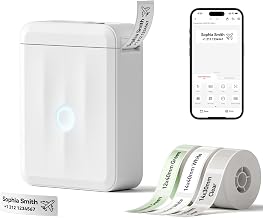
This handheld unit targets buyers who want color output without touching a smartphone. The Btag-compatible ~½-inch (12mm) wide tapes produce bold, multi-color labels that stand out on shelves, mailboxes, or storage bins. It is genuinely portable and prints quickly with a straightforward keyboard.
- Pro: Color tape options make labels scannable at a glance from a distance.
- Pro: Compact form factor fits in a desk drawer or tote bag without fuss.
- Con: Limited tape width compared to larger P-Touch models restricts label complexity.
Skip this if you need barcode, QR, or database-driven labels — it is designed for short text, not data-heavy work.
SUPVAN E11 Keyboard & Bluetooth Label Maker
The E11 bridges the gap between keyboard-driven simplicity and app-driven flexibility. It ships with four tape widths and connects via Bluetooth to an app offering 30+ fonts and 660+ icons. The minimal-margin print mode means you waste less tape per label, which adds up over hundreds of prints.
- Pro: Inkless thermal printing means zero ongoing cost beyond tape rolls.
- Pro: Rechargeable battery eliminates AA/AAA hunting during a long labeling session.
- Con: App interface occasionally lags when switching between tape widths mid-project.
Skip this if you need professional-grade laminated labels for outdoor or industrial use.
NIIMBOT D110 Mini Label Maker
The D110 is built for a specific job: parents and teachers who need to slap names onto dozens of school supplies quickly. The white compact design is inoffensive on a desk, and the app provides multiple templates so you can add a name, grade, or subject without typing each label from scratch. Inkless printing keeps consumable costs low.
- Pro: Template library reduces per-label effort to a few taps.
- Pro: Lightweight and small enough to toss in a work bag.
- Con: Single tape width limits versatility for home or office beyond school items.
Skip this if your labeling needs span file folders, pantry jars, and cables at various sizes.
Brother P-Touch PTD210 Bundle
The PTD210 bundle gives you everything to start labeling out of the box, including four TZe tapes. It is the smallest full-featured Brother P-Touch, making it ideal for a home office shelf or a teacher’s desk where real estate is scarce. Easy-to-use keyboard controls mean there is virtually no learning curve.
- Pro: Included tapes mean you start printing on day one without a separate purchase.
- Pro: Small footprint stores easily in tight spaces.
- Con: Display is cramped for reviewing longer label text before printing.
Skip this if you need wireless connectivity or batch printing from a phone.
Brother P-Touch PTD220
The PTD220 steps up from the D210 with a slightly larger display and support for TZe tapes up to approximately ½ inch. It is positioned squarely at home and office users who want reliable, durable labels without paying for premium features they will never touch. The keyboard layout is among the best in the class.
- Pro: Laminated TZe tapes produce labels that resist water, oil, and UV fading.
- Pro: Auto-cutter with a clean edge saves time on repetitive jobs.
- Con: No Bluetooth or app support limits design flexibility for graphic-heavy labels.
Skip this if you need icons, barcodes, or template-driven workflows.
Nelko P21 Label Maker
Nelko’s P21 is a strong pick for teachers and organizers who want app-connected printing with a built-in cutter. The creative app provides multiple templates, and inkless thermal printing means low running costs. It handles school supplies, office binders, and home pantry labels with equal ease thanks to Bluetooth connectivity and a compact body.
- Pro: Built-in cutter produces clean edges without manual trimming.
- Pro: Template library speeds up repetitive classroom labeling significantly.
- Con: Requires a phone for most label designs, which slows down quick one-off prints.
Skip this if you want a standalone device with a full keyboard for rapid data entry.
TZE-231 Label Maker Tape (6 Packs)
This is not a printer but an essential accessory for anyone already using a Brother P-Touch model. Each cassette is 12mm wide, laminated, and produces black-on-white labels that resist smudging and fading. The 6-pack value brings per-cassette cost well below single rolls, making it the sensible restocking choice. Compatible with PT-D220, PT-D210, PT-H110, PT-D200, PT-D410, and related models.
- Pro: Laminated construction outlasts non-laminated alternatives in kitchens and workshops.
- Pro: Bulk pack reduces long-term consumable expenses.
- Con: Single color option limits use to text-only labels.
Skip this if your printer uses D1, Btag, or non-TZe tape formats.
DYMO LabelManager 160
The LabelManager 160 is DYMO’s answer to the “I just need labels now” buyer. A QWERTY keyboard with one-touch smart keys lets you create a file folder or storage bin label in seconds. The large display reduces typos during review, and the bundled three D1 cassettes cover common widths. Portable and handheld, it slots into any home or office desk without a power cord.
- Pro: QWERTY layout with smart keys is faster than character-by-character selection.
- Pro: Large display shows the full label preview before printing.
- Con: D1 tape ecosystem is less widely stocked than Brother’s TZe line.
Skip this if you want to print from a phone or need thousands of labels across varied designs.
Buying Guide
Tape Format and Durability
Tape format determines whether your labels survive a dishwasher cycle, a sunny windowsill, or years of handling. Laminated tapes like Brother’s TZe line resist water, chemicals, and UV fading far better than non-laminated alternatives. Check that the printer you choose supports the tape width you need most: 12mm covers most text labels, while 18mm or 24mm options give you room for longer file names or barcodes.
Input Method: Keyboard vs. App
If your primary use case is one-off labels — a switch at a mailroom, a name tag for a meeting — a physical keyboard is faster than pulling out a phone, opening an app, and tapping through menus. App-connected machines earn their place when you need templates, icons, serial-number sequences, or batch printing. Many buyers are best served by owning both types, but if you must pick one, match it to your most frequent task.
Cost Per Label and Running Expenses
The sticker price of a label maker is a small fraction of its true cost. Tape cassettes run from a few dollars each, and a busy office can burn through a dozen per month. Laminated tapes cost more upfront but last longer, reducing replacement frequency. Rechargeable batteries also matter: a unit that runs on AA batteries quietly adds up over years. Factor tape availability in your region before committing to a brand-specific system.
Our Verdict
The Brother PTD220 takes the top spot for most buyers. It produces durable laminated labels, includes an auto-cutter, and requires no software or phone — making it the fastest tool for everyday labeling in a home or small office. For a budget-friendly entry into the TZe ecosystem, the PTD210 Bundle with its included tapes removes the friction of a separate consumables purchase. However, if your workflow centers on batch-printing classroom names or pantry lists with templates, the Nelko P21 or SUPVAN E11 will outperform any keyboard-driven unit because of their app template libraries and icon support.
FAQ
Do label maker tapes expire?
Thermal and transfer tapes do not expire in the way printer ink does, but adhesive quality can degrade over several years of storage, especially in hot or humid environments. Keep tapes in a cool, dry place and they will remain perfectly usable for long periods.
Can I use any tape with any label maker?
No. Tape formats are brand-specific and often model-specific. Brother P-Touch machines use TZe or Btag cassettes, DYMO uses D1, and NIIMBOT and SUPVAN use their own thermal roll systems. Cross-compatibility is rare, so verify the tape type before buying additional rolls.
Are thermal labels waterproof?
Laminated thermal labels from Brother’s TZe line are waterproof, oil-resistant, and UV-stable. Non-laminated thermal rolls from budget printers may survive a splash but will degrade with repeated exposure to moisture or direct sunlight. Check the product description for “laminated” if durability matters.
Is a keyboard label maker better than an app-connected one?
Neither is universally better. Keyboard units excel at speed for single labels and require no phone pairing or software updates. App-connected units offer templates, icons, batch printing, and creative layouts that a keyboard cannot match. Your choice depends on whether you label one item at a time or dozens in a sitting.