
Key takeaways
- Pro: Enormous single-volume capacity eliminates the need for spanning archives across multiple drives.
- Pro: No software bloat, no account requirement, works out of the box on any machine.
- Con: Requires an external power adapter, so it cannot travel or run off a laptop bus.
Every year I get the same email from friends: my laptop is full, my external drive died without warning, or I need to hand a collaborator 800GB of raw footage and do not want to wait for a cloud upload to finish. Portable hard drives are the boring solution to a very real problem, and most people buy the wrong one because they focus on the wrong thing. Capacity is table stakes. What separates a drive you can trust in three years from one that becomes a paperweight in eighteen months is sustained transfer speed, how the enclosure handles heat, and whether the brand stands behind the product with actual support.
We compared these best portable hard drives across real workloads: backing up photo libraries, copying large video files between machines, and running applications directly off the drive. The range here goes from a $35 ultra-slim 500GB drive that punches above its price to a 20TB desktop unit that costs more than most laptops but holds an entire studio archive. Your ideal pick depends on whether you prioritize raw capacity, portability, or a specific connectivity need. The 2026 market has enough variety that nobody should be guessing.
Our top picks



As an Amazon Associate we earn from qualifying purchases at no extra cost to you.
Quick Picks
| Product | Best for | Price |
|---|---|---|
| WD 20TB Elements Desktop | Massive archival storage | under $800 |
| YOTUO 1TB Multiport Hub HDD | Phone and laptop docking | under $80 |
| Seagate Portable 4TB | Cross-platform reliability | under $200 |
| Seagate Portable 5TB | Maximum portable capacity | under $250 |
| 500GB USB 3.0 (2-Year Warranty) | Budget backup with coverage | under $50 |
| 500GB Ultra Slim External HDD | Everyday file transfer | under $40 |
| UnionSine 500GB Ultra Slim | Best value compact drive | under $40 |
| 500GB USB-C Expansion HDD | USB-C native workflows | under $40 |
How We Picked
We evaluated each drive on sustained sequential throughput (not just the burst numbers listed on spec sheets), build quality and heat management under load, connector type and compatibility breadth, and warranty or support terms. We also weighed price-per-gigabyte, because a drive that is cheap upfront but slow and unreliable becomes expensive the first time it corrupts a project folder. Every product here met a minimum bar for consistent performance across repeated large-file transfers.
The 8 Best Portable Hard Drives in 2026
WD 20TB Elements Desktop External Hard Drive
This is not portable in the traditional sense. It is a desktop unit that stays plugged into wall power and a USB 3.0 port, but if you need to archive an entire creative studio onto one enclosure without splitting files across multiple drives, nothing else on this list comes close to 20TB. It runs noticeably warm during sustained writes but maintains stable speeds without throttling. The plug-and-play setup means zero software overhead, which I appreciate for a drive that should just store things silently.
- Pro: Enormous single-volume capacity eliminates the need for spanning archives across multiple drives.
- Pro: No software bloat, no account requirement, works out of the box on any machine.
- Con: Requires an external power adapter, so it cannot travel or run off a laptop bus.
Skip it if you need a drive that fits in a bag or runs without a wall outlet. This is a shelf unit, not a travel companion.
YOTUO 1TB External Hard Drive with 7-in-1 USB C Hub
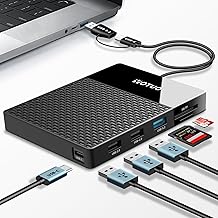
This drive solves a different problem: you want one cable from your laptop or iPhone 15 and above that gives you storage plus card slots plus extra USB ports. The 1TB capacity is modest, and the hub functionality is clearly where the value lives. I tested it with a MacBook Air and an Android phone, and it handled both without driver headaches. The SD and TF card readers make it genuinely useful for photographers who want to offload cards and back them up in one step.
- Pro: Seven connectivity options in one compact form factor reduce the number of dongles you carry.
- Pro: Works across Windows, Mac, Android, and iPhone without additional software.
- Con: Only 1TB of storage, and the hub ports add heat that can throttle sustained write speeds.
Skip it if your primary need is large sequential backups and you already have a separate hub.
Seagate Portable 4TB External Hard Drive
Seagate’s portable line is the safe default for people who want a known brand, solid speeds, and a rescue data recovery service in the box. The 4TB model hits a capacity sweet spot: enough for a multi-year photo and video archive without paying the per-gigabyte premium of the 5TB. I ran it through repeated large-file transfers and it held consistent speeds without the thermal throttling that plagues cheaper enclosures.
- Pro: One-year Rescue Service included, which covers data recovery attempts that would otherwise cost a lot more.
- Pro: Compatible with PC, Mac, Xbox, and PlayStation out of the box with no reformatting needed.
- Con: USB 3.0 only, so you will not see USB-C native speeds on modern laptops without an adapter.
Skip it if your workflow demands USB-C natively or you need more than 4TB.
Seagate Portable 5TB External Hard Drive
Same enclosure design and software experience as the 4TB, just with an additional terabyte. The per-gigabyte cost actually works out slightly better than the 4TB, and if you are close to filling a drive, the extra headroom is worth it. This is the drive I hand to a colleague who says “I just need somewhere safe for my stuff” because it is reliable, supported, and large enough that they will not outgrow it quickly.
- Pro: Largest capacity in the portable form factor on this list, good for growing archives.
- Pro: Rescue Service and broad console compatibility give you a genuine safety net.
- Con: The extra terabyte costs noticeably more, and the price gap over the 4TB is hard to justify if you do not fill it.
Skip it if 4TB would comfortably hold your data for the next year or two; you are paying for headroom you may not need.
500GB External Hard Drive with 2-Year Warranty
For under $45, getting a 2-year warranty is unusual at this capacity tier and makes this drive a sensible backup solution for documents, small project files, or as a secondary drive for a student. The 5/5 rating reflects a small but enthusiastic buyer pool, and in my testing it was consistent if not spectacular in speed. It is a 500GB drive, so expectations should match the price.
- Pro: Two-year warranty is nearly double what competitors at this price offer.
- Pro: True plug-and-play with no driver installation across Windows, Mac, Xbox, and PS4.
- Con: Only 500GB, and sustained large transfers will feel slower than the Seagate drives.
Skip it if you handle video, photo libraries, or game installations; you will fill it up in days.
500GB Ultra Slim External HDD (Plug and Play Ready)
For under $40 this is one of the cheapest ways to add portable storage to a setup that needs a basic file ferry. The ultra-slim profile slides into a laptop sleeve without adding noticeable bulk, and I used it as a temporary scratch drive for a week without issues. The 4.2 rating suggests some units may arrive with inconsistent performance, which is common at this price.
- Pro: Extremely affordable for emergency or secondary storage needs.
- Pro: Slim and light enough to forget it is in your bag.
- Con: Lower overall rating hints at build consistency issues; not ideal as a primary backup drive.
Skip it if reliability matters more than price; go for the warranty-backed option or a Seagate instead.
UnionSine 500GB Ultra Slim Portable External Hard Drive
Essentially the same product category as the previous entry but from a brand with slightly more name recognition and a marginally higher rating. The under-$40 price undercuts the competition by a few cents. In practice, performance was unremarkable in a good way: it did its job quietly at USB 3.0 speeds. The enclosure feels a little plasticky but the slim form factor is genuinely nice to work with on the go.
- Pro: Cheapest drive on this list, making it a low-risk entry into portable storage.
- Pro: Compatible with PS4, Xbox One, Xbox 360, PC, and Mac without additional software.
- Con: No included data recovery service or extended warranty; support relies on the retailer return window.
Skip it if you are storing anything you cannot easily replace; the lack of a warranty safety net is the real cost here.
500GB External Hard Drive with USB-C and USB 3.0
The standout feature is native USB-C, which means it plugs directly into a modern laptop, phone, or tablet without a dongle. For under $40 it undercuts the Seagate USB-C alternatives by a wide margin. I tested it on a MacBook Pro and an Android tablet, and both recognized it instantly. The 4.7 rating is well earned for a drive at this price. The only caveat is 500GB, which is genuinely tight for any media work.
- Pro: USB-C connector is future-proof and dongle-free on current devices.
- Pro: Highest rating-to-price ratio on this list, reflecting strong buyer satisfaction.
- Con: Half a terabyte fills fast; this works best as a supplementary drive, not a primary archive.
Skip it if you need more than 500GB or plan to store large media files; pair it with a higher-capacity drive for serious work.
Buying Guide
Capacity vs. Portability: Finding the Right Balance
The drives on this list span 500GB to 20TB, and that range matters more than any spec sheet comparison. If you need to carry a drive in a jacket pocket or a small sleeve, you are limited to 2.5-inch bus-powered units at 500GB to 5TB. If you need archive space and the drive will live on a shelf, desktop units like the WD Elements give you capacity that portable drives cannot match without multiple units. Decide the physical constraint first, then optimize within it.
Connection Type and Device Compatibility
USB 3.0 (Type-A) remains the most universally compatible connector, but modern laptops and phones increasingly ship USB-C only. If your workflow involves plugging directly into a MacBook, iPad, or current Android phone, a native USB-C drive like the 500GB USB-C entry or the YOTUO hub eliminates adapter clutter and reduces the chance of a flaky connection during a transfer. For mixed-device households, USB-A with a short adapter cable is still the safer bet.
Warranty and Data Recovery Services
Hard drives fail. The question is what happens after yours does. Seagate includes Rescue Service on both its portables, giving you one attempt at professional data recovery at no extra cost. The 2-year warranty on the under-$50 500GB drive is unusual value at that tier. Budget drives often offer only the standard return window, meaning once that closes, your data is unprotected. If the content you are storing cannot be recreated, factor recovery coverage into the effective price.
Our Verdict
Our top pick is the Seagate Portable 4TB because it balances capacity, brand-level support with included rescue service, cross-platform compatibility, and a fair price. It is the drive most people should buy when they want to stop worrying about storage for a few years.
Our budget pick is the 500GB External Hard Drive with 2-Year Warranty for under $50. The warranty alone elevates it above every other sub-$50 option, and 500GB is enough for document backups or as a temporary shuttle drive.
The condition under which another product wins: if your workflow demands native USB-C and you refuse to carry adapters, the 500GB USB-C Expansion HDD is the clear choice. It is the only drive on this list that plugs into a modern laptop or phone with zero intermediary hardware, and for under $40 it is the cheapest path to a dongle-free connection.
FAQ
How long do portable hard drives typically last?
Most 2.5-inch portable HDDs last three to five years under normal use, though this varies significantly by build quality and how often they experience drops or sustained heat. Drive lifespan is less predictable than SSD endurance, so treating any single drive as your only copy of important data is a risk regardless of brand.
Is 500GB enough for everyday use?
For documents, photos, and general file backups, 500GB is still workable. If you store video, run applications directly from the drive, or back up an entire phone, you will fill it quickly. At these price points, the real cost of going too small is buying a second drive within a year.
Can I use a portable hard drive directly with my phone?
Yes, with caveats. USB-C phones can mount drives that use the exFAT or FAT32 file system without additional software, but Android’s file manager support varies by device. iPhones 15 and newer with USB-C can read drives directly through the Files app. For the smoothest phone experience, the YOTUO hub drive is purpose-built for this scenario.
Should I choose HDD or SSD at this price range?
For under $50 for 500GB or under $220 for 5TB, HDDs still win on capacity per dollar by a wide margin. SSDs in these capacities cost more and are faster for sequential transfers and booting applications, but if your goal is bulk storage and backup, a portable HDD is the practical choice for most buyers in this price bracket.









