Key takeaways
- Paying for lighting while accepting a weak graphics card.
- Overlooking a single-channel memory configuration.
- Ignoring the power supply rating when planning a GPU upgrade.
- Assuming all RGB parts talk to each other.
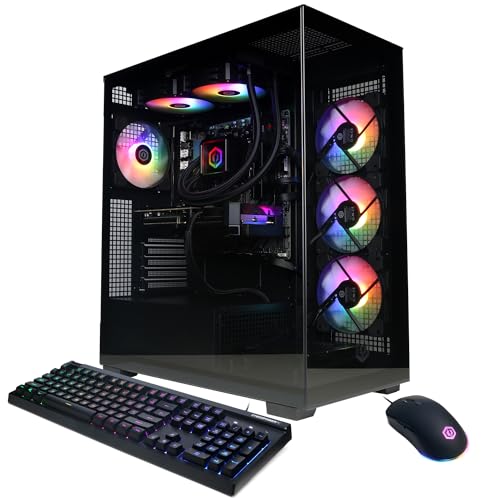
The best RGB gaming PC is a prebuilt with a tempered-glass case, addressable lighting you can control from one app, and a graphics card matched to your monitor, and the right brand depends on whether you value price (CyberPowerPC, iBuyPower, Skytech), clean software and design (NZXT, Corsair) or a premium chassis and support (Alienware, MSI, Lenovo Legion). Lighting should be the last thing you weigh: components, cooling and upgrade room decide how long the PC stays useful. This guide compares the main brands and explains the RGB-specific features that matter.
Our top picks



As an Amazon Associate we earn from qualifying purchases at no extra cost to you.
RGB Gaming PCs at a Glance
| Brand / line | Best for | Stated strengths | Limits |
|---|---|---|---|
| CyberPowerPC Gamer Xtreme / Gamer Master | Budget to mid-range value | Wide range of CPU and GPU combinations, tempered-glass cases with RGB fans | Case, power supply and motherboard vary by configuration; read the exact list |
| iBuyPower Y40 / Trace / RDY series | Mid-range gaming with lighting | Visible RGB fans and showcase cases, many configurations | Parts differ between SKUs |
| Skytech Gaming Shadow / Chronos / Legacy | Value-focused builders | Pre-installed RGB fans, high-airflow cases | Component quality varies by model |
| NZXT Player: One / Two / Three | Clean look and simple software | NZXT CAM control, cable-managed builds, standard parts | Premium over equal-spec rivals |
| Corsair Vengeance / Vengeance i-Series | Ecosystem users, iCUE lighting | iCUE software for fans, memory, coolers and peripherals | Higher tier; iCUE has a learning curve |
| Alienware Aurora | Premium design and support | Distinctive chassis with AlienFX lighting, brand support plans | Proprietary parts can limit upgrades |
| MSI Aegis / Codex | Mid to high performance with MSI Mystic Light | Matched MSI motherboard and graphics cards | Some configurations use proprietary layouts |
| Lenovo Legion Tower | Understated looks with RGB accents | Cleaner case, warranty and service network | Fewer lighting zones |
Each brand rotates models often. Compare the specific component list rather than relying on the line name.
Performance First, Lighting Second
The graphics card sets most of the gaming performance, followed by the processor. Pick the GPU based on the resolution and refresh rate of your monitor: a 1080p screen needs less than a 1440p or 4K display. Match the CPU so it does not hold back the card, and look for at least 16 GB of RAM, with 32 GB common in current mid-range builds. A solid-state drive with ample capacity matters for game load times, and an NVMe drive is standard on most current builds.
Then look at the extras. A 750 W or similar power supply from a recognised maker, a case with real mesh intake and a CPU cooler that matches the processor’s heat output make the machine quieter and longer-lasting than a build with more lights but cheaper parts.
Understanding RGB Hardware
Addressable vs non-addressable lighting
Addressable RGB (often called ARGB, using 3-pin 5 V connectors) lets each LED show a different colour and enables effects such as waves and gradients. Non-addressable RGB (4-pin 12 V) shows a single colour at a time across the strip or fan. Check the connectors: they are not interchangeable, and plugging the wrong header can damage components.
Software ecosystems
Lighting is controlled through software such as NZXT CAM, Corsair iCUE, MSI Mystic Light, ASUS Armoury Crate with Aura Sync, Gigabyte RGB Fusion or Razer Chroma. Running several programs at once can cause conflicts, so a build that uses one ecosystem is easier to manage. Some prebuilts offer a simple hardware button on the case for cycling effects without any software.
Fans, coolers and strips
RGB fans on the front and rear are the most visible. Look for the number of fans, whether they connect through a single hub and whether the lighting can be turned off. Some CPU coolers have lit pump heads or screens. Light bars and strips add colour but can get in the way during upgrades.
Cooling and Airflow
Glass front panels look striking but can restrict intake. Mesh-front cases, such as those seen in many mid-range prebuilts, usually run cooler. Reviewers frequently point out that tempered-glass panels are heavy and fragile during shipping, so check packing and inspect the case on arrival. Make sure the case has dust filters you can remove for cleaning.
Upgrade Room and Standard Parts
Standard ATX or micro-ATX motherboards, a standard power supply and normal fan sizes make future upgrades simpler. Proprietary layouts, seen in some premium brands, can limit what you can swap. Ask or read the specification sheet for the number of free RAM slots, M.2 slots and the maximum GPU length.
Budget, Mid-Range and Premium Tiers
| Tier | Typical build | Trade-offs |
|---|---|---|
| Budget | Entry graphics card, mid-range CPU, 16 GB RAM, RGB fans | Good for 1080p; upgrade limited by power supply and case |
| Mid-range | Strong 1440p graphics, 16 to 32 GB RAM, NVMe SSD, tempered glass | Best value for most players |
| Premium | High-end GPU and CPU, liquid cooling, 32 GB or more, premium case | Highest performance and finish, highest cost |
Pick X If You Want
| If you want… | Pick |
|---|---|
| The most performance for the money | CyberPowerPC, iBuyPower or Skytech mid-range |
| Tidy design and simple lighting control | NZXT Player series |
| Deep lighting sync with peripherals | Corsair Vengeance with iCUE |
| Brand-backed support and distinct styling | Alienware Aurora |
| Subtle lighting | Lenovo Legion Tower or a case where RGB can be turned off |
| A system you can upgrade easily | Standard-part builds from value brands or custom builders |
Alternatives
Building your own PC offers the most control over parts and lighting but needs time and some technical comfort. Local or boutique system builders can assemble a custom RGB build with warranty support. Gaming laptops include keyboard RGB and are portable, though they offer less upgrade room.
Checking a Prebuilt Before You Buy
Read the full specification, not just the headline. Look for the make and rating of the power supply, the motherboard chipset, the CPU cooler type and whether the memory runs in dual channel. Some value prebuilts use basic power supplies and low-end motherboards that limit upgrades. Check the warranty length and whether it is handled by the brand or the seller. Review the return window as well, so you can inspect the case, the glass panel and the lighting when the system arrives.
Setting Up Lighting Without the Headaches
On first boot, install the brand’s lighting software from the maker’s official site and update the motherboard BIOS and graphics driver. Pick one lighting app as the controller and disable competing ones to avoid flicker or reset effects. If you prefer a calm look, set a single colour or a slow breathing effect and dim the brightness. Many boards let you save a profile in onboard memory so the lighting stays consistent even without the software running. Lights can also be turned off at night using the case button or software schedules.
Noise, Heat and Dust
RGB fans vary in noise and airflow. Check the fan size and count, and look for fan-curve control in the BIOS or software. Dust builds up on filters and fan blades, so plan to clean every few months with compressed air, holding the fan still while spraying. Keep the PC off carpet and allow space around the vents. If temperatures rise during long gaming sessions, check that fans point in the intended direction and that cables do not block airflow.
Common Buying Mistakes
- Paying for lighting while accepting a weak graphics card.
- Overlooking a single-channel memory configuration.
- Ignoring the power supply rating when planning a GPU upgrade.
- Assuming all RGB parts talk to each other.
Warranty and Support
Prebuilt systems usually carry a limited warranty covering the whole machine for a set period, with some components covered separately by their own makers. Read what the warranty includes, whether on-site or mail-in service is offered and how opening the case affects coverage. Brands with larger support networks may resolve problems faster, while smaller builders sometimes offer more personal service. Keep the original packaging for the first weeks in case a return is needed.
Frequently Asked Questions
Does RGB affect PC performance?
Lighting itself does not change frame rates. Software running in the background can use small amounts of CPU, and extra fans or pumps draw some power, but the effect is generally minor.
Can I turn off the RGB on a prebuilt gaming PC?
Usually yes, through the case button, motherboard software or the brand’s lighting app. Check the manual for the exact method for your model.
What is the difference between ARGB and RGB?
ARGB is addressable, allowing different colours on each LED and richer effects. Standard RGB shows one colour across the device. Their connectors differ and should not be swapped.
How much RAM and storage should a gaming PC have?
16 GB is a minimum and 32 GB is common on mid-range builds. For storage, an NVMe SSD of one terabyte or more is a popular starting point, since modern games are large.
Are prebuilt gaming PCs worth it?
They save time and include a warranty, and sales or bundles can be competitive. Check the component list for the power supply, motherboard and cooling, which are the parts that vary most between brands.
Why is my RGB software not controlling every light?
Different components may use different ecosystems. Update the software and firmware, remove conflicting apps and consult the manufacturers’ documentation. A single hub or controller can also unify lighting.
FAQ
Does RGB affect PC performance?
Can I turn off the RGB on a prebuilt gaming PC?
What is the difference between ARGB and RGB?
How much RAM and storage should a gaming PC have?
Are prebuilt gaming PCs worth it?
Why is my RGB software not controlling every light?
More from Amazon
Programs that pair well with the guide above. Offers and eligibility are set by Amazon and may change.
Free shipping on eligible items, Prime Video and more. Eligible new members can start with a free trial.
Start a Prime free trialAudiobooks and podcasts to listen to on the go. Eligible new members can start with a free trial.
Try Audible freeAd-free music streaming. Eligible new subscribers can start with a free trial.
Try Music Unlimited freeA free business account with business pricing and bulk-buying tools for work, shop or home office.
Create a business accountAs an Amazon Associate we earn from qualifying purchases.