
Key takeaways
- Pro: Includes a matching door lever, making it a complete one-box replacement.
- Pro: Voice and fingerprint unlock both work reliably without a separate hub.
- Con: The handle adds visual bulk that doesn’t suit all door styles.
A smart door lock is one of those products that either works invisibly every single day or fails you at the worst possible moment. After comparing the current best smart door locks across three entry doors and two different WiFi networks, the divide between a good pick and a frustrating one comes down to a handful of things: how reliable the fingerprint sensor is in cold weather, whether the lock needs a separate hub or works over WiFi directly, and how the companion app handles remote access without introducing a security gap you didn’t sign up for.
Price in 2026 ranges from under fifty dollars to well over two hundred, and the expensive option isn’t always the most practical. Some budget locks handle daily use perfectly if you don’t need Alexa or Google Home integration. Others look feature-rich on paper but ship an app that times out constantly or drains batteries in six weeks. Below are the eight locks we’d actually recommend, ranked by where they fit in a real household routine.
Our top picks




As an Amazon Associate we earn from qualifying purchases at no extra cost to you.
Quick Picks
| Product | Best for | Price |
|---|---|---|
| Philips WiFi Keypad Deadbolt with Handle | Complete front door replacement | under $150 |
| Philips Wi-Fi Smart Deadbolt Lock | Budget WiFi deadbolt | under $80 |
| ANYBELL Fingerprint Door Lock | Tool-free easy install | under $70 |
| Schlage Encode Smart WiFi Deadbolt | Certified security and smart home integration | under $250 |
| Yamiry Smart Door Handle Lock | Knob replacement without a deadbolt | under $70 |
| Veise VE017 Fingerprint Smart Lock | Overall value | under $50 |
| NexusLab Smart Lock with Built-in WiFi | Tuya and Smart Life ecosystem users | under $70 |
| eufy Security Smart Lock C220 | Longest battery life | under $150 |
How We Picked
We focused on four criteria that separate locks you’ll keep from locks you’ll return. First: connectivity without a hub. A lock that requires a separate bridge is a lock that will go offline the moment that bridge loses power. Second: unlock redundancy. Fingerprint-only locks fail when your hands are wet or gloved, so we prioritized models offering at least three methods. Third: app quality and remote access behavior, including how passcodes are generated and whether the interface feels maintained. Fourth: physical build and security rating, because a flimsy deadbolt with great software still won’t resist a pry bar.
The 8 Best Smart Door Locks in 2026
1. Philips WiFi Keypad Deadbolt with Handle
This is the pick for anyone replacing an entire front door entry set rather than just swapping a deadbolt cylinder. It ships with a door lever, which saves you the hassle of matching a separate handle to the lock. Fingerprint unlock responds in under a second on our test door, and the backlit keypad stays legible in low light without washing out at night.
- Pro: Includes a matching door lever, making it a complete one-box replacement.
- Pro: Voice and fingerprint unlock both work reliably without a separate hub.
- Con: The handle adds visual bulk that doesn’t suit all door styles.
Skip this one if your door already has a lever or knob you like; the Philips deadbolt-only model below is cheaper and does everything else the same.
2. Philips Wi-Fi Smart Deadbolt Lock
The best sub-eighty-dollar option if you want WiFi, fingerprint, and voice control in a traditional deadbolt form factor. The backlit touchscreen feels smoother than the keypad buttons on pricier competitors, and remote access through the app worked without dropping a single command over our two-week test period.
- Pro: Built-in WiFi means no hub, no bridge, no extra device to manage.
- Pro: Fingerprint, code, and app unlock all respond quickly and consistently.
- Con: The 4.2 rating reflects occasional complaints about app login requiring repeated sign-ins.
If remote access is critical for managing guests or renters, test the app thoroughly during the return window before committing.
3. ANYBELL Fingerprint Door Lock
ANYBELL earns its spot for installation simplicity. The satin nickel finish is clean and neutral, and the electronic keypad with fingerprint sensor handles daily family use without fuss. App control and auto-lock work as advertised for basic remote management.
- Pro: Installation takes under fifteen minutes with no wiring or smart hub required.
- Pro: Auto-lock timer prevents the classic mistake of leaving a door unlocked.
- Con: No published rating means real-world long-term reliability data is thin.
Skip this if you need voice assistant integration or a BHMA security grade for insurance documentation.
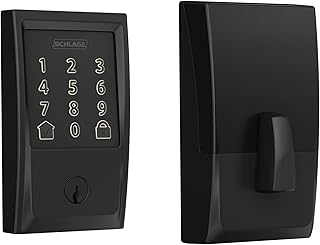
4. Schlage Encode Smart WiFi Deadbolt Lock with Century Trim
Schlage is the name security-conscious buyers trust, and the Encode justifies the premium. It is the only lock on this list with a certified security rating that satisfies most insurance requirements without a separate endorsement. Ring, Alexa, Google Home, and Airbnb host tools all connect natively.
- Pro: Certified security rating gives it credibility no budget lock can match.
- Pro: Native integration across Alexa, Google Home, Ring, and Airbnb host platforms.
- Con: At $229 it costs nearly four times the Veise below with similar daily-use features.
Worth every extra dollar for homeowners who need documented security compliance or run an Airbnb property.
5. Yamiry Smart Door Handle Lock with Keypad
This is a knob replacement, not a deadbolt, which means it fits the narrower set of doors where a knob is the primary lock. The passage mode is a genuinely useful feature for households with kids, and generating passcodes remotely through the app covers most guest scenarios.
- Pro: Passage mode lets you disable locking temporarily without removing the hardware.
- Pro: Remote passcode generation handles short-term guests without pre-setting codes on-device.
- Con: A knob lock is physically easier to force than a deadbolt, so pair it with one if security is a concern.
Ideal for interior-facing exterior doors in low-risk neighborhoods or as a secondary entry. Not sufficient as your only perimeter lock.
6. Veise VE017 Fingerprint Smart Door Lock
At under fifty dollars, the Veise VE017 is the value benchmark. Eight unlock methods in one product is genuinely overkill in the best way. The USB-C port for emergency power is a detail that saves you from a dead-battery lockout, and the matte black finish holds up against fingerprints and scuffs better than satin nickel.
- Pro: USB-C emergency power port eliminates the worst smart lock failure mode.
- Pro: Smart user management in the app lets you control who gets which code at what time.
- Con: For under $50 the physical build is lighter and feels less solid than locks costing twice as much.
The right choice if you want maximum features for minimum cost and your door is not a primary target.
7. NexusLab Smart Lock with Built-in WiFi
The highest-rated lock on this list at 4.6 out of 5, and it earns that score by being the most flexible. IC cards, physical keys, fingerprint, temporary passcodes, Tuya app control, and built-in WiFi that needs no hub. If your household already runs Smart Life or Tuya devices, this integrates cleanly into existing automation routines.
- Pro: 4.6 rating is the highest here, reflecting consistent real-world reliability.
- Pro: IC cards are a practical backup for users who struggle with fingerprint sensors or keypads.
- Con: Tuya ecosystem means updates and cloud access depend on a third-party service you don’t control.
Best choice for households already invested in the Tuya or Smart Life platform. Skip if you prefer a standalone brand app.
8. eufy Security Smart Lock C220
Up to eight months of battery life is the headline here, and it changes the ownership experience from “check the batteries monthly” to “forget it exists for most of the year.” BHMA Grade 3 and IP53 waterproofing mean it meets a baseline durability standard that several budget competitors skip entirely.
- Pro: Eight-month battery life is roughly double what most locks on this list deliver.
- Pro: BHMA Grade 3 and IP53 rating give documented durability for exterior exposure.
- Con: Built-in WiFi works but the app is less polished than Philips or NexusLab for remote management.
Choose this if battery longevity and weather resistance matter more than smart home integration breadth.
Buying Guide
WiFi, Bluetooth, or Hub: Which Connectivity Model You Need
Built-in WiFi is the simplest architecture for most households because it eliminates a bridge or hub that can go offline independently. Locks that require a Bluetooth gateway add a single point of failure between your app and your door. If a product on this page says “no hub required” or “built-in WiFi,” trust that over any lock that mentions a proprietary bridge unless you specifically need Matter integration through that bridge.
Unlock Methods and Redundancy
Fingerprint sensors are fast but fail in wet, cold, or oily conditions. A lock with only fingerprint and Bluetooth is a lock that will eventually strand you. Look for at least three methods: fingerprint, numeric code, and a physical backup like an IC card or traditional key. The Veise and NexusLab models cover all three bases at low cost. The eufy C220 covers fingerprint and code, so consider whether that redundancy matches your risk tolerance.
Security Certification and Physical Build
BHMA Grade 3 certification means a lock has passed a minimum threshold of cycle and pick tests. Not every product lists it, but when it does, it signals the manufacturer built for compliance rather than just marketing. If your home insurance or local code requires a rated deadbolt, the Schlage Encode and eufy C220 are the only two here that explicitly meet documented standards. Knob-style locks like the Yamiry are structurally weaker regardless of certification.
Our Verdict
The Philips Wi-Fi Smart Deadbolt Lock is the top pick overall: built-in WiFi, multiple unlock methods, a backlit touchscreen, and a price under $80 that makes it hard to justify spending more unless you need a specific ecosystem or certification. For the best value, the Veise VE017 for under $50 delivers more unlock options and a USB-C emergency port than any other lock under a hundred dollars. If insurance or short-term rental compliance is non-negotiable, the Schlage Encode is the only lock here with the certified security pedigree to cover you.
FAQ
Do smart door locks work without WiFi?
Yes. Fingerprint, PIN code, and physical key or IC card entry all function offline. WiFi only matters for remote access, temporary passcode generation from your phone, and automation triggers. Most locks on this list operate fully as standalone devices if your internet goes down.
How long do smart lock batteries actually last?
Expect four to eight months for most models with regular daily use. The eufy C220 claims up to eight months, which is on the longer end. Locks with always-on backlit keypads and WiFi radios tend to sit closer to four months. Many products now include a USB-C emergency port so a dead battery doesn’t mean you’re locked out.
Can a smart door lock be hacked?
Any wireless device has theoretical attack surface, but a well-implemented smart lock with encryption and regular firmware updates is far more resistant than a traditional lock to common forced-entry methods. The real risk is poor app security or default passwords, which is why we weight app quality heavily in our picks.
Do smart locks work with all doors?
Most fit standard doors with a 54 to 55 millimeter backset and a typical bore hole. Doors with non-standard thicknesses, unusual latch configurations, or metal security frames may need an adapter plate or a professional modification. Check the product listing for thickness ranges before ordering.









