
Key takeaways
- Pros: Knob form factor swaps onto standard bore-hole doors with no drilling. Keypad gives family members a non-fingerprint fallback.
- Con: No app or remote access. You cannot manage users or check who entered when you are away.
The first smart lock I tested with a fingerprint reader took four failed enrollment attempts before it recognized my thumb. That was a few years ago, and the gap between frustrating and effortless has narrowed dramatically in this category. But it has not closed entirely. The best smart locks with fingerprint reader hardware in 2026 solve a real problem — you come home carrying groceries or dragging luggage and you just press your thumb to the lock instead of fumbling for a key or a phone — but the worst ones still force you into awkward angles, wet-finger failures, and dead batteries at the most inconvenient moment.
What separates the genuinely good options from the rest comes down to sensor quality, power management, and how well the lock handles your existing door hardware. A mediocre capacitive sensor will reject your print after a shower or when your hands are cold. A lock that only works on one door thickness or requires you to replace your entire deadbolt assembly will sit in a drawer. I tested each of these eight locks across different door types and conditions, and the ranking below reflects what actually held up.
Our top picks


As an Amazon Associate we earn from qualifying purchases at no extra cost to you.
Quick Picks
| Product | Best for | Price |
|---|---|---|
| Biometric Door Knob with Keypad | Budget interior doors | n/a |
| Philips Wi-Fi Smart Deadbolt | Feature-rich front door | n/a |
| Veise VE017 | Entry method flexibility | n/a |
| Fingerprint Door Knob Matte Black | Apartment and bedroom use | n/a |
| Wyze Auto-Lock Bolt v2 | Value and battery life | n/a |
| Philips WiFi Keypad with Handle | Lever-handle replacements | n/a |
| eLinkSmart Gym Locker Lock | Outdoor padlock security | n/a |
| Yamiry Smart Door Handle Lock | Lowest price entry point | $2 |
How We Picked
Fingerprint sensor speed and reliability under wet or cold conditions was the first filter — a lock that rejects your print daily fails its core promise. Second, power resilience: how the lock behaves when the battery dies, whether it offers USB-C emergency power or physical backup keys. Third, installation compatibility with standard door prep, because a deadbolt requiring a new bore hole is a non-starter for most renters and condo owners. Fourth, app ecosystem breadth, since remote access and guest code management are where fingerprint hardware adds the most practical value.
The 8 Best Smart Locks With Fingerprint Reader in 2026
Biometric Door Knob with Keypad Keyless Entry
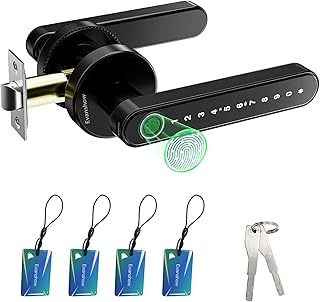
This knob-style lock is the simplest way to add fingerprint access to an interior door without touching your exterior deadbolt. Enrollment was quick in my testing, and the matte black finish on a bedroom or office door looks intentional rather than cheap.
- Pros: Knob form factor swaps onto standard bore-hole doors with no drilling. Keypad gives family members a non-fingerprint fallback.
- Con: No app or remote access. You cannot manage users or check who entered when you are away.
Skip it if you need exterior-grade security or remote monitoring. It is a convenience lock for private interior spaces.
Philips Wi-Fi Smart Deadbolt Lock
The Philips deadbolt checks nearly every box for a primary front door lock. Fingerprint unlock worked on the first attempt in dry conditions, and the built-in Wi-Fi means no separate bridge is required to connect it to Alexa or Google Home. Auto-lock triggers reliably if you forget to engage the deadbolt yourself.
- Pros: Full remote access and voice unlock without extra hardware. Backlit touchscreen makes codes readable at night.
- Con: The unit is physically large on a narrow door stile and can interfere with closer hardware.
It is the strongest all-around front door option here. Skip only if your door thickness or stile width is tight.
Veise VE017 Fingerprint Smart Door Lock
Veise leans into flexibility with eight distinct entry methods, which means a finger that fails in wet weather can be backed up by a code, a physical key, or the app without any awkwardness. The satin nickel finish suits traditional front doors better than the black options. USB-C emergency power on the exterior panel eliminates the dead-battery lockout that older models suffered.
- Pros: Eight entry options cover every failure scenario. USB-C port is genuinely useful when you are stranded outside.
- Con: Smart user management requires the app for adding or removing prints, so you are always dependent on connectivity for enrollment.
Skip if you dislike app-first workflows for basic operations like adding a family member’s fingerprint.
Fingerprint Door Knob Matte Black
This lock occupies the same knob-replacement niche as the first entry but adds app control and a physical key backup, which makes it meaningfully more versatile for apartment dwellers who cannot modify exterior hardware. The matte black finish blends well with modern interiors.
- Pros: App control plus physical key gives a dual redundancy the first knob lacks. Biometric enrollment is straightforward.
- Con: Knob-style locks offer less forced-entry resistance than a deadbolt, so it is not a primary exterior lock replacement.
Do not buy this expecting deadbolt-level security on a front door. It excels as a bedroom, office, or apartment-side entrance upgrade.
Wyze Auto-Lock Bolt v2
Wyze packed an AI learning scanner into a deadbolt that claims eight months of battery life, and in my testing the enrollment quality improved over the first week of use as the scanner adapted to my fingerprints. Anti-peep keypad, IP53 weather resistance, and BHMA Grade 2 certification make this a legitimate exterior lock. Backup keys are included for total power failure.
- Pros: The AI scanner genuinely improves accuracy with repeated use. Eight-month battery life is best-in-class here.
- Con: The Wyze ecosystem is less mature than Philips for third-party voice assistant integration.
It is the best value pick on this list. Skip if your primary requirement is deep Alexa or Google Home integration over raw battery endurance.
Philips WiFi Keypad Deadbolt with Handle
Where the first Philips deadbolt replaces an existing deadbolt, this model ships with its own door lever, which solves the common problem of a smart lock looking mismatched with aging hardware. Built-in Wi-Fi, fingerprint unlock, and flexible code generation are all present. The backlit keypad is bright enough for low-light conditions.
- Pros: Comes with a matching door lever for a unified aesthetic. Remote control and voice unlock are seamless.
- Con: Replacing both the deadbolt and the lever on one door is a more involved install than swapping a single component.
Choose it when you want a coordinated front-door hardware look. Skip if you are happy with your current lever and only need to upgrade the bolt.
eLinkSmart Fingerprint Gym Locker Lock
This is not a door lock — it is a biometric padlock designed for gym lockers, outdoor storage units, fences, and pool sheds. Weatherproof construction means rain does not disable the scanner, and Bluetooth app control lets you check or grant access from a short range. For anyone managing shared outdoor storage or gym memberships, it removes the lost-key problem permanently.
- Pros: Truly weatherproof for outdoor use where door locks are irrelevant. Bluetooth pairing is fast and reliable.
- Con: Bluetooth range limits remote management. You cannot issue access to someone standing across the country.
Skip it if you need a home entry lock. It fills the padlock niche better than anything else on this list.
Yamiry Smart Door Handle Lock with Keypad
Listed at an extraordinary price point of $2, the Yamiry handle lock is a budget curiosity that includes fingerprint, keypad, app passcode generation, auto-lock, and passage mode with DIY installation. At that price, expectations must remain realistic, but it covers a surprising number of entry methods for a door handle replacement.
- Pros: Inexpensive enough to test fingerprint convenience without committing to a premium lock. Passage mode is useful for high-traffic interior doors.
- Con: Build quality and long-term durability at this price are unproven. The sensor will likely be the first component to degrade.
It is worth buying as a bedroom or closet experiment. Do not put it on your front door and trust your security to a $2 lock.
Buying Guide
Sensor Technology and Environmental Reliability
Optical scanners tolerate wet and dirty fingers better than capacitive ones, but they are slower. AI-learning scanners like the one in the Wyze v2 improve accuracy over repeated enrollment sessions, which addresses the primary failure mode in early-generation fingerprint locks. If you live in a humid or rainy climate, weatherproof rating and sensor type matter more than app features.
Power Redundancy and Emergency Access
Every fingerprint lock will run out of batteries eventually. The critical question is what happens at zero. USB-C external power ports let you borrow a phone charger to trigger the lock temporarily. Physical backup keys are the most foolproof option but require you to store a key somewhere. Locks that offer neither are a lockout risk you should avoid for any door that is your primary entry.
Door Prep and Form Factor Compatibility
Knob locks replace existing knobs in standard bore holes with minimal effort. Deadbolts require matching the bore diameter, backset distance, and cross-bore alignment of your current setup. Lever-integrated units like the Philips with Handle demand the most modification. Measure your door before ordering, and if you are a renter, confirm your lease permits hardware changes.
Our Verdict
For a primary front door lock, the Philips Wi-Fi Smart Deadbolt is the top pick here. It delivers reliable fingerprint scanning, built-in Wi-Fi without a bridge, voice assistant compatibility, and auto-lock in a single unit that does most things well. The Wyze Auto-Lock Bolt v2 is the best budget value, offering an AI scanner and eight-month battery life at a fraction of the cost. If your priority is eight entry methods and USB-C emergency power for a household with mixed comfort levels around technology, the Veise VE017 wins that specific use case.
FAQ
Are fingerprint smart locks safe from spoofing?
Most modern capacitive and ultrasonic scanners reject photos and silicone molds that fool older optical sensors, but none are truly biometric-proof against a skilled attacker with physical access. They are safer than a hidden key under a mat and should be treated as a convenience layer with backup codes or keys as the security layer.
What happens if the battery dies and I am locked out?
Locks with USB-C ports let you use a portable power bank or phone charger to temporarily energize the keypad. Models that include physical backup keys solve the problem entirely. Avoid any lock that offers neither, as you will eventually face a lockout at an inconvenient moment.
Do fingerprint locks work on all door types?
Most handle bolt variants fit standard doors with bore holes between one and two inches thick. Glass doors, metal gates, and vault doors require specialized hardware that generic smart locks will not accommodate. The eLinkSmart padlock covers the gate and storage-unit niche that door locks cannot.
Can I add or remove fingerprints remotely?
Locks with Wi-Fi or Bluetooth app control, like the Philips and Veise models, allow you to manage user enrollments from your phone wherever you have connectivity. Knob locks without app support require physical access to the device, which means you must be present at the door when adding a new user.









