
Best wireless earbuds for gaming comes down to one number that most listings never print: latency in milliseconds. Standard Bluetooth adds enough delay to desynchronise footsteps from what you see, and a 2.4 GHz dongle is what fixes it.
As an Amazon Associate we earn from qualifying purchases.
By Daniel Foster
Why Ordinary Earbuds Feel Wrong in Games
The best wireless earbuds for gaming solve a problem music never has. Music tolerates delay because nothing on screen has to match it. Games do not. When a gunshot arrives 200 milliseconds after the muzzle flash, the disconnect is immediately noticeable, and competitive play suffers because positional audio arrives late.
The Decisive Numbers: Latency, Connection and Codec
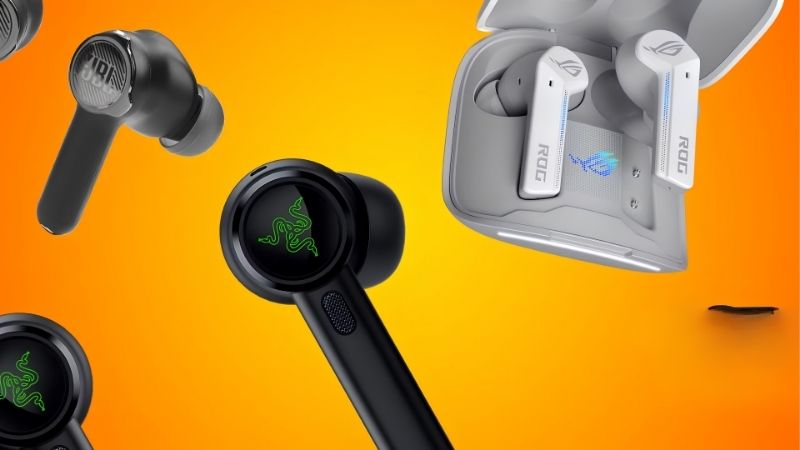
Latency is the specification that matters. Standard Bluetooth with SBC or AAC typically adds 150-250 ms, which is clearly audible as lag. A dedicated 2.4 GHz wireless link through a USB or USB-C dongle brings that to roughly 20-40 ms, which is effectively imperceptible.
Connection type follows from that. The best wireless earbuds for gaming ship with a dongle rather than relying on Bluetooth alone, and the better ones support both, so the same buds work on a console via dongle and on a phone via Bluetooth. Check which dongle form factor your platform needs.
Codecs help but do not solve the problem. aptX Low Latency and LE Audio with LC3 reduce Bluetooth delay to around 40-80 ms, which is acceptable for single-player but still behind a dedicated link. Both ends have to support the codec, which is often not the case with a console.
Space and Fit: Long Sessions and Case Size
The best wireless earbuds for gaming are worn for hours at a time, and fit determines whether that is comfortable. Multiple tip sizes, ideally including foam options, matter more than any driver specification, since a poor seal loses bass and forces higher volume.
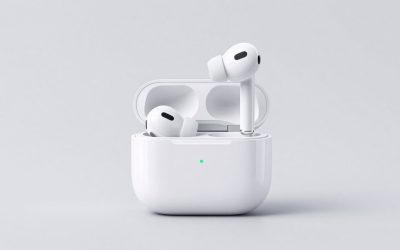
Case size decides portability. Gaming-focused cases run larger than typical earbud cases, often 3 x 2 in (7.6 x 5 cm), partly because many store the dongle inside. That dongle storage is worth prioritising, since a lost dongle usually means the buds revert to high-latency Bluetooth permanently.
Microphone, Battery and Failure Points
Microphone quality is where even the best wireless earbuds for gaming fall behind a boom headset. Beamforming arrays help, but teammates will notice the difference, particularly in a room with background noise. If clear voice chat is essential, a headset remains the better tool.
Battery runs 5-10 hours per charge with the case adding two to four more, and the 2.4 GHz link drains faster than Bluetooth. On durability, the case hinge, the charging contacts and battery degradation across cycles are the three things that end a set of earbuds, typically within two to three years of daily use.
7 Earbuds Built for Low-Latency Play
The best wireless earbuds for gaming are chosen on connection type and latency first, sound and comfort second. Amazon prices change frequently, so treat the tiers as approximate.
| Model | Low-latency link | Battery (listed) | Price tier |
|---|---|---|---|
| SteelSeries Arctis GameBuds | 2.4 GHz USB-C dongle | Up to 10 hr | Premium |
| Sony INZONE Buds | 2.4 GHz USB-C dongle | Up to 12 hr | Premium |
| Razer Hammerhead Pro HyperSpeed | 2.4 GHz dongle | Up to 6.5 hr | Mid-premium |
| HyperX Cloud MIX Buds | 2.4 GHz dongle | Up to 10 hr | Mid |
| Anker Soundcore VR P10 | 2.4 GHz dongle | Up to 6 hr | Mid |
| JBL Quantum TWS Air | 2.4 GHz dongle | Up to 8 hr | Mid |
| Turtle Beach Scout Air | Bluetooth low-latency | Up to 5 hr | Budget |
SteelSeries Arctis GameBuds: The All-Rounder
A USB-C dongle that works across PC, PlayStation, Switch and Android, plus simultaneous Bluetooth for a phone, which means one set of buds covers every platform. ANC and a well-implemented EQ round it out.
The price is at the top of the category, and the microphone, while better than most earbuds, still trails a boom headset. The case is bulky compared with consumer earbuds.
Sony INZONE Buds: Long Battery, Strong Positional Audio
Around twelve hours on the buds themselves is unusually long for a 2.4 GHz connection, and Sony’s spatial audio processing is well regarded for positional cues in first-person games. Comfort over long sessions is good.
They are optimised around PlayStation and PC, with a less complete experience elsewhere. The price is premium, and the design is bulkier in the ear than smaller consumer buds.
Razer Hammerhead Pro HyperSpeed: Fast and Feature-Rich
Very low latency on the HyperSpeed link with ANC and a customisable EQ through Razer’s app. For competitive play where positional accuracy matters more than battery, this is a strong choice.
Battery at around six and a half hours is short for a long session, so the case becomes part of the routine. The app is heavier than it needs to be, and the lighting features drain further.
HyperX Cloud MIX Buds: Balanced Mid-Price
A 2.4 GHz dongle plus Bluetooth, around ten hours of battery and a tuning that suits both games and music, at a price below the flagship options. The dongle stores in the case, which avoids the most common frustration.
ANC is weaker than the premium competition, and the microphone is adequate rather than good. Build materials are plastic-forward.
Anker Soundcore VR P10: Built for Headsets
Designed originally for VR, which demands the lowest latency of any use case, and the dongle attaches directly to a headset or console. Sound is warm and the fit is secure during movement.
Battery at around six hours is short, and the feature set is narrower than the gaming brands. It is a specialist tool that happens to work well for flat-screen gaming too.
JBL Quantum TWS Air: Sound First
JBL’s audio tuning is the strongest argument, with a fuller sound than most gaming-focused buds, plus a dongle for low latency and around eight hours of battery.
The gaming feature set is thinner than SteelSeries or Razer, with less EQ control and no meaningful spatial processing. The microphone is the weakest part of the package.
Turtle Beach Scout Air: The Budget Entry
Bluetooth with a low-latency mode rather than a dedicated dongle, at a price well below the rest. For single-player and casual play the delay is tolerable, and the buds are light and comfortable.
Without a 2.4 GHz link the latency is higher than everything else here, which shows in competitive play. Battery at around five hours is the shortest in the group.
Getting the Best From Wireless Buds
Setup and platform choice affect the best wireless earbuds for gaming as much as which pair you buy.
Dongle Placement and Interference
The 2.4 GHz band is crowded, sharing space with wifi, wireless mice and microwaves. Plugging the dongle into a front-panel USB port or a short extension cable rather than a rear port behind a metal case improves the link noticeably.
Keep the dongle away from a wifi router and from USB 3.0 ports, which are a known source of 2.4 GHz interference. If audio stutters intermittently, moving the dongle is the first thing to try before assuming the buds are faulty.
Platform Compatibility Before You Buy
Xbox uses a proprietary wireless protocol, so most 2.4 GHz dongles do not work with it directly and require a separate transmitter or a wired connection. PlayStation, PC, Switch and Android generally accept USB-C or USB-A dongles without issue.
Check the dongle form factor against your device: a USB-C dongle needs an adapter for a desktop PC, and a USB-A dongle needs one for a handheld. Where a set supports both dongle and Bluetooth simultaneously, that flexibility is worth paying for.
Battery Care and Buying Timing
Avoid leaving buds at zero for long periods and do not store the case fully depleted, since lithium cells degrade faster in that state. Expect noticeable capacity loss after two to three years of daily use, and note that earbud batteries are not replaceable.
Gaming audio follows the general electronics calendar, with Prime Big Deal Days in early October and Black Friday and Cyber Monday in late November as the next two discount windows. Both fall inside the heaviest gifting period for gaming hardware, so stock on popular models moves quickly.
Frequently Asked Questions
These come up whenever a best wireless earbuds for gaming search starts with ordinary Bluetooth buds.
How much latency is too much?
Above roughly 60 ms becomes noticeable in fast games, and standard Bluetooth at 150-250 ms is clearly out of sync. A 2.4 GHz dongle at 20-40 ms is effectively imperceptible for almost everyone.
Do these work with Xbox?
Usually not directly, because Xbox uses a proprietary wireless protocol rather than standard 2.4 GHz. A separate transmitter or a wired connection is generally required, so check the specific model before buying for that platform.
Are earbuds good enough for voice chat?
Adequate rather than good. Beamforming arrays help, but no earbud microphone matches a boom placed near the mouth, so teammates will hear more background noise. For serious voice communication a headset remains the better tool.
See More:
- Best noise cancelling headphones Bose
- Best deal on air fryer
- Best buy Bella air fryer
- Best deals air fryer
- Best blender bottle
Final Thoughts on Wireless Gaming Audio
The best wireless earbuds for gaming ship with a 2.4 GHz dongle, store that dongle in the case, and offer Bluetooth alongside it for phone use. Check platform compatibility first, particularly for Xbox, plug the dongle somewhere with a clear line of sight, and accept that the microphone is the compromise you make for not wearing a headset.
Our top picks


As an Amazon Associate we earn from qualifying purchases at no extra cost to you.
Write Your Review
No reviews yet. Be the first to share your experience!