Key takeaways
- Native NDI options reduce the need for separate video transmitters.
- 4K capture provides useful cropping flexibility for HD program output.
- The controller is approachable for operators moving up from webcam or software control.
- It fits production spaces that need professional connectivity without a full broadcast console.
Best Premium NDI PTZ Camera Bundles
The best premium NDI PTZ camera and controller bundles for broadcast are the BirdDog P400 with a BirdDog PTZ Keyboard for a native-NDI workflow, the PTZOptics Move 4K with a dedicated hardware controller for flexible multi-camera production, and the Sony BRC-X400 with an NDI-enabled production system when long-range optical zoom and image consistency matter more than plug-and-play simplicity.
A premium bundle is not simply a 4K camera plus a joystick. The useful comparison is how much detail survives at the required distance, whether the camera can transmit high-quality NDI without saturating the network, how quickly an operator can move between cameras, and whether your switch, cabling and PoE infrastructure can support the system reliably.
Our top picks
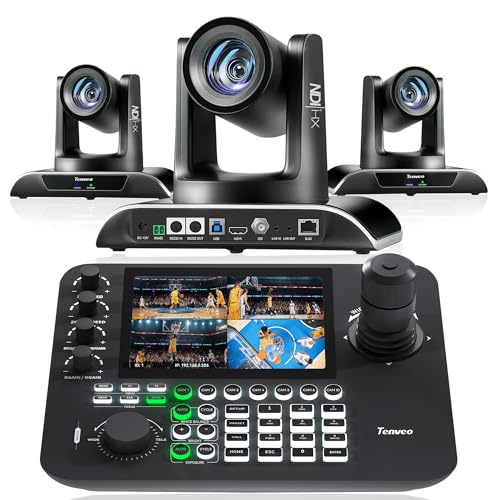 Tenveo NDI PTZ Camera AI Auto Tracking
- 🌟【𝐓𝐞𝐧𝐯𝐞𝐨 𝐏𝐓𝐙 𝐂𝐚𝐦𝐞𝐫𝐚 𝐚𝐧𝐝 𝐂𝐨𝐧𝐭𝐫𝐨𝐥𝐥𝐞𝐫 𝐁𝐮𝐧𝐝𝐥𝐞】The Tenveo PTZ…
- 🌟【𝐓𝐞𝐧𝐯𝐞𝐨 𝐍𝐃𝐈 𝐏𝐫𝐨𝐟𝐞𝐬𝐬𝐢𝐨𝐧𝐚𝐥 𝐏𝐓𝐙 𝐂𝐚𝐦𝐞𝐫𝐚】Tenveo Full Interface VHDMAX…
- 🌟【𝐀𝐈 𝐀𝐮𝐭𝐨 𝐓𝐫𝐚𝐜𝐤𝐢𝐧𝐠 𝐏𝐓𝐙 𝐂𝐚𝐦𝐞𝐫𝐚】The AI PTZ Camera…
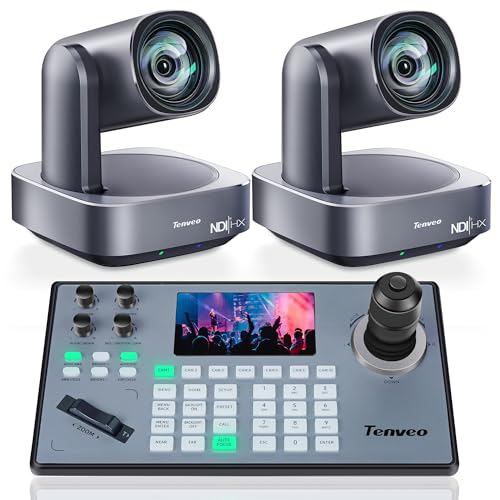 Tenveo 4K NDI PTZ Camera and Controller
- 🚀【𝐓𝐞𝐧𝐯𝐞𝐨 𝟒𝐊 𝐍𝐃𝐈 𝐏𝐓𝐙 𝐂𝐚𝐦𝐞𝐫𝐚 𝐚𝐧𝐝 𝐂𝐨𝐧𝐭𝐫𝐨𝐥𝐥𝐞𝐫 𝐁𝐮𝐧𝐝𝐥𝐞/𝐊𝐢𝐭】Professional…
- 🎥 【𝐒𝐭𝐮𝐧𝐧𝐢𝐧𝐠 𝟒𝐊 𝐕𝐢𝐝𝐞𝐨 & 𝐀𝐈 𝐀𝐮𝐭𝐨-𝐓𝐫𝐚𝐜𝐤𝐢𝐧𝐠】Capture every…
- ✨ 【𝐒𝐢𝐦𝐩𝐥𝐢𝐟𝐢𝐞𝐝 𝐒𝐞𝐭𝐮𝐩 𝐰𝐢𝐭𝐡 𝐏𝐨𝐄 & 𝐌𝐮𝐥𝐭𝐢𝐩𝐥𝐞 𝐂𝐨𝐧𝐧𝐞𝐜𝐭𝐢𝐨𝐧𝐬】Both…
As an Amazon Associate we earn from qualifying purchases at no extra cost to you.
Quick comparison
| Bundle type | Camera resolution | Optical zoom | NDI and network needs | Best suited to |
|---|---|---|---|---|
| BirdDog P400 + BirdDog PTZ Keyboard | 4K up to 30 fps | 12x | NDI High Bandwidth and NDI HX; typically PoE+ or 12V DC, depending on installation | Corporate studios, houses of worship, education and live streaming |
| PTZOptics Move 4K + hardware PTZ controller | 4K up to 60 fps | 12x, 20x or 30x versions | NDI HX-class transport; plan for PoE+ and a managed gigabit network | Multi-camera rooms where framing distance varies substantially |
| Sony BRC-X400 + NDI-enabled production workflow | 4K up to 30 fps | 20x | NDI normally requires the appropriate interface or licensed workflow; PoE is not the default assumption | Broadcast, auditoriums and installations requiring strong zoom performance |
| Premium 4K NDI camera + compact controller | 4K up to 30 or 60 fps | 12x to 20x | NDI HX is more network-friendly; full-bandwidth NDI needs substantially more capacity | Small teams that need professional control without a large control room |
Exact frame rates, NDI licensing and power options can vary by firmware, regional model and accessory configuration. Confirm the camera’s current technical sheet before ordering a matched bundle.
Best overall: BirdDog P400 with BirdDog PTZ Keyboard
The BirdDog P400 is a strong all-round choice when the priority is a native NDI workflow with familiar broadcast-style control. Its 4K output and 12x optical zoom suit presenter shots, medium-sized stages and conference rooms where cameras are usually installed within roughly 5–20 metres of the subject.
The important distinction is that optical zoom preserves detail, while digital zoom mainly enlarges existing pixels. A 12x lens may be sufficient for a lectern or panel, but it is less suitable for a wide auditorium where a speaker must be framed from the rear. The P400 therefore works best when camera placement can be planned rather than improvised.
BirdDog’s PTZ Keyboard provides physical pan, tilt and zoom controls, camera selection, preset access and a more tactile operating experience than a software interface. That matters during a live event: an operator can reach for a zoom rocker or preset button without looking away from the multiview. The main limitation is scale. A compact keyboard is comfortable for a few cameras, but a larger production may benefit from a controller with more dedicated camera-selection and preview controls.
Why choose it
- Native NDI options reduce the need for separate video transmitters.
- 4K capture provides useful cropping flexibility for HD program output.
- The controller is approachable for operators moving up from webcam or software control.
- It fits production spaces that need professional connectivity without a full broadcast console.
Best for changing distances: PTZOptics Move 4K
The PTZOptics Move 4K is the more flexible choice when the same room may require different lens ranges. Versions with 12x, 20x and 30x optical zoom allow the buyer to match the lens to the venue instead of compensating later with digital enlargement.
Choose 12x for a small studio or classroom, 20x for a medium auditorium, and 30x when the camera must sit well back from the stage. The longer lens is not automatically better: it narrows the field of view, makes small operator movements more noticeable, and can make it harder to acquire a subject quickly. A 30x camera positioned close to a panel may struggle to show the whole group.
Move 4K models can support high-frame-rate 4K workflows, which is useful for smooth camera motion, sports, demonstrations and productions that also record locally. For ordinary talking-head broadcasts, 4K at 30 fps is often adequate; the added frame-rate capability should not outweigh lens choice, lighting and network design.
Pair the camera with a hardware controller that supports adjustable pan and tilt speed, programmable presets, focus control and multiple-camera selection. The best controllers let an operator slow the movement for a precise close-up while retaining faster movement for repositioning between shots.
Best long-zoom installation: Sony BRC-X400
The Sony BRC-X400 is a serious installation camera for venues where image matching, lens reach and dependable remote operation are more important than the simplest NDI setup. Its 20x optical zoom gives it a meaningful advantage over 12x models when the camera is placed at the back of a hall or above a control booth.
This is not the easiest bundle to buy as a single box. NDI availability depends on the selected interface, license and production architecture, so the camera should be treated as part of a designed system rather than assumed to be a native plug-in NDI endpoint. It may also require a separate power arrangement; do not presume that a standard PoE switch will operate it.
The BRC-X400 makes sense for broadcast facilities, lecture theatres and houses of worship that will use the cameras frequently and keep them installed for years. For occasional streaming in a small room, its additional integration work and higher system cost are difficult to justify.
NDI bandwidth: the specification that changes the network
NDI High Bandwidth prioritizes image quality and low latency, but it can consume a large portion of a gigabit network. Depending on resolution, frame rate, motion and image complexity, a 4K full-bandwidth NDI feed can require tens to well over 100 Mbps. NDI HX modes use substantially less bandwidth, often making them practical for shared production networks, though the exact data rate depends on the codec and configuration.
A useful planning calculation is to budget approximately 150 Mbps per 4K full-bandwidth stream until the manufacturer provides a more precise figure. Four cameras would therefore require roughly 600 Mbps before adding return feeds, control traffic, recording, internet access and safety margin. That can fit on a gigabit link in ideal conditions, but a dedicated 10GbE backbone is safer for a busy production network.
For four 4K cameras using a lower-bandwidth HX mode at an illustrative 30 Mbps each, the camera traffic is about 120 Mbps. This does not mean every HX configuration uses exactly 30 Mbps; it demonstrates why HX is often the practical choice for venues with existing gigabit infrastructure.
Controller ergonomics and latency
Hardware controllers differ more in use than product listings suggest. Look for:
- Variable-speed pan and tilt: essential for smooth live moves.
- A proportional zoom rocker: preferable to repeated button presses during a shot.
- Direct camera selection: faster than opening an on-screen menu.
- At least 100 presets: useful for rooms with lectern, wide, panel and audience positions.
- PoE or a single network connection: reduces cable clutter at the control position.
- Focus and exposure access: valuable when lighting changes during an event.
Network latency is normally low enough for live switching when the cameras, controller and production system share a well-designed wired network. Wireless links, overloaded switches and unnecessary routing introduce more risk than the nominal camera specification. For fast camera moves, sports or music, use wired Ethernet, keep production traffic separate from guest internet access, and avoid relying on Wi-Fi bridges.
PoE, cabling and integration checklist
Check the camera’s power class before choosing the switch. A camera requiring PoE+ cannot be safely treated as a basic PoE device, and a higher-power camera may need a local adapter even when its video is carried over Ethernet. Verify the switch’s total PoE budget, not just its per-port rating. Four cameras drawing 25 watts each require at least 100 watts before allowing headroom for startup and other devices.
Use managed gigabit switches with VLAN support, adequate backplane capacity and clear port-speed indicators. For larger installations, place the cameras on a production VLAN, reserve fixed IP addresses or DHCP reservations, and document every camera name, preset and switch port. This saves substantial troubleshooting time when a room is reconfigured.
Decision matrix
| Your situation | Recommended direction | Reason |
|---|---|---|
| Two to four cameras, small team, native NDI preferred | BirdDog P400 bundle | Good balance of 4K quality, familiar control and manageable setup |
| Camera positions vary from close studio shots to distant stage shots | PTZOptics Move 4K, selecting 20x or 30x where needed | Multiple optical-zoom options reduce the need for digital cropping |
| Permanent auditorium or broadcast installation | Sony BRC-X400 with a planned NDI interface and controller | Longer zoom and installation-oriented operation justify the added integration |
| Existing gigabit network with several simultaneous cameras | NDI HX-capable cameras and a managed switch | Lower bandwidth leaves room for recording, monitoring and control traffic |
| Frequent fast-motion production | 4K camera supporting higher frame rates, wired Ethernet and responsive controller | Frame rate and network stability matter more than maximum resolution alone |
Ownership realities
PTZ cameras have fewer wear items than conventional cameras, but the pan-and-tilt drive, zoom mechanism, Ethernet connectors and controller joystick receive the most repeated use. Dust on the lens window reduces contrast long before a camera appears visibly dirty, so use a clean microfiber cloth and appropriate lens-safe solution; do not spray fluid directly into vents or connectors.
Common installation mistakes include mounting a 30x camera too close to the subject, using a consumer switch with insufficient PoE budget, enabling full-bandwidth NDI on every camera without measuring traffic, and relying on autofocus under theatrical lighting. Save a neutral wide preset, a presenter preset and an emergency home position before the first event. Also keep firmware versions and controller mappings documented so a replacement camera can be integrated without rebuilding the entire production.
Final recommendation
Choose the BirdDog P400 bundle for the clearest native-NDI path and a balanced control experience. Choose PTZOptics Move 4K when lens range and frame-rate flexibility are more important, particularly in rooms with changing camera distances. Choose Sony BRC-X400 when the installation demands 20x optical reach and long-term broadcast-grade integration. In every case, spend as much attention on the switch, PoE budget, controller layout and NDI mode as on the camera itself: those choices determine whether a premium bundle feels reliable during a live production.