Key takeaways
- Shopping for a Hisense television means choosing between three very different families under one brand name.
Shopping for a Hisense television means choosing between three very different families under one brand name. There are small HD sets with a Roku interface, mid-size 4K Hi-QLED models that add gaming features, and a premium tier built around Mini-LED, high refresh rates and even a display designed to look like framed art. The right pick depends on where the screen will live and what you plan to feed it.
This guide is for buyers who have narrowed the field to Hisense and need to decide which line deserves the money. It compares six models across the lineup, from a compact HD set to premium 65-inch options, judging only from the specs that appear in each listing. Where several screen sizes share a series, one representative model is covered and the others are treated as size variants.
Quick Picks
Our top picks




As an Amazon Associate we earn from qualifying purchases at no extra cost to you.
| Product | Best for | Key spec from the title |
|---|---|---|
| Hisense 43-inch E6 Cinema Series (43E6QF) | Bedroom or small den with Alexa | 4K UHD Hi-QLED Fire TV, Dolby Vision and Atmos, Motion Rate 120 |
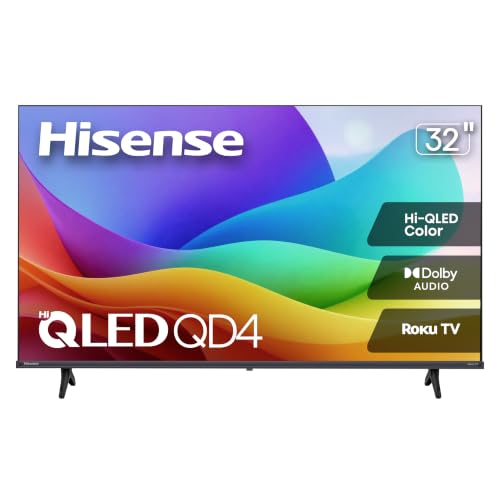
| Hisense 32-inch QD4SR Series | Kitchen, office or guest room | HD Hi-QLED Roku TV, Dolby Audio, Full Array LED |
| Hisense 50-inch E6SR Series | Console gaming on a budget | 4K Roku TV with Dolby Vision, Game Mode Plus, VRR, ALLM |
| Hisense 65-inch U6 Pro | Fast motion and bright rooms | Mini-LED ULED 4K, native 144Hz, Motion Rate 480 |
| Hisense 65-inch S7 CanvasTV | Living rooms that double as galleries | Art Mode, anti-glare panel, Hi-Matte display, 144Hz |
| Hisense 65-inch U7 | High-end gaming and movies | Mini-LED ULED 4K, native 165Hz, VRR 330, HDR10+, Dolby Vision |
How to Choose
Resolution and Size Come First
Measure the wall and the viewing distance before you shop; a screen that fits the room is worth more than a spec you will never notice.
Hisense sells HD and 4K sets side by side, and the gap shows up fast as screens get larger. HD is fine at 32 or 40 inches in a secondary room. From roughly 43 inches up, buyers should look for 4K UHD so the picture does not look soft from a couch. For a main living room, 55 inches and above is the common range, and the 65-inch models in this guide fit that role.
Match the Smart Platform
Switching platforms later is not impossible, since many buyers add an external streaming stick, but it defeats the point of paying for a built-in system.
The same hardware family appears with different operating systems: Fire TV on the 43E6QF and U6 Pro, Roku TV on the QD4SR and E6SR, and Google TV on the S7 and U7. If you live inside Alexa, Fire TV is easy. If you want a plain grid of channels, Roku is simple. Google TV suits households that use Chromecast-style casting and Google Home. Ignore minor interface differences, since all three cover the major streaming apps.
Check the Gaming Terms
For a console that outputs 4K at 60 frames per second, native 120Hz is a bonus, not a requirement; VRR and a low-latency game mode usually matter more for everyday play.
If a console is in the picture, the spec words to look for are VRR, ALLM, a game mode, and a high native refresh rate. The E6SR title names Game Mode Plus, VRR and ALLM, while the U6 Pro lists native 144Hz and the U7 lists native 165Hz with VRR 330. Motion Rate figures are marketing numbers, so lean on native refresh rate and the presence of VRR rather than the biggest-sounding label.
Know Where Budget Models Cut Corners
Pay attention to the series name in the title. QD4SR points to the entry tier, E6 to the middle, and U6, U7 and S7 to the upper end of this list.
Entry sets such as the 32-inch QD4SR give up resolution and, usually, peak brightness and speaker power. Premium Mini-LED models spend on backlight zones and brightness. In 2026 the mid-range is where most buyers land: 4K, Dolby Vision support and a game mode without paying for the top Mini-LED hardware. Plan on a soundbar for any tier if dialogue and bass matter.
The 6 Best Options
Hisense 43-Inch E6 Cinema Series (43E6QF)
Buyers who want a modern 4K picture but have limited wall space will find this the easiest fit in the lineup, and the Alexa remote keeps the experience simple for the whole household.
This is a compact 4K choice for a bedroom or small den. The title lists Hi-QLED, an AI light sensor, Dolby Vision and Atmos, an Alexa voice remote and Motion Rate 120, all on the Fire TV platform.
- Strength: Dolby Vision and Atmos are both named, which is generous for the size.
- Strength: An AI light sensor suggests automatic brightness adjustment for changing rooms.
- Trade-off: At 43 inches it is a secondary-room size, not a centerpiece.
Skip it if you want a big living room screen or prefer Roku or Google TV.
Hisense 32-Inch QD4SR Series (32QD4HSR)
It is a sensible match for a kitchen counter, a teen bedroom or a guest suite where the screen is a convenience rather than a feature.
The QD4SR is the small, simple option. The listing describes an HD Hi-QLED Roku TV with Dolby Audio, Alexa compatibility and Full Array LED, with a current-year model label. A 40-inch FHD version exists in the same series, so size is the main variable.
- Strength: Hi-QLED color and Full Array LED at a small size.
- Strength: Roku platform with Dolby Audio.
- Trade-off: HD resolution limits sharpness if you sit close.
Skip it if you want 4K or gaming features.
Hisense 50-Inch E6SR Series (50E6SR)
For households with a PlayStation or Xbox in the living room, this is where Hisense packs the most gaming vocabulary into the mid-range tier, and Roku keeps navigation uncomplicated.
The 50E6SR is the value gaming pick. Its title packs in 4K UHD, Hi-QLED, Dolby Vision, Game Mode Plus, VRR, ALLM, DTS Virtual:X and Apple AirPlay on a Roku TV. The 55-inch and 65-inch versions share the series, so this entry represents all three.
- Strength: Gaming terms VRR, ALLM and Game Mode Plus are all named.
- Strength: Apple AirPlay and Dolby Vision in the feature list.
- Trade-off: The title does not list a high native refresh rate.
Skip it if you want 144Hz or higher for a gaming PC.
Hisense 65-Inch U6 Pro (65U6SF Pro)
Sports fans and action gamers are the natural audience, because the listing stresses motion handling and a high native refresh rate rather than simple size.
This is the first step into the premium tier. The title lists Mini-LED ULED, 4K UHD HDR, gaming and AI features, native 144Hz, Motion Rate 480 and Dolby Vision on a Fire TV platform.
- Strength: Native 144Hz is named, which suits fast gameplay.
- Strength: Mini-LED backlighting with Hi-QLED in the same package.
- Trade-off: Fire TV may not suit buyers who prefer Google TV or Roku.
Skip it if the room is small or if you only stream casual shows.
Hisense 65-Inch S7 CanvasTV (65S7SG)
Think of it as a screen that doubles as wall decor, which is a different shopping logic from the spec-first approach used for the other models.
The S7 is for people who care how the screen looks when it is off. Art Mode, an anti-glare panel and a Hi-Matte display are in the title, along with 4K UHD, 144Hz, Dolby Vision HDR and Google TV. A 50-inch version exists, so treat that as the size alternative.
- Strength: Art Mode and a matte, anti-glare screen suit bright rooms.
- Strength: 144Hz and Dolby Vision HDR named in the listing.
- Trade-off: The title does not mention Mini-LED, so it is built for style more than peak brightness.
Skip it if dark-room movie contrast is your top priority.
Hisense 65-Inch U7 (65U7SG)
It targets buyers who watch HDR films and play fast games on the same set and want the most capable hardware named in the Hisense list.
The U7 sits at the top of this group. The title describes Mini-LED ULED 4K, Hi-QLED, native 165Hz, VRR 330, HDR10+, Dolby Vision and Google TV, aimed at premium gaming and HDR.
- Strength: Native 165Hz is the highest refresh rate in this group.
- Strength: HDR10+ and Dolby Vision are both named.
- Trade-off: It sits in the premium tier, so it asks more of the budget.
Skip it if you want a casual second-room TV.
Which One Fits Your Situation
A Bedroom or Home Office
Small rooms also reward a screen that is easy to mount or place on a stand without crowding other furniture.
Both models keep cost down relative to the larger sets and fit a nightstand or desk-side shelf.
The Hisense 32-inch QD4SR keeps things simple, or step up to the 43E6QF for 4K and Dolby Vision.
A Console Player on a Budget
Roku also keeps the menu clean, which helps when younger family members share the set.
The 50E6SR gives you VRR, ALLM and Game Mode Plus without moving into the premium tier.
A PC or High-Refresh Gamer
Confirm your graphics card and cable support the refresh rate you want before committing to the top model.
The U7 offers native 165Hz, with the U6 Pro as a step down at native 144Hz.
A Bright Living Room That Needs to Look Good
The anti-glare panel is the relevant feature when windows face the screen, and Google TV adds casting from phones.
Take the S7 CanvasTV for its Art Mode and anti-glare, Hi-Matte display.
Common Mistakes
- Treating Motion Rate numbers as real refresh rates instead of reading the native Hz figure.
- Buying an HD set above 40 inches and then noticing the softness from the couch.
- Ignoring the platform: Fire TV, Roku and Google TV each feel different day to day.
- Assuming every size in a series has identical features; confirm the exact model number.
- Skipping a soundbar and expecting thin built-in speakers to deliver the Atmos or DTS branding on the box.
Specs and Terms Explained
Hi-QLED and quantum dots
Hisense uses this label for LCD sets that add a quantum dot layer to widen the range of colors. It is not the same as an OLED panel, where each pixel makes its own light. In practice, quantum dots help colors look richer on a bright LED backlight, but blacks still depend on the backlight design.
Local dimming and Mini-LED
Local dimming lets the TV darken parts of the backlight so dark scenes do not look gray. Mini-LED uses many more, smaller lights, which can create finer control and higher peak brightness. For a dim room, the number of dimming zones and the quality of the control matter more than the marketing name.
Refresh rate: 60, 120 and higher
A 60 Hz panel is adequate for broadcast and streaming. Console and PC players who want smoother motion look for 120 Hz or above, and also for variable refresh rate support so the picture adjusts to the game frame rate.
HDR formats
HDR10 is the baseline format. Dolby Vision and HDR10+ add scene-by-scene instructions. A set does not need all of them, but it should support the format your streaming service uses most.
Sizing and Distance Checklist
- For a 4K screen, sitting around one to one-and-a-half times the diagonal away is a common comfort range.
- For 32-inch HD models, plan on a desk or small-room distance, since the pixels are visible if you sit very close.
- Measure the stand width and the cabinet depth; larger sets often have feet near the edges.
- Check the wall mount pattern of the exact model before buying a bracket.
- Confirm the number of HDMI ports labeled for 4K or high refresh, because not all ports are the same on every set.
- Plan for a soundbar if the room is large, as thin speakers struggle with dialogue.
Viewing angle and room light
Many LED panels lose contrast and color when seen from the side, which matters in an open living room with sofas spread across a wide area. A bright room also exposes screen reflections, so look for notes about anti-glare coatings and peak brightness in the specifications before choosing a larger screen.
Who Should Skip These Models
If your main goal is dark-room movie watching, the framed-art style of the CanvasTV is a design choice rather than a picture advantage, so weigh it against sets with stronger contrast control. The smaller HD models are a poor match for anyone who wants sharp text from a PC. And if you want the very latest gaming features, check the port specifications on the page before assuming every model has them.
Related guides
- Rechargeable Electric Toothbrush With Travel Case
- Countertop Water Filters Without Installation
- Nsf Certifications For Water Filters Explained
Frequently Asked Questions
Which Hisense TV is best for gaming?
Pair any of them with a certified high-speed HDMI cable so the headline specs actually reach the screen.
Based on the listed specs, the U7 offers native 165Hz and VRR 330, and the U6 Pro lists native 144Hz. The E6SR is the budget option with VRR, ALLM and Game Mode Plus.
What is the difference between Hi-QLED and Mini-LED ULED?
Neither term guarantees a specific brightness number, so look at the full title and the series name.
Hi-QLED refers to quantum dot color enhancement. Mini-LED ULED models add many small backlight units for better brightness and contrast control, which is why they sit higher in the lineup.
Does Hisense offer smart platforms other than Roku?
Pick based on the voice assistant and apps your family already uses, not on the brand name of the platform.
Yes. This guide includes Fire TV, Roku TV and Google TV models, so you can match your existing ecosystem.
Why are some sizes missing?
The 55-inch and 65-inch E6SR, the 40-inch QD4SR and the 50-inch S7 are size variants of models already covered, so they are not reviewed separately.