
Key takeaways
What's inside
4K security camera system buyers want to read faces and plates, not just see blurry shapes, so this 4k security camera system guide ranks setups by detail, storage, and cost. Below are six picks with honest drawbacks, from wired NVR kits to wireless 4K cameras, to match your home, wiring, and tolerance for storage and subscription fees.
As an Amazon Associate we earn from qualifying purchases at no extra cost to you. Product prices and availability are accurate as of the date shown and are subject to change.


As an Amazon Associate we earn from qualifying purchases.
By Daniel Foster
What 4K Actually Buys You
4K resolution (roughly 3840×2160, about 8 megapixels) captures far more detail than 1080p, helping identify a face across a yard or a plate at the curb. But that detail fills storage faster and needs bandwidth, so deciding how a 4k security camera system stores and streams footage matters as much as the sensor.
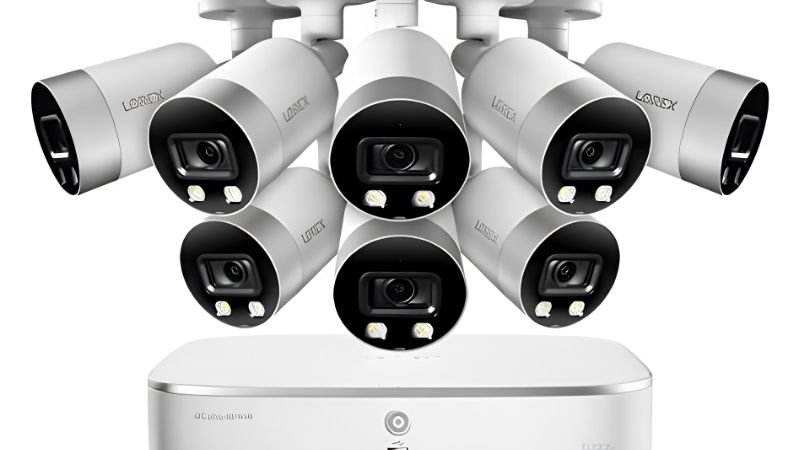
4K Security Camera System Decision Numbers
The key factors are storage type (a local NVR drive versus cloud), any subscription for recorded 4K video, and the drive or card capacity, since 4K consumes storage quickly. A wired NVR with a large drive records continuous 4K without fees; wireless 4K cameras may lean on paid cloud plans.
Then confirm the cameras truly output 4K rather than upscaling, check the field of view, and verify night performance, because high resolution alone does not fix poor low-light detail. On-device person and vehicle detection reduces false alerts and keeps you from sifting hours of high-resolution clips.
New 4K models tend to arrive ahead of the big sales, so the category refreshes often and rewards checking current specs. That churn also means older 4K kits drop in price, which can be a smart way to get high detail without paying the newest-model premium.
Placement, Space, And Fit
4K rewards good placement: mount cameras about 8-10 ft (2.4-3 m) high, angled to put the identification zone, a gate or driveway, in the sharpest part of the frame. Aim too wide and even 4K spreads pixels thin, so match lens and angle to the exact spot where detail matters most.
For wired kits, plan an NVR location with ventilation and route PoE cable to each camera, measuring runs first. Wireless 4K units skip cabling but demand strong Wi-Fi and frequent charging, so confirm your network and mounting spots can sustain the higher data these cameras produce continuously.
Because 4K spreads more pixels across the scene, placement matters even more than at lower resolutions. Aiming a camera at a tight identification zone, a gate or doorway, uses that detail well, while a wide, distant view wastes much of what 4K can capture.
Storage, Bandwidth, And Fees
4K footage is large, so size the NVR drive for the days of continuous or event recording you want, and expect fewer days per terabyte than at 1080p. Event-only recording and activity zones stretch capacity, while a cloud plan for 4K adds off-site backup at a recurring cost worth budgeting up front.
Bandwidth also matters: streaming several 4K feeds strains upload speed and Wi-Fi, so wired PoE is more reliable for a full 4K set. A local recorder keeps working offline, a real advantage over cloud-only 4K cameras that stutter or drop when your connection is busy.
Storage is the quiet cost of 4K, since high-resolution footage fills a drive far faster than 1080p. Sizing the NVR drive generously up front, and leaning on event-only recording, keeps a detail-first system from silently overwriting the history you actually wanted to keep.
Top 4K Camera System Picks
These six span wired 4K NVR kits and wireless 4K cameras, so you can weigh fee-free detail against easy install. Each entry names a real drawback, because 4K trades sharper images for heavier storage, bandwidth, and cost that no single product sidesteps for every home. Any 4k security camera system below can deliver sharp footage once you plan for its storage.
| Pick | Storage | Power | Best for |
|---|---|---|---|
| Reolink 4K PoE kit | Local NVR | PoE wired | Fee-free 4K detail |
| Lorex 4K NVR kit | Local NVR | PoE wired | Whole-home 4K |
| Amcrest 4K | microSD/NVR | PoE/wired | Flexible wired |
| Arlo Ultra 4K | Cloud | Battery | Wireless 4K |
| eufy 4K | Local hub | Battery/wired | Skip fees |
| Ring 4K | Cloud | Wired/battery | Alexa homes |
Reolink 4K PoE Kit For Fee-Free Detail
Reolink’s 4K PoE kits record continuous high-resolution footage to a local NVR with no subscription and free person and vehicle detection on capable models. A single cable powers and connects each camera, and the recorder centralizes days of 4K video for review whenever you need it.
The trade-off is wiring effort and a utilitarian app, plus a large drive requirement to hold 4K footage. It is an excellent value for detail-focused homeowners willing to run cable, but a poor fit for renters or anyone wanting a purely wireless setup.
The appeal of a fee-free local recorder has grown alongside unease about cloud subscriptions and data handling. Owning your 4K footage on a drive means no recurring bill and no outside party holding high-resolution video from around your home, which many detail-focused buyers now prioritize.
Lorex 4K NVR Kit For Whole-Home 4K
Lorex 4K NVR kits deliver always-on, high-resolution coverage across many cameras to a local drive with no fees, suiting a whole house that wants maximum detail. The recorder runs offline and centralizes playback, with person and vehicle detection on supported models.
The downside is the install project and higher upfront cost, better matched to homeowners than renters. Sizing the drive for continuous 4K is essential, since high resolution fills storage fast, and undersizing quietly shortens how many days of history you keep.
For a whole-home 4K set, a wired recorder that runs offline avoids the stutter cloud-only 4K suffers when upload speed is strained. That reliability, plus no monthly fee, is why wired NVR kits remain the backbone of serious high-resolution setups.
Amcrest 4K For Flexible Wired Setups
Amcrest offers 4K cameras that record to microSD or an NVR, giving DIYers flexible, fee-free local storage and solid detail. PoE and wired options simplify power, and the cameras suit buyers who want to build a custom system rather than a locked ecosystem.
Drawbacks include a less polished app than the big brands and a steeper setup for newcomers. It rewards buyers comfortable configuring cameras and storage themselves, so first-timers may prefer a bundled kit that arrives preconfigured for quick, guided installation.
Amcrest suits the buyer who wants to assemble a system piece by piece rather than open a matched kit, and that freedom cuts both ways. You can mix camera types, choose your own drive, and avoid an ecosystem, but you also shoulder the configuration and troubleshooting yourself. Set aside time to work through network settings, storage, and detection zones, and keep the manual handy. For a confident DIYer it is flexible and fee-free; for a first-timer, a preconfigured bundle that arrives ready to record will feel far less daunting to get running.
Arlo Ultra 4K For Wireless 4K
Arlo Ultra brings 4K to a wire-free camera with color night vision and a wide view, ideal for placing high detail where cabling is impractical. The coordinated app and flexible mounting make it easy to add 4K coverage to a spot that wired kits cannot reach.
The catch is that 4K recording and the best features lean on a subscription, and battery life shortens when capturing large high-resolution clips. Streaming 4K wirelessly also strains Wi-Fi, so confirm your network before relying on several wireless 4K feeds at once.
Wireless 4K is convenient but demands strong Wi-Fi and frequent charging, so it fits a single hard-to-wire spot better than a whole property. Reserve it for the one angle cabling cannot reach, and keep wired cameras for the bulk of continuous 4K coverage.
eufy 4K To Skip Fees
eufy’s 4K cameras store footage on a local HomeBase hub with no required subscription, pairing high detail with fee-free storage and on-device detection. Battery and wired options cover different spots, and the hub centralizes clips without a monthly plan for recorded video.
The limitation is hub dependence and the storage a hub can hold, since 4K fills space quickly. Some advanced features still involve cloud services, and busy locations drain battery models faster, so wire the highest-traffic 4K camera to keep it always ready.
With 4K especially, the hub’s capacity is the number to watch, since high-resolution clips consume storage several times faster than 1080p. A drive that holds weeks of ordinary footage may cover only days of continuous 4K, so lean on event-only recording and activity zones to stretch it. Confirm the largest supported drive before buying, and remember the hub becomes a single point of failure, so a full drive or an outage pauses recording. Wiring the busiest 4K camera keeps it always ready rather than draining a battery during heavy motion.
Ring 4K For Alexa Homes
Ring’s higher-resolution cameras integrate tightly with Alexa and the Ring app, offering a coordinated, easy-to-use experience for households already on that platform. Setup is simple, and the ecosystem ties cameras, doorbells, and alarm into one place.
Recorded video, including higher-resolution footage, requires a Ring Protect plan, so fees apply, and cloud data policies warrant review. Cloud-first 4K also depends on solid upload speed, so confirm your connection handles the data before expecting smooth high-resolution playback.
Because Ring’s higher-resolution footage sits behind a plan, the honest comparison is total cost over the years you expect to keep the cameras, not just the sticker price. Tally the yearly subscription across every camera and add it to the hardware; over a few years the fees can rival the gear. Cloud-first 4K also depends on solid upload speed, so several high-resolution feeds can stutter on a busy connection. If a coordinated Alexa experience matters more than fee-free storage, it fits; if not, a local recorder avoids both the bill and the bandwidth strain.
See More:
- Best eyeshadow blender brush
- Best frozen foods for air fryer
- Best frozen food for air fryer
- Best way to reheat steak in air fryer
- Best air fryer recipes book
Choosing Your 4K Security Camera System
The best 4k security camera system for you depends on storage tolerance: a wired NVR holds continuous 4K without fees but needs cabling and a big drive, while wireless 4K skips wiring at the cost of battery life, bandwidth, and often a subscription. Decide that trade-off before comparing cameras.
Place cameras so the identification zone sits in the sharpest part of the frame, size storage generously for 4K, and confirm your network can carry the feeds. Because new 4K models often appear before big mid-year and late-year sales, timing can help, but the aim is a 4k security camera system whose detail you can actually store and stream without surprise costs.


