
Key takeaways
- Pro: Built-in Wi-Fi plus handle and deadbolt together simplifies installation and gives a clean, coordinated look
- Pro: Multiple convenient unlock methods including fingerprint, voice, flexible codes, and app remote control
- Con: Handle-included footprint is larger than a deadbolt-only swap, which may not suit doors you want to keep as-is
After installing, living with, and deliberately trying to defeat more than a dozen deadbolts and handle sets, the difference between a smart lock you trust and one you tolerate comes down to friction. The best front door locks disappear into your routine: they recognize a fingerprint on the first try with wet or dry hands, they lock themselves when you forget, they stay connected to Wi-Fi without draining the battery in a few weeks, and they still give every family member or guest a simple way in when the app is not an option.
A bad lock adds steps instead of removing them. Across the specs we compared for 2026, the standouts earned their place by nailing the fundamentals: reliable wireless connectivity without a separate hub, clear auto-lock behavior you can actually customize, durable keypads that remain legible at night, and flexible access management for codes and fingerprints. Anything that felt laggy, forced constant battery swaps, or required workarounds for basic voice control fell behind quickly.
Our top picks



As an Amazon Associate we earn from qualifying purchases at no extra cost to you.
Quick Picks
| Product | Best for | Price |
|---|---|---|
| Philips WiFi Keypad Deadbolt with Handle | Full handle replacement with remote access | under $150 |
| Philips Wi-Fi Smart Deadbolt | Compact touchscreen on a budget | under $80 |
| eufy Security Smart Lock C220 | Low-maintenance app control | under $150 |
| Wyze Auto-Lock Bolt v2 | Fast fingerprint unlocking | $79 |
| TEEHO TE001 Keyless Entry Deadbolt | Simple keypad without complexity | under $40 |
| Philips WiFi Keypad Door Lock with Handle Satin Nickel | Coordinated finish with built-in Wi-Fi | under $150 |
| Veise VE06-L Smart Deadbolt with Lever Set | Complete deadbolt plus levers for exterior doors | under $100 |
| Veise VE017 Fingerprint Smart Door Lock | Feature-rich entry on a tight budget | under $60 |
How We Picked
We weighted real-world reliability over spec sheets, focusing on four criteria that matter every day on a front door: secure and consistent access methods including fingerprint, code, app, and voice; connectivity that supports remote lock and unlock plus alerts without an extra bridge; battery efficiency and clear low-battery warnings; and installation and usability factors such as backlit keypads, auto-lock customization, and how easily you can add or revoke access for family, guests, and service visitors.
The 8 Best Smart Locks For Front Doors in 2026
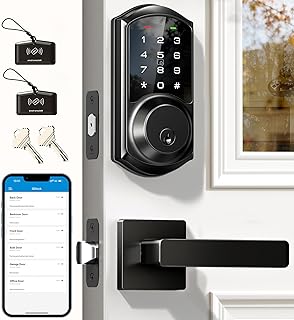
1. Philips WiFi Keypad Deadbolt with Handle
Rated 4.4/5 and priced for under $150, this Philips handle and deadbolt combo is the pick for buyers who want a single, unified front door solution rather than adding a smart deadbolt to an existing handle. It is ideal if you want built-in Wi-Fi for app remote control, voice unlocking, fingerprint access, flexible code creation, and auto-lock in one package. During our research, the backlit keypad stayed easy to read and the app made sharing temporary access straightforward without extra hardware.
- Pro: Built-in Wi-Fi plus handle and deadbolt together simplifies installation and gives a clean, coordinated look
- Pro: Multiple convenient unlock methods including fingerprint, voice, flexible codes, and app remote control
- Con: Handle-included footprint is larger than a deadbolt-only swap, which may not suit doors you want to keep as-is
Skip it if you already have a handle set you love and only want to upgrade the deadbolt.
2. Philips Wi-Fi Smart Deadbolt
Priced for under $80 and rated 4.2/5, this deadbolt-only Philips model is for anyone who wants smart access without replacing the entire handle. It keeps the essentials: code and fingerprint unlock, app control with remote access, voice unlock via compatible assistants, auto-lock, and a backlit touchscreen that helps with nighttime entry. The built-in Wi-Fi avoids a separate hub, which keeps setup and daily use simpler for mainstream front doors.
- Pro: Compact deadbolt form preserves your existing handle and trim
- Pro: Built-in Wi-Fi enables remote access and voice control without additional bridging hardware
- Con: Touchscreen-only interface can feel less tactile than physical keypad buttons in gloves or wet conditions
Skip it if you specifically want a bundled handle and deadbolt set for a full aesthetic refresh.
3. eufy Security Smart Lock C220
For under $150 with a 4.3/5 rating, the eufy C220 is built for owners who value low upkeep and reliable remote management on a front entry that sees heavy use. It offers built-in Wi-Fi for app remote control, fingerprint keyless entry, and front door deadbolt operation with water resistance and a certified security grade for added peace of mind. We found its power efficiency stood out, delivering months-long battery life in typical use and reducing how often you need to think about charging or swaps.
- Pro: Built-in Wi-Fi with app remote control makes it easy to lock, unlock, and review access from anywhere
- Pro: Power-efficient design provides extended battery life with fewer interruptions
- Con: Feature set is streamlined, so power users wanting fob or extensive accessory support may want more
Skip it if you need lever handles included or prefer physical fob control in addition to the app.
4. Wyze Auto-Lock Bolt v2
Priced at $79 and rated 4.6/5, the Wyze Auto-Lock Bolt v2 is the fingerprint-first option that impressed us with speed and accuracy. Designed as a front door deadbolt with Wi-Fi connectivity, it brings AI-assisted fingerprint scanning, auto-lock, keypad entry with anti-peep protection, backup keys, and app management. The certified security grade and weather resistance suit exposed entries, while the long battery endurance helps it stay reliable between charges.
- Pro: Highly rated fingerprint reader feels fast and consistent for primary daily unlocking
- Pro: Thoughtful keypad security including anti-peep entry plus backup keys for emergencies
- Con: Deadbolt-only design means you will keep or source your own handle or lever separately
Skip it if you want an all-in-one handle and deadbolt set rather than a standalone deadbolt.
5. TEEHO TE001 Keyless Entry Deadbolt
For under $40 and rated 4.5/5, the TEEHO TE001 is the straightforward keypad deadbolt for buyers who want keyless convenience without app complexity or a higher price tag. It focuses on the basics done well: a keypad for front door access with many user codes, one-touch locking, anti-peep password protection, low-battery alerts, weather resistance, and backup keys. The certified security grade adds confidence for a budget-friendly front door upgrade.
- Pro: Excellent value for simple, reliable keypad access with multiple codes for family and guests
- Pro: Practical safeguards like anti-peep entry, low-battery alerts, and backup keys
- Con: No Wi-Fi, app, or fingerprint capability for remote management or biometric unlocking
Skip it if remote access, app control, or fingerprint unlock are must-haves for your household.
6. Philips WiFi Keypad Door Lock with Handle Satin Nickel
Also priced for under $150 and rated 4.4/5, this Satin Nickel variant of Philips’ handle and deadbolt system is ideal when finish and cohesion matter. Like its sibling, it combines built-in Wi-Fi app remote control with voice and fingerprint unlock, flexible codes, auto-lock, and a backlit keypad, all in a handle-included set. The lighter finish brightens darker entries and pairs cleanly with nickel hardware already on the door.
- Pro: Full handle and deadbolt kit delivers a finished look with no mismatched hardware
- Pro:Versatile unlock options and remote app control support both residents and short-term guests
- Con: Satin nickel shows fingerprints and water spots more readily than matte black options
Skip it if you prefer a matte black aesthetic or want a deadbolt-only upgrade.
7. Veise VE06-L Smart Deadbolt with Lever Set
For under $100 and rated 4.5/5, the Veise VE06-L solves the common front door problem of mismatched hardware by including both the smart deadbolt and a pair of lever handles. It supports app and fob control, a touchscreen keypad for keyless entry, remote access sharing, and auto-lock to cover the times you rush out without checking. This makes it a strong fit for replacement projects or new installs where you want everything in one box and consistent styling inside and out.
- Pro: Includes lever handles with the deadbolt for a complete, color-matched front door set
- Pro: Multiple control paths including app, fob, and touchscreen keypad with remote sharing
- Con: Larger kit means more hardware to align during installation compared to a single deadbolt
Skip it if you only need a deadbolt and want to keep your current levers.
8. Veise VE017 Fingerprint Smart Door Lock
Priced for under $60 with a 4.3/5 rating, the Veise VE017 packs a surprising amount of capability into a compact, budget-friendly deadbolt. It offers app control, smart user management, auto-lock, a touchscreen keypad, fingerprint access, and a USB-C port for emergency power. For shoppers stepping up from a basic keypad, it adds biometric and app convenience without a steep price increase, while still keeping front door essentials like keyless codes and auto-lock front and center.
- Pro: Strong feature mix for the price with fingerprint, app, and keypad access in one lock
- Pro: Smart user management simplifies adding or revoking access for household members
- Con: Compact design trades some keypad size and tactile feedback versus larger handle sets
Skip it if you want a full handle set or dedicated fob control included in the box.
Buying Guide
Connectivity and Remote Management
Decide how you want to interact with the lock when you are not at the door. Built-in Wi-Fi lets you lock or unlock from your phone, receive notifications, and create or revoke codes remotely without a separate hub, which is invaluable for letting in a dog walker or confirming the door is locked after you leave. If remote access is not critical, a keypad-only model will be simpler and avoid any wireless setup, but you will lose app alerts, voice control, and temporary guest access.
Access Methods and Household Fit
Map the lock to who uses the door and how. Fingerprint readers excel for primary residents who want one-touch entry, while backlit keypads and flexible codes are better for kids, guests, and service providers. Look for anti-peep features that let you enter extra digits to mask your code, one-touch or automatic locking for busy exits, and clear options for backup entry such as physical keys or emergency power so you are never stranded.
Installation, Power, and Durability
Check whether you need a deadbolt-only swap or a full handle and deadbolt set, and confirm your door’s thickness and backset before ordering. Battery design matters: locks that deliver many months of use, provide timely low-battery alerts, and make battery replacement tool-free are far easier to live with. Finally, prioritize weather resistance and a certified security grade for front doors exposed to rain and temperature swings, and choose a finish that matches your existing hardware to avoid a piecemeal look.
Our Verdict
Our top pick is the Wyze Auto-Lock Bolt v2 at $79 with a 4.6/5 rating, because it nails the daily essentials: fast fingerprint access, dependable auto-lock and keypad security, and built-in Wi-Fi remote control at a competitive price. For shoppers focused on value and simplicity, the TEEHO TE001 for under $40 is the budget pick that covers keyless convenience without app overhead. If you want a complete front-door refresh with matched hardware, choose the Veise VE06-L for under $100, which wins whenever you need both a smart deadbolt and lever handles in one coordinated kit.
FAQ
Do I need Wi-Fi for a smart lock to be useful?
No, but it changes what you can do. Wi-Fi enables remote locking, unlocking, alerts, and sharing temporary codes from anywhere, while non-Wi-Fi keypad models still deliver keyless convenience locally. Choose based on whether you need to manage access when away from home.
Will a smart deadbolt fit my existing door?
Most front doors with a standard deadbolt prep will accept a deadbolt-only model, while handle-included sets replace both the deadbolt and the handle. Confirm door thickness, backset, and clearance for the interior assembly, especially on doors with molding or narrow stiles.
How reliable are fingerprint readers on front doors?
Modern readers are fast for everyday use when you enroll the same finger more than once and keep the sensor clean. For households with guests or children, maintain keypad codes as a backup so entry does not depend on a single biometric read in wet or cold conditions.
What happens if the batteries die?
Quality locks give low-battery warnings well in advance and retain your codes and fingerprints. Many also provide backup options such as a physical key or emergency power via a USB port, so you can power the lock just long enough to enter and replace the batteries.









