Tablet buying guide decisions rest on OS, chip and screen, not marketing, so this tablet buying guide ranks five slates across tiers and explains exactly how to choose. We combine maker specs with long-term owner feedback, note which models include a pen and microSD, and list one honest drawback per pick.
As an Amazon Associate we earn from qualifying purchases.
Our top picks


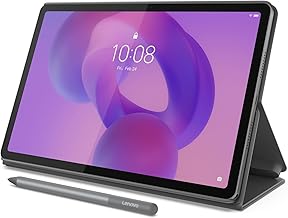
 Samsung Galaxy Tab A11+ 6GB RAM
- Generation: 11th Generation
- Warranty Description: 2 Year Manufacturer
- Specific Uses For Product: Entertainment, Student
11-inch 90Hz display delivers fluid motion for video and games
Dolby Atmos quad speakers add cinema-like sound
Backed by a 2-year manufacturer warranty
128GB of built-in storage may need a card for large files
Google Gemini and Circle to Search depend on software support
As an Amazon Associate we earn from qualifying purchases at no extra cost to you.
By Daniel Foster
Five Picks in This Tablet Buying Guide
Rather than list everything, this guide names one strong slate per need, from cheap media to premium creative work. The tiers below span budget to premium, and Amazon prices move often, so read them as guidance and confirm the live figure before you buy.

| Tablet | OS / chip | Screen / pen | Tier |
|---|---|---|---|
| Amazon Fire HD 10 | Fire OS / MediaTek | 10.1″ 1080p / no pen | Budget |
| Galaxy Tab A9+ | Android / SD 695 | 11″ 90Hz / no pen | Budget |
| Apple iPad (10th gen) | iPadOS / A14 | 10.9″ LCD / USB-C Pencil | Mid |
| Galaxy Tab S9 FE | Android / Exynos 1380 | 10.9″ 90Hz / S Pen included | Mid |
| Apple iPad Air (M2) | iPadOS / M2 | 11″ LCD / Pencil Pro | Premium |
Amazon Fire HD 10 (Budget Media)
The Fire HD 10 is the cheapest sensible large screen: a 10-inch 1080p LCD with microSD and Alexa, aimed at reading, video and browsing inside Amazon’s world. For a household media slate that costs little, it covers the basics without eating into a real budget.
The catch is Fire OS, which uses the Amazon Appstore rather than Google Play, so many apps are missing or need workarounds, and performance is basic. In any tablet buying guide it is the media-first budget pick, not a productivity device or a full Android replacement.
Samsung Galaxy Tab A9+ (Budget Android)
The Tab A9+ is the value all-rounder: an 11-inch 90Hz LCD, Snapdragon 695, microSD and quad speakers, all on full Google Play. The higher refresh rate smooths scrolling and the strong sound suits video and shared study, with Samsung’s long software support behind it.
Performance handles daily tasks but stumbles on heavy games, and there is no included pen. For buyers who want real Android, expandable storage and dependable updates on a budget, it is the model most people should choose over a locked-down Fire slate.
Apple iPad 10th Generation (Mid iPadOS)
The 10th-gen iPad pairs a 10.9-inch LCD with the A14 chip, USB-C and the deepest tablet app library, including top study and creative apps. It is fast, supported for years and light to carry, making it the safe mid-tier choice for people in the Apple world.
Storage starts at 64GB, the screen is non-laminated, and the USB-C Pencil lacks pressure sensitivity. For most users the app quality and longevity justify the price, but note-takers and artists should weigh a pen-friendly model instead of the basic USB-C stylus here.
Samsung Galaxy Tab S9 FE (Mid Android)
The Tab S9 FE is the value note-taker: a 10.9-inch 90Hz LCD, Exynos 1380, microSD, IP68 water resistance and an S Pen in the box at no extra cost. Samsung Notes handwriting and durability make it a practical daily tablet for study, work and mark-up.
The Exynos chip is mid-tier and it is LCD rather than AMOLED. For anyone who wants an included pen, water resistance and expandable storage without paying flagship prices, it is the standout Android value and a natural centrepiece of this tablet buying guide.
Apple iPad Air M2 (Premium)
The iPad Air M2 is the long-haul premium pick: a laptop-class M2 chip, an 11-inch laminated LCD, Apple Pencil Pro support and storage up to 512GB. It handles design apps, heavy multitasking and years of updates, comfortably lasting a demanding user for many years.
It is premium-priced and the Pencil Pro is a separate buy, so the real cost climbs. For creative and power users who want one device for notes, illustration and study, the performance headroom is worth the outlay over a cheaper mid-tier slate.
How to Use This Tablet Buying Guide
Buying well comes down to matching OS, chip, screen and pen to how you will actually use the tablet. Work through the points below and check the size against your bag before you commit to a device you will carry every day.
The Specs That Decide It
Read the operating system first, then chip and RAM, screen size and refresh, storage with microSD, and pen support. Fire OS limits apps, Android gives file freedom and often a pen, and iPadOS has the deepest app library, so the platform shapes everything else you can do.
For reading and media, a budget chip with a good screen is plenty; for gaming, drawing or years of use, favour a stronger chip and more storage. Deciding OS and chip first prevents the common mistake of a cheap slate that stumbles on your must-have apps.
Size and Fit for How You Carry It
Screen size is the tablet’s real footprint. A 10 to 11-inch slate is light for one-handed reading and slips into any bag, while a 12-inch or larger panel gives more room for split-screen work but adds weight for commutes and long reading sessions in bed.
Think about where and how you hold it before buying. A folio case that doubles as a stand and, for handwriters, a matte screen protector improve comfort. Check the weight in grams and the dimensions against your bag so the device actually travels with you rather than staying home.
Value, Pen and Timing
Factor the total cost, including a pen and keyboard, not just the sticker. Several Android slates include a stylus that Apple charges extra for, which can save a lot, and microSD lets budget models grow storage cheaply rather than paying up front for a bigger tier.
On timing, the late-June Prime Day and November sales are the strongest windows for any tablet buying guide pick, and slates are popular gifts in the holiday season, though Amazon shifts sale dates each year, so confirm the official ones before planning a purchase.
One more habit saves regret: picture how you will actually use the slate for a week, listing the apps, the pen and the storage you truly need. That short exercise stops you paying for a premium model when a mid one fits, or under-buying for real work.
Tablet Buying Guide FAQ
These are the questions buyers ask most before choosing a slate, covering operating systems, storage and whether a tablet can stand in for a laptop.
Which operating system should I choose?
Choose iPadOS for the deepest app library and long support, Android for file freedom, expandable storage and often an included pen, and Fire OS only if you want cheap Amazon media and can live without Google Play. Match the platform to the apps and services you rely on.
How much storage do I really need?
For reading, streaming and light apps, 64 to 128GB is enough, ideally with microSD to expand later. For offline video, games or large creative files, aim for 256GB or more, and buy generously up front on tablets like iPads that lack a microSD card slot.
Can a tablet replace a laptop?
With a keyboard case, a capable tablet handles email, documents, browsing and light work well. For heavy desktop software, programming or multitasking, a laptop is still better. Many people pair a tablet for reading and media with a laptop for demanding tasks rather than choosing one.
See More:
- Best eyeshadow blender brush
- Best frozen foods for air fryer
- Best frozen food for air fryer
- Best way to reheat steak in air fryer
- Best air fryer recipes book
Bottom Line of This Tablet Buying Guide
This tablet buying guide narrows the field to five: a Fire HD 10 for cheap media, a Galaxy Tab A9+ for the best budget Android, an iPad 10th gen for the mid-tier Apple experience, a Galaxy Tab S9 FE for value with an included pen, and an iPad Air M2 for premium creative work. Decide on OS, chip and pen first, check the weight against your bag, and let Prime Day or the holidays set the price. Match the specs to your use and you buy the right slate the first time.