Chromebook vs tablet is a choice about apps and typing, not slogans, so this chromebook vs tablet guide compares the two on software, keyboard, portability, touch and price, then gives clear advice. We combine device specs with long-term owner feedback and note the real trade-offs so you pick the device that fits how you work and play.
As an Amazon Associate we earn from qualifying purchases.
Our top picks


As an Amazon Associate we earn from qualifying purchases at no extra cost to you.
By Daniel Foster
Chromebook vs Tablet: How They Compare
Each wins on different fronts, so the right pick depends on what you do most. The table below sets a Chromebook, a tablet and a detachable 2-in-1 against the same criteria, and prices move often on Amazon, so read the tiers as a guide and confirm the live figure.
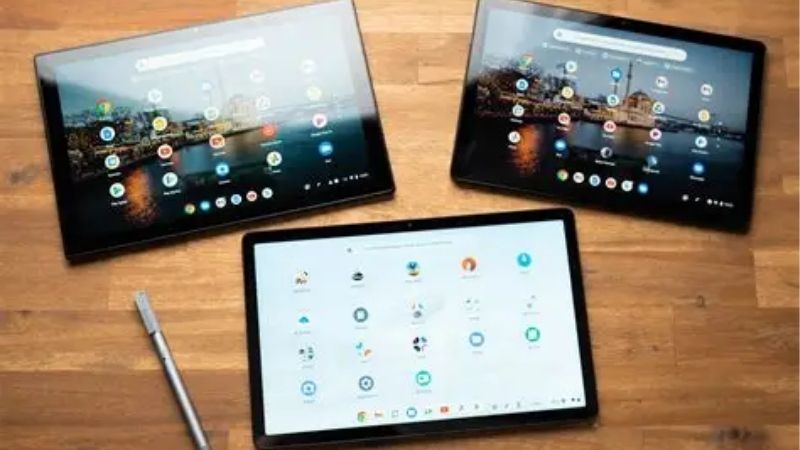
| Criteria | Chromebook | Tablet | 2-in-1 Chromebook |
|---|---|---|---|
| Typing | Built-in keyboard | Add-on keyboard | Detachable |
| Apps / OS | ChromeOS + Android | Mobile apps | ChromeOS + Android |
| Portability | Heavier | Lightest | Middle |
| Touch / pen | Some models | Best | Yes |
| Web / school | Excellent | Good | Excellent |
| Price | Low | Low base | Low-mid |
Apps and Operating System
A Chromebook runs ChromeOS with the full desktop Chrome browser, Google Workspace, Android apps from Google Play and, on many models, Linux apps. That makes it strong for web work, documents and browser-based tools, with a real file system and windowed multitasking closer to a laptop.
A tablet runs mobile app versions, which are polished for touch but sometimes limited next to desktop programs. An iPad has the deepest app library, while Android tablets share the Play Store with Chromebooks. If your work lives in a browser, a Chromebook usually handles it more comfortably.
For students and office workers whose day runs in a browser, this is where the chromebook vs tablet gap is widest. ChromeOS handles many tabs, extensions and downloaded files with a real desktop layout that a touch-first mobile tablet, even a good one, still struggles to match.
Keyboard and Typing
A Chromebook includes a proper keyboard and trackpad built in, ready for long typing sessions, essays and email without any add-on. This is its biggest everyday advantage in the chromebook vs tablet decision for anyone who writes a lot or works in documents through the day.
A tablet needs an add-on keyboard case for real typing, which adds cost and weight, though it lets you detach and use the screen alone for reading or drawing. A detachable 2-in-1 Chromebook splits the difference, giving a keyboard when needed and a tablet when you remove it.
Portability and Touch
Tablets win on portability and touch, being lighter and thinner, easy to hold and best for reading, media, drawing and pen notes. A Chromebook is heavier with its built-in keyboard, though a detachable 2-in-1 Chromebook is lighter and adds touch when separated from its base.
If you mostly consume content, read and sketch, a tablet feels more natural in the hand. If you create documents and browse for hours, the Chromebook’s keyboard and larger, laptop-style layout suit better. Detachable Chromebooks aim to offer both, at some cost to keyboard comfort.
Weight adds up over a commute. If you read and carry your device all day, a tablet lighter hand-feel is a genuine daily benefit, while a Chromebook built-in keyboard, useful as it is, makes the whole package heavier to hold and less pleasant for long reading.
Price, Battery and Value
Both start cheap, but value differs by use. Chromebooks offer laptop-style productivity for very little, with long battery life and years of automatic updates, making them superb budget school and web machines. Tablets have a low base price but add cost once you buy a keyboard.
Battery life is strong on both, with efficient chips and light software. For pure typing and web value, a Chromebook stretches a budget furthest; for a light, do-everything media and reading device, a tablet does. A detachable Chromebook costs a little more for its flexibility.
How to Choose Between Chromebook and Tablet
The right pick comes down to your main task, your apps and how you type. Work through the points below and be honest about what you do most, since the wrong choice means fighting the device daily rather than working with it.
Choose a Chromebook If…
Pick a Chromebook if you write a lot, work in a browser or Google Workspace, need a built-in keyboard, or want laptop-style productivity for a low price. It suits students writing essays, web-based work and anyone who values a real keyboard and file system over touch and portability.
A Chromebook also wins for long battery life, easy management and years of updates, making it a dependable budget school or home machine. If your tasks are typing, browsing and documents rather than drawing or reading in hand, it is the more productive choice at the price.
Choose a Tablet If…
Pick a tablet if you mainly read, browse, stream, draw or take pen notes, and want the lightest, most portable device with the best touch experience. With a keyboard case it still handles email and writing, and it excels at media, reading and creative work a Chromebook cannot match.
A tablet suits travel, sofa use and anyone who values a device they can hold comfortably for hours. If your software is available as good mobile apps and typing is occasional rather than constant, a tablet gives a lighter, more flexible everyday device than a Chromebook.
A tablet also pairs neatly with a phone in the same ecosystem, syncing notes, photos and messages without effort. In the chromebook vs tablet decision, that continuity matters if your other devices are Apple or Android, since a matching tablet slots in more naturally than ChromeOS.
The 2-in-1 Chromebook Middle Ground
A detachable 2-in-1 Chromebook, like the Lenovo Duet, runs ChromeOS with a removable keyboard and a touchscreen, aiming to be both. It suits people who want the keyboard and browser strengths of a Chromebook but also want to detach the screen for reading or casual touch use.
The trade-offs are a cramped keyboard on small models and performance built for light tasks. If you genuinely want both a typing machine and a tablet in one budget device, it is a clever compromise; if you lean firmly one way, a dedicated Chromebook or tablet serves you better.
Before paying for flexibility, picture a typical week. If most of it is typing, a full Chromebook wins; if most is reading and touch, a tablet does. A detachable device earns its price only when you genuinely split your time between both roles rather than leaning one way.
Chromebook vs Tablet FAQ
These are the questions buyers ask most when weighing the two, covering school use, offline work and whether a Chromebook can run tablet apps.
Which is better for school?
A Chromebook suits essay writing, research and Google Classroom with its built-in keyboard and browser, while a tablet suits reading, lectures and pen notes. For typing-heavy schoolwork a Chromebook is usually better; for note-taking and reading, a tablet with a pen wins. Many students value the keyboard most.
Can a Chromebook run Android apps?
Most modern Chromebooks run Android apps from Google Play alongside web apps, so they share much of a tablet’s app library plus the full desktop browser. Touch support varies by model, so a 2-in-1 Chromebook gives the most tablet-like experience for those apps when detached or folded.
Do these work offline?
Both work offline more than people expect. Chromebooks run offline-capable web apps and Android apps, and tablets run mobile apps without a connection. Neither is purely online now, though a tablet’s mobile apps are often more fully featured offline than some browser-based Chromebook tools.
See More:
- Best eyeshadow blender brush
- Best frozen foods for air fryer
- Best frozen food for air fryer
- Best way to reheat steak in air fryer
- Best air fryer recipes book
Bottom Line on Chromebook vs Tablet
The chromebook vs tablet choice comes down to typing versus touch: pick a Chromebook for a built-in keyboard, browser-based work, essays and laptop-style value; pick a tablet for the lightest, most portable device built for reading, media, drawing and pen notes; and pick a detachable 2-in-1 Chromebook only if you truly want both in one. Be honest about your main tasks and apps, factor the cost of a tablet keyboard, and let Prime Day or the holidays set the price. Match the device to your work and it helps rather than hinders.