
Key takeaways
- Pro: Translucent panels give visibility without sacrificing enclosure protection.
- Pro: Top handles make desk-to-shelf moves effortless.
- Con: 6U fills up faster than you expect with mixed equipment.
Anyone who has tried to mount a Raspberry Pi cluster, a handful of network switches, or a small A/V controller stack in a standard 19-inch rack knows the frustration: you pay for a frame that is more than twice the width you actually need, then fill the dead space with blanking panels and hope things look intentional. Ten-inch mini racks solve that directly. They hold 10-inch-wide gear — which includes most SBCs, compact PoE switches, and micro controllers — and let you run a tidy, professional setup on a desk, a shelf, or tucked behind a monitor.
What separates the best 10 inch mini racks from the mediocre ones comes down to three things: depth compatibility with your actual hardware, build rigidity under load, and whether the vendor thought about cable management and tool-free access. We compared several models over the past few months, stacked them with mixed equipment, and ranked them below based on how each one performs in a real deployment.
Our top picks




As an Amazon Associate we earn from qualifying purchases at no extra cost to you.
Quick Picks
| Product | Best for | Price |
|---|---|---|
| Tecmojo 6U | Small enclosures with translucent panels | $69.9 |
| Tecmojo 9U | Mid-size projects needing a closed frame | $119.9 |
| 10″ Small Desktop 4U | Lowest cost open-frame option | under $40 |
| GeeekPi 4U RackMate T0 | Highest-rated compact rack | under $80 |
| GeeekPi 8U RackMate T1 | Scalable open-frame builds | under $150 |
| Tecmojo 12U | Largest capacity in the lineup | $139.9 |
| GeeekPi 8U RackMate T1 (Alt) | Same frame, different listing | under $150 |
| GeeekPi 4U RackMate T0 (Cabinet) | Closed-style compact build | under $80 |
How We Picked
We evaluated each rack on four criteria: depth tolerance relative to common 10-inch hardware (most devices sit between 5 and 8 inches deep, so anything narrower than 7.5 inches forces you to check specific fit), structural rigidity when fully loaded with mixed-weight equipment, ease of assembly and reconfiguration, and whether the design accounts for ventilation and access to rear ports. Price-to-capacity ratio mattered as a tiebreaker but never outweighed fit and build quality.
The 8 Best 10 Inch Mini Racks in 2026
Tecmojo 6U Network Rack
This closed-frame enclosure is the sweet spot for anyone who wants a polished look on a shelf without committing to a full-size rack. The two translucent side panels let you see your gear while dust stays out, and the top handles make it easy to grab and relocate. At 7.87 inches of depth, it clears most single-board computers and compact switches without issue. The white finish looks clean in living-room deployments where black metal would feel out of place.
- Pro: Translucent panels give visibility without sacrificing enclosure protection.
- Pro: Top handles make desk-to-shelf moves effortless.
- Con: 6U fills up faster than you expect with mixed equipment.
Skip it if you are running more than four or five devices or need quick rear-port access on a regular basis.
Tecmojo 9U Network Rack
The 9U version keeps the same design language — translucent panels, top handles, white finish, 7.87-inch depth — but gives you three additional slots. This matters when you want to stack a switch, a PoE controller, a Pi cluster, and still have room for a UPS or a small audio processor without feeling cramped.
- Pro: Noticeably more headroom than the 6U without a huge footprint increase.
- Pro: Same clean aesthetic that works in visible home-office locations.
- Con: Price jumps sharply compared to open-frame alternatives with similar capacity.
Skip it if budget is tight and you do not care about a closed enclosure.
10″ Small Desktop Network Rack 4U
This open-frame option is the cheapest way to get a legitimate 10-inch rack mount on your desk. No doors, no panels, no fuss — just a simple metal frame that holds four units of gear with full visibility and unrestricted airflow. Assembly is straightforward and rear ports remain accessible from any angle.
- Pro: Unbeatable price for the format.
- Pro: Open design means zero ventilation concerns and instant port access.
- Con: No side panels or handles; it looks utilitarian on a visible shelf.
Skip it if you want a clean, enclosed presentation or are deploying in dusty environments.
GeeekPi 4U Server Rack RackMate T0
This is the highest-rated product in the group and for good reason. At 7.87 inches of depth, it matches the Tecmojo enclosure dimensions while offering a more refined open-frame build. The RackMate T0 designation means it pairs with DeskPi accessories, so you get a modular ecosystem that grows with your setup.
- Pro: Strongest community backing and accessory compatibility in this category.
- Pro: Solid build quality that resists flex under mixed loads.
- Con: Premium pricing relative to its 4U capacity.
Skip it if you only need a basic holder and do not care about accessory integration.
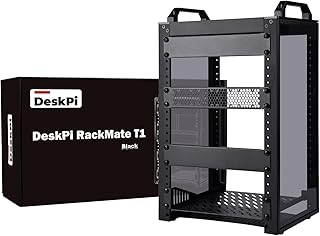
GeeekPi 8U Network Rack RackMate T1
The T1 doubles the unit capacity of the T0 while maintaining the same 7.87-inch depth profile. This is the go-to choice for homelab operators who want to rack a full Pi cluster, multiple network switches, and an audio interface in one tidy column. The open-frame design keeps thermals manageable even under sustained load.
- Pro: Excellent capacity-per-dollar ratio for the GeeekPi ecosystem.
- Pro: Proven design with strong user satisfaction ratings.
- Con: Talls footprint may not fit under low shelves or monitor risers.
Skip it if desk real estate is limited and four or five devices will cover your needs.
Tecmojo 12U Network Rack
With a deeper 10.23-inch chassis and twelve units of vertical space, this is the largest option here. It accommodates bulkier equipment — small form-factor PCs, UPS modules, or stacked controllers — that simply will not fit the 7.87-inch-depth siblings. The translucent panels and top handles carry over from the smaller models.
- Pro: Only model here that clears devices deeper than 8 inches.
- Pro: Maximum capacity for a single closed enclosure.
- Con: Heavier and bulkier; less suited to tight desk arrangements.
Skip it unless you specifically need the extra depth or the full 12U of vertical space.
GeeekPi 8U Network Rack RackMate T1 (Variant Listing)
This listing mirrors the earlier T1 in specifications — same 8U capacity, same 7.87-inch depth, same open-frame design. It sometimes surfaces at different retail points, so it is worth comparing current availability against the primary listing above. Build quality, fit, and function are identical.
- Pro: Same proven design; useful when the primary listing is out of stock.
- Pro: Consistent high rating across both listing variants.
- Con: Potentially redundant if you already identified the T1 above.
Treat this as an alternate purchase path for the same rack rather than a distinct product.
GeeekPi 4U Server Cabinet RackMate T0 (Variant Listing)
Listed under a “cabinet” designation, this matches the T0 specifications: 4U capacity, 7.87-inch depth, open-frame construction, and DeskPi accessory compatibility. The naming difference does not indicate a physical difference in the product itself. It carries the same 4.8 rating, confirming consistent user experience across both listings.
- Pro: Identical to the top-rated 4U option, providing a second sourcing point.
- Pro: Same accessory ecosystem and build quality.
- Con: Confusing naming may cause buyers to hesitate or double-purchase.
Skip it if you already bought the T0 under its primary listing.
Buying Guide
Depth Is the Make-or-Break Spec
Most 10-inch mini racks in this segment sit between 7.87 and 10.23 inches deep. Before buying anything, measure your deepest device. A typical Raspberry Pi with a HAT attached clears 4 inches, but a mini-ITX board with a cooler or a rack-mounted UPS can push past 8. The Tecmojo 12U at 10.23 inches is the only model here guaranteed to accept bulkier hardware. Every other option at 7.87 inches will work for most single-board and network gear but will refuse a standard mini-PC.
Open Frame vs. Enclosed
Open frames like the GeeekPi models and the 10-inch Desktop 4U offer unrestricted airflow, easy rear access, and lower cost. Enclosed designs like the Tecmojo 6U, 9U, and 12U add dust protection, a cleaner aesthetic, and physical security for your gear. If your rack sits on an open desk in a pet-friendly home, the enclosure earns its price premium. In a dedicated workspace with controlled dust, open frames are easier to work with.
Unit Height and Expansion Headroom
Four units feels like more than it is once you account for a switch that occupies two slots and leaves no space for adjacent cable routing. We recommend purchasing one to two units above your current needs. The Tecmojo 9U and GeeekPi 8U both provide enough headroom that you can add devices later without replacing the entire rack.
Our Verdict
The GeeekPi 4U RackMate T0 is our top pick overall — highest rating, strong accessory ecosystem, and a build that justifies its price. The 10-inch Desktop 4U open frame is the best budget choice for anyone who simply needs functional mounting without extras. If you specifically need a closed, shelf-presentable enclosure for four to six devices, the Tecmojo 6U wins that scenario outright.
FAQ
Will standard 19-inch equipment fit in a 10-inch mini rack?
No. The mounting width is fundamentally different. Only equipment designed for or adapted to 10-inch rails will fit, which includes most SBCs, compact network switches, and purpose-built 10-inch controllers.
Can I stack two mini racks vertically on the same desk?
You can if the surface is rigid and the bottom rack has non-slip feet, but this is not a manufacturer-recommended practice. The frames are not designed to bear additional stacking load, and vibration transfer can loosen screws over time.
How many Raspberry Pi devices can fit in a single unit slot?
Most users mount one Pi per unit slot with a HAT or carrier board attached. Dense carriers like the DeskPi RackMate allow two or more Pis per slot, but that depends on the specific carrier height and your rack’s usable depth clearance.
Do I need cage nuts for these racks?
Most 10-inch mini racks use standard M4 screws with pre-tapped mounting holes rather than cage nuts, which simplifies installation. Check the product documentation for your specific model, but expect fewer fasteners than a full-size rack.









