Best kids tablet value is set by durability, parental controls and content, not marketing, so this roundup ranks the best kids tablet options by rugged build, screen-time tools, bundled content and warranty. We combine maker specs with long-term parent feedback, note the age ranges, and list one honest drawback per pick.
As an Amazon Associate we earn from qualifying purchases.
Our top picks


As an Amazon Associate we earn from qualifying purchases at no extra cost to you.
By Daniel Foster
Best Kids Tablet Picks Ranked
A good children’s tablet survives drops, controls screen time and offers safe content, ideally with a worry-free guarantee. The picks below run budget to premium across age ranges, and Amazon prices move often, so read the tiers as a guide and confirm the live figure.
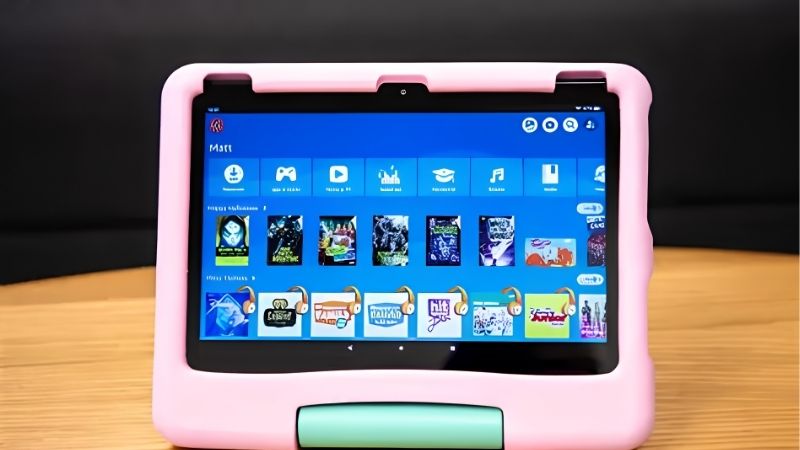
| Tablet | Age range | Extras | Tier |
|---|---|---|---|
| Fire 7 Kids | 3-7 | Case, 2yr guarantee, Kids+ | Budget |
| Fire HD 8 Kids | 3-7 | Case, 2yr guarantee, Kids+ | Budget |
| Fire HD 10 Kids | 3-7 | Big screen, case, Kids+ | Mid |
| Fire HD 10 Kids Pro | 6-12 | Slim case, maturer UI | Mid |
| Galaxy Tab A9 (Kids setup) | 4-10 | Samsung Kids, full Android | Mid |
| Apple iPad (10th gen) | Grows with child | Screen Time, rugged case | Premium |
Amazon Fire 7 Kids (Cheapest)
The Fire 7 Kids is the budget entry for little ones: a 7-inch screen in a chunky protective case, with a two-year worry-free guarantee, a year of Amazon Kids+ content and strong parental controls. It is built to survive drops and manage screen time for younger children.
The hardware is basic and slow, and the Kids+ subscription renews at a cost after the first year. For a cheap, durable first tablet for a young child who mainly watches and plays simple games, it does the job, though the small, low-resolution screen limits richer content.
Amazon Fire HD 8 Kids (Value)
The Fire HD 8 Kids steps up to a sharper 8-inch screen in the same rugged case, with the two-year guarantee, a year of Kids+ and detailed parental controls. The larger, clearer display suits reading, educational apps and video better than the Fire 7 for a small extra cost.
Performance is still modest and the content subscription renews after year one. For younger kids who want a bit more screen and clarity without a big jump in price, it is the value sweet spot of the Fire Kids range and one of the best kids tablet picks overall.
Amazon Fire HD 10 Kids (Big Screen)
The Fire HD 10 Kids pairs a 10-inch 1080p screen with the rugged case, two-year guarantee, a year of Kids+ and full parental controls. The larger, sharper display suits shared viewing, educational apps and video, making it comfortable for slightly older or content-hungry children.
The hardware is budget-grade so it can feel sluggish, and the subscription renews after the first year. For families who want the biggest, clearest Fire Kids screen for video and learning, it is the pick, though the bulky case makes it heavier for small hands to hold.
Amazon Fire HD 10 Kids Pro (Older Kids)
The Fire HD 10 Kids Pro suits ages 6 to 12 with a slimmer, more grown-up case and a maturer interface, while keeping the two-year guarantee, a year of Kids+ and robust parental controls. It bridges the gap between a toddler tablet and a standard slate for tweens.
The hardware matches the standard HD 10, so it is budget-grade, and the subscription renews after year one. For older kids who find toddler cases babyish but still need controls and protection, it is the right Fire choice, offering more independence within safe limits.
Samsung Galaxy Tab A9 (Full Android for Kids)
The Galaxy Tab A9 with Samsung Kids offers full Android and Google Play in a kid-friendly mode, with a dedicated child interface, screen-time limits and content controls. Adding a rugged case gives a durable device that runs proper apps, unlike the closed Fire ecosystem.
A protective case is often a separate buy and it lacks the bundled worry-free guarantee of the Fire Kids range. For families who want real Android apps and a tablet that outlasts the toddler years with a case, it is a flexible, longer-lasting best kids tablet choice.
Apple iPad 10th Generation (Grows With Child)
The 10th-gen iPad is the premium pick that grows with a child: powerful, long-supported and paired with Apple’s robust Screen Time controls for limits, content filters and downtime. With a rugged case it survives young hands and remains useful into the teenage years and beyond.
It is far pricier than the Fire Kids tablets and needs a separate case and setup, with no bundled kids content or guarantee. For families investing in one durable device that lasts from childhood onward, it is the strongest long-term choice, provided the higher cost fits the budget.
How to Choose the Best Kids Tablet
Match durability, controls, content and age range to your child before you buy, and weigh how long the tablet needs to last. The points below settle most decisions faster than comparing chips, since safety and toughness matter more than raw speed for children.
The Specs That Decide It
The deciding factors are a rugged case, parental controls, bundled content, a worry-free guarantee and the age range. Fire Kids tablets lead on the case, guarantee and Kids+ content, while a Galaxy or iPad offers stronger apps and longevity with controls you set up yourself.
Consider the ecosystem too: Fire OS limits apps but is tightly controlled, while Android and iPadOS give full app access with your own limits. Deciding on protection, controls and how long it must last first prevents buying a tablet a child outgrows or breaks within months.
Size, Weight and Fit for Small Hands
Children’s tablets need to suit small hands, so weight matters as much as screen size. A 7 or 8-inch model in a case is easier for young kids to hold, while a 10-inch screen suits older children and shared viewing but is heavier with a bulky protective case added.
The rugged case adds essential protection but also bulk and weight, so match the size to your child’s age and grip. Check the weight in grams with the case on, and pick a smaller model for toddlers and a larger one for tweens who can manage the extra size comfortably.
Content, Cost and Timing
Look beyond the sticker to recurring cost, since Kids+ content renews after the first year and adds up. Weigh whether the bundled content and guarantee justify the Fire route, or whether a Galaxy or iPad with free apps and your own controls suits your family better long term.
On timing, the late-June Prime Day and November sales are the strongest windows for the best kids tablet, and children’s tablets are among the most popular gifts in the holiday season, though Amazon shifts sale dates each year, so confirm the official ones before buying.
Best Kids Tablet FAQ
These are the questions parents ask most, covering the Fire Kids guarantee, whether an iPad is worth it for children and how parental controls work.
Are Fire Kids tablets worth it?
For younger children, yes. They add a rugged case, a two-year worry-free guarantee that replaces a broken tablet, a year of Kids+ content and strong parental controls, often cheaper than buying protection separately. The trade-offs are a renewing subscription and modest, budget-grade hardware.
Is an iPad worth it for a child?
An iPad costs far more but grows with the child, offering powerful hardware, long support and robust Screen Time controls. With a rugged case it lasts from childhood into the teens. For families investing in one durable device rather than replacing cheaper tablets, it can be worthwhile.
How do parental controls work on kids tablets?
Parental controls let you set screen-time limits, approve apps and content, filter the web and schedule downtime. Fire Kids, Samsung Kids and Apple Screen Time all offer these tools. Set them up before handing the tablet over, and review the limits as your child grows and their needs change.
See More:
- Best eyeshadow blender brush
- Best frozen foods for air fryer
- Best frozen food for air fryer
- Best way to reheat steak in air fryer
- Best air fryer recipes book
Bottom Line on the Best Kids Tablet
The best kids tablet matches your child and budget: a Fire 7 or HD 8 Kids for cheap, durable toddler use, a Fire HD 10 Kids for a big screen, a Fire HD 10 Kids Pro for tweens, a Galaxy Tab A9 for full Android with controls, and an iPad 10th gen for a premium device that grows with the child. Weigh the case, controls, content and guarantee, check the weight for small hands, and let Prime Day or the holidays set the price. Match the tablet to your child and it stays safe and useful.