Key takeaways
Best motion sensor alarm shopping comes down to coverage, power, and fees, so this best motion sensor alarm guide ranks proven options by what keeps false alerts down and reliability up. Below are six picks with honest limits, from standalone sirens to hub-connected sensors, to match your rooms and pets.
Our top picks


As an Amazon Associate we earn from qualifying purchases at no extra cost to you.
As an Amazon Associate we earn from qualifying purchases.
By Daniel Foster
What Defines A Good Motion Alarm
Motion alarms range from a single battery siren to sensors that feed a full security hub, so the right choice depends on how you want to be alerted and whether pets share the space. Settling coverage, power, and alert method first avoids nuisance triggers and the recurring cost of unwanted professional monitoring. A good best motion sensor alarm matches coverage, power, and fees to how you actually live.
Motion Sensor Alarm Decision Numbers
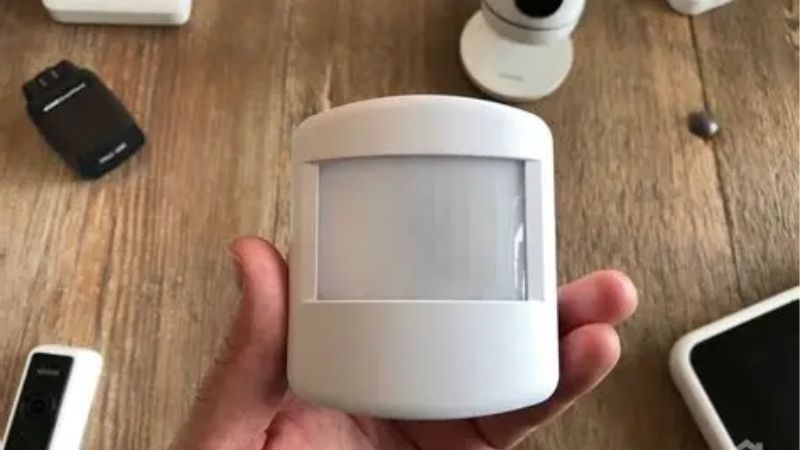
Key numbers are detection type (wired or wireless), coverage range and angle (often up to about 30 ft / 9 m and a wide arc), and whether there is a monitoring fee. Self-monitored systems alert your phone free; professional monitoring adds a subscription but can dispatch help when you cannot respond.
Pet immunity ratings let sensors ignore animals under a stated weight, cutting false alarms, while placement height tunes the detection field. Decide early between a loud standalone deterrent and a connected sensor that logs events, arms on a schedule, and integrates with cameras or door and window contacts. These numbers decide whether a best motion sensor alarm reassures you or nags you nightly.
If pets share the space, choose sensors rated to ignore animals under a stated weight and mount them so a cat cannot climb into the beam. Getting pet immunity and placement right up front is what separates a system you trust from one you disarm out of frustration after a week.
Placement, Space, And Fit
Mount sensors in a room corner about 7 ft / 2.1 m high, angled across likely walk paths rather than pointed at a door, so an intruder crosses the beam pattern. Avoid aiming at windows, vents, or heat sources, since sunlight and moving air are common causes of false trips indoors.
Renters benefit from wireless, adhesive-mounted sensors that leave no holes and travel to the next home. In an apartment, one corner sensor covering the entry hall often suffices, while houses may need several linked units to cover stairs, main rooms, and a basement or garage entry. Angle the beam across a doorway rather than straight at it for the surest trigger.
Mount sensors in a corner roughly 7 ft (2.1 m) high, angled across the paths an intruder would take, and keep them away from vents, sunny windows, and heat sources that cause false trips. In an apartment, one unit covering the entry hall often does the job without over-monitoring the whole space.
Pet Immunity, Power, And Alerts
If you have pets, choose sensors rated to ignore animals below a set weight, and mount them so a cat cannot climb into the detection zone. Confirm whether the unit uses passive infrared, which senses body heat movement, or dual-technology sensors that add microwave detection to reduce false alarms.
Battery models are easy to place but need battery checks; hardwired units never run flat but require wiring. Decide how you want alerts delivered, whether a loud local siren, a phone push notification, or both, and whether the system should also trigger lights or a camera recording. Tuning placement and sensor type is what makes a best motion sensor alarm dependable.
Interest in home security tends to rise in two windows: the spring-to-summer moving and home-buying stretch, when people secure a new place, and the holiday travel season, when empty homes need watching. A motion setup that alerts your phone while you are away fits both moments especially well.
Top Motion Sensor Alarm Picks
These six span standalone sirens, hub-connected sensors, and pet-friendly designs, so you can weigh simplicity against smart features and fees. Each entry names a real drawback, because motion alarms trade off false-trigger resistance, power convenience, and monitoring cost differently for every household. Any best motion sensor alarm below can anchor alerts once you settle dispatch and pets.
| Pick | Type | Monitoring | Best for |
|---|---|---|---|
| SimpliSafe Motion | Hub sensor | Optional pro | Whole-home system |
| Ring Alarm Motion | Hub sensor | Optional pro | Alexa homes |
| eufy Motion Sensor | Hub sensor | Self, no fee | Skip fees |
| GE/standalone siren | Standalone | None | Simple deterrent |
| Wyze Sense Motion | Hub sensor | Low-cost | Budget tier |
| Aqara Motion | Smart sensor | Self, no fee | Automations |
SimpliSafe Motion For A Whole-Home System
SimpliSafe’s motion sensors pair with an expandable hub, offer pet immunity for smaller animals, and support optional professional monitoring you can add or drop month to month. The system is wireless and renter-friendly, making it a flexible base for apartments and houses alike without long contracts.
The trade-off is that the best experience, including dispatch and full app history, leans on a subscription, so self-monitored use is more limited. Component costs add up as you expand, so budget for enough sensors to cover the paths that matter in your specific layout. Adding or dropping monitoring month to month keeps the cost flexible.
A growing preference for avoiding recurring fees is pushing buyers toward self-monitored systems that alert your phone for free, with professional dispatch left as an option. Being able to turn monitoring on for a trip and off at home, month to month, is a big part of the current appeal.
Ring Alarm Motion For Alexa Homes
Ring Alarm motion detectors integrate with Alexa and the wider Ring ecosystem, arming with routines and triggering cameras or lights for layered response. Setup is straightforward, and self-monitoring is free for phone alerts, with optional professional monitoring available for those who want dispatch capability.
The main drawback is ecosystem lock-in and the fee for professional monitoring and extended video features. Privacy-minded buyers should review Ring’s data policies, and heavy reliance on the cloud means confirming how the system behaves during an internet or power interruption at home.
Confirm how any connected alarm behaves during an internet or power cut, since a cloud-dependent system can go quiet at the worst moment. A cellular backup or battery keeps alerts flowing, and it is worth checking this before you rely on the system while traveling or overnight.
eufy Motion Sensor To Skip Fees
eufy’s motion sensors connect to its hub with self-monitoring and no required subscription, appealing to buyers avoiding recurring costs. On-device logic and pet-aware settings help reduce false triggers, and the system integrates with eufy cameras for recorded evidence when motion is detected.
The limitation is that professional dispatch is not the focus, so those wanting a monitored response may look elsewhere. Feature depth and third-party integrations trail the largest platforms, and some advanced options still involve cloud services, so confirm what stays free before you commit.
Fee-free hubs answer that same fatigue by keeping alerts and logs local without a subscription. The trade-off is that they focus on notifying you rather than dispatching help, so decide early whether a monitored response, or simply a fast alert to your own phone, matches how you live.
Standalone Siren For A Simple Deterrent
A standalone battery motion siren mounts in minutes and blasts a loud alert when it detects movement, ideal for a shed, garage, or entry where you just want noise to scare off an intruder. No hub, app, or fee is involved, which keeps things refreshingly simple.
The downside is no remote notification, logging, or smart integration, so you only benefit if you are within earshot or a neighbor is. False triggers from pets or drafts are also harder to tune, making it a supplement rather than a complete security solution.
A loud standalone siren works only if someone is in earshot, so treat it as a deterrent layer rather than a monitored system. Paired with a connected sensor at the main entry, though, the sudden noise can interrupt an intruder while the smart unit logs the event and pings your phone.
Wyze Sense Motion For Budgets
Wyze’s motion sensors offer connected alerts and automations at a budget-tier price, pairing with a low-cost hub and the wider Wyze ecosystem. For a first-time buyer, they add phone notifications and camera triggers affordably, covering the basics of movement detection in key rooms.
Trade-offs include slower response than premium systems, fewer professional monitoring options, and reliance on Wyze’s cloud reliability. It is a value pick for self-monitored setups, best suited to renters and budget-focused homes rather than those needing dispatch-grade, contract-backed security coverage.
Aqara Motion For Automations
Aqara motion sensors are compact, battery-friendly, and popular in smart-home automations, working with hubs and platforms like Apple Home to trigger lights and routines. Self-monitored and fee-free, they suit tinkerers who want motion to drive both security alerts and everyday convenience actions.
The drawback is that they are components in a broader system rather than a full alarm out of the box, so you build the response yourself. Setup complexity and hub requirements can challenge beginners, and dispatch-style monitoring is not part of the design. Treat it as a flexible smart-home building block rather than a complete alarm, layering sensors, lights, and cameras into routines you control yourself.
For travelers, motion sensors that also drive lights can fake occupancy, switching lamps on and off to suggest someone is home. That everyday automation, layered onto security alerts, is part of why component-based sensors appeal to people who want one system doing double duty while they are away.
See More:
- Best eyeshadow blender brush
- Best frozen foods for air fryer
- Best frozen food for air fryer
- Best way to reheat steak in air fryer
- Best air fryer recipes book
Choosing Your Motion Sensor Alarm
The best motion sensor alarm for you starts with two questions: do you want professional dispatch, and do you have pets? If you want free self-monitoring, eufy, Aqara, and standalone sirens fit; if dispatch matters, SimpliSafe and Ring add optional monitoring you can toggle as needed. Answering the dispatch and pet questions first removes most of the guesswork.
Mount sensors in corners across walk paths, choose pet-immune models if animals roam, and place enough units to cover the routes an intruder would take. With power, coverage, and fees matched to your home, any option here can anchor a dependable best motion sensor alarm setup without nuisance triggers or wasted subscription spend.