Key takeaways
Best video doorbell shopping means weighing wired reliability against wireless convenience, plus how footage is stored, so this best video doorbell guide ranks both types by what matters at the door. Below are six picks with honest drawbacks, from fee-free local storage to smart, low-clutter alerts.
As an Amazon Associate we earn from qualifying purchases.
Our top picks

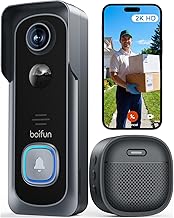
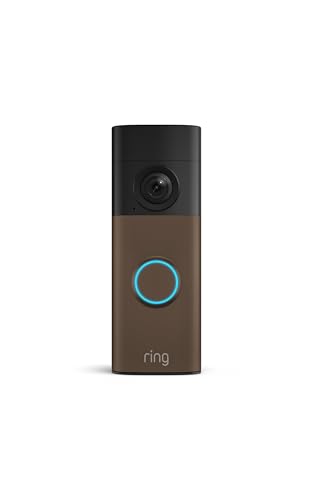 Ring Battery Doorbell 2K
- Capture it all with Retinal 2K video
- Zoom in up to 6x
- Connect to who’s there



As an Amazon Associate we earn from qualifying purchases at no extra cost to you.
By Daniel Foster
Wired Versus Wireless, And What Else Counts
Doorbells split first on power: hardwired units record continuously and never run flat, while battery models install anywhere but need recharging. Beyond that, storage type, fees, and the vertical field of view decide daily usefulness, so a best video doorbell choice starts with power and where the clips actually live.
Best Video Doorbell Decision Numbers
The core factors are power (wired to a chime transformer versus battery), storage (local card or hub versus cloud), any subscription for saved video, and the vertical field of view, sometimes called head-to-toe view, which decides whether you see a parcel at your feet. Sort these before comparing looks.
Then check resolution (1080p to 2K), two-way audio, night vision type, and whether detection separates people from cars and shadows. On-device person detection cuts nuisance alerts, and a tall aspect ratio matters more at a door than raw megapixels, since the point is seeing the whole visitor and any package.
Confirm the doorbell uses 2.4GHz Wi-Fi for range and whether a chime repeater is included, because a weak signal at the door causes lag and missed events. If you want recorded history without a fee, prioritize local-storage models and verify which alerts stay free without a plan. Confirm this early, because a doorbell that records only with a subscription can surprise you later.
Placement, Space, And Fit
Measure the trim beside your door and the angle to the walkway, since a storm door, narrow frame, or inward-facing wall can crop the view. An angled wedge mount fixes most off-center doors, and a height near 48 in / 122 cm puts faces, not chests, in the frame at the threshold.
Wired doorbells tie into a chime transformer, so confirm compatible voltage and that your existing chime works with the model, or budget for a plug-in adapter. Renters should favor battery units with adhesive or screw-in brackets that patch easily rather than wiring into house electrical they cannot alter.
A porch faces rain, heat, and cold, so an IP-rated housing and a sensible temperature range matter, especially since battery capacity falls in freezing weather. A shaded or covered spot also keeps a dark housing from overheating in direct afternoon sun, which extends component life over the years. A quick angle test with your phone before final mounting prevents a view that misses the doormat.
Storage, Fees, And Reliability
Cloud doorbells make setup easy but gate recorded video behind a subscription, so tally the yearly plan against how long you will keep the device. Over several years those fees can exceed the hardware, which is why fee-averse buyers lean toward local storage on a card or hub.
Local storage keeps footage in your home with no monthly bill, but a small card can fill quickly, so check capacity and use event-only recording. Wired models add the reliability of continuous recording without recharge chores, a real advantage at a high-traffic entry where events pile up daily.
Reliability also depends on Wi-Fi and, for cloud units, upload speed, so a mesh point near the door helps. Confirm how the doorbell behaves during an internet outage, since a purely cloud device can go silent exactly when you want it recording someone at the threshold. Weighing the yearly plan against the hardware cost up front is the clearest way to avoid later regret.
Top Video Doorbell Picks
These six span fee-free local storage, smart ecosystems, and budget value across wired and wireless designs, so you can weigh convenience against ongoing cost. Each entry names a real drawback, because the best video doorbell for one porch may be the wrong call for another based on power and fees. Reading each drawback closely matters as much as the headline specs when you pick.
| Pick | Power | Storage | Best for |
|---|---|---|---|
| eufy Video Doorbell | Battery/wired | Local hub | No monthly fee |
| Ring Video Doorbell | Battery/wired | Cloud | Ecosystem fit |
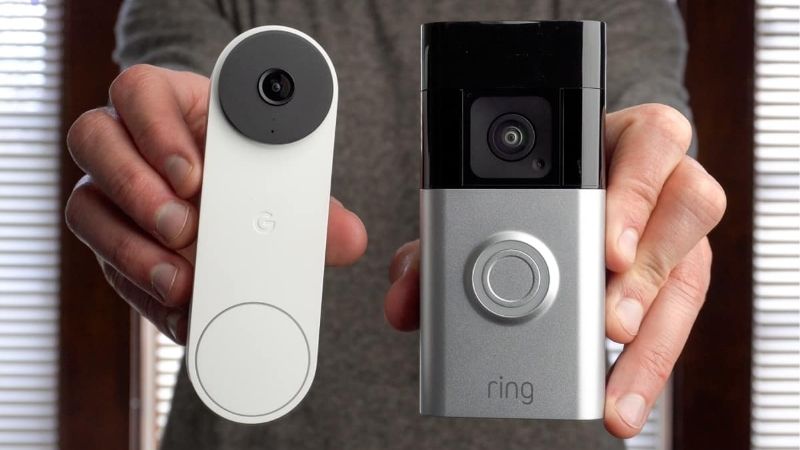
| Google Nest Doorbell | Battery/wired | On-device+cloud | Smart alerts |
| Arlo Doorbell | Battery/wired | Cloud | Tall field of view |
| Wyze Video Doorbell | Wired/battery | microSD/cloud | Budget tier |
| Blink Video Doorbell | Battery | Local/cloud | Long battery life |
eufy Video Doorbell For Fee-Free Storage
eufy stores recordings on a local hub without a required subscription, and many models offer a tall aspect ratio that shows packages at the door. On-device person detection trims false alerts, and battery or wired versions cover most entries, making it a strong fee-averse pick.
The trade-off is hub dependence and occasionally slower cloud extras, and some features still cost more. Battery versions need recharging every few weeks in busy areas, so a hardwired install is worth it at a high-traffic entrance where events accumulate quickly through the day.
Owning the footage locally answers the privacy unease many buyers feel about cloud doorbell video. With clips on a hub rather than a company server, there is no monthly bill and no third party holding video of everyone who approaches your front door. For fee-averse buyers, that local-first approach is the main reason to pick it over cloud rivals.
Ring Video Doorbell For Ecosystem Fit
Ring is easy to set up and integrates tightly with Alexa and other Ring devices, with battery and wired versions and quick-release packs for recharging. For a household already on that platform, announcements and live view feel seamless across speakers and displays.
Recorded video and history require a Ring Protect plan, so ongoing fees are the main downside, and data and law-enforcement policies warrant a look. Because the system leans on the cloud, confirm how it alerts you during an internet interruption before relying on it as your only camera.
If convenience and ecosystem cohesion matter more than fee-free storage, Ring fits well. Just budget for the subscription over the years you plan to keep it, since the recurring cost, not the hardware price, is the real long-term factor in satisfaction.
Google Nest Doorbell For Smart Alerts
Google’s Nest Doorbell adds on-device detection for people, packages, and animals, cutting nuisance pings, and keeps a short rolling history locally before a plan is added. It suits Google Home households and shows familiar-face options where regionally supported for tailored alerts.
Longer video history and richer features sit behind Nest Aware, returning the fee question for heavy users, and the price is premium. It works best as a smart front-door anchor rather than a low-cost way to cover several doors across a home.
The package and person detection genuinely reduce clutter in notifications, which is where cheaper doorbells often frustrate. Weigh that intelligence against the ongoing plan cost, and confirm your Wi-Fi reaches the door so the smart features respond quickly rather than lagging. The package alerts especially cut clutter, which is where cheaper doorbells tend to overwhelm you.
Arlo Doorbell For A Tall View
Arlo emphasizes a tall, square field of view so you see a visitor head to toe and any parcel on the ground, plus color night vision, a siren, and two-way audio. For identifying who is really at the door after dark, that combination is genuinely useful.
As with Arlo cameras, recorded clips and smart features lean on a subscription, so plan for the recurring cost. Without it, event history is limited, which weakens the appeal for anyone prioritizing fee-free saving of doorbell footage over premium detection extras.
The tall view is the standout, since seeing the full doorway and floor matters more than raw resolution for a doorbell. Just confirm your Wi-Fi strength at the entry and factor the plan into the total cost before choosing this cloud-first option.
Wyze Video Doorbell For Budgets
Wyze delivers a tall view and solid resolution at a budget-tier price, recording to a microSD card or an inexpensive cloud plan. For a simple, affordable entry camera, it covers live view, two-way talk, and motion alerts without a big outlay or a mandatory account.
Compromises include a wired-preferred design on some models, slower app response than premium brands, and fewer advanced smart features. It is a value-first pick, best for a secondary door or a first-time buyer testing whether a doorbell fits their routine before spending more.
As an inexpensive way to add a capable doorbell, it earns its place, especially with local microSD storage keeping it fee-free. Pair it with a stronger camera at the main entry if you want the sharpest identification, and confirm chime compatibility on wired installs. As a first doorbell, it lets you test the habit before spending on a premium model.
Blink Video Doorbell For Battery Life
Blink is known for long battery intervals from standard cells and a low entry price, with local storage via a Sync Module or an optional cloud plan. It integrates with Alexa and suits households that want simple, low-maintenance coverage at the front door.
Trade-offs are modest resolution and detection compared with premium rivals, and some responsiveness depends on the Sync Module setup. It shines on battery endurance and cost, not on the sharpest image, so set expectations for a busy, detail-critical entrance accordingly.
For breadth and low upkeep, Blink is a sensible pick, and local storage keeps recurring costs off the table. If your porch is very busy, though, a wired doorbell removes recharge chores and keeps the camera ready for the moment that actually matters. On a quiet porch, though, its long battery life and low price make it a genuinely easy pick.
See More:
- Best eyeshadow blender brush
- Best frozen foods for air fryer
- Best frozen food for air fryer
- Best way to reheat steak in air fryer
- Best air fryer recipes book
Choosing The Best Video Doorbell
The best video doorbell for you starts with two calls: wired or battery, and whether you will pay a monthly fee. If not, eufy, Wyze, and Blink lean on local storage; if smart alerts lead, Nest and Arlo justify their plans for many homes with fewer false pings.
Measure your door trim and angle, prioritize the vertical field of view for package visibility, and plan a Wi-Fi point near the entry. Because porch theft and delivery volume both peak late in the year, a dependable best video doorbell is where your setup earns its keep when the season gets busiest.
Frequently Asked Questions
Do I need an existing doorbell wire to install a modern video doorbell in 2026?
Not necessarily, as many top models now run on rechargeable battery packs for wire-free mounting. However, hardwired options remain popular because they provide continuous power without requiring you to periodically recharge or swap batteries. Choosing between the two ultimately depends on your home layout and whether you prefer easier installation or zero maintenance.
Will my video doorbell still record events if my internet connection drops?
Most video doorbells require an active Wi-Fi connection to stream live video and send instant motion alerts to your smartphone. Some advanced models feature local storage capabilities to keep functioning briefly during an outage, but cloud-dependent features typically pause until connection is restored. Checking the offline specifications of your chosen device is essential if your area experiences frequent service interruptions.
Are subscription plans required to access all features of a 2026 video doorbell?
While basic functions like live streaming and two-way talk are usually free, advanced features like cloud video history, person detection, and package alerts often require a monthly subscription. Some brands offer local storage options via microSD cards or base stations to bypass ongoing fees entirely. Reviewing the brand’s specific software policy before purchasing helps avoid unexpected recurring costs.
How difficult is it to prevent theft of a wireless video doorbell mounted outside?
Manufacturers design wireless video doorbells with security screw mechanisms and mounting brackets that require specialized tools to detach from the wall. Additionally, most reputable brands include theft replacement policies where the company will provide a free replacement device if yours is stolen. Registering your doorbell immediately after purchase ensures you are fully covered under these manufacturer guarantees.