Tablet for remote work value is set by chip, keyboard support and desktop mode, not marketing, so this roundup ranks each tablet for remote work by processor, multitasking, camera and battery. We combine maker specs with long-term owner feedback, note keyboard and pen support, and list one honest drawback per pick.
As an Amazon Associate we earn from qualifying purchases.
Our top picks


As an Amazon Associate we earn from qualifying purchases at no extra cost to you.
By Daniel Foster
Best Tablet for Remote Work Ranked
Remote work rewards a strong chip, a real keyboard, a desktop-style multitasking mode and a decent webcam for calls. The picks below span mid to premium across iPadOS, Android and Windows, and Amazon prices move often, so confirm the live figure before you buy.
| Tablet | OS / chip | Work extras | Tier |
|---|---|---|---|
| Apple iPad (10th gen) | iPadOS / A14 | Magic Keyboard Folio | Mid |
| Galaxy Tab S9 FE | Android / Exynos 1380 | DeX, S Pen included | Mid |
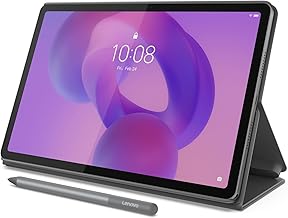
| Lenovo Tab P12 | Android / Dimensity 7050 | Big screen, pen | Mid |
| Apple iPad Air (M2) | iPadOS / M2 | Stage Manager, Magic Keyboard | Premium |
| Galaxy Tab S9 | Android / SD 8 Gen 2 | DeX desktop mode, IP68 | Premium |
| Microsoft Surface Pro | Windows / Snapdragon/Intel | Full desktop apps | Premium |
Apple iPad 10th Generation (Mid iPadOS)
The 10th-gen iPad is the affordable Apple work slate: the A14 chip, a 10.9-inch LCD and a Magic Keyboard Folio with a full trackpad. It runs the deep iPadOS app library, handles email, documents and video calls smoothly, and is light to carry between rooms or trips.
Storage starts at 64GB with no microSD, and iPadOS multitasking is simpler than a desktop. For light to moderate remote work in the Apple world it is excellent value, though heavy multi-window users should consider the Air with Stage Manager for a more desktop-like flow.
Samsung Galaxy Tab S9 FE (Value Android)
The Tab S9 FE brings Samsung DeX desktop mode and an included S Pen to a value price, with a 10.9-inch 90Hz LCD, microSD and IP68 water resistance. DeX turns it into a windowed desktop with a keyboard, which suits document work and mark-up far better than plain tablet mode.
The Exynos chip is mid-tier and it is LCD rather than AMOLED. For a budget-friendly tablet for remote work with a desktop mode, a bundled pen and expandable storage, it is a strong all-round choice, especially for note-heavy roles that value the free S Pen.
Lenovo Tab P12 (Big Screen)
The Tab P12 gives remote workers the most screen for the money: a 12.7-inch 3K LCD, Dimensity 7050, microSD and a bundled Tab Pen, with an optional keyboard. The large panel suits split-screen work, reference beside a document and video calls with room for shared content.
The mid-tier chip limits heavy multitasking and the size is less portable. For a home-office slate where screen space beats travel-friendliness, it is excellent value, giving a big canvas and a pen for far less than a large iPad or premium Galaxy with the same screen.
Apple iPad Air M2 (Premium iPadOS)
The iPad Air M2 is the premium productivity pick: a laptop-class M2 chip, Stage Manager windowed multitasking, external display support and the Magic Keyboard with a trackpad. It handles heavy multi-app workflows, design tools and long days, lasting demanding users for years.
The Magic Keyboard and Pencil Pro are separate, pricey buys, so the real cost climbs. For serious remote work in the Apple ecosystem that needs true multitasking and desktop-class power, it is the sweet spot below the Pro, provided you budget for the keyboard.
Samsung Galaxy Tab S9 (Premium Android)
The Tab S9 pairs an 11-inch 120Hz AMOLED, Snapdragon 8 Gen 2 and mature Samsung DeX with an included S Pen and IP68 durability. DeX offers the most desktop-like Android experience, with resizable windows and a taskbar, making it a genuine laptop stand-in with a keyboard.
Base storage fills fast, though microSD helps, and Android desktop apps are fewer than Windows. For a premium tablet for remote work with a vivid screen, a free pen and a real desktop mode, it is the strongest Android choice and rivals the iPad Air on productivity.
Microsoft Surface Pro (Windows)
The Surface Pro is the only true desktop-OS pick: full Windows 11 with a kickstand and Type Cover, running the same Office, browser and business apps as a laptop. For roles that need real desktop software, VPN clients or legacy tools, no tablet OS matches its compatibility.
The Type Cover and pen are separate buys, battery life trails iPads, and it is premium-priced. For remote workers who need genuine desktop apps rather than mobile versions, it is the most capable option here, effectively a laptop that detaches into a tablet when needed.
How to Choose a Tablet for Remote Work
Match the OS, chip, keyboard and desktop mode to your actual workflow before you buy, and check the size against your bag. The points below settle most decisions faster than another spec comparison, since the operating system shapes everything you can do.
The Specs That Decide It
Read the OS first, then chip and RAM, screen size, storage and keyboard support. Windows runs full desktop apps, iPadOS has the best mobile app quality with Stage Manager, and Android offers DeX desktop mode with file freedom. The platform decides which work software you can run.
For real multitasking, favour a stronger chip and a desktop mode like Stage Manager or DeX, plus a keyboard with a trackpad. Deciding OS and keyboard first prevents buying a slate that cannot run your essential work app or lacks a comfortable way to type all day.
Size and Fit for How You Work
Screen size shapes both productivity and portability. An 11-inch slate is light for travel and hot-desking, while a 12 to 13-inch panel gives more room for split-screen work and shared calls but weighs more and needs a stand or keyboard base for long sessions.
Think about whether you work at a fixed desk or move around. A keyboard case that doubles as a stand is essential for typing, and a good front camera matters for calls. Check the weight in grams and dimensions against your bag so the setup travels as easily as you need.
Battery, Calls and Timing
Battery in real hours decides whether the tablet survives a work day away from a charger, and webcam quality shapes how you look on calls, so favour a sharp front camera and all-day battery. A USB-C hub adds ports for external displays and drives at a home desk.
On timing, the late-June Prime Day and November sales are the strongest windows for a tablet for remote work, and slates plus keyboards are common gifts in the holiday season, though Amazon shifts sale dates each year, so confirm the official ones before planning a purchase.
Tablet for Remote Work FAQ
These are the questions remote workers ask most, covering whether a tablet can replace a laptop, desktop modes and which platform suits work best.
Can a tablet replace a laptop for remote work?
For email, documents, browsing, calls and light tasks, yes, especially with a keyboard and a desktop mode like Stage Manager or DeX. For heavy desktop software, legacy business tools or complex multitasking, a Windows device like the Surface Pro or a laptop is still the safer choice.
What is a desktop mode and do I need one?
Desktop modes like Samsung DeX and iPadOS Stage Manager add resizable windows, a taskbar and mouse support, making a tablet feel closer to a computer. If you juggle several apps or documents at once, it is worth having; for single-app focus, plain tablet mode is fine.
Which platform is best for work?
Choose Windows for full desktop-app compatibility, iPadOS for the best mobile app quality and Stage Manager, and Android with DeX for file freedom and value. Match the platform to the specific work apps you must run, since that requirement matters more than raw hardware speed.
See More:
- Best eyeshadow blender brush
- Best frozen foods for air fryer
- Best frozen food for air fryer
- Best way to reheat steak in air fryer
- Best air fryer recipes book
Bottom Line on the Best Tablet for Remote Work
The best tablet for remote work matches your platform and workflow: an iPad 10th gen for affordable Apple work, a Galaxy Tab S9 FE for value with DeX and a pen, a Lenovo Tab P12 for the biggest screen, an iPad Air M2 or Galaxy Tab S9 for premium multitasking, and a Surface Pro when you need true desktop apps. Decide on OS, keyboard and desktop mode first, check the weight against your bag, and let Prime Day or the holidays set the price. Match the platform to your work and a tablet earns its place.