Key takeaways
Smart locks for home promise keyless entry, but the details that matter are backup power, offline access, and whether the lock fits your door, so this smart locks for home guide ranks picks on exactly those points. Below are six options with honest drawbacks, weighed on how you unlock, what happens when the battery dies, and door compatibility.
Our top picks


As an Amazon Associate we earn from qualifying purchases at no extra cost to you.
As an Amazon Associate we earn from qualifying purchases.
By Daniel Foster
What Matters Before You Swap A Lock
A smart lock is only as good as its fallbacks: how you get in if the battery dies, whether it still works when the internet is down, and if it even fits your door. Settling entry method, backup power, offline access, and door fit first keeps smart locks for home from leaving you stranded outside. The best smart locks for home nail entry method, backup power, offline access, and door fit before anything else.
Smart Lock Decision Numbers
The deciding factors are how you unlock (fingerprint, code, app, or physical key), what powers a backup when the battery dies, whether the lock works without the internet or app, and door compatibility (backset, door thickness, and bolt type). A lock that fails these basics frustrates daily, however clever its app.
Confirm there is an emergency power option, such as a keypad you can jump with a battery or a physical key backup, and that codes and fingerprints work locally without a cloud connection. Then check the connection standard (Wi-Fi, Bluetooth, Zigbee, or Matter) against the hub and phones you already use.
Keyless entry has gone mainstream, and buyers increasingly expect a lock that works with the phones and voice assistants they already own. The Matter standard aims to unify these platforms, but support is still uneven, so confirm real-world compatibility rather than assuming a logo guarantees it.
Placement, Space, And Fit
Measure the backset (the distance from the door edge to the bolt center, usually 2 3/8 or 2 3/4 in / 60 or 70 mm) and the door thickness before buying, since a mismatch means the lock will not seat. Confirm whether it replaces the whole deadbolt or only the interior thumbturn, which affects installation.
For renters, a retrofit model that keeps the existing exterior hardware and deadbolt is often the only landlord-friendly choice, since it swaps only the inside. Check that the door is a standard bore and that the strike aligns cleanly, because a misaligned bolt strains the motor and shortens the lock’s life.
Renting shapes this category too, since a full deadbolt swap is often off-limits in a lease. A retrofit that keeps the exterior hardware and your existing key is usually the only landlord-friendly path, and it reverses cleanly when you move out.
Power, Offline Access, And Standards
Battery life varies widely, and a lock that hammers its motor on a stiff door drains faster, so low-battery warnings and an emergency power path matter. Prefer locks whose codes and fingerprints work locally, so a Wi-Fi or app outage never stops you from entering your own home.
Connection standard affects reliability and integration: Bluetooth works close range without a hub, Wi-Fi enables remote control but uses more power, and Matter aims to unify platforms. Weigh Alexa, Google, or Apple Home support as a convenience, but never at the cost of dependable offline operation. That offline reliability is the real test of smart locks for home, not app polish.
The single most important habit here is verifying the fallback before you need it: enter once on a dead-battery simulation, jump the terminals if the model supports it, and store a physical key off the door if one exists. A lock that opens only through an app or a live connection turns a router hiccup into a lockout, so treat offline code and fingerprint entry as non-negotiable rather than a bonus.
Top Smart Lock Picks
These six span full deadbolt replacements, renter-friendly retrofits, and fingerprint models, so you can match entry method and door fit to your home. Each entry names a real drawback, because smart locks trade off battery life, offline reliability, and installation in ways worth knowing before you buy. Any smart locks for home below can work well once you confirm door fit and a reliable backup.
| Pick | Entry | Install | Best for |
|---|---|---|---|
| Schlage Encode | Code + key + app | Full deadbolt | Built-in Wi-Fi |
| August Wi-Fi | App + key | Retrofit interior | Renters |
| Yale Assure | Code + app | Full deadbolt | Key-free look |
| Level Lock | App + key | Inside deadbolt | Discreet design |
| eufy fingerprint | Fingerprint + code + key | Full deadbolt | Fast biometric entry |
| Kwikset Halo | Code + key + app | Full deadbolt | Budget Wi-Fi |
Schlage Encode For Built-In Wi-Fi
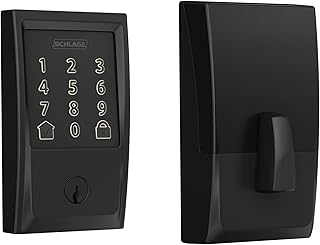
Schlage Encode packs Wi-Fi into the lock itself, so you get remote codes and control without a separate hub, plus a physical key backup and a sturdy build. Codes work locally at the keypad, so you can still enter during an internet outage, and it carries a strong security rating.
The trade-off is that built-in Wi-Fi uses more battery, so expect more frequent changes than a Bluetooth model. It is a full deadbolt replacement, which renters may not be allowed to install, and the premium price sits above simpler retrofit locks.
Built-in Wi-Fi is convenient but hungry, so weigh remote access against how often you want to change batteries. If you rarely unlock remotely, a lower-power Bluetooth model can deliver most of the daily benefit with far less battery maintenance.
August Wi-Fi For Renters
August retrofits onto your existing deadbolt’s interior, keeping the outside hardware and your keys, which makes it one of the few genuinely renter-friendly smart locks. You unlock by app or auto-unlock on approach, and the original key still works for a reliable physical fallback.
The drawback is that it relies on your phone or a keypad accessory rather than built-in codes on the base model, and battery life depends on connection settings. Auto-unlock can be finicky, so treat it as a convenience rather than a guarantee at the door.
Auto-unlock and app entry are handy, but they lean on a phone and a connection, so a working physical or code backup remains essential. The best setups treat the app as a convenience layer over a lock that still opens reliably without it.
Yale Assure For A Key-Free Look
Yale Assure offers keypad and app entry with clean, key-free designs, and module options let it join different smart-home platforms. Codes work at the keypad locally, giving reliable entry without the internet, and the touchscreen suits households that want a modern, keyless front door.
The catch is that key-free versions remove the physical backup, so a dead battery must be jumped with external power rather than a key. It is a full deadbolt replacement, so renters should confirm they are permitted to swap the hardware before buying.
Key-free designs look clean but remove the simplest fallback, so an emergency power path becomes critical when the battery dies. Check exactly how you would jump the lock or enter during a dead-battery moment before choosing a model with no keyway at all.
Level Lock For Discreet Design
Level Lock hides its motor inside the deadbolt, so the door looks unchanged while gaining app and auto-unlock features, and it keeps your existing key. For anyone who dislikes bulky keypads, it is the most discreet way to add smart entry to a front door.
The trade-off is that the base model leans on the app and Bluetooth rather than a built-in keypad, so shared access is less convenient without add-ons. The premium price also buys looks as much as features, so weigh that against plainer but cheaper locks.
Timing can help, since smart locks see their sharpest markdowns around moving season and the late-year sales, though dates shift each year. Buyers often upgrade entry right after moving in, so planning the purchase around a move can line up with a good price.
eufy Fingerprint For Fast Biometric Entry
eufy’s fingerprint deadbolts unlock with a quick touch, plus code and key backups, and many store credentials and work locally without a required subscription. Fast biometric entry suits busy households and avoids fumbling for a phone or remembering a code at the door.
The drawback is that fingerprint reading can struggle with wet or cold fingers, so the code and key backups matter. It is a full deadbolt replacement, so renters should check permission, and confirm the backset and door thickness before ordering to ensure a clean fit.
Fingerprint locks reward a clean install, so measure the backset and door thickness and confirm the bolt seats smoothly before mounting, since a strained motor wears faster on a biometric model that reads many times a day. Enroll several prints per user to cover wet or cold fingers, and keep the code and key backups current. Renters should confirm a full deadbolt swap is permitted before ordering one of these.
Kwikset Halo For Budget Wi-Fi
Kwikset Halo brings built-in Wi-Fi and keypad codes at a friendlier price, with a physical key backup and local code entry during outages. For buyers who want remote control without a hub on a tighter budget, it covers the essentials of a connected front door.
Compromises include a bulkier build and shorter battery life from onboard Wi-Fi, plus a less premium feel than pricier rivals. It is a value pick rather than a flagship, best for homeowners who want core smart features without paying for design or extras.
On a budget, the honest trade with Kwikset Halo is battery life and bulk for built-in Wi-Fi at a friendlier price, so weigh how often you truly need remote codes. If you rarely unlock from afar, the onboard radio mostly drains cells for a feature you seldom use. Local keypad entry still works during an outage, and the physical key remains the reliable fallback, which keeps the essentials covered without a premium spend.
See More:
- Best eyeshadow blender brush
- Best frozen foods for air fryer
- Best frozen food for air fryer
- Best way to reheat steak in air fryer
- Best air fryer recipes book
Choosing Smart Locks For Your Home
The best smart locks for home are the ones that fit your door, keep working offline, and give you a clear backup when the battery dies. Decide your entry method first, prefer locks whose codes and fingerprints work locally, and confirm an emergency power or key path before anything else.
Measure the backset and door thickness, check whether you need a renter-friendly retrofit, and weigh platform support as a bonus, not a requirement. Because keyless entry sells hardest around moving season and late-year sales, timing can help, but the goal is smart locks for home that let you in every time, with or without power, phone, or the internet.