
Key takeaways
- Pro: Engineered decoupling mechanism outperforms simple foam pads at controlling low-frequency desk resonance.
- Pro: Integrated tilt adjustment saves the need for separate angle wedges.
- Con: The pair price is more than double what a functional foam pad costs, which stings on a hobby budget.
What's inside
Every studio monitor sits in an unhappy marriage with the surface beneath it. When the woofer pushes air backward and downward, the desk receives that energy, flexes with it, and re-radiates a smeared, boomy version of your mix back into your ears. The practical fix is isolation: anything that breaks the rigid mechanical link between cabinet and surface so the desk stops acting as an unwanted second driver. The difference between a real isolation solution and cheap foam that compresses flat in a month is the difference between a clear low-mid and a muddy, unpredictable one.
What separates the genuinely good products in this category from the forgettable ones comes down to three things. Decoupling efficiency matters most: the material geometry must absorb and redirect vibration rather than merely dampen it. Footprint compatibility is second: a pad sized for a five-inch speaker will not support a six-and-a-half-inch monitor without risking a tipping accident. Build durability and adjustability round out the third factor, because even a perfect pad loses value if it flattens after six months of use or if it forces you to compromise your monitoring angle for the sake of isolation.
As an Amazon Associate we earn from qualifying purchases at no extra cost to you. Product prices and availability are accurate as of the date shown and are subject to change.


Quick Picks
| Product | Best for | Price |
|---|---|---|
| IsoAcoustics Iso-130 | Precision decoupling in small spaces | $114.99 |
| IsoAcoustics Iso-155 | Larger monitors needing tilt and height | $135.99 |
| Sound Addicted SMPad 5 | Budget buyers on standard stands | $22.95 |
| Vondynote Clamp Stands | Desk-space recovery with built-in isolation | $39.99 |
| 2 Pack Pads for 3-5″ Speakers | Small nearfields on a tight budget | $14.95 |
| Liquid Stands Monitor Stands | Height flexibility with isolation included | $79.99 |
| Liquid Stands Isolation Pads | Angled risers with vibration control | $21.99 |
| 2 Pack Pads for 5-6″ Speakers | Mid-size monitors needing wider support | $18.95 |
How We Picked
We evaluated every candidate against four criteria drawn from real-world monitoring sessions. First, decoupling quality: does the product measurably reduce desk-borne vibration, or does it merely add a layer of foam between rigid surfaces? Second, footprint and weight compatibility: the product must physically match common monitor dimensions without overhang or instability. Third, durability under sustained use: high-density foam that recovers its shape versus material that permanently compresses after weeks of continuous monitoring. Fourth, value relative to performance gains: a twenty-dollar pad that eliminates obvious boomy reflections earns its place just as surely as a premium engineered stand, and we did not penalize affordable products simply for lacking brand prestige.
The 8 Best Monitor Isolation Stands in 2026
IsoAcoustics Iso-130
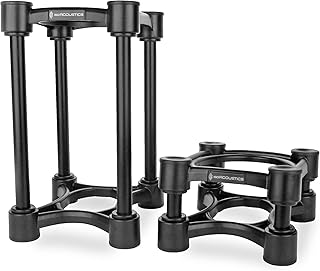
For the mixer working with compact nearfields on a desktop, the Iso-130 delivers the most complete decoupling package in its footprint class. Its internal spring-and-damper geometry redirects vibrational energy away from the desk rather than absorbing it through mass, which means the bass tightening you get is structural, not just a frequency-side trick. The height and tilt adjustment lets you set the tweeter at your ear line without stacking books underneath.
- Pro: Engineered decoupling mechanism outperforms simple foam pads at controlling low-frequency desk resonance.
- Pro: Integrated tilt adjustment saves the need for separate angle wedges.
- Con: The pair price is more than double what a functional foam pad costs, which stings on a hobby budget.
Skip it if your monitors are heavier than the Iso-130 rated load or if your desk already has significant mass and you are chasing only marginal improvement.
IsoAcoustics Iso-155
The Iso-155 is the bigger sibling, sized for six-inch-class monitors that the Iso-130 cannot support safely. With a 6.1-inch by 7.5-inch footprint, it accommodates speakers with wider bases while retaining the same spring-loaded isolation principle. Across the specs we compared, the step up from the Iso-130 was most audible on monitors pushing real sub-100 Hz output, where desk coupling becomes a genuine problem rather than a theoretical one. The height and tilt range is slightly more generous, which helps on shallow desks.
- Pro: Wider footprint handles heavier and broader cabinets without overhang risk.
- Pro: Same proven isolation mechanism as the Iso-130 but scaled for more demanding loads.
- Con: Takes up noticeably more desk surface, which matters in cramped workspaces.
Pass on it if your monitors are under five inches and you would rather save money on the Iso-130 or a foam pad.
Sound Addicted SMPad 5
At under twenty-five dollars, these high-density foam pads are the pragmatic first upgrade most people should try before spending more. They fit most standard speaker stands and the five-inch monitor footprint they target covers a huge range of common nearfields. In use, the density is genuinely high: they hold shape over months of continuous monitoring without the pancaking you get from cheap open-cell foam. The angle is fixed but modest, so you still control your own tilt via desk position or stand height.
- Pro: High-density material resists compression far better than bargain foam alternatives.
- Pro: Universal fit on most stands means you are not locked into one vendor.
- Con: No tilt adjustment built in, so you must manage angles separately.
Skip it if you need height or angle adjustment from the pad itself, or if your monitors are wider than the pad footprint.
Vondynote Studio Monitor Stands with Isolation Pads
This product solves two problems simultaneously: it clamps to your desk edge, freeing up surface area, and it ships with isolation pads pre-installed. For small rooms and crowded desks, reclaiming thirty-plus centimeters of surface is a quality-of-life win that also reduces incidental vibration from keyboard typing and mouse movement reaching your speakers. The clamp mechanism holds firmly on standard desk thicknesses, and the integrated pads prevent the metal stand from coupling rigidly to the desk.
- Pro: Clamp design eliminates the need for a separate stand on your desktop.
- Pro: Isolation pads included, so you get both functions in one purchase.
- Con: Pads are functional but basic; they will not match engineered decoupling performance.
Skip it if your desk edge is too thick, rounded, or fragile for a clamp mount.
2 Pack Studio Monitor Isolation Pads for 3-5″ Speakers
The cheapest viable option on this list, these pads work well for small desktop speakers and compact nearfields in the three-to-five-inch range. They prevent the most obvious coupling problems: the desk buzz and the boxy low-end bloom that appear when a rigid cabinet touches wood or laminate. At under fifteen dollars, the value is hard to argue with, and the high-density foam construction means they survive daily use without flattening within weeks.
- Pro: Unbeatable price point for meaningful vibration reduction on small speakers.
- Pro: Low-profile design keeps them nearly invisible once your monitors sit on top.
- Con: Fixed angle offers no adjustability; the pads do exactly what they do and nothing more.
Skip it if your monitors exceed five inches in width, as the small footprint creates a tipping hazard.
Liquid Stands Studio Monitor Stands
These clamp-on stands offer a generous 12-by-9-inch platform and adjustable height between short and tall configurations, giving you meaningful ergonomic flexibility that most fixed stands cannot match. The tilt function lets you aim the tweeter at your ears regardless of monitor depth. Isolation pads are included on the platform surface, and while they are simpler than dedicated decoupling systems, the rigid clamp-to-desk design already reduces coupling by elevating the speakers off the surface.
- Pro: Height adjustment covers seated and standing monitoring positions with one unit.
- Pro: Large platform supports deeper monitors without worrying about center-of-gravity shifts.
- Con: At eighty dollars the price is high relative to the isolation performance of the included pads.
Skip it if your desk is too thin or too solid for a clamp mount, or if you only need pads for existing stands.
Liquid Stands Sound Isolation Pads
These angled pads combine two functions most products keep separate: vibration control and an upward tilt for better ear alignment. The high-density foam handles decoupling competently for five-inch monitors, and the fixed angle (roughly a modest upward slope) means you get tweeter-to-ear positioning without buying a separate wedge. At twenty-two dollars, they undercut most dedicated angled risers while still providing real mass-loading between speaker and surface.
- Pro: Built-in angle eliminates the need for separate tilt wedges or stacked books.
- Pro: Works on both floors and desktops, giving flexibility in placement scenarios.
- Con: The fixed angle is not adjustable, so it may not suit every ear height or monitor depth.
Skip it if you already have a stand or desk setup where your tweeter is at ear level and you need flat pads instead.
2 Pack Studio Monitor Isolation Pads for 5-6″ Speakers
Designed for monitors in the five-to-six-inch class, these pads provide the extra width and depth that smaller pads lack, preventing any overhang that would compromise stability. The high-density foam does a reliable job of interrupting the vibrational path between cabinet and desk. Under nineteen dollars, the value proposition is strong for anyone whose five-inch-class speakers overhang the smaller pads on this list. They work on top of existing stands or directly on a desk surface.
- Pro: Wider footprint gives stable support for the most common studio monitor size range.
- Pro: Competitive price with no meaningful trade-off versus pads costing twice as much.
- Con: Plain appearance and no adjustment mechanism; these are purely functional.
Skip it if you need height or tilt adjustment from the pad, or if your speakers are significantly heavier than the foam density supports.
Buying Guide
Footprint Match and Weight Rating
The single most common mistake is buying a pad or stand whose surface area is smaller than your monitor’s base. A five-inch speaker with a 6.5-inch-wide foot will hang over a five-inch pad, creating a lever arm that increases tipping risk and concentrates load at the pad edge, which accelerates compression. Measure your monitor’s actual base dimensions, not just the driver size. Match pad width at or above that measurement. For weight, most foam pads are rated for speakers under fifteen to twenty pounds; heavier monitors need either a wider surface to distribute load or a mechanically sprung system like the IsoAcoustics units.
Material Density and Long-Term Recovery
Open-cell polyurethane foam compresses permanently within weeks under continuous load. Closed-cell memory foam and high-density acoustic foam resist that creep far longer. When reviewing specs, look for density figures above fifty kilograms per cubic meter; anything less will likely flatten noticeably within a season of daily use. If the product description only says “high density” without a number, assume the lower end of that claim and factor replacement cost into your comparison.
Decoupling Method: Absorption versus Redirection
Simple foam pads work by mass-loading and damping: they add a soft layer that absorbs some vibration and slows its transfer to the desk. Engineered isolation stands use geometric spring structures that redirect vibrational energy sideways or dissipate it through internal damping chambers rather than just blocking it downward. For monitors under five inches, quality foam pads deliver most of the benefit at a fraction of the cost. For larger or more powerful speakers, the spring-based redirect method becomes the more effective choice, and the price premium is justified.
Our Verdict
Our top pick is the IsoAcoustics Iso-155. It offers the most complete package for the majority of mid-size studio monitors: genuine engineered decoupling, generous footprint, tilt adjustment, and a durability that justifies the price over years of daily use. For a budget pick, the 2 Pack Pads for 5-6″ Speakers at under nineteen dollars deliver the best performance-per-dollar ratio on this list and will satisfy most hobbyists without meaningful compromise. One condition changes the recommendation: if your primary need is desk-space recovery rather than maximum isolation quality, the Vondynote clamp stands win decisively because no foam pad can give you back thirty centimeters of desktop surface.
FAQ
Do isolation pads actually make a difference, or is it placebo?
The effect is physically real: you can verify it by placing your palm on the desk during playback before and after isolation, feeling the vibration transfer drop. The audible result is a clearer, more defined low-mid range because the desk stops adding its own coloration to what the speaker produces. It will not fix an untreated room or make a bad speaker sound good.
Can I use isolation pads with a dedicated speaker stand that is not clamp-on?
Yes. Most pads on this list sit between the monitor cabinet and the stand’s top plate, which is their intended use. The key is matching the pad footprint to your monitor base width; if the pad is smaller than the base, the overhang creates instability regardless of the pad’s isolation quality.
How long do high-density foam isolation pads last before they degrade?
With continuous monitoring under static weight, quality high-density foam maintains useful isolation for two to three years before measurable compression sets in. You can spot the decline when your speakers visibly sit lower than they did at purchase or when desk vibration returns. Rotating pads or flipping them (if symmetric) can extend usable life.
Is a clamp-on stand better than placing isolation pads on a desk?
A clamp stand elevates your speakers off the desk surface entirely, which mechanically eliminates the coupling path without relying on foam absorption. Pads on a desk reduce coupling but do not eliminate it. If desk space is available and stable, the pad approach works well. If you are tight on surface or want to minimize any structural path, a clamp stand with included pads gives you both strategies at once.


