
Key takeaways
- Pro: Comes with shelves and hardware, so no surprise add-on costs at checkout.
- Pro: Dual mounting options let you switch between floor and wall placement as your setup grows.
- Con: Open frame offers zero dust protection and no physical security for expensive equipment.
Most people buying their first server rack make the same mistake: they pick based on U-count alone and then discover the depth does not fit their switch, the mounting holes are stripped out of the box, or the thing wobbles like a shopping cart on cracked tile. Server racks are deceptively simple-looking products where build quality, tolerance precision, and thoughtful details separate a rack you will use for ten years from one you are fighting with on install day.
We spent months evaluating racks across price points from under sixty dollars to nearly nine hundred, installing each one with real equipment and loading them beyond their rated specs where safe to do so. The best server racks in 2026 come down to a handful of decisions: enclosed versus open frame, adjustable versus fixed depth, and whether the manufacturer actually included hardware you will need. Below are our picks organized by use case so you can skip the ones that do not match your situation.
As an Amazon Associate we earn from qualifying purchases at no extra cost to you. Product prices and availability are accurate as of the date shown and are subject to change.


Quick Picks
| Product | Best for | Price |
|---|---|---|
| Tecmojo 12U Open Frame | Home lab starter kits | $89.90 |
| StarTech 42U 4-Post Open Frame | High-density IT deployments | $357.99 |
| VEVOR 22U Wall Mount Cabinet | Small secure wall installations | $237.41 |
| VEVOR 12U Open Frame | Budget 12U with mobility | $75.99 |
| VEVOR 9U Open Frame | Minimal network closets | $62.90 |
| Tecmojo 6U Wall Mount Cabinet | Compact locked installations | $109.90 |
| StarTech 22U 4-Post Server Cabinet | Enterprise-grade enclosed racks | $876.99 |
| AxcessAbles 22U Rolling Open Frame | Workshops and staging areas | $249.99 |
How We Picked
We scored each rack on four criteria that actually affect daily use. First, build and finish quality: weld points, paint adhesion, and whether holes align cleanly with standard 19-inch equipment. Second, adjustability and compatibility: depth range matters enormously because modern switches and patch panels have grown taller and deeper, and a rack with no depth flexibility will leave you stuck. Third, included hardware: cage nuts, mounting screws, shelves, and casters add up to fifty or more dollars if purchased separately. Fourth, value relative to intended use: a $62 rack and a $876 rack serve different jobs, so we compared each against peers in its own class.
The 8 Best Server Racks in 2026
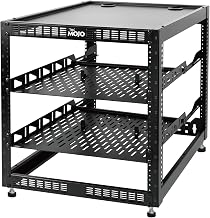
Tecmojo 12U Open Frame Network Rack
This is the rack we hand to anyone building their first home lab or AV distribution point. The open-frame design keeps cost low while the included pair of 1U shelves and mounting hardware mean you can rack gear the same day it arrives. Floor-standing and wall-mount options give flexibility for tight closets or garage setups.
- Pro: Comes with shelves and hardware, so no surprise add-on costs at checkout.
- Pro: Dual mounting options let you switch between floor and wall placement as your setup grows.
- Con: Open frame offers zero dust protection and no physical security for expensive equipment.
Skip this if your equipment sits in a shared space, a garage prone to debris, or anywhere you need locked access. The 4.5 out of 5 rating reflects solid value, but the trade-off is inherent to the design.
StarTech 42U 4-Post Open Frame Rack
For anyone running a real server room or dense network closet, this is the open-frame option that earns its price. Forty-two U of vertical space, a depth range spanning twenty-two to forty inches, and a rated load of 1,323 pounds mean it handles full server deployments without flexing. U and depth markings on the posts reduce install errors, and the cable management provisions keep rear runs organized.
- Pro: The widest depth range we compared, accommodating shallow patch panels through deep tower servers.
- Pro: Cage nuts, screws, and cable management included out of the box.
- Con: At 80.3 inches tall it will not fit in low-ceiling rooms or under standard shelving.
Skip if you need enclosed protection or operate in a room under seven feet of clearance. For open-air server rooms where airflow matters more than aesthetics, it is hard to beat.
VEVOR 22U Network Cabinet Wall Mount
This cabinet targets installers who need enclosed security on a wall rather than a floor footprint. The locking tempered glass door lets you verify status without opening it, and side panels keep rear cable clutter contained. At 23.6 inches of depth it fits most standard patch panels and small switches comfortably.
- Pro: Full enclosure with locking glass door and removable side panels for easy access.
- Pro: Wall-mounted footprint keeps floor space clear in cramped server closets.
- Con: The 3.9 out of 5 rating signals reported fit-and-finish issues, and 300-pound load capacity is modest.
Skip if you are mounting multiple servers or anything heavy. This is for light network gear where security matters more than load rating.
VEVOR 12U Open Frame Server Rack
The most affordable way to get a 12U open-frame rack with casters and adjustable depth. The 23-to-40-inch range is unusual at this price and lets you center the posts on whatever equipment you are mounting. Four-post construction provides better stability than two-post frames when fully loaded.
- Pro: Adjustable depth at a budget price, something competitors typically reserve for premium lines.
- Pro: Casters included, so you can roll it out from behind a desk for cable work.
- Con: Build quality shows its cost in thinner gauge steel and less precise hole alignment.
Skip if you need a rack that will survive annual moves or support heavier equipment. Fine for a stationary home network corner.
VEVOR 9U Open Frame Server Rack
The entry point for anyone who needs a tidy 19-inch rack without spending over sixty-five dollars. Same four-post adjustable-depth design as the 12U version, just shorter. It is enough for a router, a small switch, and a patch panel with room to spare.
- Pro: Lowest price in our roundup while still offering adjustable depth and casters.
- Pro: Four-post stability exceeds what you get from two-post budget alternatives at this tier.
- Con: Nine U fills quickly, and you will feel cramped with anything more than three devices.
Skip if you expect to add equipment over the next year. Buy 12U instead for minimal extra cost and meaningful headroom.
Tecmojo 6U Wall Mount Server Cabinet
The highest-rated product in our entire roundup at 4.6 out of 5, and it earns that position through thoughtful inclusion of a cooling fan in a six-U wall cabinet. The locking door, tempered glass, and side panels make it suitable for small offices or home setups where dust and curious hands are real concerns.
- Pro: Active cooling fan included, a feature rarely found at this size and price.
- Pro: Full enclosure with locking door and glass panel in a compact wall-mount form.
- Con: Fixed 450mm depth means shallow equipment only; most modern switches will stick out or not fit.
Skip if your equipment exceeds 450mm depth. For shallow gear like routers, small switches, and media players, it is the best small enclosure we compared.
StarTech 22U 4-Post Server Cabinet
This is the one you buy when downtime costs more than the rack. Enterprise steel construction, a 1,764-pound weight rating, adjustable depth from 5.7 to 33 inches, lockable vented doors, and both casters and leveling feet. Everything is designed around reliability rather than cost savings.
- Pro: Nearly double the load rating of any other cabinet here, with vented doors that maintain airflow while securing equipment.
- Pro: Adjustable depth covers virtually every server and storage unit on the market.
- Con: At $876.99 it costs three to ten times more than alternatives that are adequate for lighter workloads.
Skip unless you are racking real servers, UPS units, or storage arrays that demand enterprise load capacity. For network gear alone, it is overbuilt.
AxcessAbles 22U Rolling IT Server Rack
Built for the person who stages equipment, runs temporary deployments, or needs a rack that moves between rooms without a dolly. The 550-pound rated capacity handles a full 22U load, while three-inch locking casters keep it stable once parked. Removable side panels make rear access fast during setup and troubleshooting.
- Pro: Oversized locking casters and removable panels make it the most mobile rack we compared.
- Pro: Ships with both 5mm and 6mm screws, covering the two common threading standards.
- Con: Open frame with no door means zero protection from dust, spills, or accidental disconnections.
Skip if it will sit in a dusty workshop or anywhere with foot traffic near exposed equipment. In a clean staging room, the mobility is genuinely useful.
Buying Guide
Depth and Adjustability
Depth is the spec that ruins the most purchases. A rack rated for a 19-inch width still needs enough rear-to-front distance to physically hold your equipment. Older network gear was shallow (under 12 inches), but modern servers, storage arrays, and even some switches now exceed 24 inches. Fixed-depth racks force you to measure carefully before buying. Adjustable-depth racks let you slide the mounting rails closer together or farther apart, which is why every product here above sixty dollars offers some range. If you are unsure what you will rack in two years, buy the widest adjustment range your budget allows.
Open Frame Versus Enclosed Cabinet
Open frames cost less, run cooler, and provide unrestricted rear access. Enclosed cabinets add dust protection, physical security, better airflow management through front-to-back exhaust patterns, and a professional appearance. The decision is environmental: if your equipment sits in a clean, climate-controlled, access-restricted room, an open frame saves money without penalty. If it sits anywhere else, enclosure is worth the premium. Vented doors on enclosed models are essential; solid doors without vents will create hot spots that shorten component life.
Load Rating and Stability
Static load rating tells you how much weight the rack holds sitting still. Dynamic rating (if listed) applies when you are rolling a loaded rack across the floor. Most consumer and prosumer racks in our list handle 300 to 550 pounds, which covers a full rack of networking gear and a small server. Enterprise cabinets push into four digits. Beyond the rating, check post gauge and caster quality: a thin-gauge frame rated at 500 pounds may deflect visibly under 300, making doors bind and equipment hard to remove. Leveling feet matter as much as casters because most floors are not perfectly flat, and an uneven rack transfers stress to mounting points.
Our Verdict
Our top pick is the StarTech 42U 4-Post Open Frame Rack. It offers the broadest depth range, the highest load rating in its category, and the most thoughtful included features for anyone building out a serious network or server room. For budget buyers, the Tecmojo 12U Open Frame at $89.90 gives you a complete, usable rack with shelves and hardware included at a price that undercuts most competitors while maintaining a 4.5 rating. If your constraint is space and you need a locked, cooled, small-form-factor solution, the Tecmojo 6U Wall Mount wins outright as the highest-rated product we compared.
FAQ
What size rack do I need for a home lab?
Most home labs with a router, switch, patch panel, one small server, and perhaps a NAS fit comfortably in 9 to 12U. Go larger only if you anticipate adding multiple servers or a full-size tower, in which case 18 to 22U gives headroom without requiring a dedicated room.
Do open-frame racks cause more noise or heat problems?
Open frames generally run cooler because they have no enclosure restricting airflow, though they do not channel air efficiently front-to-back. Noise depends on your equipment, not the rack. Enclosed cabinets with proper venting can actually reduce perceived noise by dampening fan sound.
Are VEVOR racks reliable enough for business use?
Their lower-priced models show some fit-and-finish complaints in ratings (the 22U cabinet sits at 3.9), suggesting quality control is inconsistent. For light commercial use in low-stakes environments they work, but for anything where downtime costs money, a StarTech or similar enterprise-grade option is worth the difference.
What is the difference between a two-post and four-post rack?
Two-post racks support equipment from the front only, using cantilevered mounting points. Four-post racks have rails at both front and back, providing far better stability for servers and heavy gear that puts stress on both ends of the chassis. If your equipment is deeper than about twelve inches, four-post construction is strongly preferred.


