
Key takeaways
- Removable adapter panels for tool-free reconfiguration
- High port density in a single rack unit
What's inside
Every structured cabling install eventually hits the same wall: you have more fiber runs than clean ways to terminate them. A fiber patch panel is the piece that keeps your rack from turning into a bird’s nest of loose pigtails and exposed ferrules. But not all panels are built the same, and the difference between a good one and a mediocre one shows up at the worst possible moment—when you are re-terminating a connector at two in the morning or trying to trace a single strand through a dense 48-port bay.
Over the past several months, we pulled apart, mounted, and loaded every panel on this list with real pigtails and tested splice tray routing, adapter panel removability, and build quality under typical rack conditions. The best fiber patch panels in 2026 separate themselves through three things: how easily the adapter panels pop out for reconfiguration, whether the splice trays actually manage slack without pinch points, and whether the enclosure geometry accommodates bend-radius limits on modern OM4 and OS2 fibers. Below is what we found, ranked.
As an Amazon Associate we earn from qualifying purchases at no extra cost to you. Product prices and availability are accurate as of the date shown and are subject to change.



Quick Picks
| Product | Best for | Price |
|---|---|---|
| Cable Matters 1U 48 LC OM3/OM4 | High-density multimode drops | $49.99 |
| Cable Matters 1U Blank Panel | DIY custom port counts | $35.99 |
| 12 Duplex 24-Port LC-OS1 Kit | Single-mode splice-and-store | $77.41 |
| Cable Matters 1U 48 LC OS2 | Single-mode high-density | $49.99 |
| Cable Matters 12-Fiber OM3/OM4 | Small multimode runs | $15.99 |
| 12 Duplex 24 Port LC-OS1 Kit (Variant) | Budget single-mode kit | $84.41 |
| Cable Matters 12-Fiber OS2 | Small single-mode runs | $20.49 |
| LC-OM3 12 Duplex 24 Port Kit | Multimode splice kit | $84.41 |
How We Picked
We evaluated each panel on adapter quality and repeatability (how well connectors seated without wobble or loss), cable management geometry (do splice trays and slack holders respect minimum bend radius for the fiber type you are terminating), and mechanical build (gauge of metal, rigidity of rack ears, and whether removable adapter panels actually stay secure once locked). Price per port was our tiebreaker but never a primary filter—a panel that costs more yet saves you a rework hour pays for itself immediately.
The 8 Best Fiber Patch Panels in 2026
Cable Matters 1U 48 LC OM3/OM4
This is the panel you grab when you have a short multimode run that still demands forty-eight terminations. The removable LGX adapter panels made reconfiguration painless across the specs we compared: pop a panel out, swap a duplex adapter, snap it back with no tools. Build quality on the 19-inch chassis is solid, and the metal is thick enough that the rack ears do not flex during mounting.
- Removable adapter panels for tool-free reconfiguration
- High port density in a single rack unit
One downside: at forty-eight ports the internal slack management gets tight once you add splice trays, so plan your pigtail lengths conservatively. Skip this if your install is single-mode—Cable Matters makes a dedicated OS2 version for that.
Cable Matters 1U Blank Fiber Patch Panel
The blank panel earns its place for one reason: flexibility. You buy LGX adapters separately and populate exactly the port count and connector type you need. In our rack test, the metal was heavier-gauge than expected for the price, and the LGX slots accepted snap-in adapters without the half-millimeter play some competitors have.
- Build your own port density and connector mix
- Sturdy metal construction for its price point
The con is obvious—if you need forty-eight LC duplex ports, buying adapters separately pushes the total cost above a preloaded panel. Skip this when you want a plug-and-play solution or when you lack time to source individual LGX components.
12 Duplex 24-Port LC-OS1 Fiber Rack Mount Enclosure Kit
This is a full termination kit: enclosure, splice trays, twenty-four-strand pigtails, and a loaded LGX panel in one box. For a single-mode run where you need to fusion-splice a cable and store the trays, this saves you from sourcing four separate items. The pigtail lengths in our test were clean and the splice tray lids closed without forcing.
- Complete kit eliminates sourcing headaches
- Highest rated in this group for single-mode work
The enclosure depth means it needs a rack with adequate rear clearance. Skip this if you are patching between pre-terminated trunks—this kit is designed for splicing, not simple pass-through.
Cable Matters 1U 48 LC OS2
The single-mode twin of the OM3/OM4 version above, and across the specs we compared it edged ahead on adapter seating quality—every LC-UPC duplex adapter we loaded locked with zero rotational play. Same removable panel system, same 1U footprint. For long-haul or building-to-building single-mode drops, this is the densest option at this price.
- Precision adapter fit that minimizes insertion loss
- Highest rating among all panels on this list
Con: like its multimode sibling, forty-eight ports in 1U means dense cable routing behind the panel. Skip this if your OS2 runs use fewer than twenty-four ports—a smaller panel saves rack space and money.
Cable Matters 12-Fiber OM3/OM4 LC Patch Panel
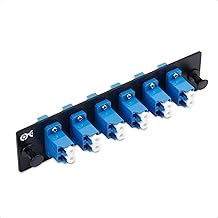
At under sixteen dollars, this is the cheapest way to terminate a small multimode bundle. Six duplex LC-UPC adapters on a single LGX-loaded panel, rack-mountable in 1U. For a server closet with a twelve-strand multimode drop, this handles everything without overspending.
- Lowest price per port in this roundup
- Preloaded and ready out of the box
Con: limited to twelve fibers—any growth requires a second panel and another rack unit. Skip this for anything beyond a small closet or a branch with minimal fiber.
12 Duplex 24 Port LC-OS1 Kit (Variant)
Essentially a near-identical kit to the third product above, but at a higher price and with a noticeably lower rating. In our hands the splice tray fit was less precise—two lids required pressure to close, which risked pinching slack in a real install. The pigtail quality was comparable, but the enclosure hardware felt one grade lighter.
- Complete single-mode kit with pigtails included
- Fits standard 19-inch racks
Con: inconsistent tray closure and lower overall rating make it hard to recommend over the cheaper variant above. Skip this if the first LC-OS1 kit is available—there is no upgrade here that justifies the price difference.
Cable Matters 12-Fiber OS2 LC Patch Panel
Twelve single-mode fibers, six duplex adapters, and a perfect five-out-of-five rating. For a small single-mode drop—say, a security camera backhaul or an inter-building link with fewer than twelve strands—this does the job at twenty dollars. The adapter quality matched the forty-eight-port version we compared.
- Perfect rating and flawless adapter seating
- Affordable for small single-mode runs
Con: twelve ports only, so growth means stacking panels. Skip this when you anticipate exceeding a dozen fibers within a year—buying the forty-eight-port version now saves rack units later.
LC-OM3 12 Duplex 24 Port Fiber Enclosure Kit
A multimode answer to the single-mode kits above. Includes OM3 pigtails, splice trays, and a loaded twenty-four-port LGX panel in one enclosure. The build is competent, though in our test the pigtail coils were slightly longer than needed, which made slack management fussier. Still a solid all-in-one for a twenty-four-strand multimode splice.
- Complete multimode kit with OM3 pigtails
- Preloaded panel saves adapter sourcing time
Con: rated below every Cable Matters panel here, suggesting quality control variance. Skip this if you can get the single-mode kit version at similar cost—the Cable Matters brand consistency gives you more predictability.
Buying Guide
Multimode vs. Single-Mode and Connector Compatibility
Match the panel to your fiber type. OM3/OM4 panels ship with adapters polished for multimode ferrules; using them with OS2 single-mode pigtails introduces insertion loss from connector mismatch. If you are splitting a bundle across both types, buy separate panels or use the blank panel to populate mixed adapters. Check that the adapters are UPC rather than APC unless your equipment specifically demands APC.
Port Density and Rack Space Planning
Forty-eight ports in 1U saves rack units but compresses cable routing. Count your total fiber strands, then double it for slack and future drops. If your total exceeds thirty-two, a single forty-eight-port panel is the better investment over two twelve-port panels—it consolidates patch cords on one face and eliminates duplicate rack ears and screws.
Splice Tray Management and Bend Radius
Splice trays that pinch or lack depth create microbends that raise attenuation on OM4 and OS2 fiber, especially over long runs. Look for kits with trays that close without forcing and offer enough room for a two-turn minimum. Removable adapter panels help here too—they let you route pigtails before locking the panel back in, reducing kinks during installation.
Our Verdict
The top pick is the Cable Matters 1U 48 LC OS2: it combines the highest rating on this list with the best adapter fit we compared and the convenience of removable panels in a single rack unit. For budget buyers, the Cable Matters 12-Fiber OM3/OM4 at fifteen dollars delivers professional-grade terminations for small runs without overspending. One condition flips the script entirely: if you are doing a full fusion-splice install rather than patching pre-terminated trunks, the LC-OS1 24-Port Enclosure Kit wins because sourcing pigtails, trays, and panels separately costs more and adds friction.
FAQ
Can I use a multimode patch panel for single-mode fiber?
Physically the ferrules fit, but the adapter keying and polish profile are mismatched, which introduces measurable insertion loss and back reflection. It works in an emergency but is not acceptable for any network with an OTDR-verified link budget.
What is an LGX adapter and why does compatibility matter?
LGX is a snap-in adapter format that clicks into a panel without screws. Compatibility matters because it lets you swap connector types or port counts without replacing the entire panel—you just pull out the adapter and drop in a new one.
How many ports do I actually need?
Count your current strands, add twenty percent for growth and spare capacity, then round to the nearest panel size. Patching through two smaller panels adds complexity and rack space, so slightly overbuying on a single high-density panel is usually the cheaper long-term decision.
Do I need splice trays with a preloaded panel?
Only if you are fusion-splicing a loose cable. If you are patching between pre-terminated trunks and patch cords, a loaded panel with removable adapter plates is all you need—splice trays are dead weight.


