Key takeaways
- Shopping for a Linux laptop starts with a question Windows buyers never ask: will the hardware actually cooperate with the operating system?
Shopping for a Linux laptop starts with a question Windows buyers never ask: will the hardware actually cooperate with the operating system? A laptop can look perfect on paper and still ship with a Wi-Fi chip that needs a proprietary driver, a fingerprint reader that never works, or a touchscreen that behaves oddly under a particular desktop. The keyword “best Linux laptop” implies a buyer who wants fewer of those surprises, ideally a machine that arrives with a Linux distribution already installed so the first boot is a working desktop instead of a weekend of installer screens.
This guide is for students learning the command line, developers who live in a terminal, field technicians who need a rugged machine with a known operating system, and anyone leaving Windows for good in 2026. Every laptop below names Linux in its listing, either Linux Mint, Ubuntu or a generic Linux label. The comparison relies only on the processor, memory, storage and display facts stated in those titles, so confirm details like ports and driver support on the full spec sheet before you buy. The five machines span a wide range, from a rugged field unit to a workstation-class model, which makes the choice mostly about matching the workload.
Quick Picks
Our top picks



As an Amazon Associate we earn from qualifying purchases at no extra cost to you.
| Product | Best for | Key spec from the title |
|---|---|---|
| Lenovo Business Laptop (Linux Mint, i5-1335U) | Everyday office and study work | Core i5-1335U, 16GB RAM, 256GB SSD, 15.6-inch FHD |
| Lenovo IdeaPad Slim 3 Linux Laptop | Touch input and multitasking | Ryzen 7 5825U 8-core, 16GB RAM, 512GB SSD, FHD touchscreen |
| Panasonic Toughbook CF-31 MK5 | Fieldwork in harsh conditions | Rugged 13.1-inch, i5, 8GB, 256GB, 4G LTE, Ubuntu |
| NIMO 16-inch Linux Laptop | Local AI work and heavy compiling | Ryzen Max+ 395 16-core, 128GB LPDDR5x, 1TB SSD |
| Lenovo Business 15-inch (Linux Mint, i7-1065G7) | Large local file storage on a tight setup | Core i7-1065G7, 20GB RAM, 1TB hard disk drive |
How to Choose
Pre-installed Linux versus installing it yourself
A listing that names Linux Mint or Ubuntu means someone has already set up the system, which saves time and proves the machine boots the distribution at least once. It does not guarantee every component works, and you should plan to check Wi-Fi, Bluetooth, suspend and resume, and the webcam on the first day. If you are comfortable reinstalling, any mainstream laptop can run Linux, but an already-installed machine is the safer pick for a first-time switcher.
Hardware that Linux handles well
Intel and AMD processors with integrated graphics are the easiest path because their open drivers ship inside the kernel. Intel and Realtek network chips are usually trouble-free, while unusual Wi-Fi modules can need extra packages. Fingerprint readers and some touchscreens are the most common sources of gaps, so treat those as nice extras rather than reasons to buy. Search the model number together with the distribution name before ordering; community threads usually reveal which components work and which need a workaround. Be cautious with a discrete graphics card from a vendor that relies on proprietary drivers if you want a trouble-free upgrade path.
Memory and storage thresholds
Linux runs lean, so 8GB handles web browsing, documents and light development. For containers, virtual machines or large code bases, look for 16GB or more. Choose a solid state drive of at least 256GB for a snappy system; a mechanical hard drive adds noticeable delay at boot and when opening large projects. If you virtualize several operating systems, 512GB or more gives breathing room for disk images. Remember that Linux keeps swap space and caches on disk too, so a drive that looks roomy on paper can feel small after a year of updates, packages and downloaded toolchains.
Ports, display and durability
A 15.6-inch full HD display is comfortable for coding and documents, while a 13-inch rugged body suits fieldwork. Check that the laptop has the ports you rely on: USB-A for older drives, HDMI for projectors, Ethernet if you manage servers, and an SD card slot if you move photos. Battery life matters too: a processor with a low power rating usually lasts longer unplugged, while a high-end chip trades runtime for speed. Ignore marketing about AI performance unless you plan to run local models, and be wary of titles that stuff in bonus accessories instead of stating clear specifications.
The 5 Best Options
Lenovo Business Laptop with Linux Mint (i5-1335U)
This Lenovo ships with the Cinnamon desktop of Linux Mint, a familiar layout for people coming from Windows. The title lists an Intel Core i5-1335U, 16GB of RAM, a 256GB SSD and a 15.6-inch full HD display with a full keyboard and fast charging. That combination reads as a no-nonsense work machine: the listing leads with business use rather than gaming or flashy extras, which is what many Linux users want from a daily driver.
- Strength: A recent Intel processor with 16GB of memory is a comfortable base for coding and office work.
- Strength: Linux Mint Cinnamon is a gentle landing for first-time switchers.
- Trade-off: The 256GB SSD fills quickly with virtual machines or large datasets.
Skip it if you need plenty of internal storage without adding an external drive.
Lenovo IdeaPad Slim 3 Linux Laptop
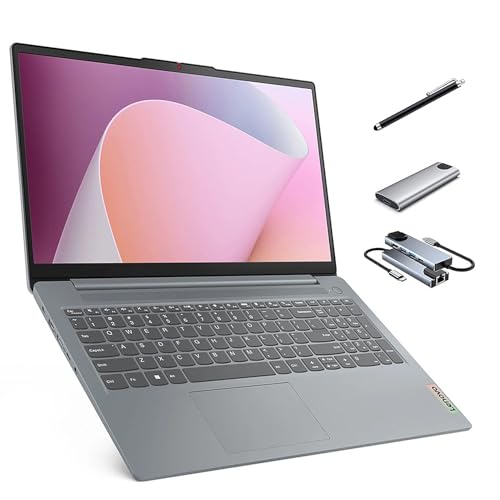
The IdeaPad Slim 3 uses an eight-core Ryzen 7 5825U that the title says reaches 4.5GHz, with 16GB of RAM, a 512GB SSD and a 15.6-inch full HD touchscreen. A keypad, SD card reader and stylus pen are also named. For a buyer who wants more cores than the typical office laptop offers, it is the middle path between the plain Lenovo and the high-end NIMO.
- Strength: Eight cores and 16GB of memory suit multitasking, compiling and light virtual machines.
- Strength: The 512GB SSD, touchscreen and SD card reader widen what you can do without add-ons.
- Trade-off: Touch support varies by desktop environment, so try the gestures and the stylus on the first day.
Skip it if you want a lightweight system with no touchscreen.
Panasonic Toughbook CF-31 MK5
The Toughbook is a renewed rugged laptop with a 13.1-inch touch display, an Intel i5, 8GB of memory and a 256GB drive, running Ubuntu. It adds 4G LTE and a backlit keyboard, which is useful for fieldwork away from Wi-Fi. Rugged laptops in this family are chosen for durability and connectivity rather than speed, so judge it on those terms.
- Strength: Built-in 4G LTE keeps you connected where Wi-Fi is unreliable.
- Strength: The rugged design suits outdoor, vehicle or industrial use.
- Trade-off: As a renewed unit with an older design, it offers less performance for its size than newer machines.
Skip it if you want a modern, light office laptop.
NIMO 16-inch Linux Laptop
The NIMO is the powerhouse of the group, built around a Ryzen Max+ 395 with 16 cores reaching 5.1GHz, 128GB of LPDDR5x memory, a 1TB SSD and Radeon 8060S graphics with 40 compute units. The title also cites 126 TOPS of AI performance. Few laptops list this much memory, which is why it appeals to people who load large models or run many services at once.
- Strength: 128GB of memory and 16 cores handle containers, large builds and local AI models.
- Strength: A 16-inch display gives plenty of space for terminals and editors side by side.
- Trade-off: The hardware is high-end, so portability and battery life are likely compromises.
Skip it if you only browse the web and write documents.
Lenovo Business 15-inch with Linux Mint (i7-1065G7)
This Lenovo pairs an older Core i7-1065G7 with 20GB of RAM and a 1TB hard disk drive, running Linux Mint Cinnamon. The display is listed as a 15.6-inch HD panel, with fast charging. It is the older design of the group, so it suits buyers who value storage space and memory over the latest processor generation.
- Strength: 20GB of memory is generous for multitasking and light virtual machines.
- Strength: 1TB of storage holds a large library of documents and media.
- Trade-off: A mechanical hard drive and an HD display feel dated next to solid state storage and full HD panels.
Skip it if boot speed and screen sharpness matter to you.
Which One Fits Your Situation
You are switching from Windows for the first time
The Lenovo Business Laptop with Linux Mint and the i5-1335U is the gentlest option. Cinnamon looks familiar, and 16GB of RAM keeps everyday tasks responsive. Add an external drive if the 256GB internal one proves small, and keep your documents in a synced folder so a reinstall never costs you work.
You write code and run containers all day
The Lenovo IdeaPad Slim 3 balances eight cores, 16GB of RAM and a 512GB SSD at a sensible size. If your workloads are far heavier, such as training local models, the NIMO 16-inch is the only listing here with the resources for it.
You work outdoors or in vehicles
The Panasonic Toughbook CF-31 MK5 is built for that. Its rugged shell, 4G LTE and Ubuntu install make sense for technicians who need a known system in rough conditions.
You hoard files and need large capacity
The Lenovo Business 15-inch with the i7-1065G7 offers 1TB of storage and 20GB of RAM. Accept slower boots from the mechanical drive in exchange for the space, and consider swapping in a solid state drive later if the chassis allows it.
Common Mistakes
- Assuming every component works in Linux, especially fingerprint readers and touchscreens.
- Paying for a powerful graphics card from a vendor with proprietary drivers when integrated graphics would do.
- Picking a mechanical hard drive for a system disk and then wondering why boot, updates and application launches all feel slow.
- Overlooking port needs such as Ethernet, HDMI or an SD card slot until the laptop is on your desk and the projector cable does not fit.
- Buying for AI performance figures in the title without a plan to run local models.
Linux Laptop Specs and Terms Explained
Kernel support
Linux drivers ship inside the kernel, so a very new processor or graphics part can lag behind the distribution you install. A long-term-support release with a recent kernel is the safe pairing. If a model uses a chip generation that launched only months ago, expect to enable a newer kernel before every feature works.
Wi-Fi and Bluetooth chipsets
The wireless card matters more than the processor for day-one comfort. Intel adapters are widely supported out of the box, while some Realtek and Broadcom parts need extra packages or a wired connection to fetch them. Look for the chipset name in the spec sheet instead of a vague “Wi-Fi 6” label.
Secure Boot and firmware
Secure Boot checks that the bootloader is signed. Mainstream distributions such as Ubuntu and Fedora carry signed loaders, so it usually stays on. If a niche distribution refuses to start, turning the setting off in firmware is a normal step, not a fault.
Wayland, X11 and screen scaling
These are the two display systems on a Linux desktop. Wayland handles fractional scaling and touch gestures more gracefully, while X11 still suits older apps and some screen-sharing tools. A high-resolution panel on a small screen is where this choice becomes visible.
Setup and Care Tips
- Boot a live USB stick first and check Wi-Fi, sound, the webcam, suspend and the trackpad before wiping anything.
- Back up the existing drive, or leave a Windows partition in place until you are sure everything works.
- Run the distribution’s firmware updater (fwupd is common) so the BIOS and device firmware stay current.
- Install a power-management tool such as TLP if battery drain at idle looks high.
- Turn on automatic security updates and snapshot your settings after the first clean install.
Which One Should You Buy?
| If you… | Choose… |
|---|---|
| want a business-style machine with Mint already installed | Lenovo Business Laptop with Linux Mint (i5-1335U) |
| prefer a slim, lightweight everyday notebook | Lenovo IdeaPad Slim 3 Linux Laptop |
| need a machine built for rough field conditions | Panasonic Toughbook CF-31 MK5 |
| like a larger screen for side-by-side windows | NIMO 16-inch Linux Laptop |
| want an older but familiar business platform with Mint | Lenovo Business 15-inch with Linux Mint (i7-1065G7) |
Who Should Skip These
Anyone who depends on Windows-only software such as certain CAD tools, Adobe apps or anti-cheat games should keep a Windows machine or plan on dual booting. People who need a vendor-supported fingerprint reader or a specific docking station should confirm Linux support first, because those parts are the most common source of surprises.
Related guides
- Rechargeable Electric Toothbrush With Travel Case
- Countertop Water Filters Without Installation
- Nsf Certifications For Water Filters Explained
Frequently Asked Questions
Which Linux distribution should a beginner choose?
Linux Mint with the Cinnamon desktop is a friendly start because its layout resembles Windows. Ubuntu is another well-supported option with wide documentation and software availability, and most tutorials you find online assume one of the two.
Can I install a different distribution later?
Yes, in most cases. Pre-installed systems are normal PCs, and you can replace them with another distribution, though you should back up data first and confirm the drivers you need are supported. Keep the original install media or a recovery image handy in case you want to return to the shipped setup.
How much RAM is enough for Linux?
Eight gigabytes covers browsing and office tasks. For virtual machines, containers or heavy development, 16GB or more is the more comfortable level.
Is a renewed laptop a sensible choice?
It can be, especially for rugged hardware that is built to last. Check the condition details and warranty terms in the listing, and remember that older processors offer less performance than current ones. For a machine that lives in a truck or on a job site, durability often outweighs raw speed.