A MIDI controller makes no sound. That single fact confuses more first-time buyers than anything else in the studio, and it also explains why the buying criteria are completely different from a digital piano. You are not choosing a sample engine or a speaker system; you are choosing an input device. What matters is how many keys you can reach without moving your hands, whether the keys are velocity-sensitive enough to record expressive dynamics, and how many knobs and pads sit within reach of your right hand while the left keeps playing.
The other real decision is key size. Mini keys let a controller sit in front of a laptop on a desk, which is where most beat-making actually happens, at the cost of chord accuracy for anyone with large hands. Full-size synth-action keys are comfortable for playing parts properly but eat desk space. And a small number of controllers use weighted hammer beds, which is what you want if you are playing serious piano parts into a DAW rather than programming them. This guide sorts them by that division.
Our top picks



As an Amazon Associate we earn from qualifying purchases at no extra cost to you.
Quick Comparison
| Product | Best For | Standout Feature | Watch Out For |
|---|---|---|---|
| Akai MPK Mini MK3 | Desk-sized beat production | Eight MPC pads and eight knobs in a tiny footprint | Mini keys are cramped for two-hand piano parts |
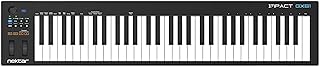
| Nektar Impact GX61 | Playing full parts into a DAW | Sixty-one full-size keys with deep DAW integration | No pads for finger drumming |
| Akai MPK Mini Play MK3 | Practising away from a computer | Built-in sounds and speaker for standalone use | Onboard sounds are basic next to plugins |
| Studiologic SL73 MK2 | Serious piano performance into software | Weighted hammer bed with aftertouch and MIDI 2.0 | Large, heavy and the most expensive option |
| M-Audio Keystation 49 MK3 | Balanced size for small studios | Forty-nine synth-action keys with pitch and mod wheels | Minimal knobs and no pads |
| Yamaha P71 | Doubling as a real piano | Graded hammer action with USB-MIDI output | No pads, knobs or transport controls |
How to Choose
- Key count follows your parts: Twenty-five keys is enough for bass lines, drums and single-hand riffs. Forty-nine covers most two-hand work. Sixty-one and above is for playing piano parts properly.
- Mini versus full-size keys: Mini keys fit on a desk and suit programming. Full-size keys are necessary if you want your recorded performance to feel like playing rather than typing.
- Pads matter for rhythm: Velocity-sensitive pads let you finger-drum and trigger clips naturally. Keys can trigger drum samples, but the feel and velocity control are far worse.
- Check aftertouch and control assignments: Aftertouch adds expression to synth patches. Assignable knobs turn plugin automation into a physical gesture rather than a mouse drag.
- Confirm bus power and DAW support: A controller that runs from a single USB cable and maps automatically to your DAW saves an evening of configuration.
Top Picks Reviewed
Best for Beat Making: Akai MPK Mini MK3
This is the controller that sits permanently in front of a laptop. Eight MPC-style pads handle drums and clip launching, eight knobs map to plugin parameters, and the velocity-sensitive mini keys are enough for bass lines and chord stabs. The bundled software means you can start producing immediately.
Twenty-five mini keys are not a piano. Two-handed voicings are cramped, and players with large hands will hit adjacent notes until they adapt.
Best for Playing Parts: Nektar Impact GX61
Sixty-one full-size keys give you room to play left-hand bass and right-hand chords simultaneously, and Nektar’s DAW integration means transport and track controls map without a configuration marathon.
There are no drum pads. If finger drumming is a core part of your workflow, you will end up buying a separate pad controller.
Best Standalone Option: Akai MPK Mini Play MK3
Adding internal sounds and a speaker to the MPK Mini formula makes it usable on a sofa, on a train or anywhere a computer is not open. For sketching ideas away from the studio that is genuinely valuable.
The onboard sound set is basic compared with the plugins you would use in a session. Treat it as a sketchpad, not a sound source for finished tracks.
Best Piano Feel: Studiologic SL73 MK2
A seventy-three key weighted hammer bed with aftertouch, USB-C audio, MIDI 2.0 and DAW controls is a different class of instrument. If you are recording real piano performances into software, the action is what makes the difference between a played part and a programmed one.
It is big, heavy and priced accordingly. For someone making beats on a desk it is entirely the wrong tool.
Best Middle Ground: M-Audio Keystation 49 MK3
Forty-nine full-size synth-action keys hit the sweet spot for a small studio: enough range for two-hand parts, small enough to sit on a desk beside a monitor. Pitch and mod wheels cover the expression most synth parts need.
Control surface features are sparse. There are few assignable knobs and no pads, so plugin tweaking stays mostly on the mouse.
Best Dual-Purpose Choice: Yamaha P71
Because it has USB-MIDI, a digital piano with graded hammer action doubles as the most musical controller in this list. If you already practise on it, using the same instrument to record piano parts costs you nothing extra.
It offers none of the studio controls a purpose-built controller has — no pads, no knobs, no transport buttons — so plugin control stays entirely on screen.
Frequently Asked Questions
Does a MIDI keyboard make sound on its own?
Usually no. It sends note and controller data to software that generates the sound. A few models include internal sounds and a speaker for standalone use, which is the exception rather than the rule.
How many keys do I need for production?
Twenty-five is enough for drums, bass and single-hand riffs. Forty-nine handles most two-hand parts comfortably. Sixty-one or more only matters if you play piano properly rather than programming.
Are mini keys a problem?
For playing chords with both hands, yes, especially with large hands. For programming drums, bass lines and one-hand parts on a crowded desk, they are a reasonable trade.
What is aftertouch and do I need it?
It is pressure sensing after the key is down, used to add vibrato or filter movement to synth patches. It is a genuine expressive tool for synth players and largely irrelevant for piano sample libraries.
Final Thoughts
Decide whether you are programming or performing. Programming favours mini keys, pads and knobs within a desk footprint. Performing favours full-size keys, more of them, and a weighted bed if piano parts are the point. Buy the one that matches how you actually work, not the one with the longest feature list.