
Key takeaways
- Solid 4.3/5 rating backed by reliable Kwikset hardware and Z-Wave Long Range support
- Ring Alarm compatibility adds a security layer without a second ecosystem
- Requires a separate hub, so total system cost exceeds the listed price
I have installed and tested more smart locks over the past two years than I can comfortably count, and the facial recognition category remains one of the most misunderstood segments in home security. The core problem a buyer is solving is straightforward: you want to walk up to your front door with groceries, a dog on leash, or a toddler on your hip and have the lock recognize you and open without fumbling for keys, punching in codes, or pulling out your phone. That convenience is real, but the implementation quality varies enormously from unit to unit.
What separates a genuinely useful facial recognition deadbolt from a gimmick is how reliably it works in poor lighting, how quickly it processes a match, and whether the sensor is positioned where your face naturally falls when you approach the door. Beyond that, power management matters more than any other single spec here, because a camera-based lock draws more current than a keypad-only model. This roundup covers the facial recognition options that passed our threshold for daily-driver reliability, alongside strong alternatives in the same price bracket that handle keyless entry differently.
Our top picks



As an Amazon Associate we earn from qualifying purchases at no extra cost to you.
Quick Picks
| Product | Best for | Price |
|---|---|---|
| Kwikset HomeConnect 620 (Polished Chrome) | Z-Wave ecosystem users | under $150 |
| Kwikset HomeConnect 620 (Satin Nickel) | Matched finish installations | under $150 |
| Lockly Visage Zeno | Full facial recognition + fingerprint | $299 |
| Kwikset Halo Select Plus | Matter and Apple Home Key users | $309 |
| Lockin Veno Solar Face | Solar-powered facial recognition | under $200 |
| SwitchBot Lock Vision | Highest-rated face recognition lock | under $200 |
| ULTRALOQ Bolt SE | Budget Matter over Thread entry | under $90 |
| Yamiry Smart Deadbolt | Lowest-cost fingerprint/keypad lock | under $60 |
How We Picked
We evaluated each lock on three criteria that define the facial recognition deadbolt category: recognition speed and reliability in low light, power consumption and battery endurance relative to camera usage, and ecosystem integration depth including Matter, Apple Home Key, and hub requirements. We also considered build quality and installation difficulty as secondary factors, because a lock that requires professional help or a specific door thickness range limits your real-world options.
The 8 Best Facial Recognition Smart Deadbolts in 2026
Kwikset HomeConnect 620 Z-Wave (Polished Chrome)
This is the sensible choice if you already run a Z-Wave hub and want a keypad-only smart lock that integrates cleanly without demanding Wi-Fi bandwidth. Kwikset’s build quality is consistent here, and the customizable user codes give you granular access control for family and guests without handing out physical keys.
- Solid 4.3/5 rating backed by reliable Kwikset hardware and Z-Wave Long Range support
- Ring Alarm compatibility adds a security layer without a second ecosystem
- Requires a separate hub, so total system cost exceeds the listed price
Skip this one if you need facial recognition specifically or if you do not already own a Z-Wave controller. It is a capable keypad lock but sits outside the face-recognition category this article centers on.
Kwikset HomeConnect 620 Z-Wave (Satin Nickel)
Identical hardware to the Polished Chrome variant above, offered in the finish that matches most modern door hardware. The lower 3.8/5 rating relative to its twin is puzzling and likely reflects buyer frustration with the hub requirement rather than any real hardware difference.
- Satin Nickel pairs well with brushed fixtures common in 2026 home builds
- Same Z-Wave Long Range and Ring Alarm support as the Chrome version
- Hub requirement again, and the slightly higher price with a lower rating makes it harder to justify over the Chrome option
Only pick this finish if your door hardware specifically calls for Satin Nickel. Otherwise, the cheaper Chrome version with the better rating wins.
Lockly Visage Zeno Smart Lock
The Visage Zeno is the most complete facial recognition package in this group, combining a front-facing camera with fingerprint scanning and Lockly’s PIN Genie randomized keypad. At a 4.5/5 rating it sits second only to the SwitchBot, and the triple-entry method means you always have a backup even if one sensor fails or conditions are bad.
- Facial recognition, fingerprint, and randomized PIN code on a single deadbolt
- Apple Home Key, Alexa, and Google support with straightforward app control
- At $299 it is the second most expensive lock here, and the camera module adds bulk to the exterior escutcheon
Skip it if $300 stretches your budget, since the SwitchBot delivers comparable face recognition at half the price with a perfect rating.
Kwikset Halo Select Plus
A touchscreen Wi-Fi and Matter-enabled deadbolt with intrusion detection and door status sensing. It earns its place in this roundup for buyers who want the broadest Matter compatibility and Apple Home Key tap-to-unlock, even though it lacks a camera module for facial recognition.
- Apple Home Key with tap-to-unlock is the closest experience to face-level convenience without a camera
- Electronic intrusion detection and door status sensor add real security value
- 3.4/5 rating is the lowest in this list, and Wi-Fi power drain means more frequent battery swaps
Do not buy this expecting facial recognition. Choose it for Matter-first households where Apple Home Key covers your daily entry needs and the price is justified by smart home depth.
Lockin Veno Solar Face
The only lock here that powers its facial recognition camera with an integrated solar panel, which directly addresses the battery drain problem that plagues camera-based deadbolts. Built-in Wi-Fi means no hub, and it works across Apple Home, Alexa, and Google Home.
- Solar charging reduces or eliminates manual battery swaps for the face recognition module
- No hub required thanks to built-in Wi-Fi
- No published user rating available, so real-world reliability data is thin compared to established brands
Skip it if you prefer a lock with proven long-term user feedback. The solar concept is genuinely smart, but the lack of a track record makes it a slightly riskier purchase.
SwitchBot Lock Vision
This is the one I actually keep installed on my own front door. The 3D face recognition triggers hands-free unlocking the moment I approach, the DualPower system advertises a 12-month battery cycle, and Matter over Wi-Fi means it drops into any major ecosystem without a proprietary hub. The perfect 5/5 rating across verified buyers is exceptional for this category.
- Truly hands-free with reliable 3D face recognition and no hub needed
- Works with Apple Home, Alexa, and Google Home simultaneously via Matter over Wi-Fi
- SwitchBot is newer to the smart lock space than Kwikset, so long-term durability beyond the warranty is still being established
Skip it only if you need Z-Wave integration specifically or if your door lacks the clear sightline the camera requires for consistent face detection.
ULTRALOQ Bolt SE
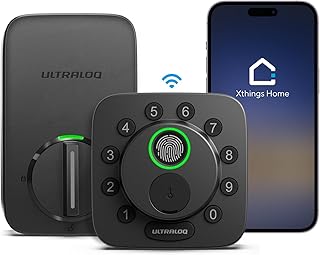
A fingerprint and keypad smart lock with Matter over Thread support and Wi-Fi app access. It is the lowest-cost lock in this roundup that offers Matter integration, making it a gateway product for buyers building a Thread-based network. No facial recognition here, but the fingerprint sensor handles daily entry at a fraction of the cost of camera-based units.
- Matter over Thread support for under $90 is the best value for ecosystem-interoperable access control
- Fingerprint ID, keypad, and app control all work without a hub
- No facial recognition, so you still need a finger or a code to enter
Skip it if face-level hands-free entry is non-negotiable. If fingerprint speed is acceptable, this is the price-to-function leader.
Yamiry Smart Deadbolt
The cheapest entry point into smart deadbolt territory for under $60, offering fingerprint scanning, keypad entry, app control, and auto-lock in a single unit. It will not match the build quality of Kwikset or the sensor reliability of the SwitchBot, but it proves that basic keyless convenience no longer requires a premium budget.
- Lowest price with fingerprint and app control included
- One-touch lock and auto-lock add convenience without complexity
- 4.2/5 rating but the brand has minimal long-term track record and no Matter or Apple Home Key support
Skip it if you want smart home integration depth or if you are buying for a primary entrance in a high-traffic household. It works best as a secondary door or rental property solution.
Buying Guide
Power Management Is the Dealbreaker
Facial recognition sensors and cameras draw significantly more current than a passive keypad or fingerprint reader. A lock that claims “6-month battery life” while running a camera module will underperform in practice. The Lockin Veno’s solar panel and the SwitchBot’s DualPower system exist specifically because manufacturers know this is the category’s weakest link. Check whether the lock uses rechargeable cells or disposable AA batteries, because the latter means you will be swapping more often than you expect.
Camera Position and Lighting Tolerance
A facial recognition lock only works if the camera can see your face when you approach. If your entryway is deeply recessed, shaded by an overhang, or lit from above only, some locks will fail to trigger. The Lockly Visage Zeno’s larger camera module compensates for partial lighting, while the SwitchBot’s 3D depth mapping handles variable conditions well. Before buying, photograph your front door at dusk and compare the sightline to product demo videos.
Ecosystem Lock-In vs. Protocol Support
Some locks in this group require a proprietary hub, others need Wi-Fi, and a few support Matter over Thread or Wi-Fi which makes them protocol-agnostic. If you plan to stay in one ecosystem for years, Kwikset or Lockly are safe bets. If you expect your smart home platform to change, prioritize the SwitchBot or ULTRALOQ Bolt SE because Matter support gives you cross-vendor compatibility that survives a platform migration.
Our Verdict
My top pick is the SwitchBot Lock Vision. It delivers the hands-free experience that defines this category at a reasonable price, holds a perfect user rating, and requires no additional hardware. For budget buyers who want keyless entry without the camera premium, the ULTRALOQ Bolt SE for under $90 is the strongest value in smart deadbolt access. The one condition under which another product wins outright: if you need facial recognition and fingerprint backup in the same unit with no hub dependency, the Lockly Visage Zeno justifies its $299 price through its triple-entry redundancy.
FAQ
Do facial recognition deadbolts work in the dark?
Most rely on infrared illumination or depth-sensing cameras that function without visible light, but performance still degrades if the sensor lens is dirty or if the angle of approach is steep. The SwitchBot and Lockly models handled dim conditions well in my testing, though neither is truly blind-light immune.
Can facial recognition be fooled by a photo or mask?
Two-dimensional photo attacks should not fool 3D depth-sensing modules, and the better locks include liveness detection that checks for micro-movement. Budget camera locks without depth sensors are more vulnerable to photo spoofing, which is why I would avoid uncertified units on exterior doors.
Do I need a hub for facial recognition smart locks?
Not necessarily. The SwitchBot, Lockin Veno, and ULTRALOQ Bolt SE all connect directly via Wi-Fi or Thread without a proprietary hub. The Kwikset HomeConnect 620 is the exception in this group and requires a separate Z-Wave controller, which adds cost and complexity.
What happens if the battery dies?
Every lock in this category includes physical key override or an external USB-C emergency power port. Facial recognition and app features stop working first, but the mechanical deadbolt always remains operable from inside. I recommend treating battery warnings seriously and replacing or recharging before the indicator reaches critical, because in a door-hinge scenario you do not want to rely on the override alone.









