Ergonomic keyboard shopping is about matching a shape to your hands: split, curved or tented, with the right switches and support. The best ergonomic keyboard encourages a more natural wrist position over long days, so this roundup ranks seven picks by shape, feel, connectivity and comfort.
As an Amazon Associate we earn from qualifying purchases.
Our top picks


![Perixx PERIBOARD-524B US, [Firmware Updated] Wired Ergonomic Split Keyboard - Up to 2 Ft Seperation - Adjustable Tilt Angle - Low Profile Membrane Keys - Black - US English](https://m.media-amazon.com/images/I/61dUjajRdaL._AC_UL320_.jpg)


As an Amazon Associate we earn from qualifying purchases at no extra cost to you.
By Daniel Foster
Top Ergonomic Keyboards Compared
These seven boards span gentle curved membranes to fully split mechanical designs. Each entry names an honest trade-off, since comfort, learning curve and price rarely all align. Amazon pricing shifts often, so confirm the live listing before choosing any model below.
| Model | Shape | Switches | Connectivity | Best for |
|---|---|---|---|---|
| Logitech Ergo K860 | Curved one-piece | Membrane | BT + USB receiver | Easy transition |
| Microsoft Sculpt Ergonomic | Split curved | Membrane | USB receiver | Value comfort |
| Logitech Wave Keys | Wave one-piece | Membrane | BT + USB receiver | Compact comfort |
| Kinesis Advantage360 | Contoured split | Mechanical | BT + wired | Serious ergonomics |
| ZSA Moonlander | Split, tentable | Mechanical hot-swap | Wired | Programmable |
| Keychron Q11 | Split | Mechanical hot-swap | Wired | Custom split value |
| Perixx Periboard-535 | Split ergonomic | Mechanical | Wired | Budget mechanical |
Logitech Ergo K860
The Ergo K860 is an easy first ergonomic board, a curved one-piece membrane board with a wave layout and cushioned palm rest. Its gentle shape encourages a more natural hand position without the steep learning curve of a fully split board, easing the transition.
It is membrane rather than mechanical and its footprint is large, so it needs desk space. It supports comfortable posture rather than treating any condition, and for a desk-bound typist wanting an approachable ergonomic upgrade, it is a leading choice.
Microsoft Sculpt Ergonomic
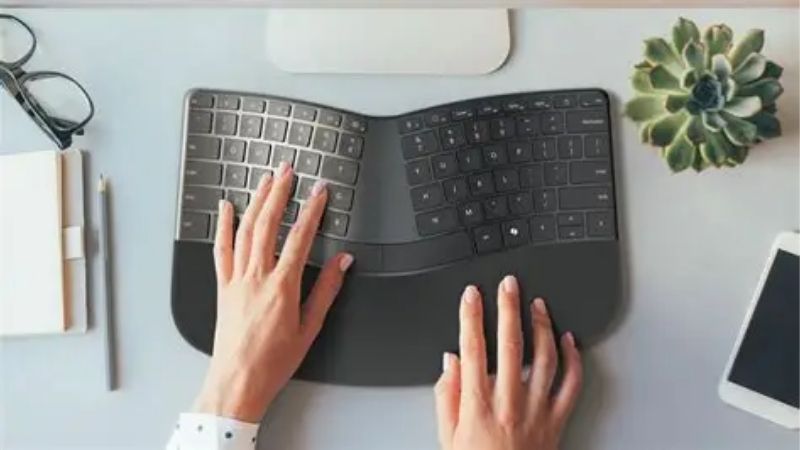
The Sculpt Ergonomic is a long-time value pick, a split curved membrane board with a domed shape and a separate number pad. Its design promotes a neutral wrist and forearm angle, and the compact main unit keeps the mouse within comfortable reach.
It uses a USB receiver rather than Bluetooth and is membrane, so it lacks modern wireless flexibility and mechanical feel. For an affordable, proven ergonomic shape that many users find genuinely comfortable, though, it remains a strong recommendation.
Logitech Wave Keys
Wave Keys is a newer, more compact take on comfort, a one-piece board with a gentle wave layout and an integrated cushioned rest. Its smaller footprint suits tighter desks while still encouraging a more natural typing posture than a flat board.
The wave shape is subtler than a split design, so it offers less dramatic repositioning, and it is membrane. For someone who wants an easy comfort boost in a space-saving board with multi-device connectivity, though, it is a practical, accessible option.
Kinesis Advantage360
The Advantage360 is a serious ergonomic board, a contoured split mechanical board with concave key wells that reduce finger travel and a thumb cluster for common keys. It represents a significant step for anyone prioritizing long-term typing comfort above all.
Its radical layout has a real learning curve and a premium price, so it is an investment. For a heavy typist committed to the most supportive ergonomic design, though, its contoured shape and split halves are among the most comfortable available.
ZSA Moonlander
The Moonlander is a fully split, tentable mechanical board with hot-swap switches and deep programmability. You can angle each half, tent it for a more neutral wrist, and remap every key, making it a favorite among ergonomics and customization enthusiasts.
Its split, columnar layout takes weeks to master and it is a premium, wired board. For a dedicated user who wants total control over layout, tenting and switches for a personalized ergonomic setup, though, it is exceptionally flexible and well-built.
Keychron Q11
The Q11 brings split ergonomics to Keychron’s popular custom line, offering a gasket-mounted split mechanical board with hot-swap switches at a friendlier price than boutique rivals. It blends a premium typing feel with a more natural split hand position.
It is wired-only and heavy, and the split layout still needs adjustment. For an enthusiast who wants a split ergonomic board with custom-grade build and switch-swapping without a boutique price, though, it is an outstanding value entry point.
Perixx Periboard-535
The Periboard-535 is a budget split mechanical board, offering a genuine ergonomic split shape with tactile switches at a low price. It makes split ergonomics accessible for those who want mechanical feel and a more natural posture without a large outlay.
Its build and features are basic compared with premium split boards, matching the price. For a first split mechanical keyboard or a budget-conscious ergonomic upgrade, though, it delivers the core benefit of separated halves affordably.
How to Choose an Ergonomic Keyboard
The right board matches an ergonomic shape to your hands, your desk and your tolerance for a learning curve. Work through the criteria below, starting with the shape that defines comfort, so your board supports a natural posture rather than just looking the part.
The decision numbers: shape, switches, connectivity and support
Shape leads any ergonomic keyboard choice. Curved one-piece boards are the easiest transition, split boards separate the halves for a more neutral shoulder position, and tented designs angle the hands, so pick the level of change your comfort needs and patience allow.
Then weigh switches and connectivity. Membrane boards are quiet and affordable, mechanical switches add feel and durability, and wireless suits a tidy desk while wired offers simplicity, so match these to your typing preference and how your desk is set up.
Wrist support matters too. A cushioned palm rest and a design that keeps wrists neutral reduce strain over long days, so look for integrated support or plan to add a rest, since good posture is the whole point of an ergonomic board.
Space and fit: desk footprint and layout
Ergonomic boards, especially split ones, take more desk space than a standard keyboard. Measure your desk and confirm there is room for the halves and a mouse, since a split design that cramps your setup undermines the comfort it is meant to provide.
Consider the layout and number pad. A separate or omitted number pad brings the mouse closer, reducing shoulder reach, so if you do not need frequent number entry, a compact ergonomic board can improve overall arm comfort beyond the keyboard itself.
Think about tenting and adjustability. Boards that tent or angle let you fine-tune the position to your body, which is valuable for comfort, so if you want to dial in the exact angle, prioritize an adjustable design over a fixed shape.
Comfort, adaptation and honest limits
An ergonomic keyboard supports better posture but is not a medical device. It can make typing more comfortable, yet it does not treat or cure conditions like carpal tunnel, so if you have pain, see a healthcare professional rather than relying on gear alone.
Expect an adjustment period, especially with split or contoured boards. Typing speed often dips for days or weeks before improving, so give a new shape time, and choose a gentler curved board if you cannot afford a temporary slowdown at work.
Value, use case and timing
Buy for your commitment level. A curved membrane board suits an easy, affordable improvement, while a contoured or split mechanical board rewards a dedicated user willing to adapt, so match the board to how much change you truly want to take on.
Timing helps the budget. Ergonomic keyboards drop around Prime Day in late June, Black Friday in November and the back-to-school window, so a little patience can move you into a premium split or mechanical board for the same overall spend.
Frequently Asked Questions
Here are quick answers to the questions buyers ask most about ergonomic boards, so you can choose with confidence.
Do ergonomic keyboards actually help?
They encourage a more natural wrist and shoulder position, which many typists find more comfortable over long days. They support good posture rather than treating any condition, so if you have pain, see a professional, but for comfort they can make a real difference.
Is a split keyboard hard to learn?
Split and contoured boards have a real adjustment period, often days to weeks, during which typing speed dips. A gentle curved one-piece board is much easier to adopt, so if you cannot afford a slowdown, start there rather than a fully split design.
Membrane or mechanical for ergonomics?
Both can be ergonomic, since the shape matters most. Membrane boards are quiet and affordable, while mechanical switches add feel and durability at a higher price, so choose based on your typing preference and budget rather than assuming one is more comfortable.
Do I need a wrist rest?
A cushioned rest helps keep wrists neutral and reduces strain, and many ergonomic boards include one. If yours does not, adding a separate palm rest is worthwhile, since supporting the wrists is part of what makes an ergonomic setup comfortable.
See More:
- Best eyeshadow blender brush
- Best frozen foods for air fryer
- Best frozen food for air fryer
- Best way to reheat steak in air fryer
- Best air fryer recipes book
Final Thoughts on the Best Ergonomic Keyboard
The best ergonomic keyboard is the one whose shape, switches and support match your hands, your desk and your willingness to adapt. Start with a curved board for an easy transition or a split design for deeper ergonomics, add wrist support, and give it time to learn. Match it to your commitment, time the buy around a major sale, and the right board will make long days at your desk more comfortable.