Best wireless keyboard shopping means weighing switch type, connectivity, comfort and battery life. The best wireless keyboard for you depends on whether you type all day, game or want a tidy multi-device desk, so this roundup ranks seven top picks by the specs that shape daily use.
As an Amazon Associate we earn from qualifying purchases.
Our top picks


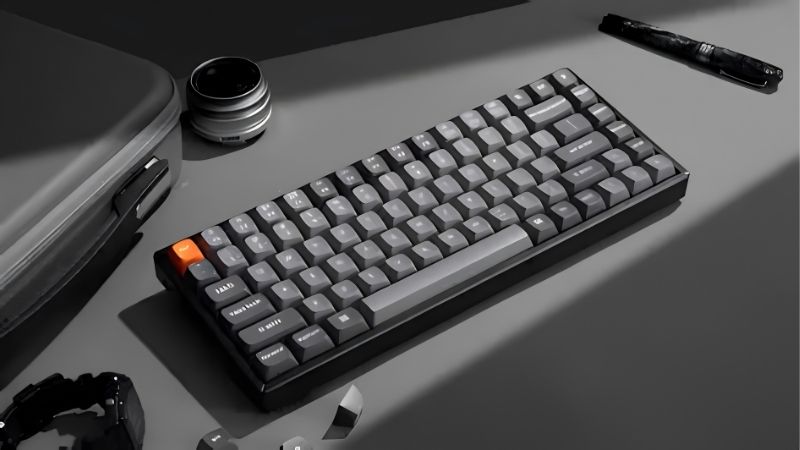
 AULA F75 Pro Wireless Mechanical Keyboard
Multi-function knob adjusts brightness or volume on the fly
75% layout saves desk space while keeping arrow keys
Hot-swappable base lets beginners customize without soldering
Compact 75% layout omits a full number pad
Tri-mode switching relies on shortcut keys to manage
As an Amazon Associate we earn from qualifying purchases at no extra cost to you.
By Daniel Foster
Top Wireless Keyboards Compared
These seven keyboards span compact multi-device boards to full mechanical and ergonomic models. Each entry names an honest trade-off, since comfort, portability and features rarely all align. Amazon pricing shifts often, so confirm the live listing before choosing any model below.
| Model | Type | Connectivity | Standout | Best for |
|---|---|---|---|---|
| Logitech MX Keys S | Low-profile scissor | BT + USB receiver | Typing comfort | Productivity |
| Logitech MX Mechanical | Low-profile mechanical | BT + USB receiver | Tactile feel | Typists |
| Keychron K8 | Mechanical | BT + wired | Hot-swap options | Enthusiasts |
| Logitech K380 | Membrane | Bluetooth | Multi-device compact | Portability |
| Logitech Ergo K860 | Membrane split | BT + USB receiver | Ergonomic shape | Comfort |
| Apple Magic Keyboard | Low-profile scissor | Bluetooth | Mac integration | Apple users |
| Logitech Signature K650 | Membrane | BT + USB receiver | Value comfort | Everyday value |
Logitech MX Keys S
The MX Keys S is a top best wireless keyboard for productivity, a low-profile scissor board with a comfortable, quiet typing feel and backlighting. It connects over Bluetooth or a USB receiver and switches between multiple devices, making it ideal for a busy multi-device desk.
It is not mechanical, so enthusiasts who want a tactile click will look elsewhere, and it is a premium membrane-class board. For all-day typing comfort, multi-device flow and long battery life, though, it is one of the most recommended productivity keyboards available.
Logitech MX Mechanical
The MX Mechanical brings low-profile mechanical switches to the MX productivity line, adding a tactile feel without the bulk of a full mechanical board. It keeps the multi-device switching and backlighting, appealing to typists who want mechanical feedback in a slim, office-friendly form.
Low-profile switches feel different from full-height mechanical ones, so purists may prefer a taller board, and it is a premium purchase. For a typist who wants tactile keys plus productivity features and clean wireless connectivity, though, it strikes an excellent balance.
Keychron K8
The Keychron K8 is a favorite among enthusiasts, a wireless mechanical board available with hot-swappable switches so you can change the feel without soldering. It connects over Bluetooth or wired USB, bridging enthusiast customization with practical multi-device wireless use.
It is taller and heavier than low-profile boards, and battery life with backlighting is shorter than membrane keyboards. For anyone who wants genuine mechanical feel and the freedom to swap switches on a wireless board, though, it is a superb value entry point.
Logitech K380
The K380 is a compact, lightweight membrane board built for portability and multi-device use over Bluetooth. It pairs with several devices and switches between them at a button press, making it ideal for travel, tablets and tidy desks where space is limited.
Its membrane feel and small size suit convenience over serious typing, and it lacks backlighting. For a portable, affordable board that hops between a laptop, tablet and phone, though, it is one of the most practical compact keyboards you can buy.
Logitech Ergo K860
The Ergo K860 is a split, curved membrane keyboard designed to reduce wrist strain with a wave-shaped layout and a cushioned palm rest. Its ergonomic shape encourages a more natural hand position, which many long-day typists find noticeably more comfortable over time.
The split ergonomic layout takes adjustment and its footprint is large, so it is not for tight desks or travel. It supports comfort rather than treating any condition, and for a desk-bound typist prioritizing an ergonomic posture, it is a leading choice.
Apple Magic Keyboard
The Magic Keyboard is the natural best wireless keyboard for Mac users, a slim scissor-switch board with seamless macOS integration and a clean, minimal design. Pairing is instant on Apple devices, and the low-profile keys suit anyone who likes a quiet, compact typing feel.
It is Apple-centric, works best in that ecosystem, and offers limited feel options. For a Mac owner who wants effortless setup, tidy looks and reliable wireless typing, though, it remains the default and most convenient choice.
Logitech Signature K650
The Signature K650 is a value comfort pick, a full-size membrane board with a cushioned palm rest and quiet keys at an accessible price. It connects over Bluetooth or a receiver and offers a comfortable everyday typing experience without a premium cost.
It is membrane rather than mechanical and lacks backlighting, so it prioritizes comfort and value over enthusiast features. For an everyday home-office board that is comfortable, quiet and affordable, though, it delivers strong value for most users.
How to Choose the Best Wireless Keyboard
The right keyboard depends on how you type, your devices and your comfort needs. Work through the criteria below, starting with the features that define daily feel, so the best wireless keyboard for you fits your desk rather than a marketing headline.
The decision numbers: type, connectivity, ergonomics and battery
Four factors define a wireless keyboard. Switch type sets the typing feel, connectivity sets how it links to your devices, ergonomics set comfort over long sessions, and battery life sets how often you recharge, so weigh these against how you work each day.
Choose the switch type for your preference. Membrane and low-profile scissor boards are quiet and slim for offices, while mechanical switches offer tactile feedback and durability, so decide whether a soft, quiet feel or a defined, clicky one suits your typing style.
Weigh connectivity carefully. Bluetooth suits multi-device switching and travel, a USB receiver offers a stable low-latency link for a fixed desk, and boards with both give flexibility, so match the connection to whether you roam between devices or stay at one desk.
Space and fit: layout and desk footprint
Match the layout and size to your desk and needs. A full-size board with a number pad suits data entry, while a compact tenkeyless or smaller layout frees desk space and brings the mouse closer, reducing shoulder reach over a long working day.
Consider ergonomic shape if comfort is a priority. Split and curved boards encourage a more natural wrist position and can ease strain, though they need desk space and adjustment, so weigh the comfort benefit against the larger footprint before choosing one.
Think about portability separately from your main desk. If you travel or switch between a tablet and laptop, a compact, light board matters, while a desk-bound setup can favor a larger, more featured keyboard without worrying about carrying it around.
Battery, feel and everyday use
Battery life varies widely by type. Membrane boards often run for months or longer, while backlit mechanical keyboards need more frequent charging, so if you dislike recharging, prioritize a board with long battery life or easy USB-C top-ups.
Typing feel is personal, so weigh feedback against noise. Mechanical switches feel satisfying but can be loud in a shared space, while low-profile and membrane boards stay quiet, so match the feel to both your preference and the people around you.
Value, use case and timing
Buy for how you type and where. A productivity user gains most from comfort and multi-device switching, a gamer from a low-latency receiver, and a traveler from a compact board, so match the keyboard to your role rather than paying for unused features.
Timing helps the budget. Keyboards drop around Prime Day in late June, Black Friday in November and the back-to-school window, so a little patience can move you into a mechanical or ergonomic board for the same overall spend you had planned.
Frequently Asked Questions
Here are quick answers to the questions buyers ask most about wireless keyboards, so you can choose with confidence.
Is Bluetooth or a USB receiver better?
Bluetooth suits multi-device switching and travel, while a USB receiver gives a more stable, low-latency link for a fixed desk or gaming. Many boards offer both, so choose based on whether you roam between devices or want the most reliable single-desk connection.
Are mechanical wireless keyboards worth it?
If you value typing feel and durability, yes. Mechanical switches offer satisfying feedback and last longer, though they cost more, are louder and use more battery. For quiet offices or pure convenience, a low-profile or membrane board may suit you better.
Do ergonomic keyboards really help?
Split and curved boards encourage a more natural wrist position, which many long-day typists find more comfortable. They support good posture rather than treating any condition, so if comfort is a priority and you have desk space, they are worth considering.
How long does the battery last?
It varies by type. Membrane boards often run for months, while backlit mechanical keyboards need charging more often. If you dislike recharging, prioritize a board with long battery life or convenient USB-C charging so a low battery never interrupts your work.
See More:
- Best eyeshadow blender brush
- Best frozen foods for air fryer
- Best frozen food for air fryer
- Best way to reheat steak in air fryer
- Best air fryer recipes book
Final Thoughts on the Best Wireless Keyboard
The best wireless keyboard is the one whose switch type, connectivity, ergonomics and battery life match how you work. Favor comfort and multi-device switching for productivity, mechanical feel for typists, a compact board for travel, or a split shape for ergonomics. Match the layout to your desk, time the buy around a major sale, and the best wireless keyboard will make every day at your desk more comfortable.