Best 4K monitor shopping means weighing sharpness against panel type, color accuracy and the ports that fit your gear. Finding the best 4K monitor for your desk depends on whether you prioritize creative color, office clarity or high-refresh gaming, so this roundup sorts the options by the specs that decide real everyday use.
As an Amazon Associate we earn from qualifying purchases.
Our top picks


As an Amazon Associate we earn from qualifying purchases at no extra cost to you.
By Daniel Foster
Top Best 4K Monitor Picks for Work and Play
These seven screens cover office productivity, creative color work and 4K gaming. Each entry lists an honest limitation, because a panel tuned for color rarely leads on speed and vice versa. Amazon prices move frequently, so check the live listing before choosing any model in the table.
| Model | Size | Panel | Refresh | Best for |
|---|---|---|---|---|
| Dell UltraSharp U2723QE | 27″ | IPS Black | 60Hz | Office + docking |
| ASUS ProArt PA279CV | 27″ | IPS | 60Hz | Creative color |
| LG 27UP850 | 27″ | IPS | 60Hz | USB-C value |
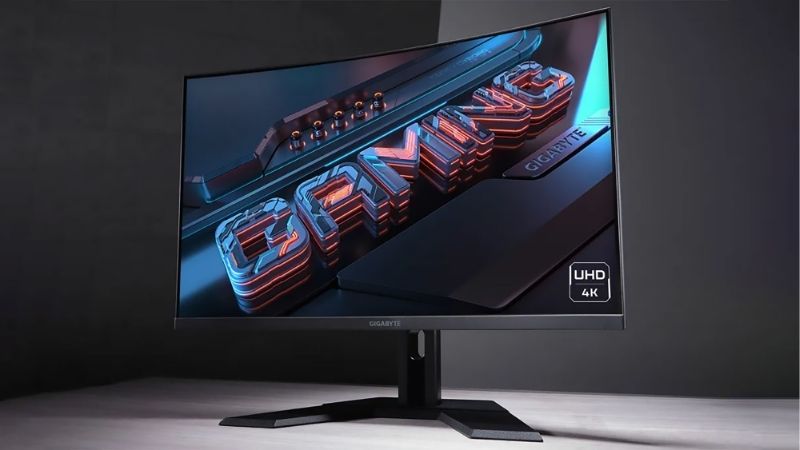
| Gigabyte M28U | 28″ | IPS | 144Hz | 4K gaming value |
| Samsung ViewFinity (S9-class) | 27″ | IPS | 60Hz | Mac-style workflow |
| BenQ PD2725U | 27″ | IPS | 60Hz | Design + Thunderbolt |
| LG UltraGear 27GR93U | 27″ | IPS | 144Hz | High-refresh 4K |
Dell UltraSharp U2723QE
The U2723QE is a strong default for an office 4K monitor, thanks to an IPS Black panel with deeper contrast than standard IPS and a built-in USB-C hub. A single cable can charge a laptop, drive the display and feed your peripherals, which keeps a work-from-home desk tidy.
Color accuracy and uniformity are excellent for daily work and light creative tasks. At 60Hz it is not a gaming panel, and the premium price reflects the dock features, so pass on it if you only want a basic screen without the extra connectivity and cable-clutter savings it brings.
For a hybrid worker who plugs a laptop in each morning, the single-cable convenience is the real selling point over cheaper 4K panels. Add its long-standing reputation for reliability, and it becomes an easy recommendation for a professional home office that values a tidy, dependable desk.
ASUS ProArt PA279CV
The ProArt targets creators with factory calibration and wide sRGB coverage, making it a reliable pick when color fidelity matters more than speed. USB-C with power delivery keeps a laptop workflow tidy, and the understated design suits a studio or a serious home-office desk.
It runs at 60Hz, so it is not built for fast gaming, and its color gamut focuses on sRGB rather than the widest DCI-P3 that video pros may want. For photo editing and everyday design work at a fair price, though, it remains a dependable and accurate choice.
LG 27UP850
This 27-inch IPS panel delivers solid 4K clarity with USB-C power delivery at a friendlier price than premium rivals. It is a smart value 4K monitor for a home office that wants one-cable laptop docking without paying for a full-blown dock or a designer-grade calibration package.
Wide color coverage suits light creative use, though its calibration is not as tight as dedicated creator panels. As a 60Hz screen it is a productivity and content-consumption display rather than a gaming one, which keeps the cost sensible for a general-purpose upgrade.
Gigabyte M28U
The M28U is the value gaming crossover, a 28-inch 4K IPS panel at 144Hz with HDMI 2.1 for current consoles. It gives you ultra-sharp detail plus smooth motion without stepping up to OLED or premium pricing, which is a rare combination at its everyday price point.
Feeding 4K at 144Hz demands a strong GPU, so plan your hardware around it before buying. IPS contrast is the usual limitation versus VA or OLED, but for crisp, fast 4K across a PC and a console it is a well-rounded and flexible option for mixed households.
Samsung ViewFinity (S9-class)
Samsung’s ViewFinity line leans into a clean, Mac-style workflow with accurate color and a matte finish that tames glare. For a bright room or a creative desk paired with a laptop, the anti-reflective coating is a practical advantage that reduces eye strain over long working days.
These are 60Hz productivity and creative panels, not gaming screens, and premium versions carry premium pricing to match their finish and color. If your work is color-led and you value a glare-free surface in a sunny room, it earns a firm place on the shortlist.
BenQ PD2725U
The PD2725U is a designer-focused panel with Thunderbolt connectivity, factory calibration and useful creator modes. Thunderbolt daisy-chaining and strong color make it a tidy hub for a professional laptop setup that runs several devices from one accurate central display each day.
It is a 60Hz screen, so gamers should look elsewhere for speed, and the Thunderbolt feature set pushes the price up noticeably. For color-critical design work where connectivity and calibration matter, though, the trade-off is easy to justify against cheaper, simpler panels.
LG UltraGear 27GR93U
This 27-inch 4K IPS panel runs at 144Hz, making it the top pick here for players who want gaming speed at desktop size rather than a larger 28 or 32-inch screen. HDMI 2.1 covers current consoles, and the pixel density is superb for fine, sharp on-screen detail.
As with any 4K high-refresh screen, you need a capable GPU to hit those frame rates consistently. Contrast is standard IPS, so deep blacks trail OLED, but for sharp, fast 4K gaming on a compact 27-inch panel it is a strong and space-efficient option.
The 27-inch size is the quiet advantage here, packing 4K density that looks razor-crisp up close while fitting desks that cannot take a 32-inch screen. For gamers who also work in sharp text all day, it is arguably the most balanced pick among fast 4K panels in this roundup.
How to Choose the Best 4K Monitor
The right 4K screen depends on your main task, your hardware and your desk. Move through the criteria below, starting with the numbers that separate a color panel from a gaming one, so the best 4K monitor for you follows naturally from how you actually work and play each day.
The decision numbers: panel, color and refresh
Panel type sets contrast and viewing angles, color coverage decides creative suitability, and refresh rate separates office and gaming screens. For the best 4K monitor, define your priority first, since a 60Hz creator panel and a 144Hz gaming panel serve very different needs at very different prices.
Match refresh to your GPU. A 4K 144Hz screen only shines if your graphics card can push those frames, while office and creative users lose nothing at 60Hz and gain sharper, more accurate color for the same money spent on a gaming feature they would never actually use.
Weigh HDR and brightness for your room too. A brighter panel with good HDR helps in a sunlit space and lifts movies and games, but do not pay for HDR badges without checking that the screen has the brightness and local dimming to make the feature meaningful in practice.
Space and fit: size, distance and mounting
At 4K, a 27-inch panel packs a very high pixel density that looks razor-sharp up close, while 32 inches spreads those pixels for a larger, more relaxed view. Measure your desk depth so the size you choose sits at a comfortable distance rather than crowding your keyboard.
Consider mounting as well. Check the VESA pattern if you want a monitor arm to free desk space, and confirm the stand offers height and tilt adjustment, which matters a great deal for long work-from-home days spent at a single fixed desk and chair.
Plan placement to reduce strain. Set the top of the screen near eye level and angle it away from window glare, since a well-positioned 4K panel keeps text crisp and your neck comfortable through the long hours that a sharp, detailed display tends to encourage.
Connectivity: USB-C, Thunderbolt and HDMI 2.1
Ports shape the daily experience. USB-C with power delivery enables single-cable laptop docking, Thunderbolt adds daisy-chaining for creators, and HDMI 2.1 unlocks 4K high-refresh on current consoles, so pick the standard your own devices actually use before chasing a longer spec sheet.
Verify the advertised refresh rate is available over your chosen port, and count the downstream USB ports if the monitor will act as your dock. For a tidy work-from-home setup, built-in USB-C connectivity can replace a separate hub entirely and cut a tangle of cables from the desk.
Think about how many devices share the screen. A KVM or extra inputs let one 4K panel serve a work laptop and a personal machine, which is a genuine convenience for hybrid workers and a good reason to spend a little more on connectivity than on raw speed.
Value, use case and timing
Buy for your dominant task rather than a spec you will rarely use. A creator does not need 144Hz, and a gamer gains little from Thunderbolt, so paying for the wrong strength is the most common way to overspend on the best 4K monitor without gaining anything you notice.
Timing helps your budget. 4K panels drop most around Prime Day in late June, Black Friday in November and the back-to-school window, so a little patience can move you into a better panel or a docking model at the same price you would have paid off-season.
Frequently Asked Questions
These are the questions that come up most when choosing a 4K screen, answered briefly so you can pick the right panel for your desk and hardware.
Is 27 or 32 inches better at 4K?
A 27-inch panel packs a very high pixel density that looks razor-sharp up close, while 32 inches spreads those pixels for a larger, more relaxed view. Choose based on your desk depth and viewing distance, since both sizes deliver excellent detail at this resolution.
Do I need a powerful GPU?
For office, creative and 60Hz use, a modest graphics card is fine and the sharp text and color are the real benefit. Gaming at 4K with a high refresh rate is what demands serious GPU power, so match your ambitions to the hardware you already own.
Which ports should I look for?
USB-C with power delivery enables single-cable laptop docking, Thunderbolt adds daisy-chaining for creators, and HDMI 2.1 unlocks 4K high-refresh on current consoles. Pick the standard your own devices use rather than paying for connectivity you will never plug into.
See More:
- Best eyeshadow blender brush
- Best frozen foods for air fryer
- Best frozen food for air fryer
- Best way to reheat steak in air fryer
- Best air fryer recipes book
Final Thoughts on the Best 4K Monitor
The best 4K monitor is the one whose panel, color and refresh rate match your main use, whether that is office docking, creative color or high-refresh gaming. Size it to your desk, choose the ports your devices need, and match any high-refresh 4K panel to a GPU that can genuinely drive it. Focus on those priorities, time the purchase around a major sale, and the best 4K monitor for your workflow will feel sharp, fast and future-ready.